Python2 to Python3 is a major version update. Today, a large number of projects in production still run on Python2. But that does not mean those projects will stay on Python2 forever — developers also need to consider the project’s compatibility with Python3, both to make migration easier and as a way to learn new knowledge. Below is a collection of what I learned.
1. Upgrading from Python2 to Python3
Rushing into a Python3 upgrade will undoubtedly expose you to enormous risk. It is essential to fully understand the differences between Python2 and Python3, learn the new features of Python3, set aside time, and draw up an upgrade plan.
- Unit tests.
Having unit tests pass is an important guarantee of a smooth upgrade. Unit tests can verify that functionality is consistent before and after the upgrade. If the project has no unit tests, they should be added before the upgrade. - py2 → six → py3.
The hardest part of upgrading to Python3 is changing developers’ habits. For example,xrange, which is recommended in Python2, cannot be used in Python3. Developers need a process of learning and adapting. The recommended strategy is to make new feature code compatible with Python3 and gradually refactor the existing code.
2. The __future__ Module
New versions of Python introduce new features, but in fact these features already exist in the previous version. To use a given new feature, you can import the __future__ module.
__future__ includes the following new features:
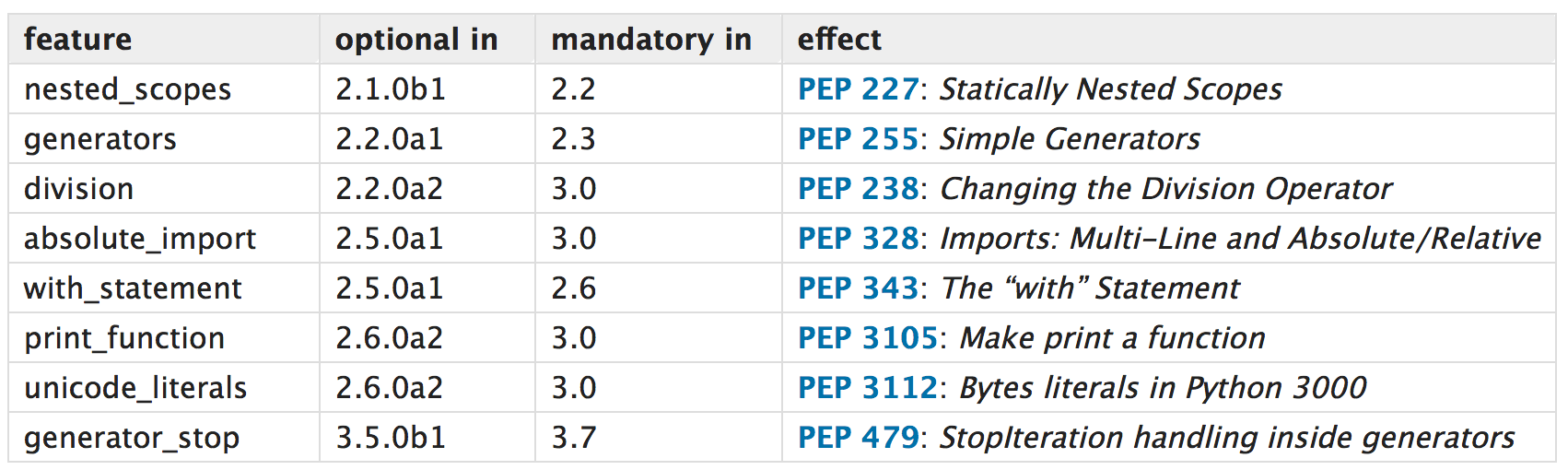
Above, the first column of the table lists all the features that can be imported from __future__; the version in “optional in” is the lowest version where it can be used, and the version in “mandatory in” is the version where it is already implemented and no longer needs to be imported from __future__. The last column is the PEP corresponding to each new feature, with a short description. Below are examples of some of the Python3 new features:
2.1 Print Function
Use the Python3 print function and disable the Python2 print statement.
| |
2.2 Text Strings
The type of a string literal is text (unicode in Python2, str in Python3) rather than bytes (str in Python2, bytes in Python3).
| |
2.3 Prefer Absolute Paths When Importing Modules
When a module is imported with an absolute path, Python looks for the module in sys.path.
In Python 2.4 or earlier, Python would first check whether a module exists in the current directory, and if one was found, it would import that module.
| |
2.4 Use True Division
In Python3, int divided by int gives a float, whereas Python2 uses integer division.
| |
3. The six Module
six is a library dedicated to compatibility between Python 2 and Python 3. six redefines the functions that differ between Python2 and Python3, and calls the appropriate handling function according to the version of the Python interpreter.
3.1 Compatible Constant Definitions
- six.PY2 / six.PY3, boolean values. Checks whether the interpreter version is Python2 or Python3.
- six.class_types, the class type. In Python2 it includes both old-style and new-style classes. In Python3 it is only new-style classes.
- six.integer_types, the integer type. In Python2 it is long or int; in Python3 it is int.
- six.string_types, the type for text data. In Python2 it is basestring(); in Python3 it is str.
- six.text_type, the type used to represent (Unicode) text data. In Python2 it is unicode(); in Python3 it is str (Python3 unified text data, defaulting to Unicode text data).
- six.binary_type, the type for binary data. In Python2 it is str; in Python3 it is bytes.
- six.MAXSIZE, the maximum size of containers such as list or dict. This is equivalent to sys.maxsize in Python 2.6 and later (including 3.x). There is no direct equivalent in Python3, because the length of its integer type is limited only by memory size.
Usage example:
| |
3.2 Compatible Module Locations
Python3 reorganized the locations of many modules. For example, HTMLParser in Python2 is html.parser in Python3.
You can use six to import modules in a compatible way:
| |
In most cases, the six.moves alias is the name of the module in Python3.
Here you can find a list of Supported renames.
Other
The rest of the content can be found in the official documentation. Basically it means calling through six rather than writing your own checks on the Python version. It includes:
3.3 Other
Beyond the compatibility operations above, six also provides:
- Compatibility for binary and text data
- Compatibility for unittest asserts
- Compatibility for changes to the urllib library
- Advanced custom moves
