1. Background
Many build nodes were added to Jenkins using the same Label for pipelines to use, but Jenkins tends to run builds on the same node every time.
This leads to concurrency problems: a single node is overloaded while other nodes sit idle, so the load is extremely unbalanced.
2. The Design of the Business Pipeline
The problem above is related to how the business pipeline is designed.
The current business pipeline design is as follows:
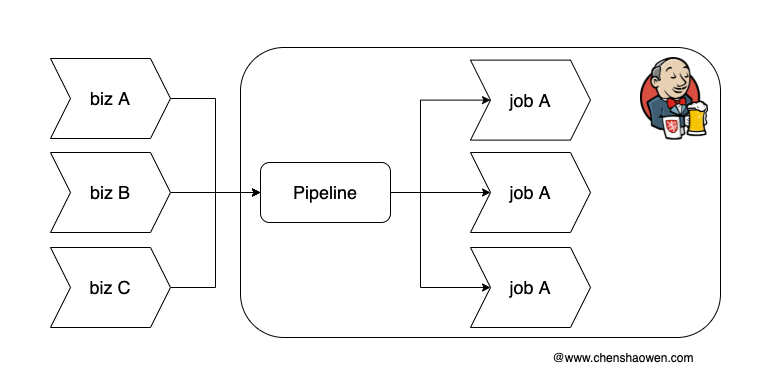
As shown above, all business shares a single pipeline, and by passing different parameters it generates different jobs to execute each business’s pipeline logic.
The advantage of this approach is that the number of pipelines is very small, the design is simple, and it is easy to maintain. But the build logs are highly concentrated: a single pipeline has tens of thousands of build histories, which puts a lot of IO pressure on queries and pagination.
In Jenkins’ scheduling strategy, a snapshot of Slave nodes is taken by default every 10 seconds, and an exponential moving average algorithm (EMA, an algorithm that smooths out spikes) is used to calculate the number of Executors needed. When the number is insufficient, NodeProvisioner is used to start new Agents. When Agent resources are sufficient, Jenkins will not start more Agents. But Jenkins’ scheduling of available Agents is not balanced: some nodes tend to accumulate many builds while others stay idle. Jobs produced by the same pipeline tend to use the same Agent for builds.
This scheduling strategy of Jenkins is not conducive to effectively sharing the CI build pressure. In the end, what the business side observes is that the pipeline is very laggy and the failure rate grows as the number of builds and the business volume increase.
3. How to Optimize a Single-Pipeline Multi-Business Design
3.1 Adopt a Multi-Pipeline Multi-Business Design
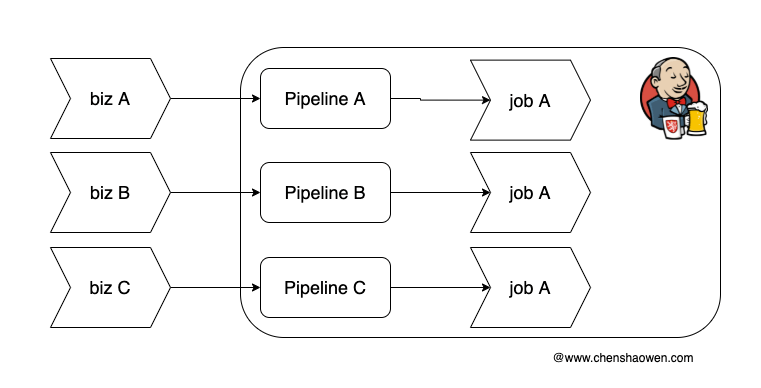
As shown above, each business creates its own pipeline, so with the same number of builds, what used to be 1 pipeline with 10000 build histories becomes 100 pipelines with 100 build records each.
This brings a significant improvement in query performance. At the same time, it gives the scheduling strategy much more flexibility. You can assign specific build nodes to some pipelines, ensuring that high-priority business has higher availability.
3.2 Add More Build Machines and Reduce the Concurrency of Each Node
Usually, to make fuller use of build machine resources, we set the concurrency of a node very high, for example 50 or 100. Because of Jenkins’ scheduling strategy, under a single-pipeline multi-business design, Jobs concentrate on one node and create pressure.
Therefore, we can increase the number of build machines while reducing the concurrency of each node.
Previously a single node had a maximum concurrency of 50; now the configuration can be lowered, using 3 low-spec build machines with the same label and a concurrency of 20.
This approach physically isolates the build environments and improves the availability of the entire pipeline system.
3.3 Use the Throttle Concurrent Builds Plugin to Control Concurrency
Offline plugin download address: https://archives.jenkins-ci.org/plugins/throttle-concurrents/ , and it takes effect after a direct upload without a restart.
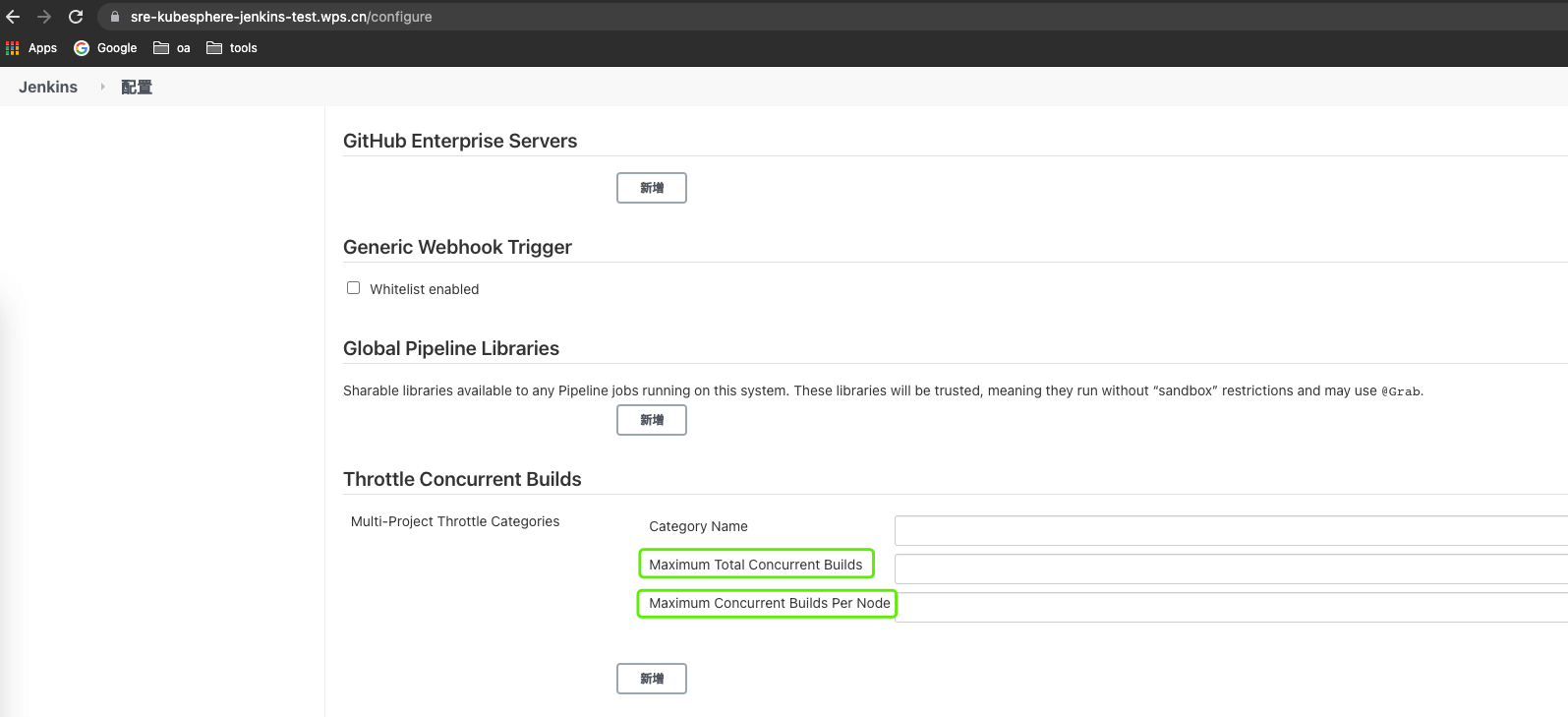
The Throttle Concurrent Builds plugin is mainly used to control the number and strategy of concurrent builds.
On the Jenkins configuration page, you can set the maximum total number of builds and the maximum number of builds per node.
In each pipeline, you can set the number of builds within a specified time interval.
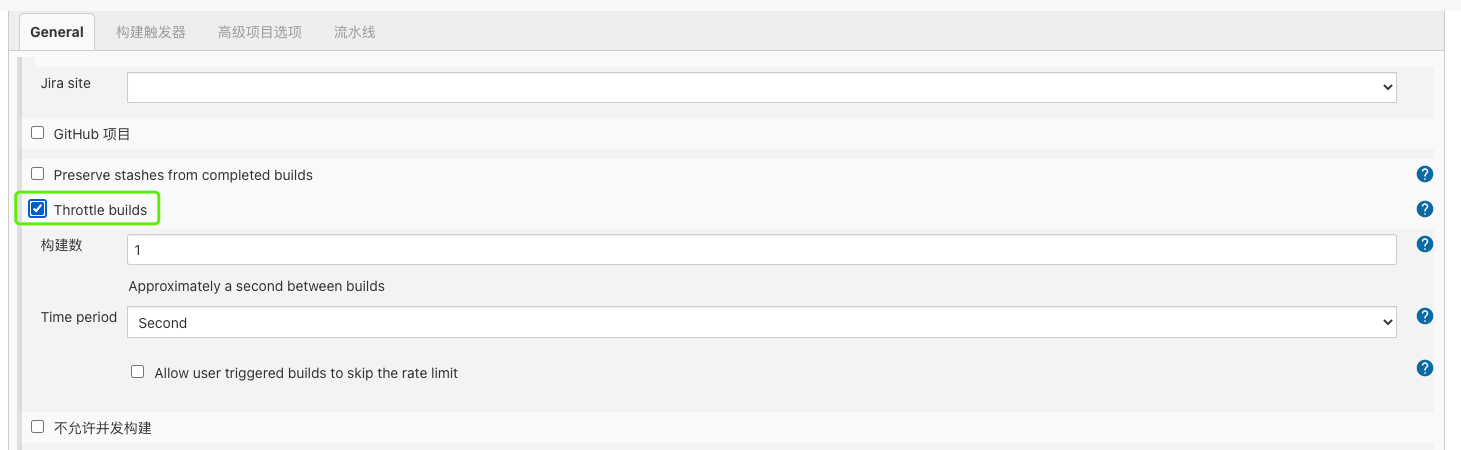
This approach mainly guarantees service availability through rate limiting, avoiding the pipeline becoming unavailable when the business volume exceeds the system design value. But the drawback is also obvious: when the business volume is large, a large number of pipelines are left waiting.
3.4 Make Node Selection a Pipeline Parameter Too
In the model above, multiple businesses share one pipeline, and the pipeline uses the same label to select nodes — that is, scheduling is entirely handed over to Jenkins. This is one of the root causes of the problem above.
Therefore, we can maintain a list of available labels in the business system, and provide a valid label at random each time a Job is created, controlling the Job to select a specified node for its build.
This approach uses control from the business system to designate build machines, so as to control the balanced distribution of Jobs across build machines.
3.5 Use Kubernetes to Provide the Build Environment
Taking advantage of the elasticity Kubernetes provides, dynamically creating Jenkins Slaves on Kubernetes can achieve very high concurrency. See Creating Jenkins Slaves Dynamically on Kubernetes and Stress Testing Kubernetes Dynamically Created Jenkins Agents.
4. Summary
This article focuses on the scheduling and concurrency problems encountered by pipelines, analyzes them, and gives several solutions. Among them, the recommendations:
- Use a multi-business multi-pipeline model
- Add more build machines to spread out builds
- Set the concurrency value a build machine can withstand
are the optimization points I consider more important.
