1. What Ray Is
In 2016, UC Berkeley’s RISELab released a new distributed computing framework called Ray.
In 2017, after the Ray paper was published, it drew broad attention across the industry; in China it was mainly Ant Group that adopted and contributed to Ray.
In 2020, Ray released version 1.0, introducing the Placement Group feature, which added flexibility for users to define their own task orchestration and provided the foundational support for later projects such as the Ray AI Libraries and vLLM.
In 2021, Ray released version 1.5 and launched Ray Data Alpha, filling Ray’s gap in AI data processing and offline inference; it was subsequently widely used for AI data processing.
In 2022, Ray released version 2.0, introducing the concept of Ray AIR (Ray AI Runtime) and focusing on the AI ecosystem, so that users could build AI infrastructure quickly on top of it.
In 2023, Ray released version 2.9, introducing the Streaming Generator and natively supporting streaming inference, which fits large-model scenarios better. The large-model inference engine vLLM built its distributed inference capability on Ray Core and Ray Serve, further enriching Ray’s AI ecosystem.
In 2024, Ray released version 2.32, introducing Ray DAG to better support communication between heterogeneous devices in AI scenarios, continuing to push Ray’s adoption and development in distributed computing, especially in the AI field.
The latest version of Ray at the moment is 2.42.0.
2. Ray’s Architecture
2.1 Architecture Diagram
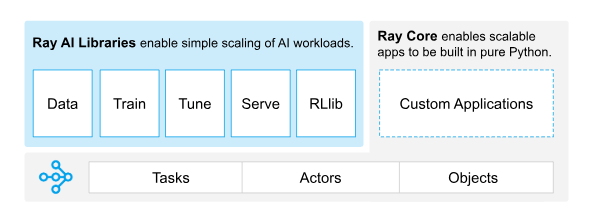
As shown above, Ray consists of two parts: Ray Core and Ray AI Libraries.
2.2 Ray Core
Ray Core is Ray’s core component, providing capabilities such as task scheduling, state management, and data transfer.
It has three core parts:
- Tasks
Tasks are the basic unit of parallel computation in Ray. Tasks are distributed to different nodes for execution, and the result is returned to the caller once execution completes.
- Actors
Actors are Ray’s stateful computing units, used to maintain intermediate state between tasks and suited to long-running or stateful computation.
- Objects
Objects are Ray’s data units, used to pass data between different nodes and store intermediate results, simplifying data transfer between tasks.
2.3 Ray AI Libraries
Building on the capability Ray Core provides to manage computation, state, and data in a distributed setting, Ray AI Libraries offer a set of AI-related libraries through which various distributed computing scenarios can be integrated more conveniently.
- Data
Scalable, framework-agnostic data loading and transformation, covering training, tuning, and prediction.
- Train
For distributed training
- Tune
Scalable hyperparameter tuning to optimize model performance
- RLlib
Scalable reinforcement learning workloads
- Serve
Scalable and programmable serving for deploying models for online inference, with optional micro-batching to improve performance.
3. Building a Ray Cluster
When building a Ray Cluster, you need to pick one node as the Head Node (control node) and use the others as Worker Nodes.
3.1 Installing Ray
| |
Note that the Python and Ray versions on the Head Node and the Worker Nodes must stay consistent.
3.2 Starting the Head Node
| |
After startup it prints the Local node IP. At this point you can check ray’s status.
| |
3.3 Starting a Worker Node
Set the Head Node’s IP
| |
Check network connectivity
| |
Start the Worker Node
| |
3.4 Checking Ray Cluster Status from Any Node
| |
At this point you can see that the Ray Cluster has aggregated the compute and storage resources of the two nodes, including the GPUs.
4. Testing the Ray Cluster
- Write a simple task
Save the following code as ray_test.py.
| |
- Run the task
| |
| |
5. Multi-Machine Inference with vLLM
The official vLLM documentation has a Docker example, https://docs.vllm.ai/en/latest/serving/distributed_serving.html .
The official Ray documentation also has a vLLM example, https://docs.ray.io/en/latest/serve/tutorials/vllm-example.html .
The official Kubernetes documentation also has a vLLM example, https://github.com/kubernetes-sigs/lws/tree/main/docs/examples/vllm .
All of the documentation above describes examples of multi-GPU, multi-machine setups based on Ray. Here we test directly on the host node, to make it easier to adapt and adjust for different runtime environments later.
Once the Ray Cluster is started, you only need to start the vLLM service as if the current host owned all the GPU resources. There are two common ways to do multi-GPU inference, one is Tensor Parallel and the other is Pipeline Parallel.
- Install the dependencies
| |
- Specify the network interface for inter-GPU communication
In multi-machine inference scenarios, ensuring efficient communication between nodes is critical; you can set the NCCL_SOCKET_IFNAME environment variable to specify the network interface used for inter-GPU communication.
| |
Some cards may need
| |
- Start the vLLM service
| |
In the startup log you can see that vLLM has discovered the Ray Cluster; here you can also use --pipeline-parallel-size 2 to split the model.
- Test the vLLM service
| |
6. Summary
This post mainly introduced Ray’s basic concepts and architecture, along with how to set up a Ray Cluster, and finally used a simple task and a vLLM example to demonstrate multi-machine inference for large models with Ray.
Ray’s networking is somewhat similar to the earlier MPI Communication Primitives and Their Use in Python Programming; it may be that the computation and communication patterns in distributed scenarios are essentially the same.
