1. What Is Prefix Cache
In model inference scenarios, caching mechanisms are often used to improve throughput and performance. There are two common caching mechanisms:
- Key-Value Cache (KV Cache), which is oriented toward the internals of a single request, caching the intermediate computation results (Key and Value) of the Transformer model to avoid redundant computation.
- Prefix Cache, which is oriented toward multiple requests, exploiting the common prefix of prompts to avoid redundant computation.
The principle of Prefix Cache is to detect the common prefix of requests through structures such as hashing and radix trees, and reuse the previous computation results during the prefill stage to improve inference performance.
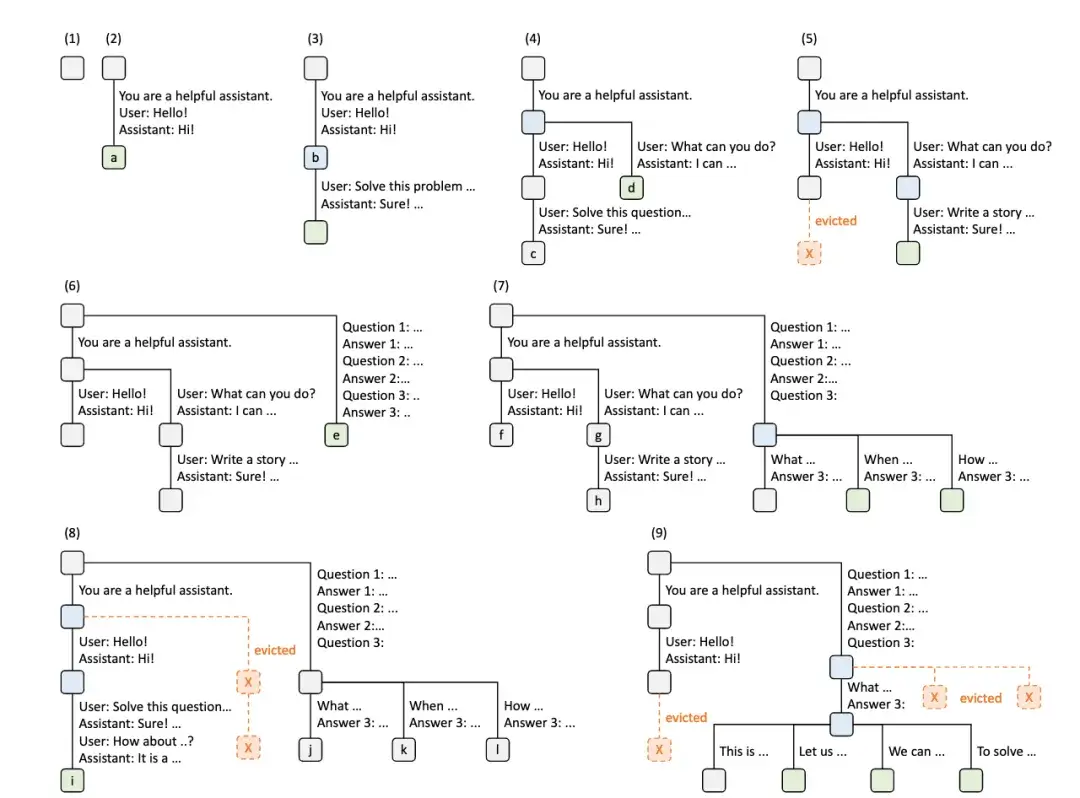
The figure above is a schematic of a Radix Tree (base tree) building the Prefix Cache across multiple requests.
As requests increase, the cache tree is constantly adjusted: it both adds new nodes and removes nodes according to a strategy.
The insight that Prefix Cache offers AI application developers is:
- Put the invariant part of the prompt first and the variable part last.
- When there are multiple prompts, try to keep them sharing the same prefix.
2. Starting the Environment
To be able to use the built-in benchmark tool directly, the vLLM OpenAI API Server image is used here.
| |
3. Starting the Service
3.1 Inference Service
- Disable prefix cache
| |
- Enable prefix cache
| |
3.2 Starting the Client
- Enter the environment
| |
- Use a random dataset
| |
- Use the ShareGPT dataset
| |
4. Test Results
- Disable prefix cache
| times | Dataset | output tokens/s | P99 TTFT (ms) | P99 TPOT (ms) | Prefix Cache Hit Rate (%) |
|---|---|---|---|---|---|
| first | random | 1287.99 | 32274.35 | 142.70 | 0.0% |
| again | random | 1283.74 | 32440.12 | 145.42 | 0.0% |
| first | sharegpt | 2759.34 | 143.35 | 35.83 | 0.0% |
| again | sharegpt | 2763.50 | 138.34 | 35.68 | 0.0% |
During the test, there is a small amount of GPU KV cache hit.
- Enable prefix cache
| times | Dataset | output tokens/s | P99 TTFT (ms) | P99 TPOT (ms) | Prefix Cache Hit Rate (%) |
|---|---|---|---|---|---|
| first | random | 1276.67 | 32963.75 | 149.21 | 0.4% |
| again | random | 1275.01 | 33149.52 | 156.06 | 0.8% |
| first | sharegpt | 2754.99 | 135.72 | 35.90 | 0.8% |
| again | sharegpt | 2783.04 | 47.05 | 17.73 | 96.0% |
The device used is an NVIDIA A100-SXM4-80GB. From the test results, it can be seen that with Prefix Cache on the ShareGPT dataset, the Prefix Cache hit rate of the second test reached 96.0%, and P99 TTFT dropped from 138.34ms to 47.05ms — a very noticeable improvement.
This shows that when there is sufficient GPU memory, if a prompt can hit the cache, both TTFT and TPOT of inference will improve significantly.
