1. Compiling Models with TensorRT-LLM
1.1 Introduction to TensorRT-LLM
When using TensorRT, you usually need to convert the model to ONNX format, then convert the ONNX to TensorRT format, and finally run inference in TensorRT or Triton Server.
But this conversion process is not simple, and you often run into various errors. It requires a certain grasp of model structure and platform operators, as well as the ability to convert and debug. The goal of TensorRT-LLM is to reduce the complexity of this process so that large models can more easily run on the TensorRT engine.
Note that TensorRT targets specific hardware: different GPU models require compiling different TensorRT format models. This is markedly different from the generality that the ONNX model format aims for.
At the same time, TensorRT-LLM does not support all GPU models; it only supports cards such as H100, L40S, A100, A30, and V100.
1.2 Configuring the Compilation Environment
| |
--gpus device=0 means using the GPU card numbered 0, and here shaowenchen/nvidia-tensorrt-llm:v0.7.1 corresponds to the Release version of TensorRT-LLM v0.7.1.
Since building images yourself is very troublesome, here are a few images for optional versions:
- shaowenchen/nvidia-tensorrt-llm:v0.7.1
- shaowenchen/nvidia-tensorrt-llm:v0.7.0
- shaowenchen/nvidia-tensorrt-llm:v0.6.1
1.3 Compiling and Generating a TensorRT Format Model
In the container environment described above, run the command:
| |
There are mainly three generated files:
- baichuan_float16_tp1_rank0.engine, the model computation graph file with embedded weights
- config.json, the file with detailed configuration information such as model structure, precision, and plugins
- model.cache, the compilation cache file, which can speed up subsequent compilation
1.4 Inference Test
| |
| |
1.5 Verifying There Is No Serious Degradation
Model inference optimization can use techniques such as replacing operators, quantization, and pruning backpropagation, but there is one baseline that must be met: the model must not degrade much.
Only when the precision loss is within an acceptable range does model inference optimization make sense. The summarize.py provided by the TensorRT-LLM project can run some tests and score the model. rouge1, rouge2, and rougeLsum are metrics used to evaluate the quality of text generation, and they can be used to assess model inference quality.
- Get the Rouge metrics for the original format model
| |
Since optimum currently does not support the Baichuan model, you need to edit examples/summarize.py and comment out model.to_bettertransformer(). This problem has already been resolved in the latest TensorRT-LLM code; I am using the latest Release version (v0.7.1).
| |
Output:
| |
- Get the Rouge metrics for the TensorRT format model
| |
Output:
| |
For the model compiled with TensorRT-LLM, rougeLsum dropped from 24 to 22, which shows that capability does degrade somewhat. But as long as it is within an acceptable range, it is still usable, because inference speed improves considerably.
After this step, you can exit the container; inference is carried out in a different container.
2. Triton Server Configuration Notes
2.1 Introduction to Triton Server
Triton Server is an inference framework that gives users the ability to run inference at scale. Specifically:
- It supports multiple backends —
tensorrt,onnxruntime,pytorch,python,vllm,tensorrtllm, and so on — and you can also customize a backend, needing only the correspondingshared library. - It provides HTTP and GRPC interfaces externally.
- Batching capability: it supports inference in batches, and once Dynamic batching is enabled, multiple batches can be merged and inferred simultaneously, achieving higher throughput.
- Pipeline capability: a single Triton Server can run inference for multiple models at once, and models can be orchestrated with each other, supporting Concurrent Model Execution for pipelined parallel inference.
- Observability: it provides Metrics for real-time monitoring of various inference indicators.
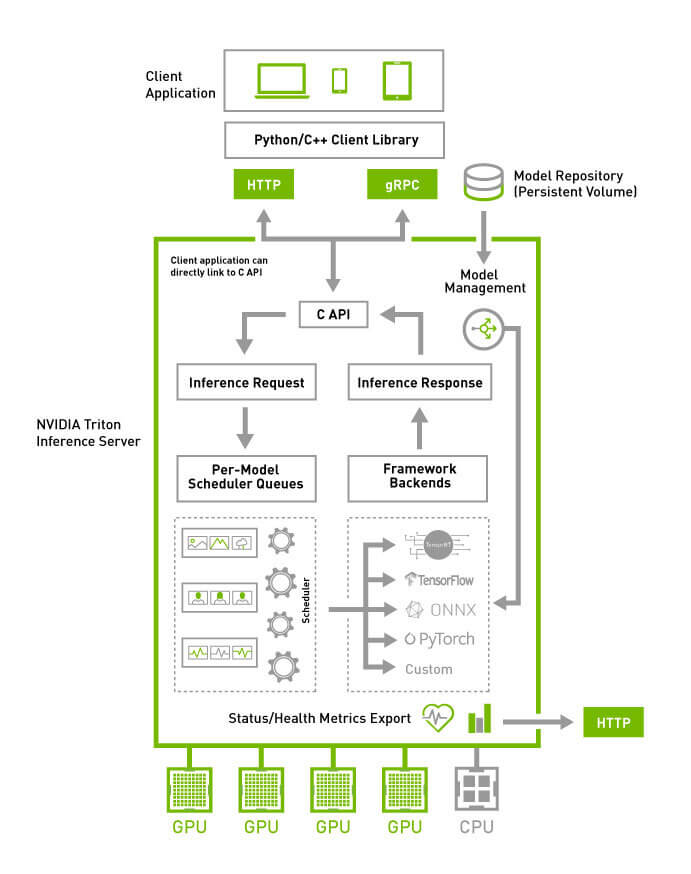
The above is the architecture diagram of Triton Server. Simply put, Triton Server is an end (model) to end (application) inference framework that provides lifecycle process management around inference; once the model is configured, it can directly provide services to the application layer.
2.2 Triton Server Usage Configuration
In Triton community examples, there are usually four directories like this:
| |
For Triton Server, the directory format above actually defines four models: preprocessing, tensorrt_llm, postprocessing, and ensemble, except that ensemble is a composite model that defines multiple models to fuse them together.
The reason ensemble exists is that tensorrt_llm inference is not text2text. With the Pipeline capability of Triton Server, preprocessing tokenizes the input and postprocessing detokenizes the output, which together deliver end-to-end inference capability. Otherwise, when using TensorRT-LLM directly on the client side, you would still need to handle the bidirectional mapping between words and indices yourself.
The specific roles of these four models are as follows:
preprocessing, used for preprocessing the input text, including tokenization and word vectorization, implementing preprocessing similar to text2vec.tensorrt_llm, used for vec2vec inference of the TensorRT format modelpostprocessing, used for post-processing the output text, including post-processing of the generated text such as alignment and truncation, implementing post-processing similar to vec2text.ensemble, which fuses the three models above to provide text2text inference
Each of the models defined above has a 1 directory representing version 1. Model files go in the version directory, and config.pbtxt goes in the model directory to describe inference parameters such as input, output, and version.
2.3 Control and Management of Model Loading
Triton Server controls how models are loaded through the --model-control-mode parameter. There are currently three loading modes:
none, load all models in the directoryexplicit, load specified models in the directory, loading the specified models through the--load-modelparameterpoll, periodically poll and load all models in the directory, configuring the polling period through the--repository-poll-secsparameter
2.4 Control and Management of Model Versions
Triton Server provides a Version Policy in the model configuration file config.pbtxt, and each model can have multiple versions coexisting. By default it uses the model with version number 1. There are currently three version policies:
- Use all versions simultaneously
version_policy: { all: {}}
- Use only the most recent n versions
version_policy: { latest: { num_versions: 3}}
- Use only specified versions
version_policy: { specific: { versions: [1, 3, 5]}}
3. Using TensorRT-LLM in Triton Server
3.1 Cloning the Configuration Files
The configuration related to the examples in this article has been organized into a repository on GitHub. After copying the model to the specified directory, you can run inference directly.
| |
3.2 Organizing the Inference Directory
- Copy the TensorRT format model
| |
- Copy the source model
| |
At this point the file directory structure is:
| |
3.3 Starting the Inference Service
| |
If multiple triton servers are running on one machine, you need to use shm-region-prefix-name=prefix0_ to distinguish the shared memory prefix. For details, see https://github.com/triton-inference-server/server/issues/4145 .
Startup log:
| |
Once all four models are in the READY state, inference can proceed normally.
- View model configuration parameters
| |
You can view the model’s inference parameters. If auto-complete-config is used, this interface can be used to export the model inference parameters automatically generated by Triton Server, for modification and debugging.
- Check whether Triton is running normally
| |
3.4 Client Invocation
- Install dependencies
| |
The performance of the Triton GRPC interface is significantly higher than that of the HTTP interface, and inside the container I could not find an example for the HTTP interface either, so I just used GRPC here.
- Inference test
| |
| |
3.5 Viewing Metrics
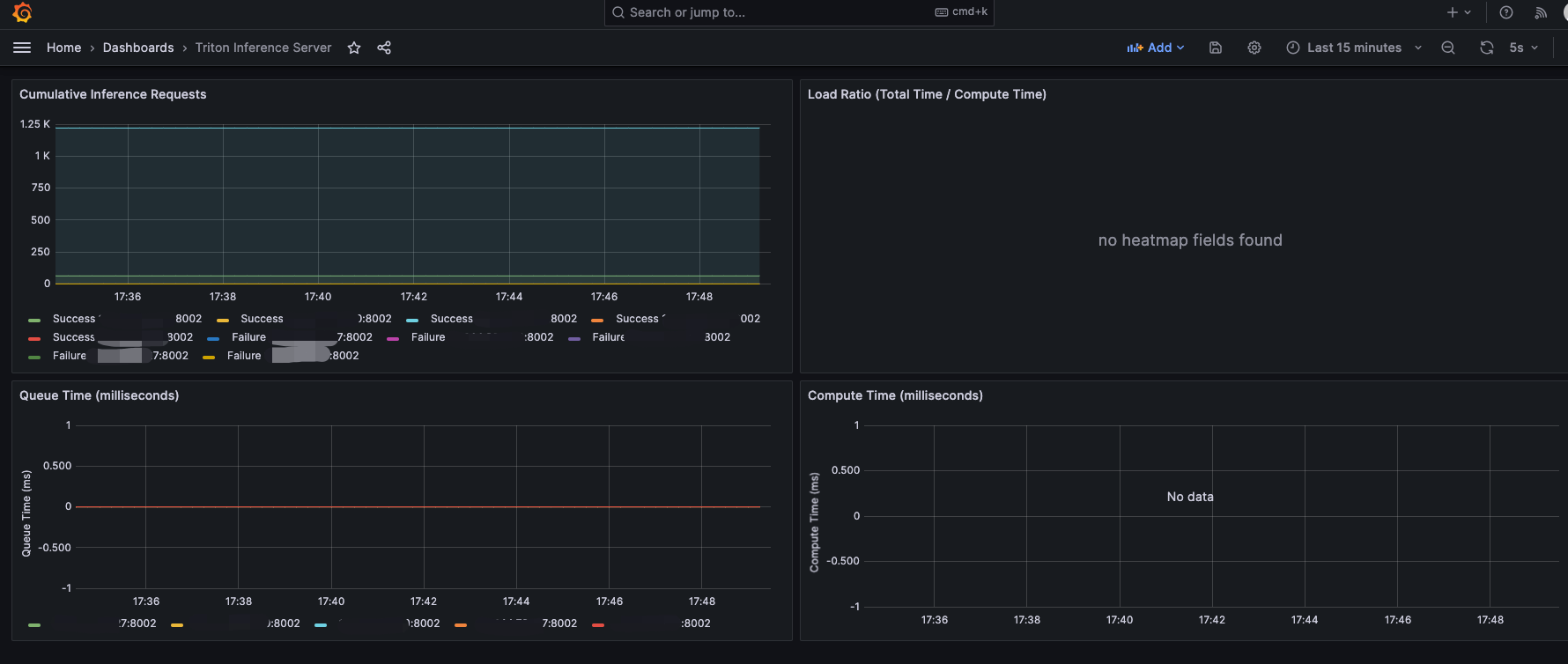
Triton Server already provides inference metrics, listening on port 8002. In the example in this article, that is port 38002.
| |
You can import the dashboard https://grafana.com/grafana/dashboards/18737-triton-inference-server/ in Grafana to view the metrics, as shown below:
4. Summary
This article is mainly a record of the process of learning to use TensorRT and Triton Server for inference. The main content is as follows:
- TensorRT is a more efficient model inference engine for Nvidia GPU hardware
- TensorRT-LLM lets large models use the TensorRT engine faster
- Triton Server is an end-to-end inference framework that supports most model frameworks and helps users quickly implement inference services at scale
- An example of using TensorRT-LLM for inference under Triton Server
5. References
- https://mmdeploy.readthedocs.io/zh-cn/latest/tutorial/03_pytorch2onnx.html
- https://docs.nvidia.com/deeplearning/tensorrt/container-release-notes/running.html#running
- https://github.com/NVIDIA/TensorRT-LLM
- https://github.com/triton-inference-server/triton-tensorrtllm
- https://zhuanlan.zhihu.com/p/663748373
