1. What TensorBoard Is
TensorBoard is mainly used to monitor how a model’s various metrics change — accuracy, loss, the weight distributions of each layer, and so on.
TensorBoard is a visualization tool from TensorFlow that supports visualizing scalar, text, image, audio, video, and embedding data, among other types. But PyTorch can use TensorBoard too.
2. Installing tensorboard
1
| pip install tensorboard
|
3. Using tensorboard
3.1 FileWriter and SummaryWriter
There are two writers in torch.utils.tensorboard: FileWriter and SummaryWriter.
- FileWriter is a low-level writer that writes event data directly to TensorBoard’s event file
- SummaryWriter wraps FileWriter and provides a higher-level API, making it more convenient to record scalar, image, audio, text, and other data
In most cases, using SummaryWriter is enough.
3.2 Setting the Storage Directory
1
| writer = SummaryWriter('./log')
|
What Tensorboard records is saved under the log directory, in a file format of events.out.tfevents.xxxxx.
3.3 Methods Included in SummaryWriter
Used to record hyperparameters along with their corresponding metric values (such as loss and accuracy)
1
2
3
| hparams = {'lr': 0.01, 'batch_size': 32}
metrics = {'accuracy': 0.98, 'loss': 0.05}
writer.add_hparams(hparams, metrics)
|
Records a single scalar value (such as the loss value or the learning rate)
1
| writer.add_scalar('Loss/train', train_loss, epoch)
|
Records multiple scalar values at once, usually for comparison (such as the training loss and the validation loss)
1
| writer.add_scalars('Loss', {'train': train_loss, 'val': val_loss}, epoch)
|
Adds a tensor of any shape, usually for debugging and inspecting data.
1
2
| tensor = torch.rand(3, 3)
writer.add_tensor('Tensor', tensor)
|
Adds a histogram of tensor data (such as the model’s weight distribution)
1
| writer.add_histogram('Weights', model.fc.weight, epoch)
|
Adds histogram data manually (rarely used); you need to construct the min, max, and bucket data
Adds a single image; accepts a PyTorch tensor or a NumPy array as input
1
| writer.add_image('Image', image_tensor, epoch)
|
Adds multiple images (such as a batch of data).
1
| writer.add_images('Images', images_tensor, epoch)
|
Visualizes bounding boxes on an image (such as object detection results)
1
2
| boxes = torch.tensor([[10, 20, 50, 60]]) # (x_min, y_min, x_max, y_max)
writer.add_image_with_boxes('ImageWithBoxes', image_tensor, boxes)
|
Adds a figure drawn with matplotlib (such as a custom visualization)
1
2
3
4
5
| import matplotlib.pyplot as plt
fig, ax = plt.subplots()
ax.plot([0, 1, 2], [3, 4, 5])
writer.add_figure('CustomPlot', fig)
|
Adds video data, for visualizing time-series tasks or the output of a generative model
1
| writer.add_video('GeneratedVideo', video_tensor, fps=10)
|
Adds audio data, for presenting the results of speech tasks
1
| writer.add_audio('Speech', audio_tensor, sample_rate=16000)
|
Adds text data (such as logs or descriptions of attention weights)
1
| writer.add_text('TrainingLog', 'Epoch: 5, Loss: 0.05', epoch)
|
Visualizes the structure of an exported ONNX model
1
| writer.add_onnx_graph(onnx_model)
|
Visualizes the computation graph of a PyTorch model
1
| writer.add_graph(model, input_tensor)
|
Visualizes the embedding space (such as word embeddings or feature distributions)
1
| writer.add_embedding(embeddings, metadata=labels)
|
Adds a PR curve (Precision-Recall), used to evaluate the model’s classification performance
1
| writer.add_pr_curve('PRCurve', labels, predictions)
|
Adds PR curve data manually (rarely used)
add_custom_scalars_multilinechart
Adds a multi-line chart, for custom visualization of multiple scalar values
1
2
| layout = {'CustomChart': {'Multiline': ['train/loss', 'val/loss']}}
writer.add_custom_scalars_multilinechart(layout)
|
add_custom_scalars_marginchart
Adds a chart with upper and lower bounds.
Combines multiple custom chart layouts.
Adds 3D mesh data (such as a point cloud or a 3D surface generated by a model)
1
2
3
| vertices = torch.rand(100, 3)
colors = torch.rand(100, 3)
writer.add_mesh('Mesh', vertices=vertices, colors=colors)
|
Writes the buffered data to the event file and releases the file resource.
3.4 Starting the Service
1
| tensorboard --logdir=./log --host=0.0.0.0 --port=6006
|
--logdir specifies the log file directory that TensorBoard reads from--host specifies the host address; if you do not want to restrict access, you can set it to 0.0.0.0. When set to 127.0.0.1, it can only be accessed locally--port specifies the port; the default is 6006
4. Complete Example
- Add the TensorBoard-related code
Create a training script, mnist.py, with the following content:
  1
  2
  3
  4
  5
  6
  7
  8
  9
 10
 11
 12
 13
 14
 15
 16
 17
 18
 19
 20
 21
 22
 23
 24
 25
 26
 27
 28
 29
 30
 31
 32
 33
 34
 35
 36
 37
 38
 39
 40
 41
 42
 43
 44
 45
 46
 47
 48
 49
 50
 51
 52
 53
 54
 55
 56
 57
 58
 59
 60
 61
 62
 63
 64
 65
 66
 67
 68
 69
 70
 71
 72
 73
 74
 75
 76
 77
 78
 79
 80
 81
 82
 83
 84
 85
 86
 87
 88
 89
 90
 91
 92
 93
 94
 95
 96
 97
 98
 99
100
101
102
103
104
105
106
107
108
109
110
111
112
113
114
115
116
117
118
119
120
121
122
123
124
125
126
127
128
129
130
131
132
133
134
135
136
137
138
139
140
141
142
143
144
| import torch
import torch.nn as nn
import torch.nn.functional as F
import torch.optim as optim
from torchvision import datasets, transforms
from torch.utils.tensorboard import SummaryWriter
# Define the TensorBoard writer
writer = SummaryWriter("./log")
# Define the hyperparameters
BATCH_SIZE = 512
EPOCHS = 20
LEARNING_RATE = 1e-3
DEVICE = torch.device("cuda" if torch.cuda.is_available() else "cpu")
# Data loading and preprocessing; download the MNIST dataset into the data directory
train_loader = torch.utils.data.DataLoader(
datasets.MNIST(
"data",
train=True,
download=True,
transform=transforms.Compose(
[
transforms.RandomRotation(10), # random rotation, improves the model's generalization
transforms.RandomAffine(
0, shear=10, scale=(0.8, 1.2)
), # affine transform, improves the model's generalization
transforms.ToTensor(),
transforms.Normalize((0.1307,), (0.3081,)),
]
),
),
batch_size=BATCH_SIZE,
shuffle=True,
)
test_loader = torch.utils.data.DataLoader(
datasets.MNIST(
"data",
train=False,
transform=transforms.Compose(
[transforms.ToTensor(), transforms.Normalize((0.1307,), (0.3081,))]
),
),
batch_size=BATCH_SIZE,
shuffle=False,
)
# Define the model architecture; this is a simple convolutional neural network
class ConvNet(nn.Module):
def __init__(self):
super(ConvNet, self).__init__()
self.conv1 = nn.Conv2d(1, 32, 3)
self.conv2 = nn.Conv2d(32, 64, 3)
self.dropout1 = nn.Dropout(0.25)
self.fc1 = nn.Linear(64 * 5 * 5, 128)
self.dropout2 = nn.Dropout(0.5)
self.fc2 = nn.Linear(128, 10)
def forward(self, x):
x = F.relu(self.conv1(x))
x = F.max_pool2d(x, 2)
x = F.relu(self.conv2(x))
x = F.max_pool2d(x, 2)
x = self.dropout1(x)
x = x.view(-1, 64 * 5 * 5)
x = F.relu(self.fc1(x))
x = self.dropout2(x)
x = self.fc2(x)
return F.log_softmax(x, dim=1)
# Initialize the model and the optimizer
model = ConvNet().to(DEVICE)
optimizer = optim.Adam(model.parameters(), lr=LEARNING_RATE)
scheduler = torch.optim.lr_scheduler.StepLR(
optimizer, step_size=5, gamma=0.5
) # learning rate decay
# Add the model structure to TensorBoard
example_input = torch.randn(1, 1, 28, 28).to(DEVICE) # create an example input
writer.add_graph(model, example_input) # add the model graph
# Training function
def train(model, device, train_loader, optimizer, epoch):
model.train()
running_loss = 0.0 # used to track the accumulated loss during training
for batch_idx, (data, target) in enumerate(train_loader):
data, target = data.to(device), target.to(device)
optimizer.zero_grad()
output = model(data)
loss = F.nll_loss(output, target)
loss.backward()
optimizer.step()
running_loss += loss.item()
if (batch_idx + 1) % 30 == 0:
print(
f"Train Epoch: {epoch} [{batch_idx * len(data)}/{len(train_loader.dataset)} "
f"({100. * batch_idx / len(train_loader):.0f}%)]\tLoss: {loss.item():.6f}"
)
# Write the average training loss to TensorBoard
writer.add_scalar("Loss/train", running_loss / len(train_loader), epoch)
# Test function
def test(model, device, test_loader, epoch):
model.eval()
test_loss = 0
correct = 0
with torch.no_grad():
for data, target in test_loader:
data, target = data.to(device), target.to(device)
output = model(data)
test_loss += F.nll_loss(output, target, reduction="sum").item()
pred = output.argmax(dim=1, keepdim=True)
correct += pred.eq(target.view_as(pred)).sum().item()
test_loss /= len(test_loader.dataset)
accuracy = 100.0 * correct / len(test_loader.dataset)
print(
f"\nTest set: Average loss: {test_loss:.4f}, Accuracy: {correct}/{len(test_loader.dataset)} ({accuracy:.2f}%)\n"
)
# Write the test loss and accuracy to TensorBoard
writer.add_scalar("Loss/test", test_loss, epoch)
writer.add_scalar("Accuracy/test", accuracy, epoch)
# Training and testing loop
for epoch in range(1, EPOCHS + 1):
train(model, DEVICE, train_loader, optimizer, epoch)
test(model, DEVICE, test_loader, epoch)
scheduler.step() # update the learning rate
# Save the model
torch.save(model.state_dict(), "mnist_cnn.pth")
print("Model saved to mnist_cnn.pth")
# Close the TensorBoard writer
writer.close()
|
An events.out.tfevents.xxxxx file will be generated under the log directory.
1
2
3
| tensorboard --logdir=./log --host=127.0.0.1 --port=6006
TensorBoard 2.18.0 at http://127.0.0.1:6006/ (Press CTRL+C to quit)
|
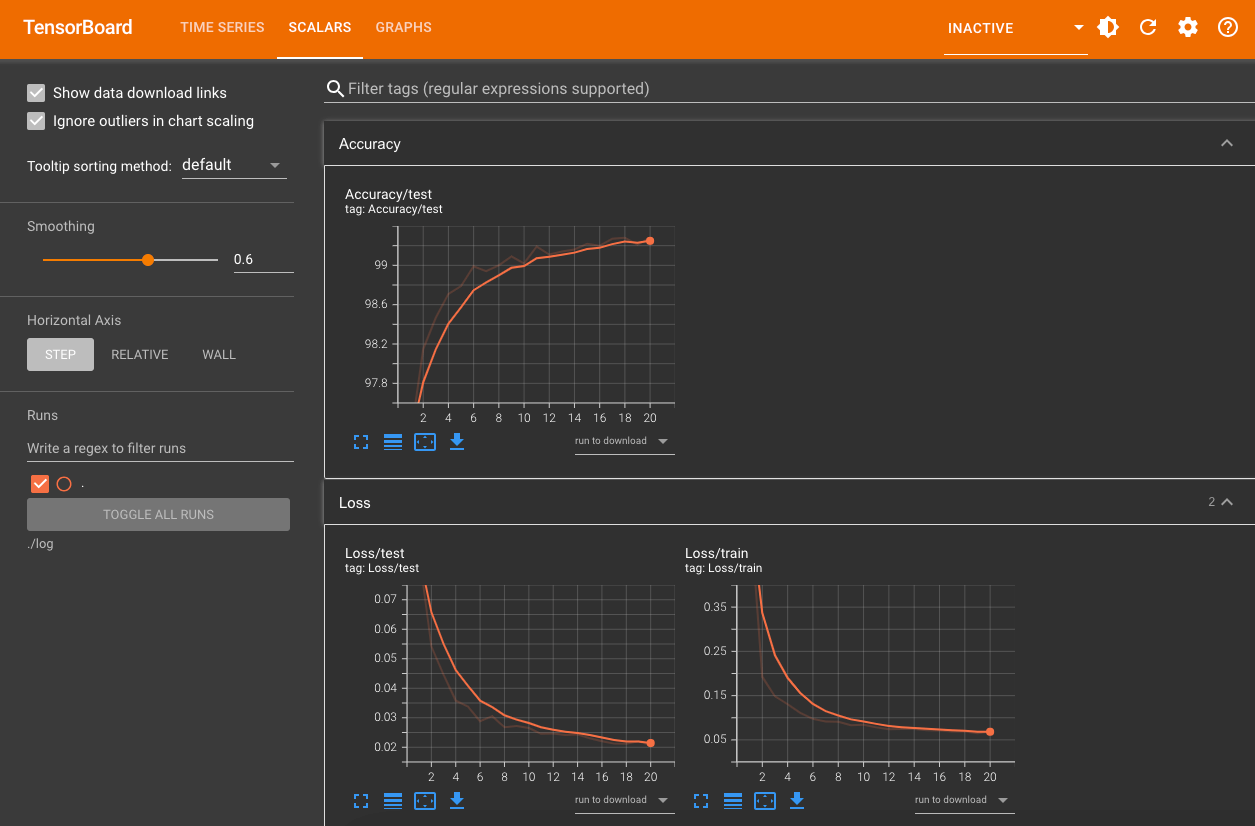
Open http://127.0.0.1:6006/ in your local browser to see the TensorBoard interface. Even if training has not finished, you can see how the loss and accuracy change during training, as shown below:
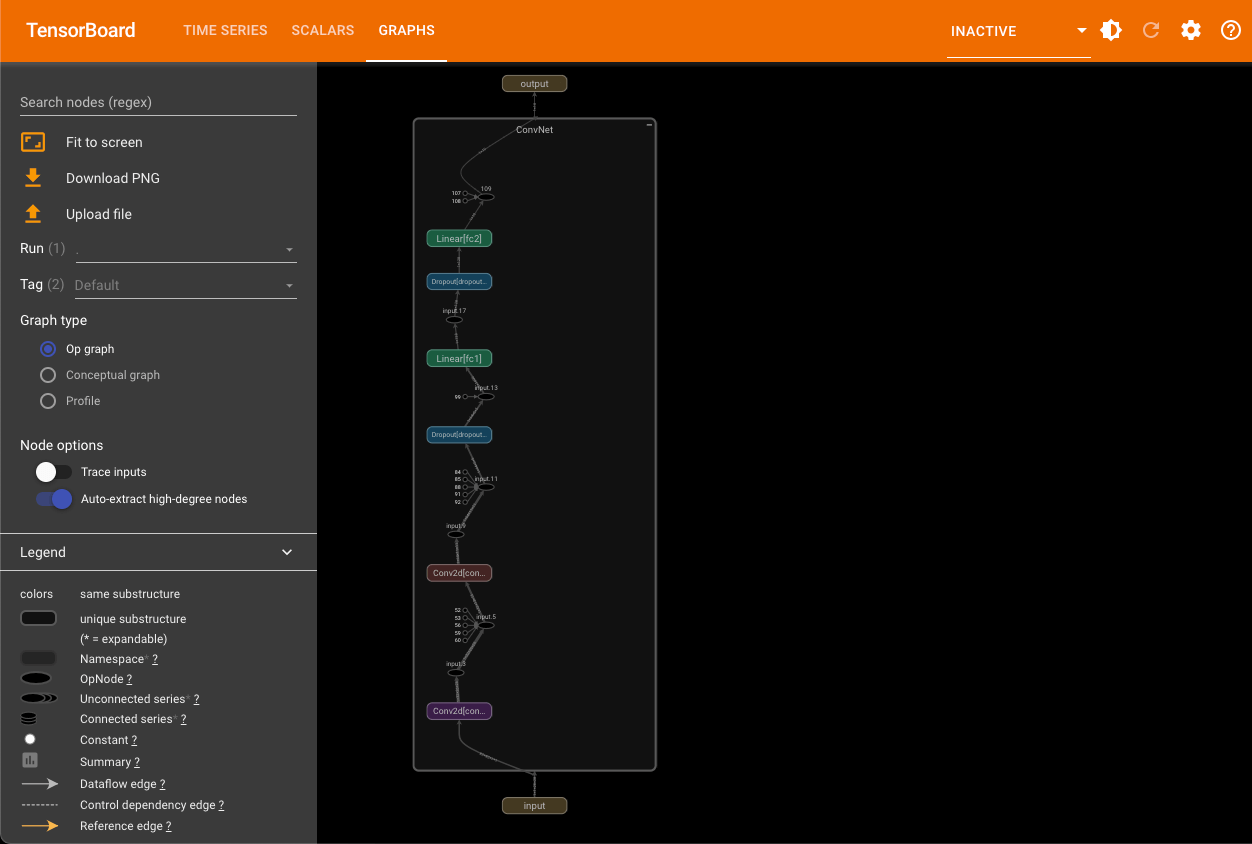
The graphs tab lets you view the model’s computation graph, as shown below: