This page looks best with JavaScript enabled

Using S3 to Store Terraform State

 ·  ☕ 3 min read

1. How Terraform Manages Resource State

After running terraform init, Terraform downloads the dependent plugins into a local plugins directory.

 1
 2
 3
 4
 5
 6
 7
 8
 9
10
11
12
13
tree -aL 5

.
|-- myresource.tf
|-- .terraform
|   `-- plugins
|       |-- registry.terraform.io
|       |   |-- hashicorp
|       |   |   `-- null
|       |   `-- shaowenchen
|       |       `-- qingcloud
|       `-- selections.json
`-- var.tf

After running terraform apply, Terraform uses the terraform.tfstate file to store information about the resources. It creates a .terraform.tfstate.lock.info file to lock the resources, preventing multiple Terraform runs from using the same state file at the same time. Once execution finishes, the .terraform.tfstate.lock.info file is deleted.

 1
 2
 3
 4
 5
 6
 7
 8
 9
10
11
12
13
14
15
tree -aL 5

.
|-- myresource.tf
|-- .terraform
|   `-- plugins
|       |-- registry.terraform.io
|       |   |-- hashicorp
|       |   |   `-- null
|       |   `-- shaowenchen
|       |       `-- qingcloud
|       `-- selections.json
|-- terraform.tfstate
|-- .terraform.tfstate.lock.info
`-- var.tf

terraform.tfstate is a JSON file that stores information such as resource IDs and states, in the following format:

1
2
3
4
5
6
7
8
{
  "version": 4,
  "terraform_version": "0.13.0",
  "serial": 11,
  "lineage": "9359dc1c-9a6d-b1e0-9780-d26500869e82",
  "outputs": {},
  "resources": [...]
}

After running terraform destroy, Terraform creates a terraform.tfstate.backup file to back up the resource state, and then deletes the resources.

 1
 2
 3
 4
 5
 6
 7
 8
 9
10
11
12
13
14
15
tree -aL 5

.
|-- myresource.tf
|-- .terraform
|   `-- plugins
|       |-- registry.terraform.io
|       |   |-- hashicorp
|       |   |   `-- null
|       |   `-- shaowenchen
|       |       `-- qingcloud
|       `-- selections.json
|-- terraform.tfstate
|-- .terraform.tfstate.backup
`-- var.tf

I did not dig too deeply into the specifics. Put simply, Terraform stores resource state as JSON, by default in the local directory.

2. Using S3 to Store Terraform State

In a team or in GitHub Actions, how do you persist Terraform’s state? Persisting state means storing the JSON data above in some remote persistent service. Terraform supports many kinds of backend storage; below is a Backend list taken from the Terraform website:

  • artifactory
  • azurerm
  • consul
  • cos
  • etcd
  • etcdv3
  • gcs
  • http
  • kubernetes
  • manta
  • oss
  • pg
  • s3
  • swift

Terraform uses the Backend module to handle state storage. In the var.tf file, you only need to add a backend and fill in the parameters to use remote state storage.

 1
 2
 3
 4
 5
 6
 7
 8
 9
10
11
12
13
terraform {
  backend "s3" {
    bucket   = "terraform-deploy"
    key      = "tf-cd"
    region     = "sh1a"
    endpoint = "s3.sh1a.qingstor.com"
    skip_region_validation      = true
    skip_metadata_api_check     = true
    skip_credentials_validation = true
    access_key = "ACCESS_KEY"
    secret_key = "SECRET_KEY"
  }
}

After terraform apply, the state file is visible on object storage that supports S3:
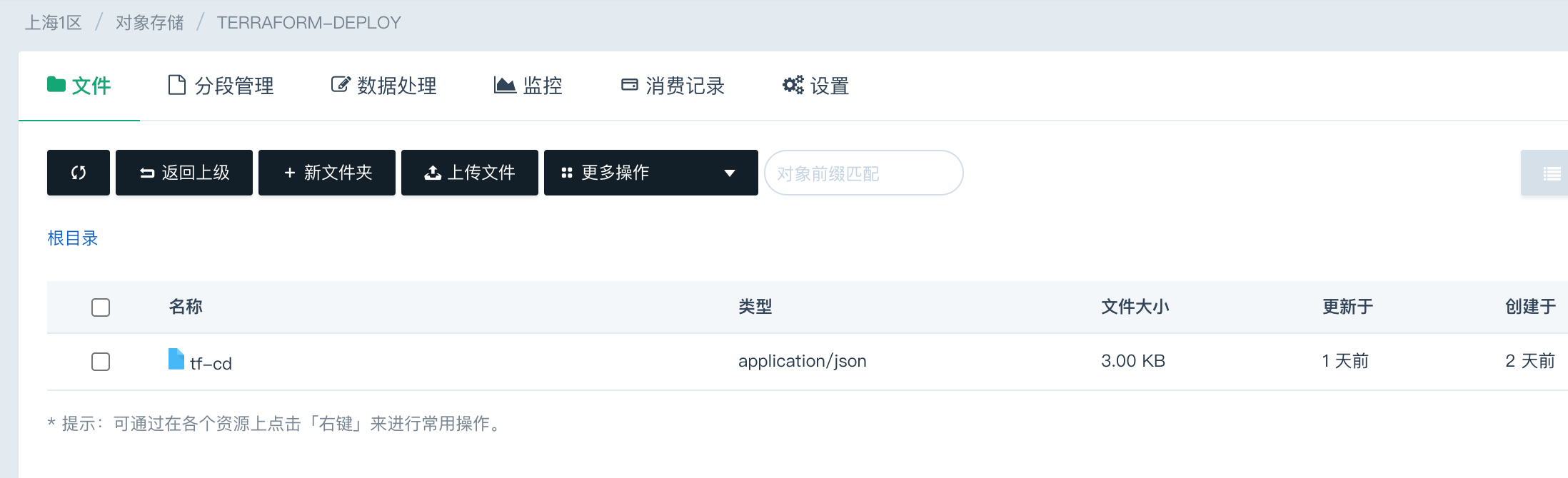
If you need to lock the state file, you can use a BaaS such as DynamoDB to guarantee data consistency.

3. References


WeChat Official Account
WRITTEN BY
WeChat Official Account