Python and Excel are both commonly used for data processing, so passing data back and forth and handling computations between them is unavoidable. This article mainly introduces the Python-Excel family of libraries, and how to use the xlrd and xlwt libraries.
1. Common Libraries
xlwings, openpyxl, pandas, win32com, xlsxwriter, DataNitro, xlutils
2. Environment Requirements
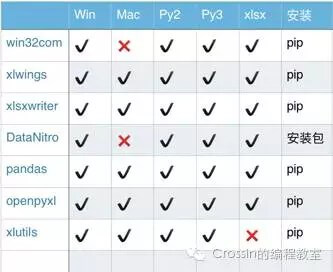
- xlutils only supports xls files, that is, versions before 2003
- win32com and DataNitro only support Windows
- After xlwings is installed successfully, if running it reports the error “ImportError: no module named win32api”, install the pypiwin32 or pywin32 package as well
- win32com is not a standalone extension library but is integrated into other libraries; installing the pypiwin32 or pywin32 package is enough to use it
- DataNitro is an Excel plugin and must be downloaded from its official website to install
3. Document Read/Write/Modify Capabilities
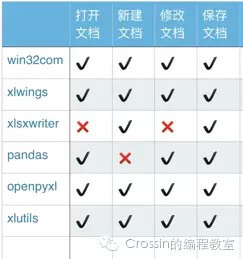
- xlsxwriter does not support opening or modifying existing files
- xlwings does not support naming newly created files
- As an Excel plugin, DataNitro depends on the software itself
- pandas needs to rely on other libraries to create new documents, and so on
4. Basic Features
- xlwings
Can be combined with VBA to program Excel, with powerful data input and analysis capabilities and a rich set of interfaces; together with pandas/numpy/matplotlib it easily handles Excel data processing work. - openpyxl
Simple and easy to use, with broad functionality — cell formatting/images/tables/formulas/filtering/comments/file protection and more, and its charting feature is a highlight. Its drawback is that VBA support is not good enough. - pandas
Data processing is pandas’ reason for existing; Excel serves as the container for pandas’ input/output data. - win32com
As the name suggests, this is an extension for handling Windows applications, and Excel is only a small part of what the library can do. It also supports many Office operations. Note that the library does not exist on its own; it can be obtained by installing pypiwin32 or pywin32. - xlsxwriter
Rich in features, supporting images/tables/charts/filtering/formatting/formulas and more. Similar in function to openpyxl, and its advantage is that unlike openpyxl it also supports VBA file import, sparklines and other features. Its drawback is that it cannot open/modify existing files, which means using xlsxwriter requires starting from scratch. - DataNitro
Embedded into Excel as a plugin, it can completely replace VBA, letting you use Python scripts inside Excel. Since it is called “Python in Excel,” working together with other Python libraries is a trivial matter. However, it is a paid plugin… - xlutils
Built on xlrd/xlwt, an old-guard Python package and arguably a pioneer in this field, with unremarkable features; its bigger drawback is that it only supports xls files
5. Performance
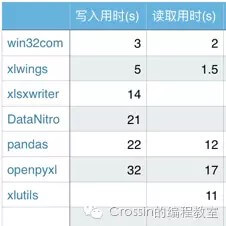
Different libraries were each used to add and read 1000 rows * 700 columns of data, and the time taken was recorded, with repeated runs averaged
6. Library Selection Advice
- If you do not want to use the GUI but want to give Excel more capabilities, choose either openpyxl or xlsxwriter
- If you need scientific computing and to process large amounts of data, pandas+xlsxwriter or pandas+openpyxl is recommended;
- If you want to write Excel scripts and know Python but not VBA, consider xlwings or DataNitro;
7. Reading and Writing Excel with xlrd and xlwt
| |
