This page looks best with JavaScript enabled

Tekton Pipelines Across Multiple Clusters

1. The Advantages of Multi-Cluster Tekton Builds

Thanks to Kubernetes, Tekton already has good elasticity and can support large-scale builds. At the same time, developing Tasks mainly uses Yaml and Shell, which widens the range of scenarios Tekton can adapt to.
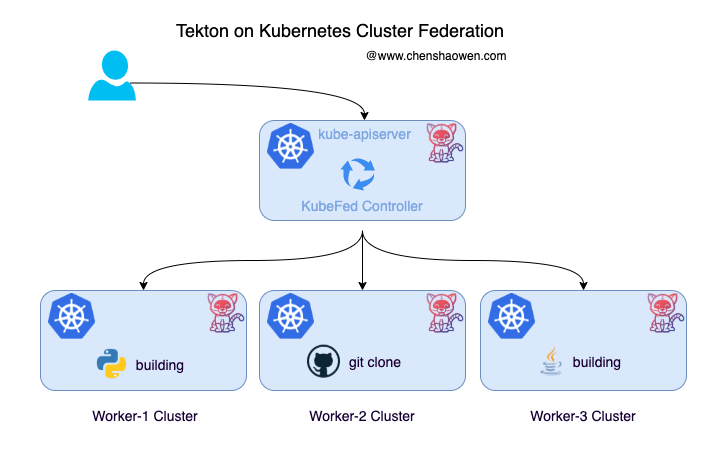
The figure above is a sketch of Tekton across multiple clusters. Why does Tekton need multi-cluster pipeline execution?

  • Kubernetes clusters that can change at any time. A single Kubernetes cluster cannot satisfy operations requirements, since the cluster cannot be changed at will. With multiple clusters, some clusters can be taken offline for maintenance.
  • Larger-scale builds. CI consumes a great deal of CPU, memory, and IO resources, and can easily overwhelm a node or even a cluster. Multiple clusters effectively share the load pressure and improve availability.
  • Business isolation. Different businesses have different requirements for code security level, build speed, and build environment. Multiple clusters can provide isolated environments and customized pipeline services.

2. Kubernetes Cluster Federation

Kubernetes Cluster Federation is abbreviated KubeFed. The biggest change in KubeFed v2 compared to v1 is that the API Server was removed, and the extension of Federated Resources is done through the CRD mechanism. The KubeFed Controller manages these CRDs and implements functions such as synchronizing Resources and orchestrating across clusters, achieving modularity and customization. Below is the community architecture diagram:
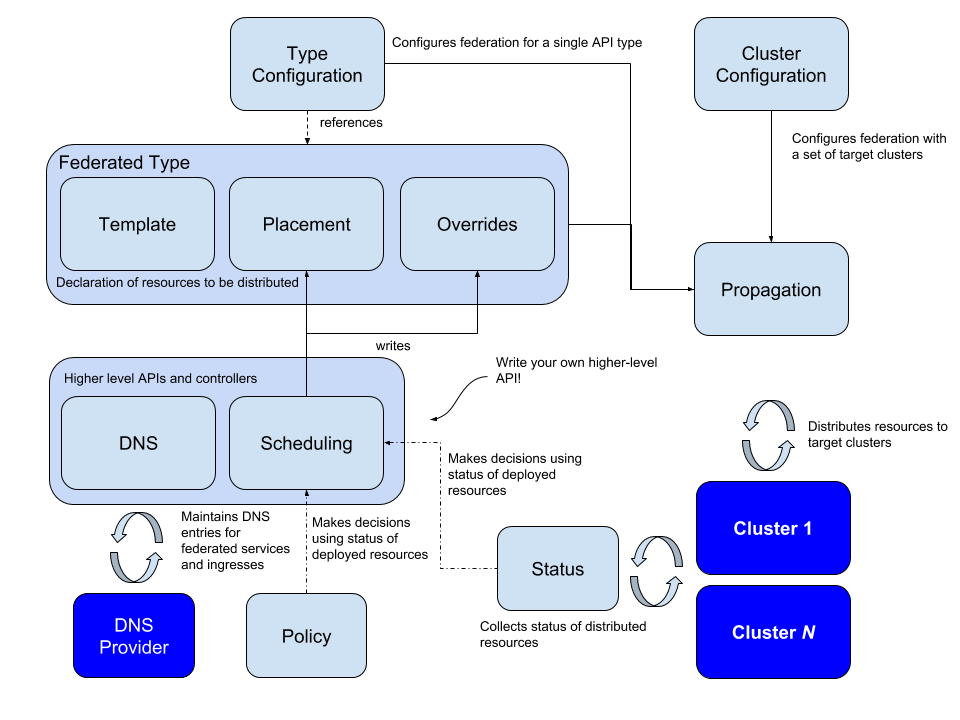
KubeFed configures two types of information:

  • Type configuration, which declares the API types KubeFed handles
  • Cluster configuration, which declares which clusters KubeFed manages

Type configuration has three basic concepts:

  • Templates, which define the template description of a resource in a cluster
  • Placement, which defines which clusters a resource needs to be distributed to
  • Overrides, which define the field contents in a cluster that need to override the Templates

In addition, more advanced features can be achieved through Status, Policy, and Scheduling:

  • Status collects the status of distributed resources in each cluster
  • Policy provides policy control over which clusters a resource may be assigned to
  • Scheduling allows resources to migrate replicas across clusters

Besides this, KubeFed also provides MultiClusterDNS, which can be used for service discovery between multiple clusters.

3. Federating Kubernetes Clusters

3.1 Preparing Clusters and Configuring Contexts

Here two clusters are deployed: dev1 serves as the primary cluster, used as the control plane for Tekton and not running pipeline tasks; dev2 serves as the secondary cluster, used to execute Tekton pipeline tasks.

  1. Prepare two clusters

Primary cluster dev1

1
2
3
4
kubectl get node

NAME    STATUS   ROLES                         AGE    VERSION
node1   Ready    control-plane,master,worker   151m   v1.20.4
1
2
3
helm version

version.BuildInfo{Version:"v3.2.1", GitCommit:"fe51cd1e31e6a202cba7dead9552a6d418ded79a", GitTreeState:"clean", GoVersion:"go1.13.10"}

Secondary cluster dev2

1
2
3
4
kubectl get node

NAME    STATUS   ROLES                         AGE   VERSION
node1   Ready    control-plane,master,worker   42d   v1.20.4
  1. Configure the Contexts of all clusters on the primary cluster (the cluster Apiserver entry points are required to be on one network and directly connectable), in order to add the secondary cluster

Here the name in contexts cannot contain special characters such as @, otherwise an error is reported when joining. This is because the name is used to create a Secret, and it must conform to Kubernetes naming conventions.

Place the kubeconfig of the primary cluster dev1 at ~/.kube/config-1, and modify the name and other information, in the following format:

 1
 2
 3
 4
 5
 6
 7
 8
 9
10
11
12
apiVersion: v1
clusters:
  - cluster: ...
    name: dev1.cluster.local
contexts:
  - context:
      cluster: dev1.cluster.local
      user: dev1-kubernetes-admin
    name: dev1-context
users:
  - name: dev1-kubernetes-admin
    user: ...

Place the kubeconfig of the secondary cluster dev2 at ~/.kube/config-2, and modify the name and other information, in the following format:

 1
 2
 3
 4
 5
 6
 7
 8
 9
10
11
12
apiVersion: v1
clusters:
  - cluster: ...
    name: dev2.cluster.local
contexts:
  - context:
      cluster: dev2.cluster.local
      user: dev2-kubernetes-admin
    name: dev2-context
users:
  - name: dev2-kubernetes-admin
    user: ...
  1. Merge the kubeconfigs
1
2
cd $HOME/.kube/
KUBECONFIG=config-1:config-2 kubectl config view --flatten > $HOME/.kube/config
  1. View the added cluster Contexts
1
2
3
4
5
kubectl config get-contexts

CURRENT   NAME           CLUSTER              AUTHINFO                NAMESPACE
          dev1-context   dev1.cluster.local   dev1-kubernetes-admin
          dev2-context   dev2.cluster.local   dev2-kubernetes-admin
  1. Switch to the primary cluster dev1
1
2
3
kubectl config use-context dev1-context

Switched to context "dev1-context".

3.2 Installing KubeFed on the Primary Cluster

  1. Install KubeFed using Helm
1
2
3
git clone https://github.com/kubernetes-sigs/kubefed.git
cd kubefed/charts/
helm install kubefed ./kubefed/ --namespace kube-federation-system --create-namespace
  1. View the workloads
 1
 2
 3
 4
 5
 6
 7
 8
 9
10
kubectl get deploy,pod -n kube-federation-system

NAME                                         READY   UP-TO-DATE   AVAILABLE   AGE
deployment.apps/kubefed-admission-webhook    1/1     1            1           95s
deployment.apps/kubefed-controller-manager   2/2     2            2           95s

NAME                                              READY   STATUS    RESTARTS   AGE
pod/kubefed-admission-webhook-598bd776c6-gv4qh    1/1     Running   0          95s
pod/kubefed-controller-manager-6d9bf98d74-n8kjz   1/1     Running   0          17s
pod/kubefed-controller-manager-6d9bf98d74-nmb2j   1/1     Running   0          14s

3.3 Installing kubefedctl on the Primary Cluster

Run the commands:

1
2
3
wget https://github.com/kubernetes-sigs/kubefed/releases/download/v0.8.0/kubefedctl-0.8.0-linux-amd64.tgz
tar -zxvf kubefedctl-*.tgz
mv kubefedctl /usr/local/bin/

3.4 Adding Clusters

Run the commands on the primary cluster to add both dev1 and dev2 to the primary cluster dev1.

1
2
3
4
5
kubefedctl join dev1-context --host-cluster-context dev1-context --kubefed-namespace=kube-federation-system --v=2

I0625 14:32:42.969373   25920 join.go:861] Using secret named: dev1-context-dev1-context-token-2w8km
I0625 14:32:42.972316   25920 join.go:934] Created secret in host cluster named: dev1-context-ln6vx
I0625 14:32:42.991399   25920 join.go:299] Created federated cluster resource
1
2
3
4
5
kubefedctl join dev2-context --host-cluster-context dev1-context --kubefed-namespace=kube-federation-system --v=2

I0625 14:33:11.836472   26424 join.go:861] Using secret named: dev2-context-dev1-context-token-dcl8s
I0625 14:33:11.840121   26424 join.go:934] Created secret in host cluster named: dev2-context-264dz
I0625 14:33:11.898044   26424 join.go:299] Created federated cluster resource

View the cluster list:

1
2
3
4
5
kubectl -n kube-federation-system get kubefedclusters

NAME           AGE   READY
dev1-context   45s   True
dev2-context   16s   True

3.5 Testing Whether the Clusters Are Federated Successfully

  • View the resources that are already federated

After installing KubeFed, many common resources are already federated, which can be seen in the CRDs:

 1
 2
 3
 4
 5
 6
 7
 8
 9
10
11
12
13
14
kubectl get crd |grep federated

federatedclusterroles.types.kubefed.io                2021-06-26T06:22:50Z
federatedconfigmaps.types.kubefed.io                  2021-06-26T06:22:50Z
federateddeployments.types.kubefed.io                 2021-06-26T06:22:50Z
federatedingresses.types.kubefed.io                   2021-06-26T06:22:50Z
federatedjobs.types.kubefed.io                        2021-06-26T06:22:50Z
federatednamespaces.types.kubefed.io                  2021-06-26T06:22:50Z
federatedreplicasets.types.kubefed.io                 2021-06-26T06:22:50Z
federatedsecrets.types.kubefed.io                     2021-06-26T06:22:50Z
federatedserviceaccounts.types.kubefed.io             2021-06-26T06:22:50Z
federatedservices.types.kubefed.io                    2021-06-26T06:22:50Z
federatedservicestatuses.core.kubefed.io              2021-06-26T06:22:50Z
federatedtypeconfigs.core.kubefed.io                  2021-06-26T06:22:50Z

The resources for which federation is already enabled can also be seen in federatedtypeconfigs.

 1
 2
 3
 4
 5
 6
 7
 8
 9
10
11
12
13
kubectl get federatedtypeconfigs.core.kubefed.io -n kube-federation-system

NAME                                     AGE
clusterroles.rbac.authorization.k8s.io   29m
configmaps                               29m
deployments.apps                         29m
ingresses.extensions                     29m
jobs.batch                               29m
namespaces                               29m
replicasets.apps                         29m
secrets                                  29m
serviceaccounts                          29m
services                                 29m
  • Create a federated Namespace

Namespace-level resources need to be placed under a federated Namespace, otherwise the Controller reports an error when distributing resources.

 1
 2
 3
 4
 5
 6
 7
 8
 9
10
11
12
13
14
15
apiVersion: v1
kind: Namespace
metadata:
  name: testing-fed
---
apiVersion: types.kubefed.io/v1beta1
kind: FederatedNamespace
metadata:
  name: testing-fed
  namespace: testing-fed
spec:
  placement:
    clusters:
      - name: dev1-context
      - name: dev2-context
  • Create a federated Deployment on the primary cluster

A common Deployment looks like this:

 1
 2
 3
 4
 5
 6
 7
 8
 9
10
11
12
13
14
15
16
17
18
apiVersion: apps/v1
kind: Deployment
metadata:
  name: nginx
  namespace: default
spec:
  replicas: 1
  selector:
    matchLabels:
      app: nginx
  template:
    metadata:
      labels:
        app: nginx
    spec:
      containers:
        - image: nginx
          name: nginx

A federated Deployment looks like this.

 1
 2
 3
 4
 5
 6
 7
 8
 9
10
11
12
13
14
15
16
17
18
19
20
21
22
23
24
25
26
27
28
29
30
31
32
33
34
35
36
37
apiVersion: types.kubefed.io/v1beta1
kind: FederatedDeployment
metadata:
  name: nginx-fed
  namespace: testing-fed
spec:
  overrides:
    - clusterName: dev1-context
      clusterOverrides:
        - path: /spec/replicas
          value: 2
    - clusterName: dev2-context
      clusterOverrides:
        - path: /spec/replicas
          value: 3
  placement:
    clusters:
      - name: dev1-context
      - name: dev2-context
  template:
    metadata:
      labels:
        app: nginx
      namespace: testing-fed
    spec:
      replicas: 1
      selector:
        matchLabels:
          app: nginx
      template:
        metadata:
          labels:
            app: nginx
        spec:
          containers:
            - image: nginx
              name: nginx

When writing a FederatedDeployment, three fields need attention

- overrides, the field attributes that need to be overridden per cluster. Here the replica count on dev1 is changed to 2, and the replica count on dev2 is changed to 3.
- placement, the list of clusters the resource needs to be placed in. Here it is placed in the two clusters dev1 and dev2.
- template, the template of the resource. Here it is the remainder of the Deployment after removing apiVersion and kind.
  • Verify whether the resources are distributed successfully

On the dev1 cluster

1
2
3
4
5
kubectl -n testing-fed get pod

NAME                         READY   STATUS    RESTARTS   AGE
nginx-fed-6799fc88d8-7llk9   1/1     Running   0          8m2s
nginx-fed-6799fc88d8-clc5w   1/1     Running   0          8m2s

On the dev2 cluster

1
2
3
4
5
6
kubectl -n testing-fed get pod

NAME                         READY   STATUS    RESTARTS   AGE
nginx-fed-6799fc88d8-2ld4k   1/1     Running   0          7m49s
nginx-fed-6799fc88d8-6dncp   1/1     Running   0          7m49s
nginx-fed-6799fc88d8-x64fb   1/1     Running   0          7m49s

4. Federating Tekton’s CRD Resources

4.1 Installing Tekton

Tekton needs to be installed on all clusters

1
kubectl apply -f https://raw.githubusercontent.com/shaowenchen/image-syncer/main/tekton/v0.24.1-release-0.24.1.yaml

Since the Tekton community uses images from gcr.io, some host environments may not be able to pull them. I backed them up on Dockerhub, and the relevant yaml can be found here, https://github.com/shaowenchen/image-syncer/tree/main/tekton .

4.2 Federating Tekton’s CRDs

When installing KubeFed, common resources such as Deployment and Secret are federated by default, but user-defined CRDs need to be enabled manually.

Run the commands:

1
2
3
4
5
6
7
8
kubefedctl enable clustertasks.tekton.dev
kubefedctl enable conditions.tekton.dev
kubefedctl enable pipelineresources.tekton.dev
kubefedctl enable pipelineruns.tekton.dev
kubefedctl enable pipelines.tekton.dev
kubefedctl enable runs.tekton.dev
kubefedctl enable taskruns.tekton.dev
kubefedctl enable tasks.tekton.dev

Taking taskruns as an example, kubefedctl enable taskruns.tekton.dev automatically creates two resources:

  • customresourcedefinition.apiextensions.k8s.io/federatedtaskruns.types.kubefed.io, the federated CRD resource federatedtaskruns
  • federatedtypeconfig.core.kubefed.io/taskruns.tekton.dev, which creates a resource of type federatedtypeconfig named taskruns in the kube-federation-system namespace to enable resource distribution

4.3 Editing the Newly Created Federated CRD Resource to Add a Field

Skipping this step causes the content of the CR resources synchronized to the secondary cluster to be empty. This is because the CRD resource federated by kubefedctl enable lacks the template field.

Run the command:

1
kubectl edit crd federatedtasks.types.kubefed.io

At the same level as overrides and placement, simply add the template content shown in the example below.

 1
 2
 3
 4
 5
 6
 7
 8
 9
10
11
12
13
14
15
16
17
18
apiVersion: apiextensions.k8s.io/v1
...
spec:
  versions:
  - name: v1beta1
    schema:
      openAPIV3Schema:
        properties:
          spec:
            properties:
              overrides:
                ...
              placement:
                ...
              template:
                type: object
                x-kubernetes-preserve-unknown-fields: true
            type: object

If this is not clear enough, you can refer to https://github.com/shaowenchen/demo/tree/master/tekton-0.24.1-kubefed for modifications. If you are also using version 0.24.1, you can kubectl apply these CRD resources directly.

4.4 Testing Distribution of Tekton Objects Across Multiple Clusters

To avoid pasting a large amount of yaml here, the Task resource is created directly on the secondary cluster in advance, rather than using FederatedTask for distribution.

  • Create a Task on the secondary cluster
1
kubectl apply -f https://raw.githubusercontent.com/tektoncd/catalog/main/task/git-clone/0.4/git-clone.yaml -n testing-fed
  • Create a FederatedTaskRun resource on the primary cluster dev1 to distribute to the secondary cluster dev2
 1
 2
 3
 4
 5
 6
 7
 8
 9
10
11
12
13
14
15
16
17
18
19
20
21
apiVersion: types.kubefed.io/v1beta1
kind: FederatedTaskRun
metadata:
  name: git-clone-test
  namespace: testing-fed
spec:
  placement:
    clusters:
      - name: dev2-context
  template:
    metadata:
      namespace: testing-fed
    spec:
      workspaces:
        - name: output
          emptyDir: {}
      taskRef:
        name: git-clone
      params:
        - name: url
          value: https://github.com/kelseyhightower/nocode
  • View the Tekton Taskrun task on the secondary cluster dev2
1
2
3
4
kubectl get taskrun -n testing-fed

NAME             SUCCEEDED   REASON      STARTTIME   COMPLETIONTIME
git-clone-test   True        Succeeded   15s         7s

5. Summary

This article mainly introduces and puts into practice the use of KubeFed to manage multiple clusters and federate Tekton CRD resources.

With Tekton across multiple clusters, using the primary cluster to manage resources and the secondary clusters to execute pipelines can effectively balance the load, increase the concurrent execution capacity of pipelines, and improve the maintainability of the CICD system.

The KubeFed here is mainly used to store and distribute Tekton object resources. If you build your own encoding, this can be done with data storage plus a loop controller, but using the KubeFed Controller achieves it quickly while avoiding many potential problems. KubeFed is very well suited to cross-cluster resource distribution.

6. References


微信公众号
WRITTEN BY
微信公众号