1. Get the Project ID and API Key
Visit https://aistudio.google.com/apikey
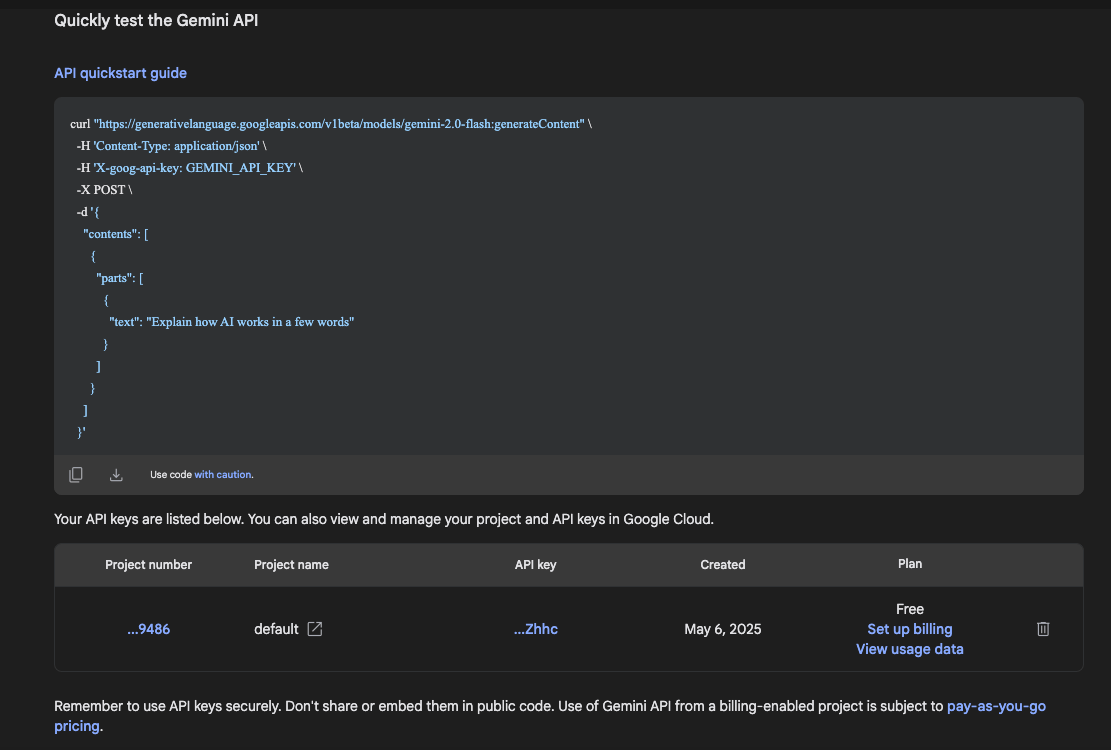
Get the project ID and API key, and set them as environment variables
1
2
| echo "export GOOGLE_CLOUD_PROJECT=" >> ~/.bashrc
echo "export GEMINI_API_KEY=" >> ~/.bashrc
|
2. Prepare the Node.js Environment
1
| curl -o- https://raw.githubusercontent.com/nvm-sh/nvm/v0.40.3/install.sh | bash
|
1
2
| echo 'export NVM_DIR="$([ -z "${XDG_CONFIG_HOME-}" ] && printf %s "${HOME}/.nvm" || printf %s "${XDG_CONFIG_HOME}/nvm")"' >> ~/.bashrc
echo '[ -s "$NVM_DIR/nvm.sh" ] && \. "$NVM_DIR/nvm.sh"' >> ~/.bashrc
|
3. Install gemini
1
| npm install -g @google/gemini-cli
|
4. Using gemini
4.1 Interactive
Output:
 1
 2
 3
 4
 5
 6
 7
 8
 9
10
11
12
13
14
15
16
17
18
19
20
21
22
23
24
|
 ███            █████████  ██████████ ██████   ██████ █████ ██████   █████ █████
░░░███         ███░░░░░███░░███░░░░░█░░██████ ██████ ░░███ ░░██████ ░░███ ░░███
  ░░░███      ███     ░░░  ░███  █ ░  ░███░█████░███  ░███  ░███░███ ░███  ░███
    ░░░███   ░███          ░██████    ░███░░███ ░███  ░███  ░███░░███░███  ░███
     ███░    ░███    █████ ░███░░█    ░███ ░░░  ░███  ░███  ░███ ░░██████  ░███
   ███░      ░░███  ░░███  ░███ ░   █ ░███      ░███  ░███  ░███  ░░█████  ░███
 ███░         ░░█████████  ██████████ █████     █████ █████ █████  ░░█████ █████
░░░            ░░░░░░░░░  ░░░░░░░░░░ ░░░░░     ░░░░░ ░░░░░ ░░░░░    ░░░░░ ░░░░░


Tips for getting started:
1. Ask questions, edit files, or run commands.
2. Be specific for the best results.
3. Create GEMINI.md files to customize your interactions with Gemini.
4. /help for more information.


╭────────────────────────────────────────────────────────────────────────────────────────────────────────╮
│ >   Type your message or @path/to/file                                                                 │
╰────────────────────────────────────────────────────────────────────────────────────────────────────────╯

/data/datasets/mnist (main*)          no sandbox (see /docs)            gemini-2.5-pro (
|
Type your question or command into the input box in the middle, then press Enter.
1
| > 查看四级目录磁盘占用情况,仅列出占用高的前 10 个
|
Output:
 1
 2
 3
 4
 5
 6
 7
 8
 9
10
11
12
13
14
15
16
17
18
19
20
21
22
| ✦ I have already provided the top 10 fourth-level directories by disk usage.
Here they are again:
1. /var/lib/containerd/io.containerd.snapshotter.v1.overlayfs: 437G
2. /run/containerd/io.containerd.runtime.v2.task/k8s.io: 370G
3. /var/lib/containerd/io.containerd.content.v1.content: 210G
4. /run/containerd/io.containerd.runtime.v2.task: 370G
5. /var/lib/containerd: 646G
6. /run/containerd: 370G
7. /var/lib: 706G
8. /var: 708G
9. /run: 370G
10. /: 1.2T
As you can see, the disk usage is heavily concentrated in directories
related to container runtimes.
Would you like me to go one level deeper and show you the top 10
fifth-level directories? This might give us more insight into which
specific containers or images are using the most space.
|
4.2 Non-interactive
The -p flag passes the question directly, without interactive input. The -y flag makes the command answer “yes” automatically, avoiding interactive confirmation.
1
| gemini -p "帮我检查当前节点上 GPU 卡的状态" -y
|
Output:
 1
 2
 3
 4
 5
 6
 7
 8
 9
10
11
12
13
14
15
16
| 好的,我将使用 `nvidia-smi` 命令来检查 GPU 卡的状态。好的,这是您当前节点上 GPU 卡的状态摘要:
- **GPU 总览**: 系统上共有 8 张 NVIDIA L20 GPU。
- **驱动和 CUDA 版本**: NVIDIA 驱动版本为 570.158.01,CUDA 版本为 12.8。
- **GPU 使用情况**:
- **GPU 0, 1, 2, 3, 4, 5** 目前正在被使用,主要运行 `python` 和 `tritonserver` 进程。
- **GPU 6, 7** 目前处于空闲状态,功耗和温度都较低。
- **内存使用**:
- GPU 0, 1, 2 的显存几乎被占满。
- 其他 GPU 的显存使用率各不相同。
简而言之,大部分 GPU 资源都已被分配使用,但仍有两张卡是完全空闲的。
如果您需要任何其他具体信息,请告诉我。
|
