1. Data Processing Architecture
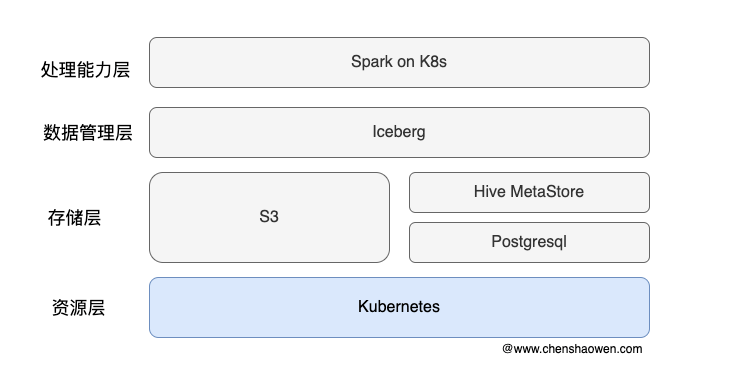
It is mainly divided into four layers:
- Processing capability layer: Spark on Kubernetes provides streaming data processing capability
- Data management layer: Iceberg provides dataset access operations such as ACID and tables
- Storage layer: Hive MetaStore manages Iceberg table metadata, PostgreSQL serves as the storage backend for Hive MetaStore, and S3 serves as the data storage backend
- Resource layer: Kubernetes manages the cluster’s compute, storage, and network resources, providing a unified resource management capability to the layers above
1.1 Spark
Apache Spark is an open-source cluster computing framework, originally developed by the AMPLab at UC Berkeley. Compared with Hadoop’s MapReduce, which writes intermediate data to disk after a job completes, Spark uses in-memory computing technology and can perform analysis and computation in memory before the data has been written to disk.
The tasks it can accomplish include:
- Batch processing, extraction, transformation, loading, processing, etc.
- Stream processing, real-time analytics, event processing
- SQL queries, integrating with data sources such as Hive and Iceberg, providing powerful query optimization
- Machine learning, MLlib in Spark supports common machine learning algorithms such as regression, classification, and clustering
- Graph computation, GraphX in Spark supports common graph algorithms such as PageRank
The Spark on Kubernetes project is a solution for running Apache Spark applications on Kubernetes, providing a more cloud-native way to run them.
1.2 Iceberg
Iceberg is a table format, which we can define as a way of organizing data.
Iceberg is an open table format for huge analytic datasets, developed and open-sourced by Netflix. Iceberg adds tables using a high-performance format to Presto and Spark (Hudi also supports Presto and Spark integration), and the format works similarly to SQL tables.
The biggest difference from the underlying storage format (such as columnar storage formats like ORC and Parquet) is that it does not define how data is stored, but rather how data and metadata are organized, providing a unified table semantics upward.
The common usage is to create a table in iceberg format in Hive Metastore. Write to iceberg with flink or spark, and then read the table through other means, such as spark, flink, presto, etc. This article mainly adopts this technical route.
1.3 Hive Metastore
Hive Metastore is one of the core components of Apache Hive. It is mainly used as a metadata management service, providing a unified metadata storage and access layer for big data processing tools such as Hive, Spark, Presto, and Trino.
Simply put, Hive Metastore is responsible for managing and storing metadata such as table structures, database information, and storage locations, making it easy for distributed computing frameworks to quickly access and process large-scale data.
2. Deploying Hive Metastore
2.1 Deploying PG
Deploy with reference to the postgres15.yaml file in the https://github.com/shaowenchen/demo/tree/master/spark-3.5-iceberg directory.
Note that the PGSQL storage in the example uses local hostPath storage. For a production environment, it needs to be replaced with a more reliable storage service.
2.2 PG Database Initialization
- Set environment variables
| |
- Create the database
| |
2.3 Deploying Hive Metastore
Deploy with reference to the hive-metastore.yaml file in the https://github.com/shaowenchen/demo/tree/master/spark-3.5-iceberg directory.
The S3-related bucket configuration needs to be replaced: BUCKET, ACCESS_KEY, SECRET_KEY, ACCESS_KEY, SECRET_KEY, etc.
Hive Metastore uses PGSQL as its database backend, and the PGSQL information is written in the deployment configuration file. If an external database is used, the relevant configuration in the deployment file needs to be updated.
3. Deploying Spark Operator
3.1 Introduction to Spark Operator
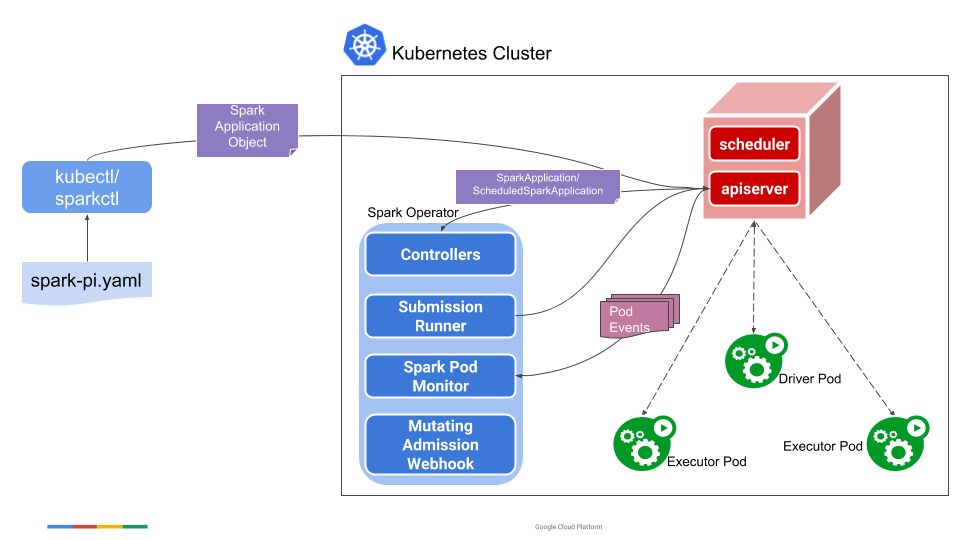
The figure above shows the architecture of Spark Operator and the relationships among its components. Its workflow is as follows:
- spark-submit submits the Spark job to the Kubernetes cluster (it can be submitted via the sparkapplications object)
- The Kubernetes cluster creates the Driver Pod
- The Driver starts several Executor Pods
- The Executor runs the concrete Task
- After execution completes, the Driver cleans up the Executors
3.2 Installing Spark Operator
- Add the repo
| |
- Install spark-operator
| |
spark-operator only processes Spark jobs in the namespaces specified by jobNamespaces.
- Uninstall spark-operator
| |
- View the workloads
| |
- View the CRDs
| |
sparkapplications.sparkoperator.k8s.io defines a Spark job, and scheduledsparkapplications.sparkoperator.k8s.io defines a scheduled Spark job.
4. Processing Data with Standalone Spark and Iceberg
In standalone mode, Spark starts the complete set of dependencies locally.
4.1 Deploying a Standalone Spark Instance
Deploy with reference to the spark-iceberg.yaml file in the https://github.com/shaowenchen/demo/tree/master/spark-3.5-iceberg directory.
4.2 Entering the Spark Pod for Interactive Operations
| |
There are three available Spark interactive terminals:
- spark-shell
- spark-sql
- spark-python
4.3 Creating an Iceberg Table
Run the spark-sql command to enter the spark-sql (default)> terminal
- Create a namespace
| |
- Create a table
| |
The table created by the command above is saved to the spark-warehouse set in the default configuration file. If you want to specify the storage location, you can use the LOCATION keyword.
| |
4.4 Processing with spark-python
Exit the spark-shell terminal, save the code below into the Pod, and execute it with python spark-example.py.
| |
This processing flow is divided into three parts:
- Data loading: read external raw JSON data, or read data from an Iceberg table directly.
- Data processing: use Spark’s computing power to process the data.
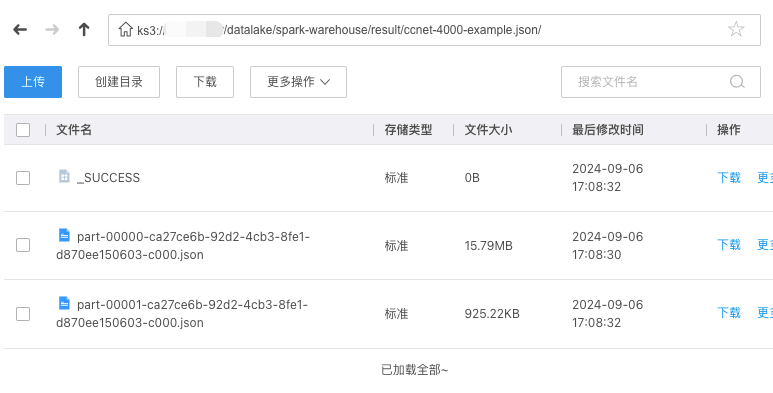
- Data output: write the processed data to external storage S3 for business teams to use.
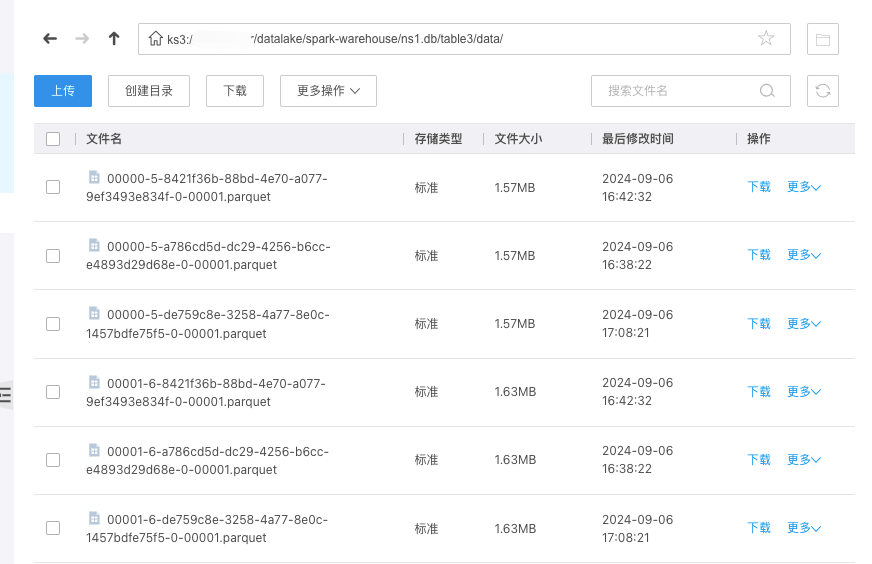
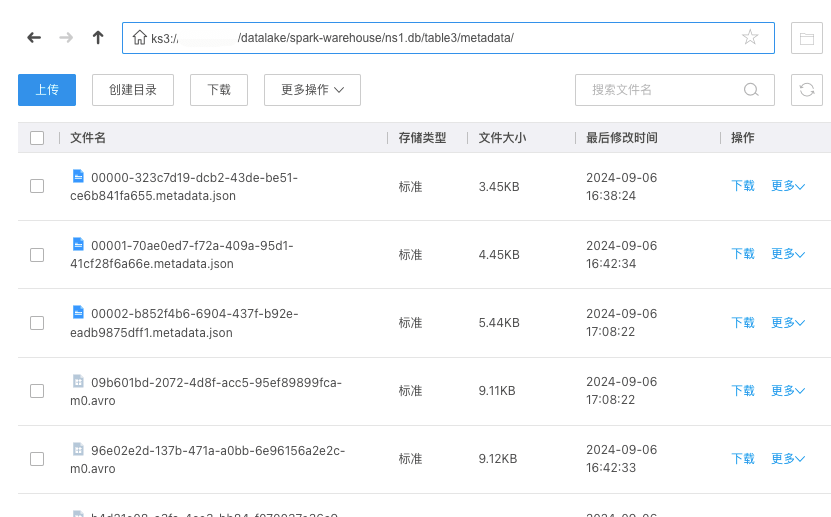
At this point, the Iceberg table’s data can be seen in object storage
The Iceberg table’s metadata
The data exported after processing
5. Processing Data in the Cluster with Spark
5.1 Submitting a Spark Job with YAML
- Grant permissions to the Driver
| |
| |
- Submit the Spark job
| |
The official Spark image is used here, which has the examples built in.
- Track the running status
| |
When it is Completed, the Spark job has finished; at the same time, the executor pods have been cleaned up, leaving only the driver pod.
- View the result
| |
The Driver obtains the execution result from the Executor and then outputs it locally.
- Clean up
| |
5.2 spark-submit Related Parameters
| |
- Basic usage
spark-submit [选项] <应用程序 JAR 文件 | Python 文件 | R 文件> [应用程序参数]
spark-submit --kill [提交 ID] --master [spark://...]
spark-submit --status [提交 ID] --master [spark://...]
spark-submit run-example [选项] 示例类名 [示例参数]
- Options
–master MASTER_URL: the master URL of the Spark cluster (such as spark://host:port, mesos://host:port, yarn, k8s://https://host:port, or local mode local[*]), defaulting to local[*] (that is, running with all local CPU cores).
–deploy-mode DEPLOY_MODE: specifies the deployment mode of the driver, “client” means running the driver locally, “cluster” means running the driver in the cluster (defaults to client mode).
–class CLASS_NAME: the main class of your application (for Java / Scala applications).
–name NAME: the name of the application.
–jars JARS: a comma-separated list of JAR files to include in the classpaths of the driver and executors.
–packages: a comma-separated list of Maven coordinates specifying the JAR packages to include in the classpaths of the driver and executors. It searches the local Maven repository first, then Maven Central and other remote repositories specified via --repositories.
–exclude-packages: a comma-separated list of groupId:artifactId used to exclude specified dependency packages, avoiding conflicts with dependencies provided by --packages.
–repositories: a comma-separated list of remote repositories used to search for the Maven coordinates specified by --packages.
–py-files PY_FILES: a comma-separated list of .zip, .egg, or .py files that will be placed on the PYTHONPATH of the Python application.
–files FILES: a comma-separated list of files that will be placed in each executor’s working directory; these files can be accessed via SparkFiles.get(fileName).
–archives ARCHIVES: a comma-separated list of archive files that will be extracted into each executor’s working directory.
–conf, -c PROP=VALUE: set arbitrary Spark configuration properties.
–properties-file FILE: specify a file path from which to load additional configuration properties. If not specified, Spark looks for the conf/spark-defaults.conf file by default.
–driver-memory MEM: specifies the driver’s memory size (such as 1000M, 2G), defaulting to 1024M.
–driver-java-options: pass additional Java options to the driver.
–driver-library-path: pass an additional library path to the driver.
–driver-class-path: pass an additional classpath to the driver. Note that JAR files added with --jars are automatically included in the classpath.
–executor-memory MEM: specifies the memory size of each executor (such as 1000M, 2G), defaulting to 1G.
–proxy-user NAME: specifies the user to impersonate when submitting the application. This option is incompatible with --principal and --keytab.
–help, -h: show help information and exit.
–verbose, -v: print additional debug information.
–version: print the current Spark version information.
- Spark Connect (Spark Connect mode only)
–remote CONNECT_URL: specifies the URL for connecting to the Spark Connect service, for example sc://host:port. This option cannot be set together with --master and --deploy-mode. This option is experimental and may change in minor releases.
- Cluster Deploy Mode Only
–driver-cores NUM: specifies the number of cores used by the driver (only used in cluster mode, defaults to 1).
- Spark Standalone or Mesos (cluster mode only)
–supervise: if this option is specified, the driver is automatically restarted on failure.
- Spark Standalone, Mesos, or K8S (cluster mode only)
–kill SUBMISSION_ID: when specified, kills the driver with the given ID.
–status SUBMISSION_ID: when specified, gets the status of the driver with the given ID.
- Spark Standalone and Mesos (Standalone and Mesos modes only)
–total-executor-cores NUM: specifies the total number of cores used by all executors.
- Spark Standalone, YARN, and Kubernetes (Standalone, YARN, and K8S modes only)
–executor-cores NUM: the number of cores used by each executor (defaults to 1 in YARN and Kubernetes modes, and defaults to all cores available on the worker node in Standalone mode).
- Spark on YARN and Kubernetes (YARN and K8S modes only)
–num-executors NUM: the number of executors to launch (defaults to 2). If dynamic resource allocation is enabled, the initial number of executors is at least the specified value.
–principal PRINCIPAL: specifies the principal used to log in to the KDC.
–keytab KEYTAB: specifies the full path of the keytab file corresponding to the principal.
- Spark on YARN (YARN mode only)
–queue QUEUE_NAME: specifies the YARN queue name, defaulting to “default”.
5.3 Submitting a Spark Job with spark-submit
- Enter the Pod terminal
| |
- Submit the Spark job
In the steps above, sufficient permissions have already been granted to the default ServiceAccount, so here we just need to specify the master address.
| |
The --conf entries contain a large number of configuration parameters; see https://spark.apache.org/docs/latest/running-on-kubernetes.html for details.
During execution, information about the interaction with Kubernetes is printed, mainly the status of the Pod
- View the related Pods
| |
As above, the driver is retained after it finishes executing, and the executors are deleted.
- View the related logs
| |
6. Processing Data in the Cluster with Spark and Iceberg
Since the scripts that Spark processes may be adjusted from time to time in a production environment, in order to make scripts easier to update and manage, the scripts for Spark data processing need to be mounted into the Driver and Executor via a PVC.
See https://github.com/shaowenchen/demo/blob/master/spark-3.5-iceberg/sparkapp.yaml
7. Exposing a Spark Processing API with Argo Webhook
- Create a Sensor
https://github.com/shaowenchen/demo/blob/master/spark-3.5-iceberg/argo-sensor.yaml
- Create an EventSource
| |
- Check the Sensor Pod status
| |
- View the Webhook’s service port
| |
- Call the API to trigger the task
| |
The script to start can be specified via script, and path can be used to isolate directories within the PVC.
8. Summary
This article records the process of deploying a data processing software stack based on Spark, Iceberg, and Hive Metastore. The main contents are as follows:
- Introduced the basic concepts of Spark, Iceberg, and Hive Metastore
- Deployed Hive Metastore and Spark Operator
- Tested running Spark jobs in standalone mode
- Tested running Spark jobs with spark-submit and YAML
- Exposed a Spark data processing API externally via Argo Webhook
