This page looks best with JavaScript enabled

Elastic, Fault-Tolerant Training with DLRover-Managed Jobs

1. Problems Facing Distributed Training

  • Estimating training resources is difficult and cannot be automated

How much compute, how much time, how much bandwidth, how many CPUs, how much memory — without enough accumulated experience it is hard to estimate accurately. The result is over-requesting and over-allocation, causing enormous resource waste.

We need to accumulate and provide solutions.

  • The failure rate is high, troubleshooting is hard, and efficient tools are lacking

Algorithm engineers do not understand Kubernetes infrastructure well, and operations engineers do not understand the training process well. Being a good AI Infra Engineer is not an easy job.

In training scenarios the failure rate is very high. How to quickly and accurately locate and resolve failures is a question we need to think about.

  • A single node failure stops training on all nodes, and someone must be on duty to bring the job back up promptly

Training jobs are similar to StatefulSets in Kubernetes. In distributed training, because of parallel techniques such as data, model, pipeline, and tensor parallelism, each node is not fully equivalent during the training process.

From failure occurring to training resuming, there are many technical points that can be turned into tools and products.

At the same time, if a failure occurs outside working hours, we cannot respond in time, and delayed model iteration plus idle AI accelerator cards are a huge loss. Whether failures can be detected and training automatically resumed is also a question worth studying.

2. What Is DLRover

DLRover is one solution that attempts to address the above problems. Below is the architecture diagram of the https://github.com/intelligent-machine-learning/dlrover project.
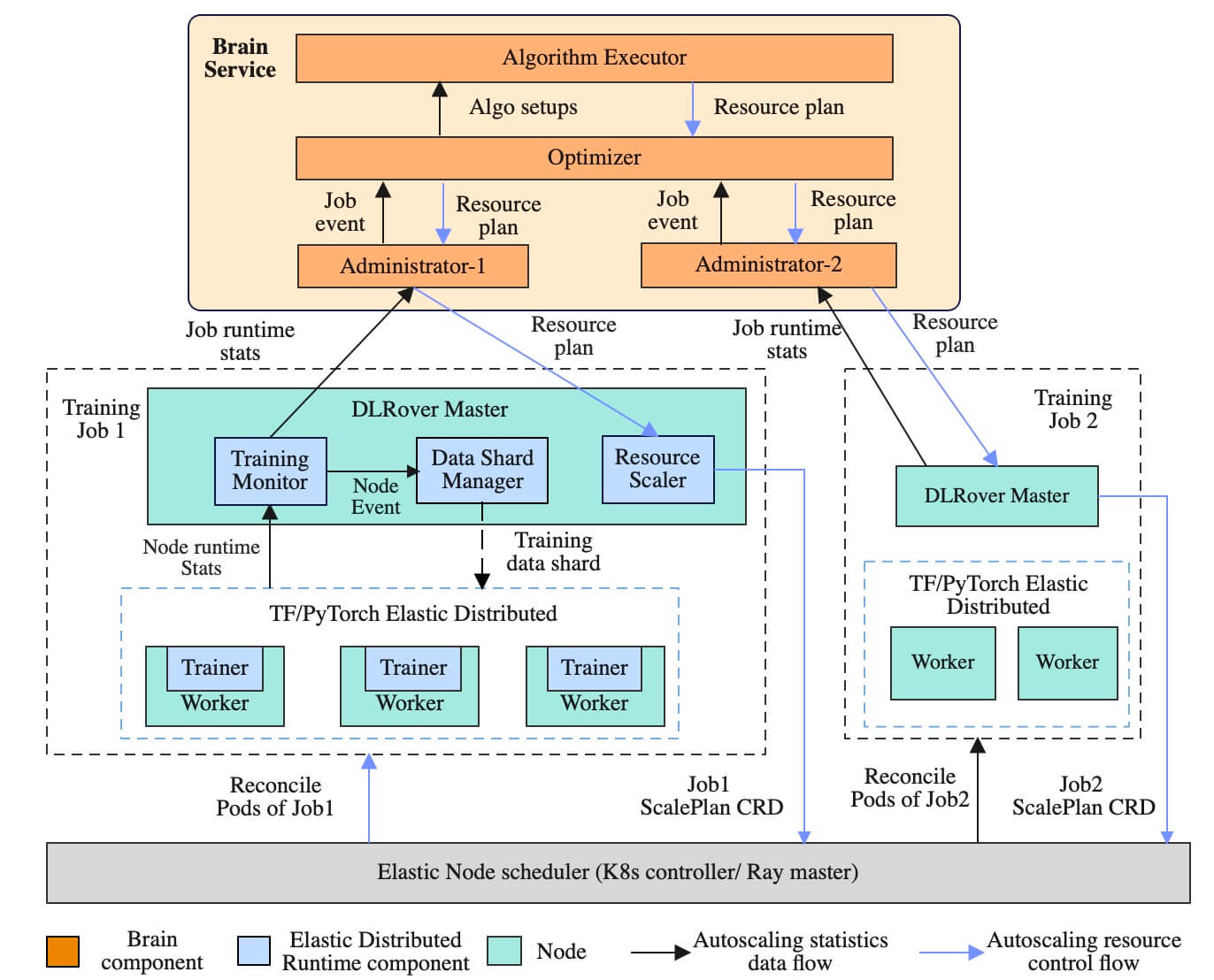
Components of the management plane:

  • Brain Service, responsible for resource elasticity optimization. It automatically optimizes the resource configuration of jobs based on the training speed and per-node load collected in real time, and there is also an event collection service, k8smonitor
  • Elastic Controller, the controller for the Kubernetes objects ElasticJob and ScalePlan

CRD objects:

  • ElasticJob is used to describe an elastic training job
  • ScalePlan is used to pass information between Brain, DLRover Master, and Elastic Controller in order to make optimization adjustments. Normally it does not need to be created manually; DLRover manages it automatically

Components related to the training job:

  • DLRover Job Master, responsible for elastic scheduling and fault-tolerant self-healing. Each training job has one master node, and the master node is responsible for collecting training speed, collecting node load, managing training samples, and elastic scheduling.
  • Elastic Agent is not deployed separately; you need to use the dlrover-run command to manage the training job, and it coordinates with the training framework to support fault tolerance and elasticity of training. Each node has an Elastic Agent. The agent obtains the information of the nodes currently running the job from the master and notifies the training framework to update the distributed training state. The agent is also responsible for getting training sample information from the master for the training framework to iterate the model, so that training sample sharding supports worker elasticity.

The following diagram is its fault-tolerance architecture design:
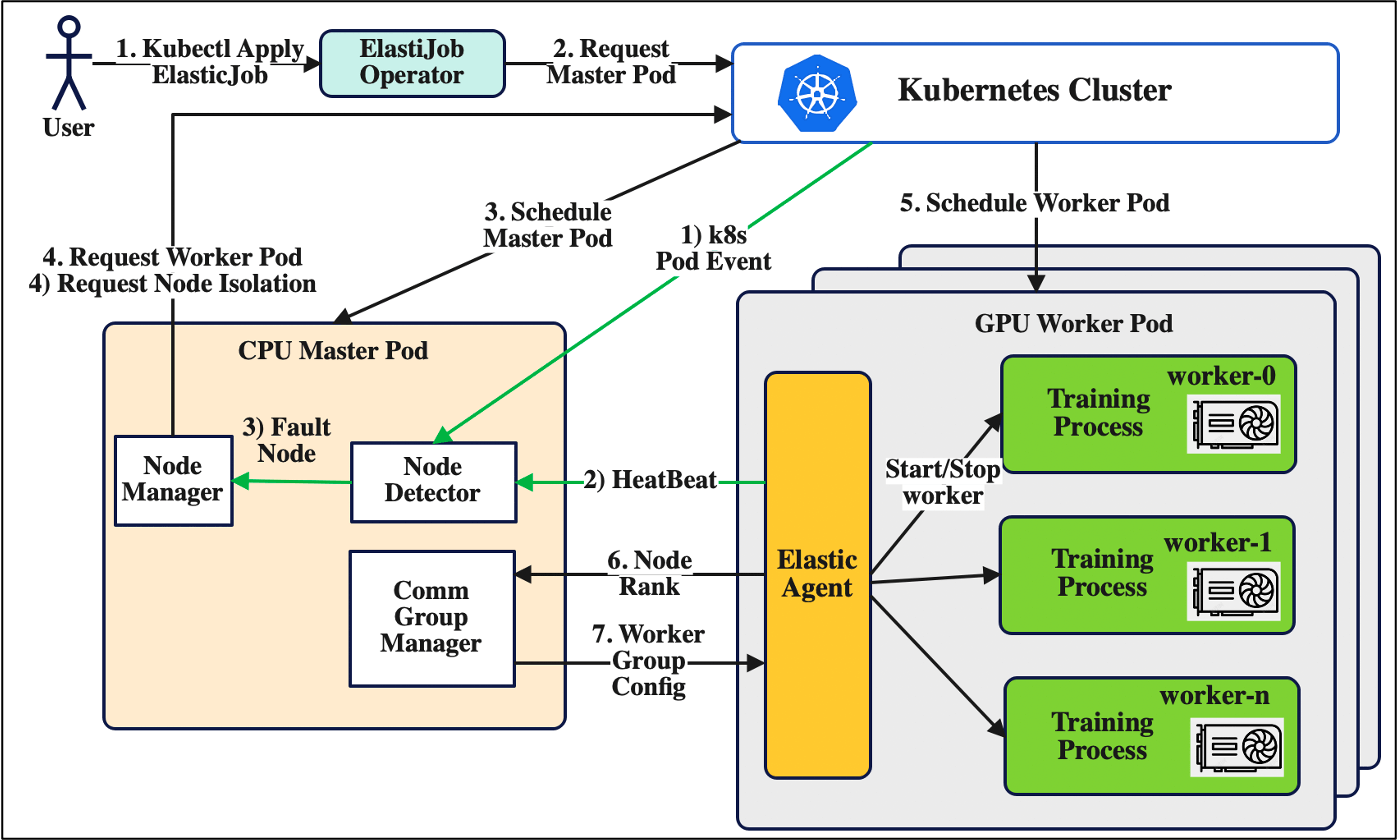
DLRover Job Master is responsible for detecting and handling failures, while dlrover-run acts as the Agent and reports status information.

3. The dlrover-run Command and Its Parameters

  • Install the dlrover package
1
pip install dlrover[torch] -U -i https://mirrors.aliyun.com/pypi/simple
  • dlrover-run is just a wrapper around dlrover.trainer.torch.main
 1
 2
 3
 4
 5
 6
 7
 8
 9
10
cat /usr/local/bin/dlrover-run

#!/usr/local/bin/python
# -*- coding: utf-8 -*-
import re
import sys
from dlrover.trainer.torch.main import main
if __name__ == '__main__':
    sys.argv[0] = re.sub(r'(-script\.pyw|\.exe)?$', '', sys.argv[0])
    sys.exit(main())
  • View the parameters
 1
 2
 3
 4
 5
 6
 7
 8
 9
10
11
12
13
14
15
16
17
18
19
20
21
22
23
24
25
26
27
28
29
30
31
32
33
34
35
36
37
38
39
40
41
42
43
44
45
46
47
48
49
50
51
52
53
54
55
56
57
58
59
60
61
62
63
64
65
66
67
68
dlrover-run  --help
用法: dlrover-run [-h] [--nnodes NNODES] [--nproc-per-node NPROC_PER_NODE] [--rdzv-backend RDZV_BACKEND] [--rdzv-endpoint RDZV_ENDPOINT]
                   [--rdzv-id RDZV_ID] [--rdzv-conf RDZV_CONF] [--standalone] [--max-restarts MAX_RESTARTS]
                   [--monitor-interval MONITOR_INTERVAL] [--start-method {spawn,fork,forkserver}] [--role ROLE] [-m] [--no-python]
                   [--run-path] [--log-dir LOG_DIR] [-r REDIRECTS] [-t TEE] [--node-rank NODE_RANK] [--master-addr MASTER_ADDR]
                   [--master-port MASTER_PORT] [--local-addr LOCAL_ADDR] [--network-check] [--node-unit NODE_UNIT] [--auto_config]
                   [--auto_tunning] [--exclude-straggler] [--save_at_breakpoint] [--accelerator {nvidia.com/gpu,ascend-npu}]
                   training_script ...

Torch Distributed Elastic Training Launcher

位置参数:
  training_script       启动并行执行的训练程序/脚本的完整路径,后跟训练脚本的所有参数。
  training_script_args  训练脚本的参数

可选参数:
  -h,--help            显示帮助信息并退出
  --nnodes NNODES       节点数量或节点范围,格式为 <minimum_nodes>:<maximum_nodes>。
  --nproc-per-node NPROC_PER_NODE,--nproc_per_node NPROC_PER_NODE
                        每个节点的工作进程数量;支持的值:[auto,cpu,gpu,int]  --rdzv-backend RDZV_BACKEND,--rdzv_backend RDZV_BACKEND
                        Rendezvous 后端。
  --rdzv-endpoint RDZV_ENDPOINT,--rdzv_endpoint RDZV_ENDPOINT
                        Rendezvous 后端的端点;通常格式为 <host>:<port>。
  --rdzv-id RDZV_ID,--rdzv_id RDZV_ID
                        用户定义的组 ID。
  --rdzv-conf RDZV_CONF,--rdzv_conf RDZV_CONF
                        附加的 rendezvous 配置(<key1>=<value1>,<key2>=<value2>,...)。
  --standalone          启动一个本地独立的 rendezvous 后端,使用 C10d TCP 存储在端口 29400 上。用于启动单节点、多工作进程作业时非常有用。如果指定,则 --rdzv-backend、--rdzv-endpoint、--rdzv-id 会被自动分配;任何显式设置的值将被忽略。
  --max-restarts MAX_RESTARTS,--max_restarts MAX_RESTARTS
                        最大的工作进程组重启次数,超出此次数将失败。
  --monitor-interval MONITOR_INTERVAL,--monitor_interval MONITOR_INTERVAL
                        监控工作进程状态的时间间隔,单位为秒。
  --start-method {spawn,fork,forkserver},--start_method {spawn,fork,forkserver}
                        创建工作进程时使用的多进程启动方法。
  --role ROLE           工作进程的用户定义角色。
  -m,--module          将每个进程更改为将启动脚本解释为 Python 模块,行为与 'python -m' 相同。
  --no-python,--no_python
                        跳过在训练脚本前添加 'python' - 直接执行脚本。如果脚本不是 Python 脚本时非常有用。
  --run-path,--run_path
                        使用 runpy.run_path 在相同解释器中运行训练脚本。脚本必须提供为绝对路径(例如 /abs/path/script.py)。优先于 --no-python。
  --log-dir LOG_DIR,--log_dir LOG_DIR
                        用于日志文件的基础目录(例如 /var/log/torch/elastic)。相同的目录会被多个运行重用(会创建一个以 rdzv_id 为前缀的唯一作业级子目录)。
  -r REDIRECTS,--redirects REDIRECTS
                        将标准流重定向到日志目录中的日志文件(例如 [-r 3] 重定向所有工作进程的 stdout+stderr,[ -r 0:1,1:2] 重定向本地 rank 0 的 stdout 和本地 rank 1 的 stderr)。
  -t TEE,--tee TEE     将标准流分流到日志文件和控制台(参见 --redirects 格式)。
  --node-rank NODE_RANK,--node_rank NODE_RANK
                        多节点分布式训练中节点的排名。
  --master-addr MASTER_ADDR,--master_addr MASTER_ADDR
                        主节点(rank 0)的地址,仅用于静态 rendezvous。它应该是 rank 0 的 IP 地址或主机名。对于单节点多进程训练,--master-addr 可以简单地是 127.0.0.1;IPv6 应该是 `[0:0:0:0:0:0:0:1]` 的模式。
  --master-port MASTER_PORT,--master_port MASTER_PORT
                        主节点(rank 0)上用于分布式训练期间通信的端口。仅用于静态 rendezvous。
  --local-addr LOCAL_ADDR,--local_addr LOCAL_ADDR
                        本地节点的地址。如果指定,将使用给定的地址进行连接。否则,将查找本地节点地址。否则,默认为本地计算机的 FQDN。
  --network-check,--network_check
                        是否在启动训练过程前检查网络。
  --node_unit NODE_UNIT,--node-unit NODE_UNIT
                        要调度的节点数量单位。调度的节点数量应为 node_unit 的倍数。
  --auto_config,--auto-config
                        是否自动配置 nnodes 和 nproc_per_nodes。
  --auto_tunning,--auto-tunning
                        是否自动调优并行配置。
  --exclude-straggler,--exclude_straggler
                        布尔值,如果节点是滞后节点且参数为 True,则该节点将退出。该参数仅在 network-check 为 True 时有效。
  --save_at_breakpoint,--save-at-breakpoint
                        布尔值。如果为 True,主进程中的代理将在训练过程失败时将检查点保存到存储中。
  --accelerator {nvidia.com/gpu,ascend-npu}
                        机器的加速器芯片类型。

4. Quick Managed Training with DLRover

  • Start a test container
1
nerdctl -n k8s.io run --rm -it --gpus all  registry.cn-beijing.aliyuncs.com/intell-ai/dlrover:pytorch-example bash
  • Run the Python script directly
1
2
3
4
5
6
7
8
export RANK=0
export LOCAL_RANK=0
export WORLD_SIZE=1
export MASTER_ADDR="localhost"
export MASTER_PORT=1234
python3 examples/pytorch/mnist/cnn_train.py --num_epochs 1 \
                                            --training_data /data/mnist_png/training/ \
                                            --validation_data /data/mnist_png/testing/

I found that the --no-cuda parameter has no effect; the only way to train on CPU only is to control the GPU mounts.

  • Managed training with DLRover

You can run it directly without setting environment variables; DLRover saves us the step of setting them.

1
2
3
4
5
dlrover-run --network-check --nnodes=1 \
                  --nproc_per_node=1 --max_restarts=3  \
                  examples/pytorch/mnist/cnn_train.py --num_epochs 1\
                  --training_data /data/mnist_png/training/ \
                  --validation_data /data/mnist_png/testing/

Since a single container is used for training, the --nnodes parameter needs to be set to 1, otherwise DLRover will keep waiting for new nodes to join; setting max_restarts to 3 allows 3 retries after a failure.

5. Installing DLRover Components in the Cluster

What is installed here is DLRover’s latest Release version v0.3.7, released on 5.13 this year.

  • Download the installation package
1
2
3
wget https://github.com/intelligent-machine-learning/dlrover/archive/refs/tags/v0.3.7.tar.gz
tar xvf v0.3.7.tar.gz
cd dlrover-0.3.7
  • Install the ElasticJob Controller Manager
1
kubectl -n dlrover apply -k dlrover/go/operator/config/manifests/bases

Note that the default permission settings are in the dlrover namespace. If you want to use it in another namespace, you need to create a corresponding default-role.yaml.

  • Check the workloads
1
2
3
4
kubectl -n dlrover get pod

NAME                                          READY   STATUS    RESTARTS   AGE
dlrover-controller-manager-6d676545d7-nrc4g   2/2     Running   0          73s
  • Check the CRDs
1
2
3
4
kubectl get crd |grep elastic

elasticjobs.elastic.iml.github.io                     2024-08-15T07:27:29Z
scaleplans.elastic.iml.github.io                      2024-08-15T07:27:29Z

If you only use the automatic recovery of training workers, you do not need to install components such as Brain. Because Brain depends on MySQL, and this is only for testing, the MySQL deployment method below is not reliable.

  • Install DLRover Brain
1
kubectl -n dlrover apply -f dlrover/go/brain/manifests/k8s
  • Create the database tables

Check the MySQL Pod name

1
2
3
kubectl -n dlrover get pod  |grep mysql

mysql-85dd8c7fdb-kdxtz                                  1/1     Running            0              7m41s

Run the command to create the database and initialize the tables

1
2
3
kubectl exec -it mysql-85dd8c7fdb-kdxtz --namespace dlrover -- bash
cd dlrover
mysql -uroot -proot < dlrover-tables.sql
  • Restart the Brain-related components
1
kubectl -n dlrover rollout restart deployment dlrover-brain dlrover-kube-monitor
  • Check the workloads
1
2
3
4
5
6
7
kubectl -n dlrover get pod

NAME                                                      READY   STATUS    RESTARTS   AGE
dlrover-brain-689c4b77d4-bqcz9                            1/1     Running   0          3m55s
dlrover-controller-manager-6b6f9dcd88-2h2fs               2/2     Running   0          6m19s
dlrover-kube-monitor-69ff5f99f4-gwqws                     1/1     Running   0          3m55s
mysql-799f94cbfd-864th                                    1/1     Running   0          4m17s

6. Creating a Training Job with ElasticJob

6.1 ElasticJob Object Definition

 1
 2
 3
 4
 5
 6
 7
 8
 9
10
11
12
13
14
15
16
17
18
19
20
21
22
23
24
25
26
27
28
29
30
31
32
33
34
type ElasticJobSpec struct {
	// DistributionStrategy 指定作业的分发策略。
	// 目前,策略支持 parameter-server 和 ring-allreduce。
	DistributionStrategy string `json:"distributionStrategy,omitempty"`

	// ResourceLimits 指定作业的最大资源。例如,
	// {"cpu": "100", "memory": "10240Mi"} 表示最大 CPU 核数为 100,所有 Pod 的最大内存为 10Gi。
	ResourceLimits map[string]string `json:"resourceLimits,omitempty"`

	// OptimizeMode 指定优化作业资源的模式。
	// 目前支持 "manual"(手动)、"single-job"(单作业)、"cluster"(集群)。
	OptimizeMode string `json:"optimizeMode,omitempty"`

	// BrainService 指定 Brain 的地址,以优化作业资源。Brain 可以单独部署,配置在 ElasticJobSpec 中。
	// 仅在 optimizeMode 为 cluster 时使用。
	BrainService string `json:"brainService,omitempty"`

	// EnableElasticScheduling 启动 Pod 的弹性调度。
	EnableElasticScheduling bool `json:"enableElasticScheduling,omitempty"`

	// EnableDynamicSharding 启动数据集的动态分片。
	EnableDynamicSharding bool `json:"enableDynamicSharding,omitempty"`

	// 一个从 ReplicaType(类型)到 ReplicaSpec(值)的映射。指定训练集群的配置。
	// 例如,
	//   {
	//     "PS": ReplicaSpec,
	//     "Worker": ReplicaSpec,
	//   }
	ReplicaSpecs map[commonv1.ReplicaType]*ReplicaSpec `json:"replicaSpecs"`

	// Envs 指定作业 Pod 的环境变量。
	Envs map[string]*corev1.EnvVar `json:"envs,omitempty"`
}

The ReplicaSpec definition is as follows:

 1
 2
 3
 4
 5
 6
 7
 8
 9
10
11
12
13
14
15
16
type ReplicaSpec struct {
	commonv1.ReplicaSpec `json:",inline"`

	// RestartCount 是重新启动失败副本的次数。
	RestartCount int `json:"restartCount,omitempty"`

	// AutoScale 是一个标志,用于自动调整副本数量和每个副本的资源。
	AutoScale bool `json:"autoScale,omitempty"`

	// RestartTimeout 是等待挂起副本的时间。
	RestartTimeout int `json:"restartTimeout,omitempty"`

	// Priority 支持 high/low/0.5。0.5 表示一半的工作节点具有高优先级,
	// 另一半工作节点具有低优先级。默认值为 low。
	Priority string `json:"priority,omitempty"`
}

Some of the key fields are explained below.

6.2 DistributionStrategy

There are two DistributionStrategy strategies:

  • ParameterServerStrategy

Suitable for TensorFlow parameter_server jobs, https://www.tensorflow.org/tutorials/distribute/parameter_server_training .

  • AllreduceStrategy

Suitable for Horovod ring-allreduce and PyTorch DistributedDataParallel jobs.

From this you can see that if training uses PyTorch, choose AllreduceStrategy; if it uses TensorFlow, choose ParameterServerStrategy.

Under PyTorch DistributedDataParallel’s Allreduce strategy, the Global Batch Size stays fixed during pre-training, so there is no need to add or remove nodes and no elastic training is involved; the main capability used is Job Master’s fault-tolerant self-healing.

Under TensorFlow parameter_server’s ParameterServerStrategy, the number of nodes can be adjusted, relying on the Brain service for elastic training.

6.3 optimizeMode

There are three optimizeMode modes:

  • manual

Debug mode. When you modify a running job, the job does not restart; it is used to explore better job parameter configurations.

  • single-job

For testing and quick verification scenarios; it does not depend on additional components. It uses the master’s memory to store historical statistics, so if the master node fails, the historical statistics are lost.

  • cluster

For training in production environments. The Brain service persists the job’s historical statistics to the database for cluster-level optimization. Even if the master node fails, DLRover can restart the master node and continue training.

The description above comes from DLRover’s design document. During testing, I found that the single-job\cluster modes showed no obvious difference under AllreduceStrategy, and the cluster mode also runs normally when Brain is unavailable. At the same time, under AllreduceStrategy, when the Job Master fails, the entire job fails.

6.4 Testing the Training Job

  • Create the ElasticJob object
 1
 2
 3
 4
 5
 6
 7
 8
 9
10
11
12
13
14
15
16
17
18
19
20
21
22
23
24
25
26
27
28
29
30
31
32
33
34
35
36
37
38
39
kubectl apply -f - <<EOF
apiVersion: elastic.iml.github.io/v1alpha1
kind: ElasticJob
metadata:
  name: torch-mnist-single-job-testing-1
  namespace: dlrover
  labels:
    some-label: some-value
spec:
  distributionStrategy: AllreduceStrategy
  optimizeMode: cluster
  replicaSpecs:
    worker:
      replicas: 5
      template:
        spec:
          restartPolicy: Always
          containers:
            - name: main
              image: registry.cn-beijing.aliyuncs.com/intell-ai/dlrover:pytorch-example
              imagePullPolicy: Always
              command:
                - /bin/bash
                - -c
                - "dlrover-run --network-check --nnodes=1:10 \
                  --nproc_per_node=1 --max_restarts=10  \
                  examples/pytorch/mnist/cnn_train.py --num_epochs 500 \
                  --training_data /data/mnist_png/training/ \
                  --validation_data /data/mnist_png/testing/"
              resources:
                limits:
                  cpu: 2
                  memory: 3Gi
                  tencent.com/vcuda-core: 100
                requests:
                  cpu: 2
                  memory: 3Gi
                  tencent.com/vcuda-core: 100
EOF

Once the ElasticJob is created, DLRover immediately starts creating the master and worker Pods, and it does not check whether there are enough resources, since there is no gang-scheduler support. According to community discussions, DLRover will support this feature in combination with Volcano’s gang-scheduler.

  • Check the job status
1
2
3
4
5
6
7
8
9
kubectl -n dlrover get pod

NAME                                                         READY   STATUS    RESTARTS      AGE
elasticjob-torch-mnist-single-job-testing-1-dlrover-master   1/1     Running   0             10s
torch-mnist-single-job-testing-1-edljob-worker-0             1/1     Running   0             5s
torch-mnist-single-job-testing-1-edljob-worker-1             1/1     Running   0             5s
torch-mnist-single-job-testing-1-edljob-worker-2             1/1     Running   0             5s
torch-mnist-single-job-testing-1-edljob-worker-3             1/1     Running   0             5s
torch-mnist-single-job-testing-1-edljob-worker-4             1/1     Running   0             5s
  • Actively delete a worker
1
kubectl -n dlrover delete pod torch-mnist-single-job-testing-1-edljob-worker-3
  • Check the job status
1
2
3
4
5
6
7
8
9
kubectl -n dlrover get pod

NAME                                                         READY   STATUS    RESTARTS      AGE
elasticjob-torch-mnist-single-job-testing-1-dlrover-master   1/1     Running   0             6m18s
torch-mnist-single-job-testing-1-edljob-worker-0             1/1     Running   0             6m13s
torch-mnist-single-job-testing-1-edljob-worker-1             1/1     Running   0             6m13s
torch-mnist-single-job-testing-1-edljob-worker-2             1/1     Running   0             6m13s
torch-mnist-single-job-testing-1-edljob-worker-4             1/1     Running   0             6m12s
torch-mnist-single-job-testing-1-edljob-worker-5             1/1     Running   0             3m12s

DLRover automatically brings up a new worker job and continues the training task — this is its automatic failure recovery capability. Of course, for other failures, such as a dropped card, an abnormal program exit, or an IO exception, DLRover can also handle them automatically without manual intervention.

  • Clean up
1
kubectl -n dlrover delete elasticjob torch-mnist-single-job-testing-1
1
kubectl -n dlrover delete scaleplans.elastic.iml.github.io torch-mnist-single-job-testing-1

6.5 How Elastic Jobs Work

Allreduce currently only supports fault tolerance, not elastic scale-out. Our target scenario is PyTorch distributed pre-training of large models, and we have no strong need for TensorFlow-related elasticity. Here we will just briefly look at its elasticity principle.

DLRover Brain uses algorithms to compute the data needed for resource optimization based on monitoring of the current training task. After the training job’s Job Master receives the new resource optimization result, it generates a ScalePlan CRD and notifies the ElasticJob Controller to change the node scale of the training job.

I tested the deepctr-auto-scale example provided by the community; the chief consumed a large amount of memory resources, and no increase in the number of worker replicas was observed.

1
deepctr-auto-scale-edljob-chief-0              1947m        185022Mi
1
2
3
4
5
6
7
8
deepctr-auto-scale-edljob-chief-0              1/1     Running   0               4h42m
deepctr-auto-scale-edljob-evaluator-0          1/1     Running   0               4h42m
deepctr-auto-scale-edljob-ps-0                 1/1     Running   0               4h42m
dlrover-brain-78b6484859-p67s5                 1/1     Running   0               16h
dlrover-controller-manager-688c767cb7-8bzgl    2/2     Running   1 (7h43m ago)   15h
dlrover-kube-monitor-88548c89f-kjjjw           1/1     Running   1 (16h ago)     16h
elasticjob-deepctr-auto-scale-dlrover-master   1/1     Running   0               4h42m
mysql-574fb78ddb-8l79r                         1/1     Running   0               16h

At the same time, this job depends on the data in /nas, and the documentation does not provide configuration instructions, so I did not test it much further.

7. Some Issues

  • After the master goes down, training stops
1
kubectl -n dlrover delete pod elasticjob-torch-mnist-single-job-testing-1-dlrover-master

Afterwards

1
dlrover-controller-manager-6b6f9dcd88-2h2fs     1/2     CrashLoopBackOff   4 (35s ago)   58m

The probability of dlrover-controller-manager CrashLoopBackOff is quite high. After waiting a while, the job also fails entirely.

1
2
3
4
5
torch-mnist-single-job-testing-1-edljob-worker-0   0/1     Error     0             112s
torch-mnist-single-job-testing-1-edljob-worker-1   0/1     Error     0             112s
torch-mnist-single-job-testing-1-edljob-worker-2   0/1     Error     0             112s
torch-mnist-single-job-testing-1-edljob-worker-3   0/1     Error     0             112s
torch-mnist-single-job-testing-1-edljob-worker-4   0/1     Error     0             112s
  • When the ElasticJob object is missing non-critical fields, workers cannot be created

If the spec.template.spec.restartPolicy field is not set, only the Job Master is created and no workers are created. No abnormal errors can be seen in the logs of the ElasticJob Manager and Job Master Pods.

Not setting the ElasticJob’s labels field is the same situation.

  • Version control is done poorly, which may trigger many potential problems

In the Release version, the image tag is still test, master, and the pull policy is Always. Some of the test cases in the documentation also lack much version control, which easily triggers compatibility issues.

Also, the DLRover master’s Dockerfile uses 0.3.6, while pytorch-example uses 0.3.4.

  • The project’s completeness may not be very high

When I saw the EnableElasticScheduling field I quickly associated it with the autoScale field, but I found that only the definition of this field exists; there is no related implementation in the code repository.

Perhaps the open-source folks have a lot of internal pressure to support and do not have much time to polish these details of the community edition — some package names have not yet been changed from EasyDL to DLRover.

8. Summary

This article is a record of testing what DLRover can do for managed training. The main contents are as follows:

  • Training on Kubernetes has problems specific to its scenario that need to be solved. Distributed training jobs are shaped like StatefulSets, and nodes (Pods) are not fully equivalent to each other
  • DLRover can solve some problems in distributed training, including resource configuration, elastic training, and failure detection, localization, and recovery.
  • DLRover was tried out on both a host and Kubernetes infrastructure
  • At present the DLRover project still has some imperfect areas, but it also gives us the opportunity to participate together, and I hope the project can go a bit further

微信公众号
WRITTEN BY
微信公众号