transformers is a Python library developed by Hugging Face for using and training pretrained Transformer models in natural language processing (NLP) tasks. It provides many powerful tools and features that make working with text data and building NLP models much easier. The library is widely used across a variety of NLP tasks, such as text classification, named entity recognition, question answering, text generation, and more.
1. The pipeline in transformers
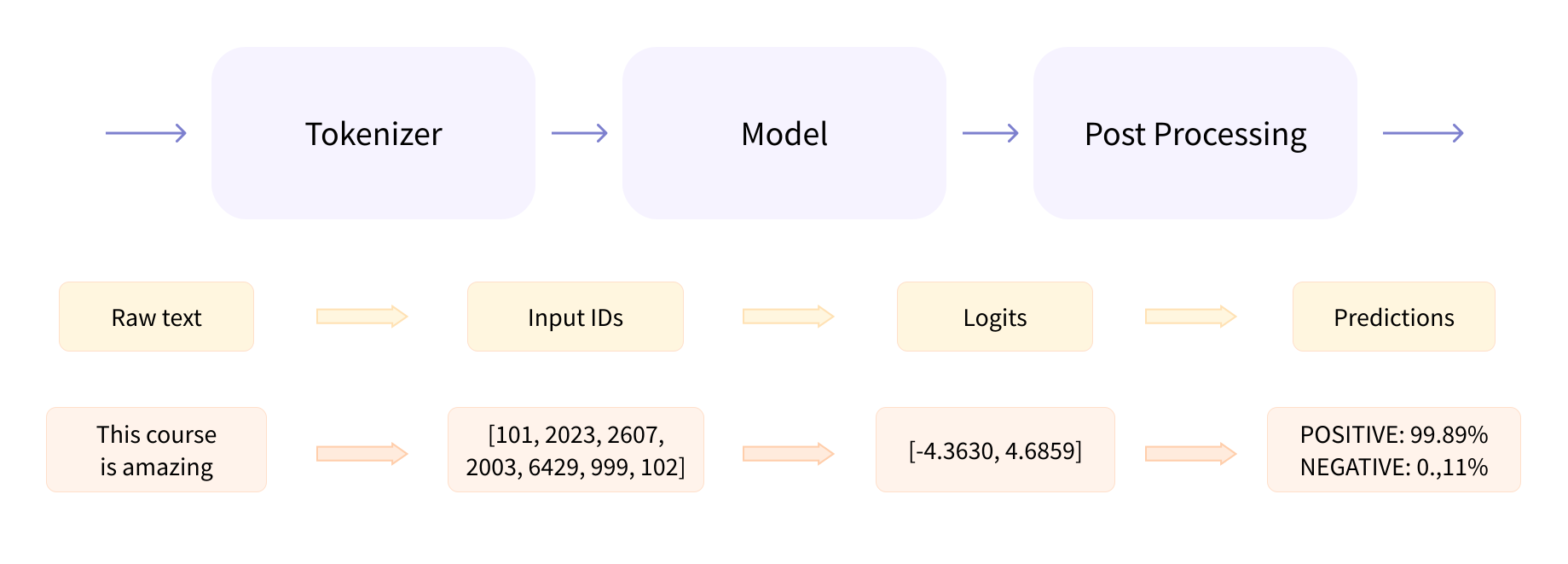
pipeline provides a convenient way to combine the tokenizer, model processing, post-processor, and so on, making it easy for users to work with.
| |
The available task types for pipeline are:
- audio-classification, audio classification
- automatic-speech-recognition, automatic speech recognition
- conversational, conversation
- depth-estimation, depth estimation
- document-question-answering, document question answering
- feature-extraction, feature extraction
…
For the full list, see https://huggingface.co/docs/transformers/main_classes/pipelines
In the example above, the tokenizer is explicitly specified, but it can also be omitted. The model and the tokenizer are tightly coupled; by default, pipeline automatically selects the appropriate tokenizer.
| |
Using pipeline lets us focus more on the task itself, without having to worry about the details of the model, the tokenizer, and so on.
2. Model classes in transformers
2.1 About the Auto Classes
transformers implements a large number of algorithm model classes, such as the BertModel class for the Bert model, the BartModel class for the BART model, the GPT2Model class for the GPT model, and so on.
To relieve users of the burden of having to find the corresponding model class whenever they use a given model, the AutoModel class automatically selects the appropriate model class based on the type of the model.
The same design idea also applies to AutoConfig, AutoTokenizer, and so on; these are called Auto Classes. For details, see https://huggingface.co/docs/transformers/model_doc/auto .
2.2 Loading a model with AutoModel
| |
But AutoModel can only load the model; it cannot call methods such as generate() to generate text.
2.3 Using the AutoModelFor Classes
The AutoModelFor class is a subclass of the AutoModel class; it automatically selects the appropriate model class and automatically loads the corresponding configuration file. These include:
- AutoModelForCausalLM, for autoregressive language models
- AutoModelForMaskedLM, for masked language models
- AutoModelForSeq2SeqLM, for sequence-to-sequence task models
- AutoModelForQuestionAnswering, for question answering models
- AutoModelForTokenClassification, for token classification models
- AutoModelForSequenceClassification, for sequence classification models
- AutoModelForMultipleChoice, for multiple choice models
…
AutoModel compared with its subclass AutoModelForXXX:
- AutoModel provides some basic capabilities, while AutoModelForXXX provides additional capabilities depending on the task type
- AutoModel contains only the Encoder, while AutoModelForXXX contains both the Encoder and the Decoder
- AutoModel is used for text encoding and feature extraction, while AutoModelForXXX is used for training models and generating text
| |
2.4 Saving the Model and the Tokenizer
- Model
| |
| |
- Tokenizer
| |
| |
3. Tokenizers in transformers
The role of the tokenizer is to convert between the input and the input format that the model can understand. There are therefore two directions of conversion:
- Convert the input text into an input format the model can understand
- Convert the model’s output into a format humans can understand
AutoTokenizer automatically selects the appropriate tokenizer based on the type of the model. Note that a pretrained model and its tokenizer are used as a matched pair. If you use the cardiffnlp/twitter-roberta-base-sentiment-latest model, you should use the cardiffnlp/twitter-roberta-base-sentiment-latest tokenizer; otherwise the results will be very poor.
| |
3.1 A Single Sentence
| |
| |
3.2 Multiple Sentences
| |
3.3 Tokenizer Parameters
| |
| |
- padding: whether to pad; if True, all sentences are padded to the same length
- truncation: whether to truncate; if True, all sentences are truncated to the same length
- max_length: the length of the sentence after padding or truncation
In the output, input_ids is the result after tokenization, and attention_mask is the attention mask, which indicates which positions are real input and which are padding.
4. Model Configuration Classes in transformers
The model configuration holds the model’s hyperparameters, such as the hidden layer size of a Bert model, the number of attention heads, and so on.
| |
- Modifying the Model Configuration
The model below has 12 attention heads; here we change it to 11.
| |
- Creating a Model from a Model Configuration
| |
In this way you can modify the model’s parameters and debug the model’s behavior.
5. Summary
This post has mainly introduced the pipeline, model classes, tokenizers, and model configuration classes in transformers. pipeline provides a convenient way to combine the tokenizer, model processing, post-processor, and so on, making it easy for users to work with. The AutoModel class automatically selects the appropriate model class based on the type of the model. AutoTokenizer automatically selects the appropriate tokenizer based on the type of the model. AutoConfig automatically selects the appropriate model configuration class based on the type of the model.
