The platform currently includes multiple subsystems and multiple versions, and all versions use the same operations system. To make it easy for users to use multiple versions, we need to bind their QQ and WeChat accounts. In addition, to minimize the chance that a failure in some login system leaves users unable to use the APP, we need a unified account management & login service. That service is: [Unified Login Service]. It mainly includes the following features: binding users’ QQ and WeChat accounts, supporting multiple login methods (QQ, WeChat), supporting operations-configured collaborator QQ (employees of the developer acting as the game’s agent), providing a unified login page & REST API, and supporting integration with systems in the xx domain.
1. Unified Login Service Design
The unified login service provides subsystems with a unified login ticket and a unified way to verify it, fully shielding subsystems from the integration differences between third-party login systems. Once a subsystem integrates the BlueKing unified login service, it can offer QQ login and WeChat login without concerning itself with the implementation details and integration flow of either method; more importantly, when a third-party login system changes, only the unified login service needs to change, while subsystems need no modification at all.
Before going into the details, let’s look at a simplified diagram of the overall architecture of the unified login service:
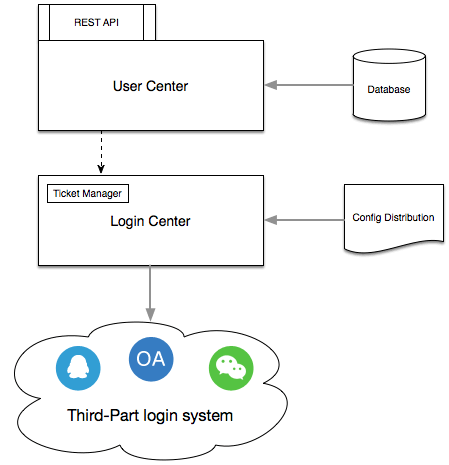
Figure 1: Unified login service architecture diagram
The unified login service is mainly divided into two parts: the login service and the account management service. The login service is chiefly responsible for converting the login tickets of third-party login systems into unified login tickets and maintaining ticket information, while the account management service mainly handles the mapping relationships among a user’s multiple account systems (QQ, WeChat).
The core data of the unified login service is the login ticket, and the hard part is how to write the login ticket into a subsystem’s cookie across domains. This article focuses on these two parts first.
1.1 Login Ticket Design
After the third-party login system successfully verifies the user’s login information, the unified login service generates the original login ticket (o_ticket) based on the login method, user id, login timestamp, and other information; the original login ticket (o_ticket) is then encrypted with AES and Base64-encoded to produce the unified login ticket (bk_ticket).
| |
1.2 Cross-Domain Design
Everyone knows that cookies cannot be written across domains, so how does the BlueKing unified login service write the login ticket under different domains? The detailed process is shown in the figure below:
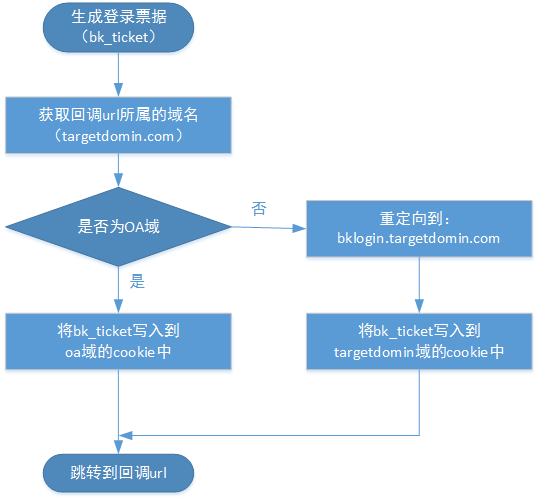
Figure 2: Writing the login ticket into a cookie
As shown in the figure above, once the login ticket is generated successfully, the system determines from the callback url whether the subsystem’s domain is the xx domain; if not, it redirects to the domain the subsystem belongs to and writes the cookie there. If the callback url is: http://t.ob.com, it redirects to bklogin.ob.com, writes the cookie under the ob domain, and then jumps to http://t.ob.com.
Notes:
(1) The unified login service currently supports the xx domain, the ob domain, and the tencent domain.
(2) When a subsystem under another domain integrates, it only needs to apply for the domain name: bklogin.targetdomin.com, and cname it to bklogin.xx.com.
2. User Information Management
The unified login service does not just integrate multiple login methods; more importantly, it provides a unified account management service. For example, the internal interfaces of the company authenticate by the user’s rtx name, while the API interfaces provided by third-party cloud platforms (such as the Tencent Cloud API) authenticate by the user’s QQ number, which requires that no matter which method the user logs in with, the unified login service can correctly obtain their identity information in the different account systems.
The unified login service synchronizes users’ rtx names, QQ numbers, and WeChat IDs from the user system and stores them in its own user information table. Users can also modify their bound QQ number and WeChat ID in the platform’s personal center. The user information table of the unified login service is shown in the figure below:
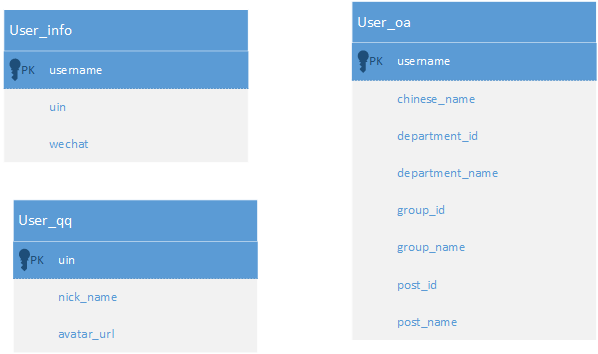
Figure 3: User information table
3. System Integration
To make system integration convenient, the unified login service provides a unified login page, a simple login box page, and a REST API. In addition, the unified login service provides a frontend js logout interface, so a system can call the js method on the frontend to clear the unified login ticket cookie and then run its own logout logic.
3.1 API Interfaces
The unified login service provides a REST API, including backend interfaces and frontend js interfaces.
3.1.1 Backend Interfaces:
- Login home page: http://login.o.xx.com?app_code=xx&c_url=http://xx.xx.xx
- Login box page: http://login.o.xx.com/plain?app_code=xx&c_url=http://xx.xx.xx
- Verify login interface: http://login.o.xx.com/user/is_login?bk_ticket=xxxxxxxxx
- User basic information interface: http://login.o.xx.com/user/get_info?bk_ticket=xxxxxxxxx
- User detailed information interface: http://login.o.xx.com/user/get_full_info?bk_ticket=xxxxxxxxx
- User permission interface: http://login.o.xx.com/user/get_user_right?bk_ticket=xxxxxxxxx
[Return parameter description]:
| Parameter name | Type | Description |
|---|---|---|
| Return code | If there is an error, returns the error message | Returned data |
[Return code description]:
ret = 0: Correct return
ret > 0: A parameter passed by the user is incorrect
ret < 0: Internal system error, please contact [BlueKing Assistant] to handle it
[Error code description]:
| Error code (ret) | Meaning |
|---|---|
| 1000 | No login ticket |
| 1001 | The login ticket is invalid |
| 1002 | The login ticket has expired |
| 1003 | The user information does not exist |
| -1 | Internal system error, please contact [Assistant] |
3.1.2 Frontend js Interfaces:
Reference the js: http://login.o.xx.com/static/js/bklogout.js
Logout method: bk_logout.logout();
3.2 Integration Flow
To integrate a system with the BlueKing unified login service, only three steps are needed: integrating the login page, verifying the login state, and logging out.
3.2.1 Integrating the Login Page
The unified login service provides two ways to integrate a login page:
- One is the complete login page ( http://login.o.xx.com ), as shown in Figure 4.
- The other is the simple login box page ( http://login.o.xx.com/plain ), which contains only the most minimal login box; system developers can conveniently embed it into the system’s own login home page, or present it as a popup (for the case where a user’s login state expires after entering the system, this approach is friendlier to users, since it only needs to pop up the login box to obtain the login state again, without refreshing the page), as shown in Figure 5.
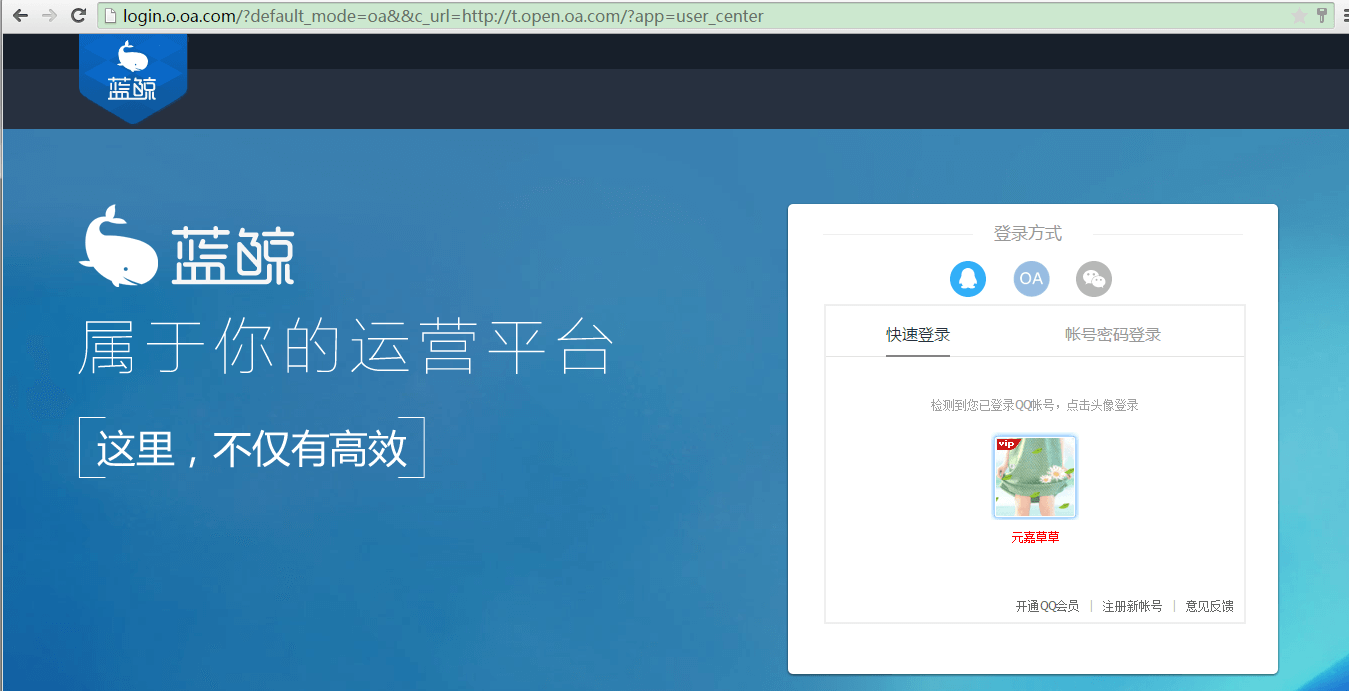
Figure 4: Login page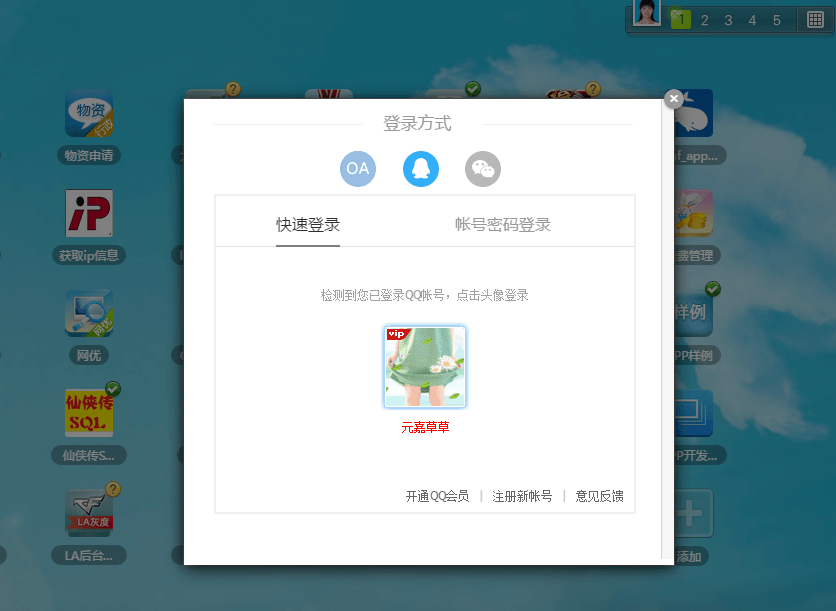
Figure 5: Login box page
[Parameter description]:
| Parameter name | Type | Description |
|---|---|---|
| app_code | str | Id of the integrating system |
| c_url | str | Callback link after a successful login |
| default_mode | str | Default login method, possible values: qq, xx |
3.2.2 Verifying the Login State
After obtaining the login ticket (bk_tciket) from the cookie, you can verify the login state in either of the following two ways:
- Way 1: Call the /user/get_info interface to verify the login state. It is recommended to use this interface when a user enters the system, since it both verifies the login state and obtains the logged-in user’s information.
- Way 2: Call the dedicated login state verification interface /user/is_login.
- Way 3: Call the user permission judgment interface /user/get_user_right. When a backend admin system integrates, it can call this interface to judge user permissions (is_superuser: the user is a super administrator of that system, is_staff: the user is an ordinary administrator of that system)
3.2.3 Logging Out:
When logging out, please follow the steps below to call the interface and clear the login state. Do not delete the cookies issued by the unified login service at will, to avoid causing login problems for users.
- Import the js script: http://login.o.xx.com/static/js/bklogout.js
- Call the logout interface: bk_logout.logout(callback);
| |
