1. Traffic Control Principles Under Linux
By queuing packets, we can control how data packets are sent. This kind of control is called data shaping (shape the data), and it includes the following operations on data:
- Adding latency
- Dropping packets
- Reordering
- Duplicating, corrupting
- Rate control
Under the qdisc-class-filter structure, controlling traffic requires three steps:
As mentioned above, Linux controls traffic by queuing packets, so first there must be a queue.
A class is, in effect, a category that divides traffic policies. For example, dividing into two tiers of rate limits: 10MBps and 20MBbs.
Although the class has been created, no IP or Port has been bound to it, so it has no controlling effect yet. You also need to create a filter to bind the specified IP and Port to the class, so that the traffic-control class takes effect on the resource.
TC is the traffic control tool provided by Linux, and is also one of the core infrastructure pieces of network components such as Cilium/eBPF.
2. Limiting the Access Speed from a Specified IP/Port to This Host
2.1 Inspecting the NIC
 1
 2
 3
 4
 5
 6
 7
 8
 9
10
| ifconfig
eth0: flags=4163<UP,BROADCAST,RUNNING,MULTICAST> mtu 1500
inet 1.1.1.1 netmask 255.255.254.0 broadcast 1.1.1.1
inet6 1::1:1:1:1 prefixlen 64 scopeid 0x20<link>
ether 1:1:1:1:1:1 txqueuelen 1000 (Ethernet)
RX packets 2980910 bytes 2662352343 (2.4 GiB)
RX errors 0 dropped 0 overruns 0 frame 0
TX packets 1475969 bytes 122254809 (116.5 MiB)
TX errors 0 dropped 0 overruns 0 carrier 0 collisions 0
|
2.2 Configuring qdisc-class-filter
- Create the qdisc root queue
1
| tc qdisc add dev eth0 root handle 1: htb default 1
|
- Create the first-level class binding all bandwidth resources
Note that the unit here is 6 MBps, that is, 48 Mbps.
1
| tc class add dev eth0 parent 1:0 classid 1:1 htb rate 6MBps burst 15k
|
You can create multiple subclasses to finely manage the traffic of the resource.
1
| tc class add dev eth0 parent 1:1 classid 1:10 htb rate 6MBps ceil 10MBps burst 15k
|
Here ceil sets the upper limit: normally the rate is limited to 6MBps, but when the network is idle it can reach 10 MBps.
- Create a filter, limiting the IP
1
| tc filter add dev eth0 protocol ip parent 1:0 prio 1 u32 match ip dst 1.2.3.3 flowid 1:10
|
Here the bandwidth for 1.2.3.4 is limited to 1:10, that is, 6MBps. Of course, you can also apply a class policy directly to the subnet 1.2.0.0/16.
2.3 Inspecting and Cleaning Up the Configuration
- View the class configuration
1
2
3
4
| tc class show dev eth0
class htb 1:10 parent 1:1 leaf 10: prio 0 rate 48Mbit ceil 80Mbit burst 15Kb cburst 1600b
class htb 1:1 root rate 48Mbit ceil 48Mbit burst 15Kb cburst 1590b
|
- View the filter configuration
1
2
3
4
5
6
| tc filter show dev eth0
filter parent 1: protocol ip pref 1 u32 chain 0
filter parent 1: protocol ip pref 1 u32 chain 0 fh 800: ht divisor 1
filter parent 1: protocol ip pref 1 u32 chain 0 fh 800::800 order 2048 key ht 800 bkt 0 flowid 1:10 not_in_hw
match 01020303/ffffffff at 16
|
- Clean up all configuration
1
| tc qdisc del dev eth0 root
|
3. Limiting This Host’s Access Speed to a Specified IP/Port
Because the queuing discipline is mainly based on the egress direction, it cannot limit traffic in the ingress direction (Ingress). Therefore we need to redirect traffic to an ifb device, then limit the egress traffic of the ifb (Egress), ultimately achieving the control goal.
3.1 Enabling the Virtual NIC
- Enable the ifb0 virtual device
1
| ip link set dev ifb0 up
|
3.2 Configuring qdisc-class-filter
1
| tc qdisc add dev eth0 handle ffff: ingress
|
For egress traffic you can use egress; here it is ingress traffic, so use ingress.
- Redirect the NIC traffic to ifb0
1
| tc filter add dev eth0 parent ffff: protocol ip u32 match u32 0 0 action mirred egress redirect dev ifb0
|
1
2
3
4
| tc qdisc add dev ifb0 root handle 1: htb default 1
tc class add dev ifb0 parent 1:0 classid 1:1 htb rate 600Mbps ceil 600Mbps
tc class add dev ifb0 parent 1:1 classid 1:10 htb rate 6Mbps ceil 6Mbps
tc filter add dev ifb0 parent 1: protocol ip prio 16 u32 match ip src 1.2.3.4/32 flowid 1:10
|
3.3 Inspecting and Cleaning Up the Configuration
- Below is a monitoring chart of limiting this host’s access to a specified IP
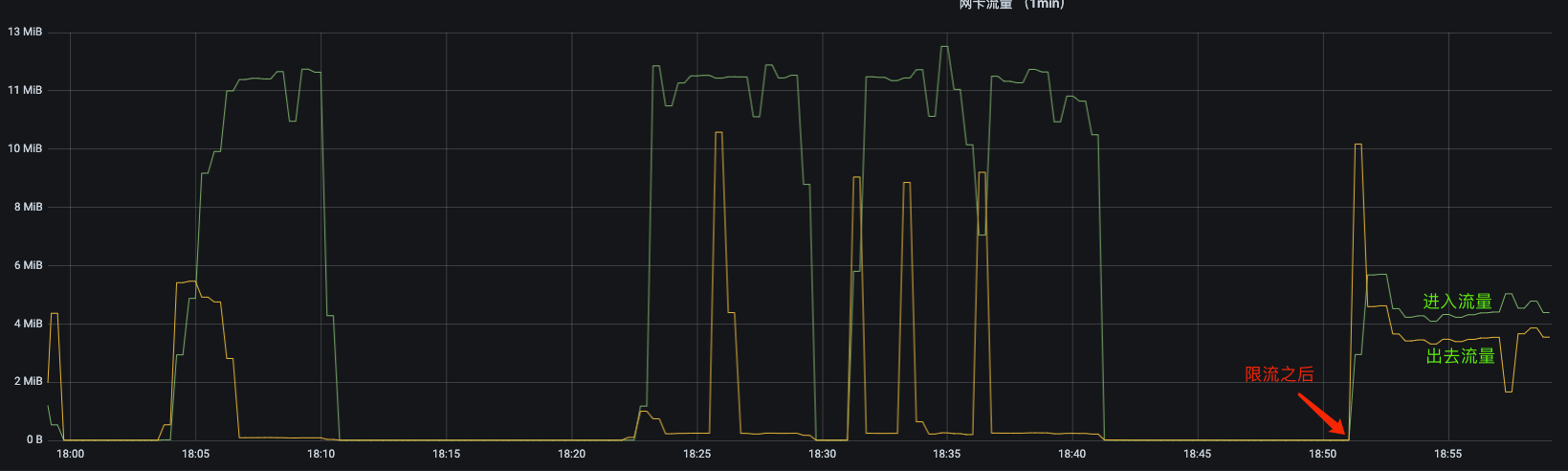
Incoming traffic is limited to below 6 MBps, while outgoing traffic is not limited.
- View the class configuration
1
2
3
4
| tc class show dev ifb0
class htb 1:10 parent 1:1 prio 0 rate 48Mbit ceil 48Mbit burst 1590b cburst 1590b
class htb 1:1 root rate 48Mbit ceil 48Mbit burst 1590b cburst 1590b
|
- View the filter configuration
1
2
3
4
5
6
| tc filter show dev ifb0
filter parent 1: protocol ip pref 16 u32 chain 0
filter parent 1: protocol ip pref 16 u32 chain 0 fh 800: ht divisor 1
filter parent 1: protocol ip pref 16 u32 chain 0 fh 800::800 order 2048 key ht 800 bkt 0 flowid 1:10 not_in_hw
match 01020304/ffffffff at 16
|
- Clean up all configuration
1
2
3
| tc qdisc del dev eth0 ingress
tc qdisc del dev ifb0 root
modprobe -r ifb
|
4. References
