In the client, we have already seen the Docker CLI passing credentials to the Docker Daemon via X-Registry-Config when sending the build context. But recent build feedback still shows some phenomena that cannot be explained. This post mainly runs some basic tests to make troubleshooting easier.
1. Building under host Docker
The Docker Daemon is started with root privileges.
- Not logged in to any account
1
2
3
4
| su ansible
echo "FROM harbor.chenshaowen.com/private/test:v1" | sudo docker build - -t harbor.chenshaowen.com/private/test:v2 --pull
unauthorized
|
The credentials have been cleared.
- ansible user logged in, root user not logged in
At this point note that you cannot use sudo docker login; instead, place the credentials directly in /home/ansible/.docker/config.json.
1
2
3
4
| su ansible
echo "FROM harbor.chenshaowen.com/private/test:v1" | sudo docker build - -t harbor.chenshaowen.com/private/test:v2 --pull
unauthorized
|
1
2
3
4
| su ansible
echo "FROM harbor.chenshaowen.com/private/test:v1" | sudo docker build - -t harbor.chenshaowen.com/private/test:v2 --push
unauthorized
|
- ansible user not logged in, root user logged in
1
2
3
4
| su ansible
echo "FROM harbor.chenshaowen.com/private/test:v1" | sudo docker build - -t harbor.chenshaowen.com/private/test:v2 --pull
OK
|
When building with sudo, the credentials configured by the current user do not take effect; the credentials of the sudo user are used instead.
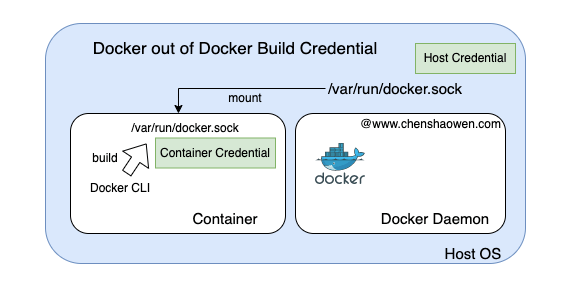
2. Building under Docker out of Docker
To simulate the build environment, start a Docker container on the host with root privileges for testing.
1
| docker run --rm -it -v /var/run/docker.sock:/var/run/docker.sock docker:19.03 sh
|
- Container not logged in, host not logged in
1
2
3
| echo "FROM harbor.chenshaowen.com/private/test:v1" | docker build - -t harbor.chenshaowen.com/private/test:v2 --pull
unauthorized
|
The credentials have been cleared.
- Container logged in, host not logged in
1
2
3
| echo "FROM harbor.chenshaowen.com/private/test:v1" | docker build - -t harbor.chenshaowen.com/private/test:v2 --pull
OK
|
1
2
3
| docker push harbor.chenshaowen.com/private/test:v2
OK
|
- Container not logged in, host logged in
1
2
3
| echo "FROM harbor.chenshaowen.com/private/test:v1" | docker build - -t harbor.chenshaowen.com/private/test:v2 --pull
unauthorized
|
1
2
3
| docker push harbor.chenshaowen.com/private/test:v2
unauthorized
|
- Both logged in, but the container lacks sufficient permissions while the host has enough
1
2
3
| echo "FROM harbor.chenshaowen.com/private/test:v1" | docker build - -t harbor.chenshaowen.com/private/test:v2 --pull
unauthorized
|
1
2
3
| docker push harbor.chenshaowen.com/private/test:v2
unauthorized
|
In Docker out of Docker mode, the build credentials have nothing to do with the host; the credentials provided in the container are used instead.
3. Running pipeline tasks under Kubernetes
- Provide imagePullSecrets, Docker does not configure credentials
 1
 2
 3
 4
 5
 6
 7
 8
 9
10
11
12
13
14
15
16
17
18
19
20
21
22
23
| cat <<EOF | kubectl apply -f -
apiVersion: apps/v1
kind: Deployment
metadata:
name: a2
spec:
replicas: 1
selector:
matchLabels:
app: demo
template:
metadata:
labels:
app: demo
spec:
containers:
- name: demo
command: ['sh', '-c', 'echo "Hello, wwww.chenshaowen.com !" && sleep 3600']
image: harbor.chenshaowen.com/private/test:v1
imagePullPolicy: Always
imagePullSecrets:
- name: pull-harbor-secret
EOF
|
- Do not provide imagePullSecrets, Docker configures credentials
 1
 2
 3
 4
 5
 6
 7
 8
 9
10
11
12
13
14
15
16
17
18
19
20
21
| cat <<EOF | kubectl apply -f -
apiVersion: apps/v1
kind: Deployment
metadata:
name: a2
spec:
replicas: 1
selector:
matchLabels:
app: demo
template:
metadata:
labels:
app: demo
spec:
containers:
- name: demo
command: ['sh', '-c', 'echo "Hello, wwww.chenshaowen.com !" && sleep 3600']
image: harbor.chenshaowen.com/private/test:v1
imagePullPolicy: Always
EOF
|
Kubernetes Pod image pulling is also unrelated to the Docker credential configuration.
4. Summary
The tests in this post did not bring any strange knowledge; they were only to verify whether the understanding is correct. The conclusions are as follows:
- When building with sudo, the credentials configured by the current user do not take effect; the credentials of the sudo user are used instead
- In Docker out of Docker mode, the build credentials have nothing to do with the host; the credentials provided in the container are used instead
- Kubernetes Pods pulling images do not use the credentials configured on the host either. If you think they do, it may be that the image is already present on the host and the pull policy is IfNotPresent
