This post mainly covers how to operate and maintain a DevOps pipeline, and how to solve some common problems. The problems fall mainly into two categories: one is Kubernetes-related and fairly general in nature; the other is business-related and requires some understanding of the domain before you can solve problems with half the effort. The content of this document will be continuously updated on a rolling basis.
1. Troubleshooting Kubernetes Problems
1.1 The Basic Creation Flow
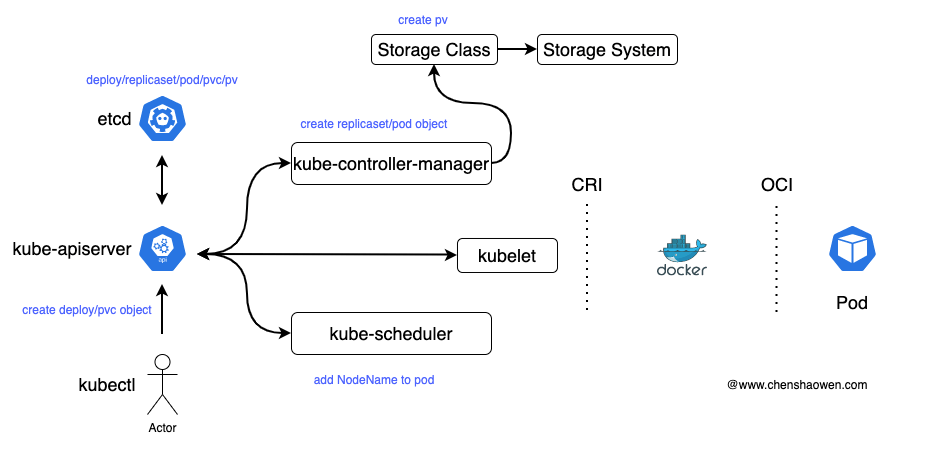
As shown in the figure above, this is the simple flow of a user creating a Deployment. It mainly consists of the following steps:
- kubectl fills in the relevant fields according to the command entered by the user and sends the deployment/pvc object to kube-apiserver
- kube-apiserver goes through a series of permission/admission controls, and ultimately serializes and stores the data in etcd
- kube-controller-manager contains a large number of controllers, and these controllers generate replicaset/pod objects that are stored in etcd. A pvc needs to be bound to a pv; if no pv satisfies the requirements, a pv is dynamically created through the Storage Class.
- kube-sheduler is responsible for selecting a node for the pod to run on, and then writes the NodeName field into the pod object.
- kubelet discovers that the current node has a pod waiting to be created, and then starts calling the CRI interface to manage the pod’s lifecycle. If there is a pvc, the remote disk also needs to be mounted to a host directory.
Understanding the basic creation flow helps with troubleshooting all kinds of possible failures. A failure can be understood as a state in the cluster lifecycle, and creation is the starting point of that entire lifecycle. At the same time, resetting and restarting are very fast ways to solve problems, and both involve creation.
1.2 How to Think About Solving Cluster Failures
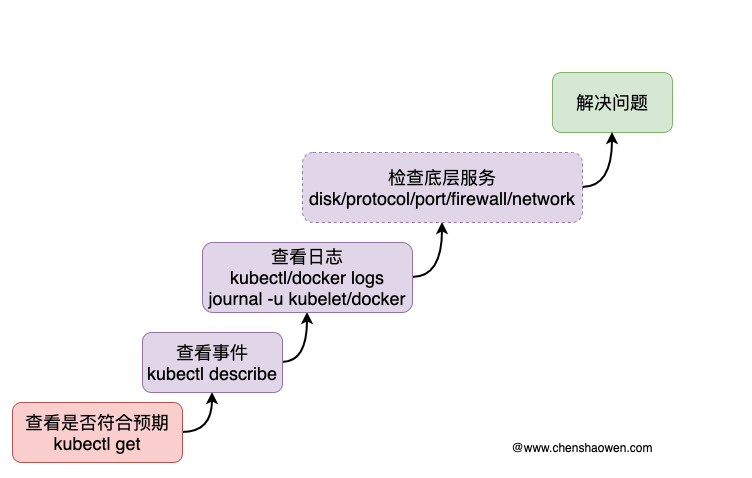
As shown in the figure above, this is my approach to fixing cluster failures. It mainly consists of the following steps:
kubectl getchecks whether resources such as node and pod are as expectedkubectl describelooks at the event information in Kubernetes, including kube-sheduler scheduling, image pulling, whether startup succeeded, and so on. This usually solves most problems.kubectl logslooks at the logs of the workload. When a pod is running but cannot provide service normally, the logs information can give useful hints. Sometimes you cannot view the logs of the container in the pod, in which case you need to go to the node where the pod runs and check docker’s logs.journalis also very useful: use the-uparameter to specify a service, and-fto view the latest rolling logs.- If the two approaches above still cannot solve the problem, then congratulations, you have another chance to improve yourself. Check the underlying services, that is, check the cluster’s basic environment, including disks, allowed protocols, allowed ports, firewall, network, and so on. Whether it can ultimately be solved depends on your accumulated experience and your ability to search for answers to the problem.
1.3 Necessary Checks
Here are some necessary checks that can assist in troubleshooting.
- node load
When node load is too high, it may cause the node to become NotReady.
- node disk
The disk consists of two parts: size and inode.
- swap, firewall
Configuration from when the cluster was installed may become ineffective after the machine is restarted.
- pod communication across nodes
When cross-node communication is abnormal, services become inaccessible.
- the status of kubelet and docker on the node
systemctl status kubelet and systemctl status docker check the status of the components.
- check the configuration of kubelet and docker
ps aux|grep kubelet and docker info check whether the relevant configuration is as expected.
- view the storage CSI plugin logs
StorageClass usually provides storage services through a CSI plugin; you can view the relevant logs to check for any abnormal output.
- check the ip forwarding feature
Run the command cat /proc/sys/net/ipv4/ip_forward ; if it outputs 0, it means it is not enabled. ip forwarding allows packets from one port to be forwarded to another port. When it is not enabled, network access fails, and tcpdump shows a large number of syn packets being sent but no ack .
- check whether the Pod CIDR conflicts with the host subnet
You can first look at the Pod’s ip and check whether it overlaps with the ip of the host or VPC. If a conflict occurs, the service will be inaccessible and errors like No route to host will appear, and the CIDR needs to be modified.
2. Installation Problems
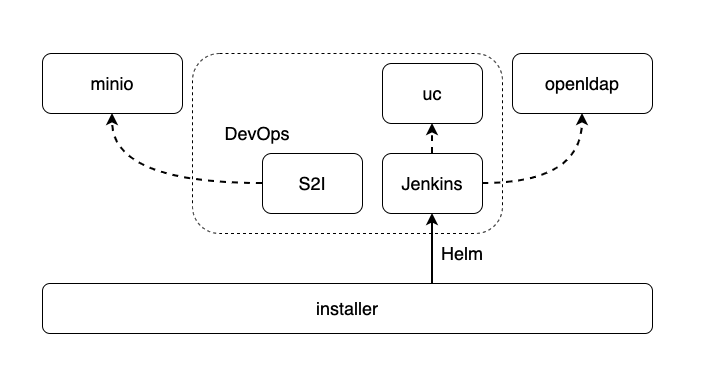
As shown in the figure above, this is the dependency relationship when the installer installs DevOps. DevOps mainly has two core components, S2I and Jenkins . S2I depends on minio to store files, and Jenkins depends on uc to provide plugin downloads and depends on openldap to connect the account system.
During installation, the more common case is that minio fails to install, which prevents DevOps from continuing the installation. And a minio installation failure is usually caused by storage and network issues.
3. Jenkins Operations Problems
3.1 Abnormalities Caused by Modifying the Default Configuration
DevOps allows users to customize the configuration, but in the Jenkins /configureSecurity/ page, authentication and CSRF Protection must not be modified.
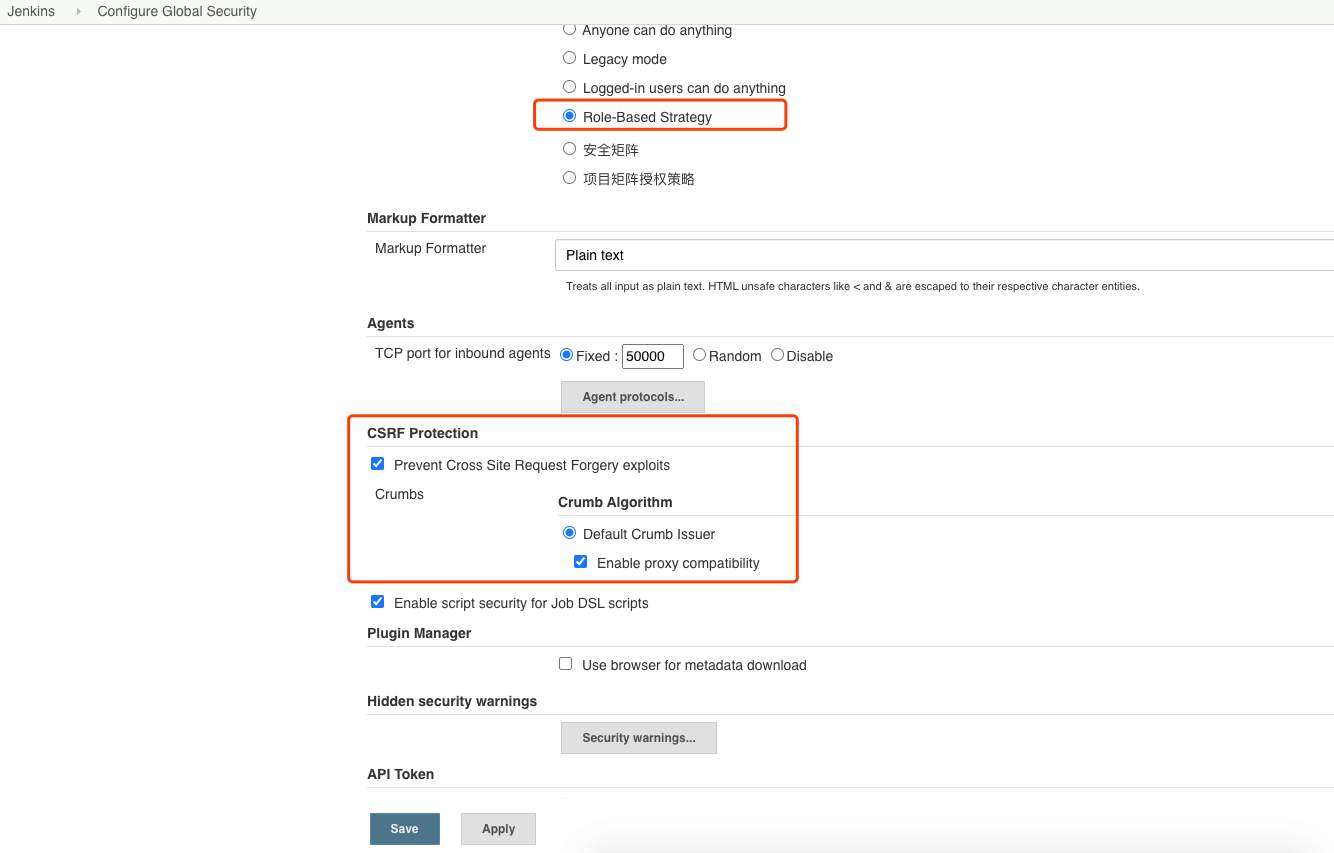
Modifying the content in the red box in the figure above will make the pipeline unusable.
3.2 A Large Number of Multibranch Pipelines Fills Up Disk Space
When a multibranch pipeline scans, it pulls the repository into /var/jenkins_home/cache to look for the jenkinsfile.
If you scan multibranch pipelines heavily, set Jenkins’ pv larger, 50 GB or more.
3.3 The Lightweight Problem Causes Concurrent Pipeline Conflicts
For details, refer to the document: Analysis of the Lightweight Code Checkout Problem in Jenkins
3.4 Cannot Create a Pipeline in a Multi-Node Cluster
For node-to-node communication problems, you can schedule ks-controller-manager and ks-jenkins onto the same node to verify.
If it can be created successfully, then there is a problem with the Pod’s cross-node communication.
3.5 The Number of Concurrent Pipelines Is Low
Adjust the cpu and memory limits of ks-jenkins, as well as the Xms and Xmx values.
For the specific adjustments, refer to the document: Stress Test of Kubernetes Dynamically Creating Jenkins Agents
3.6 Pipeline Deployment Reports an Error
Jenkins’ Kubernetes Deploy plugin’s messages are not very friendly in terms of readability; possible causes are:
- the apiVersion version is not supported
- the namespace was not created in advance
- the yaml itself has a problem
- there is a problem with the credential
- the credential created and the credential ID used are inconsistent
You can run kubectl apply directly on the node to verify. When you suspect a problem with the credential, you can directly use the admin’s credential to confirm.
If it is an EKS cluster, please refer to https://github.com/kubesphere/community/issues/165 to generate a credential separately. Deploying with DevOps on EKS requires a token-type credential; a certificate-type credential does not have sufficient permissions. To keep it simple, you can directly use kubectl -n kubesphere-system get secret kubesphere-token-xxx -o jsonpath={.data.token} | base64 -d to obtain the token and replace it in the kubeconfig .
3.7 The Pipeline Is Stuck in Pending and Kubernetes Cannot Create the Pod
If the pipeline cannot run, and kubectl -n kubesphere-devops-system get pod shows no newly created Pod for running the pipeline, then it is very likely that admission control is the limitation.
kube-apiserver provides the ability to modify workload-related information when a workload is created. For example, Istio injects a Sidecar into a Pod via a webhook at creation time for microservice governance. But if the Istio component becomes abnormal, it will also cause Pods to wait indefinitely for injection, so Pods cannot be created.
The solution is to add the exemption-from-injection label to the running namespace, for example, kubectl label namespace kubesphere-devops-system istio-injection=disabled .
3.8 Variable References Do Not Take Effect, or the Pipeline Reports an Error When Referencing a Variable
${env.<ParameterName>} , ${params.<ParameterName>} , and ${<ParameterName>} can all reference variables, and can also be used to pass values between Stages. When referencing variables, a common mistake is not distinguishing single quotes from double quotes. Single quotes do not substitute variables, only double quotes substitute variables, consistent with Shell.
Also note the scope. If you get groovy.lang.MissingPropertyException: No such property: , and you are quite sure you defined this variable, then it is very likely a scope problem. Just add env or params and try again.
3.9 When Editing Graphically, the Error 至少需要一个嵌套步骤 Is Reported
The API reports the error instance failed to match at least one schema . In the pipeline part, the frontend page’s graphical view and the backend data model are converted to each other through the pipeline-model-api plugin. The specific interfaces are /tojson and /tojenkinsfile ; the frontend edits json , and the backend needs jenkinsfile .
For example, the following example:
| |
will be converted into the following content:
| |
The json format pipeline is very friendly to the frontend, and the scheme is very simple, greatly reducing the difficulty of implementing graphical editing. When the conversion fails, the page displays an error message. If the returned error message is empty, the page displays 当前 Jenkinsfile 不是标准的声明式 Jenkinsfile,无法进行图形化显示 .
The frontend only covers a few common cases, and the messages are not very accurate. For example, when defaultValue is an empty string, it prompts 至少需要一个嵌套步骤 , which is incomprehensible. It is best to refer directly to the return of the /tojson interface for handling.
3.10 When Building an Image, External Services Are Inaccessible and a timeout Error Is Reported
When executing the docker build command in the Jenkinsfile, because it is a Docker in Docker network, it uses the Docker Daemon on the Node to build. It looks like the dynamically created Pod cannot access the external network, but in fact it is the Node that cannot access the specified external service.
This is very likely because a runtime environment with strict network requirements has prohibited the host from accessing the external network. Use the iptables command to add a whitelist.
3.11 During Upgrade, the PVC Reports an Error
The two common error messages are The PersistentVolumeClaim "pvc1" is invalid: spec: Forbidden: is immutable after creation except resources.requests for bound claims and Error: UPGRADE FAILED: cannot patch "mysql" with kind PersistentVolumeClaim: persistentvolumeclaims "mysql" is forbidden: only dynamically provisioned pvc can be resized and the storageclass that provisions the pvc must support resize .
The cause of the error is that the StorageClass does not support dynamic expansion, so the PVC capacity before and after the upgrade must be kept consistent.
Before upgrading, you can use the describe command to check whether the StorageClass supports dynamic expansion. If AllowVolumeExpansion is set, it means it is supported; otherwise it is not.
3.12 After Installing an Incompatible Plugin, Jenkins Cannot Start
The way to handle it is to enter the Pod where Jenkins runs and delete the incompatible plugin.
First, exec into the Pod
| |
Then enter the /var/jenkins_home/plugins directory and delete the plugin mentioned in the Jenkins Pod logs as causing the error. If you have installed a large number of plugins, here is a trick: delete them by date.
Sometimes there are complex dependencies between plugins. Another emergency approach is to directly clear /var/jenkins_home/plugins ; Jenkins will download plugins from UC according to /var/jenkins_home/plugins.txt , restoring to the initial state.
3.13 After Modifying the Authentication Policy, You Cannot Log In
The way to handle it is to enter the Pod where Jenkins runs, change useSecurity to false, and change it back to its original value after logging in.
useSecurity is configured in /var/jenkins_home/config.xml .
3.14 Jenkins Cannot Find the User, LDAP Reports an Error (Reset Password)
The message is similar to:
| |
Jenkins users come from the OpenLdap component, and the meaning of the error message is that the admin user cannot be found in the OpenLdap component. To solve this problem, you need to check two things: whether the OpenLdap component is abnormal, and whether the admin user is in OpenLdap. Then, fix the component and recreate the admin user.
The rebuild method can be found from the code at https://github.com/kubesphere/kubesphere/blob/release-3.0/pkg/controller/user/user_controller.go#L537 ; it requires editing the admin user’s encryption annotation. Run the command kubectl patch users admin --type merge --patch '{"spec":{"password":"P@88w0rd"}, "metadata":{"annotations":{"iam.kubesphere.io/password-encrypted":"false"}}}' to reset the admin user’s login password to the default value, triggering the sync logic. This command can also be used to reset a password.
3.15 After the Pipeline Is Created, It Is Not Visible on the Page
In 3.0.0, CRDs are used to manage DevOps projects and Pipelines, which are ultimately synced to Jenkins. If the pipeline is not visible on the page after being created, it is because the sync has not completed. There are many possibilities for the sync not completing, and the logs in ks-controller-manager will help you. It may be a network communication problem between nodes, or it may be that the Jenkins service has become abnormal; you need to troubleshoot based on the error logs.
3.16 The Docker Command Cannot Be Found
First you need to understand the process by which Jenkins creates an Agent to run a pipeline:
- In the agent template, the docker.socket file needs to be mounted
- When running the pipeline, Jenkins selects an agent by label
- Kubernetes creates a Pod using the agent’s configuration as a template
- When executing docker, it needs to be executed wrapped in a container (otherwise the default container jnlp is used)
If the Docker command cannot be found when running the pipeline, then the jnlp container may have been used. Please check step 4 and select a container that contains the docker command and has docker.socket mounted.
