In a CICD pipeline, image builds come up often, and the conventional approach is to build with Docker in Docker or Docker out of Docker. For details, see: How to Use Docker in Docker
In fact, to avoid monopolies and advance the industry, a unified OCI image format specification based on the Docker image format was defined long ago. In other words, all you need is to obtain an OCI-compliant image from a Dockerfile; no particular tool is mandated to do the job.
A daemon-less build tool can build images without depending on the Docker Daemon. That carries real significance in CICD scenarios. At the same time, Kubernetes is shedding Docker’s influence and building a more open architectural ecosystem, so CICD needs to be decoupled from the Docker Daemon.
1.2 Advantages of daemon-less
- No need to mount the sock file
Today more and more runtime components implement the CRI and OCI interfaces, such as cri-o and containerd. These runtime management tools have no file like /var/run/docker.sock to mount into the service. The daemon-less approach to building can interoperate with these tools.
These daemon-less tools usually run in userspace rather than with root privileges, providing a more secure runtime.
- A better fit for Kubernetes
Building images with the Docker Daemon by mounting /var/run/docker.sock is a centralized build approach. The image build is mainly left to the Docker Daemon on the node. If a Dockerfile could instead be turned directly into an image, it would fit Kubernetes and Serverless infrastructure better, and build scale and efficiency would improve.
- Kaniko, led by Google
- Buildah, led by Red Hat
- Img, initiated by Jessie Frazelle
By Star count, Buildah and Img are currently at 3K+, while Kaniko has reached 7K+, so the rest of this article uses Kaniko as the example.
2. How Kaniko Works
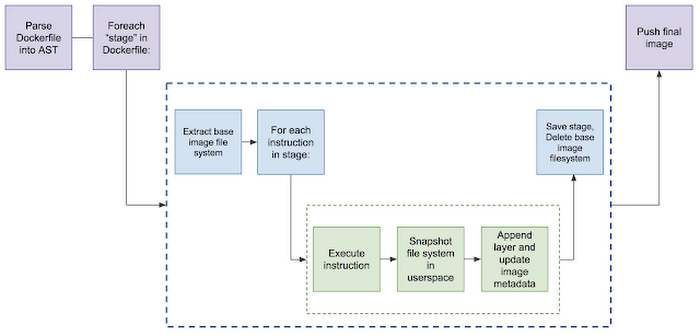
The figure above is a diagram of how Kaniko works. The Kaniko executor builds an image from a Dockerfile and pushes it to an image registry. The steps are mainly as follows:
- Extract the filesystem of the base image according to the FROM description in the Dockerfile
- Execute each command in the Dockerfile, taking file snapshots in userspace
- Add the changed file layers to the base image and update the image metadata
- Push the image
Known issues
- Building Windows images is not supported
- The kaniko command can only run inside the official image; other Docker images are not supported
- The Registry V1 API is not supported
3. Kaniko Demo
3.1 Choosing a Test Demo
The project chosen here is https://github.com/traefik/whoami. After accessing the service, the endpoint returns information about the visitor.
The requirement for the project is that an image can be compiled directly from the Dockerfile. There are two verification points:
- The image can be built
- The built image can run
3.2 Running Kaniko on Docker
- Generate credentials for pushing the image
 1
 2
 3
 4
 5
 6
 7
 8
 9
10
11
| export AUTH=$(echo -n YOUR_USERNAME:YOUR_PASSWORD | base64 )
cat > config.json <<-EOF
{
"auths": {
"https://index.docker.io/v1/": {
"auth": "${AUTH}"
}
}
}
EOF
|
1
2
3
4
5
6
| docker run \
--security-opt apparmor=unconfined --security-opt seccomp=unconfined \
--interactive -v `pwd`/config.json:/kaniko/.docker/config.json gcr.io/kaniko-project/executor:latest \
--context git://github.com/traefik/whoami \
--dockerfile Dockerfile \
--destination=shaowenchen/kaniko-demo:v1
|
Parameter description:
- context, the build context. Multiple formats are supported, such as S3, a local directory, standard input, and a Git repository
- dockerfile, the path to the Dockerfile
- destination, the image address to push to after the build
In a production environment, you can configure a cache to speed up image builds.
After running the command from the previous step, you can see the following output:
 1
 2
 3
 4
 5
 6
 7
 8
 9
10
11
12
13
14
15
16
17
18
19
20
21
22
23
24
25
26
27
28
29
30
31
32
33
34
35
36
37
38
39
40
41
42
43
44
45
46
47
48
49
50
51
52
53
54
55
56
57
58
59
60
61
62
63
64
65
66
67
68
69
70
71
72
73
74
| Enumerating objects: 17, done.
Counting objects: 100% (17/17), done.
Compressing objects: 100% (13/13), done.
Total 157 (delta 3), reused 12 (delta 3), pack-reused 140
INFO[0004] Resolved base name golang:1-alpine to builder
INFO[0004] Retrieving image manifest golang:1-alpine
INFO[0004] Retrieving image golang:1-alpine
INFO[0007] Retrieving image manifest golang:1-alpine
INFO[0007] Retrieving image golang:1-alpine
INFO[0010] No base image, nothing to extract
INFO[0010] Built cross stage deps: map[0:[/usr/share/zoneinfo /etc/ssl/certs/ca-certificates.crt /go/whoami/whoami]]
INFO[0010] Retrieving image manifest golang:1-alpine
INFO[0010] Retrieving image golang:1-alpine
INFO[0012] Retrieving image manifest golang:1-alpine
INFO[0012] Retrieving image golang:1-alpine
INFO[0015] Executing 0 build triggers
INFO[0015] Unpacking rootfs as cmd RUN apk --no-cache --no-progress add git ca-certificates tzdata make && update-ca-certificates && rm -rf /var/cache/apk/* requires it.
INFO[0035] RUN apk --no-cache --no-progress add git ca-certificates tzdata make && update-ca-certificates && rm -rf /var/cache/apk/*
INFO[0035] Taking snapshot of full filesystem...
INFO[0041] cmd: /bin/sh
INFO[0041] args: [-c apk --no-cache --no-progress add git ca-certificates tzdata make && update-ca-certificates && rm -rf /var/cache/apk/*]
INFO[0041] Running: [/bin/sh -c apk --no-cache --no-progress add git ca-certificates tzdata make && update-ca-certificates && rm -rf /var/cache/apk/*]
fetch http://dl-cdn.alpinelinux.org/alpine/v3.12/main/x86_64/APKINDEX.tar.gz
fetch http://dl-cdn.alpinelinux.org/alpine/v3.12/community/x86_64/APKINDEX.tar.gz
(1/7) Installing nghttp2-libs (1.41.0-r0)
(2/7) Installing libcurl (7.69.1-r2)
(3/7) Installing expat (2.2.9-r1)
(4/7) Installing pcre2 (10.35-r0)
(5/7) Installing git (2.26.2-r0)
(6/7) Installing make (4.3-r0)
(7/7) Installing tzdata (2020c-r1)
Executing busybox-1.31.1-r19.trigger
OK: 25 MiB in 22 packages
WARNING: ca-certificates.crt does not contain exactly one certificate or CRL: skipping
INFO[0042] Taking snapshot of full filesystem...
INFO[0045] WORKDIR /go/whoami
INFO[0045] cmd: workdir
INFO[0045] Changed working directory to /go/whoami
INFO[0045] Creating directory /go/whoami
INFO[0045] Taking snapshot of files...
INFO[0045] COPY go.mod .
INFO[0045] Taking snapshot of files...
INFO[0045] COPY go.sum .
INFO[0045] Taking snapshot of files...
INFO[0045] RUN GO111MODULE=on GOPROXY=https://proxy.golang.org go mod download
INFO[0045] cmd: /bin/sh
INFO[0045] args: [-c GO111MODULE=on GOPROXY=https://proxy.golang.org go mod download]
INFO[0045] Running: [/bin/sh -c GO111MODULE=on GOPROXY=https://proxy.golang.org go mod download]
INFO[0045] Taking snapshot of full filesystem...
INFO[0047] COPY . .
INFO[0047] Taking snapshot of files...
INFO[0047] RUN make build
INFO[0047] cmd: /bin/sh
INFO[0047] args: [-c make build]
INFO[0047] Running: [/bin/sh -c make build]
CGO_ENABLED=0 go build -a --trimpath --installsuffix cgo --ldflags="-s" -o whoami
INFO[0058] Taking snapshot of full filesystem...
INFO[0062] Saving file usr/share/zoneinfo for later use
INFO[0062] Saving file etc/ssl/certs/ca-certificates.crt for later use
INFO[0062] Saving file go/whoami/whoami for later use
INFO[0062] Deleting filesystem...
INFO[0063] No base image, nothing to extract
INFO[0063] Executing 0 build triggers
INFO[0063] Unpacking rootfs as cmd COPY --from=builder /usr/share/zoneinfo /usr/share/zoneinfo requires it.
INFO[0063] COPY --from=builder /usr/share/zoneinfo /usr/share/zoneinfo
INFO[0063] Taking snapshot of files...
INFO[0063] COPY --from=builder /etc/ssl/certs/ca-certificates.crt /etc/ssl/certs/
INFO[0063] Taking snapshot of files...
INFO[0063] COPY --from=builder /go/whoami/whoami .
INFO[0063] Taking snapshot of files...
INFO[0063] ENTRYPOINT ["/whoami"]
INFO[0063] EXPOSE 80
INFO[0063] cmd: EXPOSE
INFO[0063] Adding exposed port: 80/tcp
|
Finally it exits normally, and the image is built and pushed successfully.
- Check whether the built image is stored locally
1
| docker images|grep kaniko-demo
|
After running the command there is no output at all, which is as expected. The built image is pushed directly to the remote Registry.
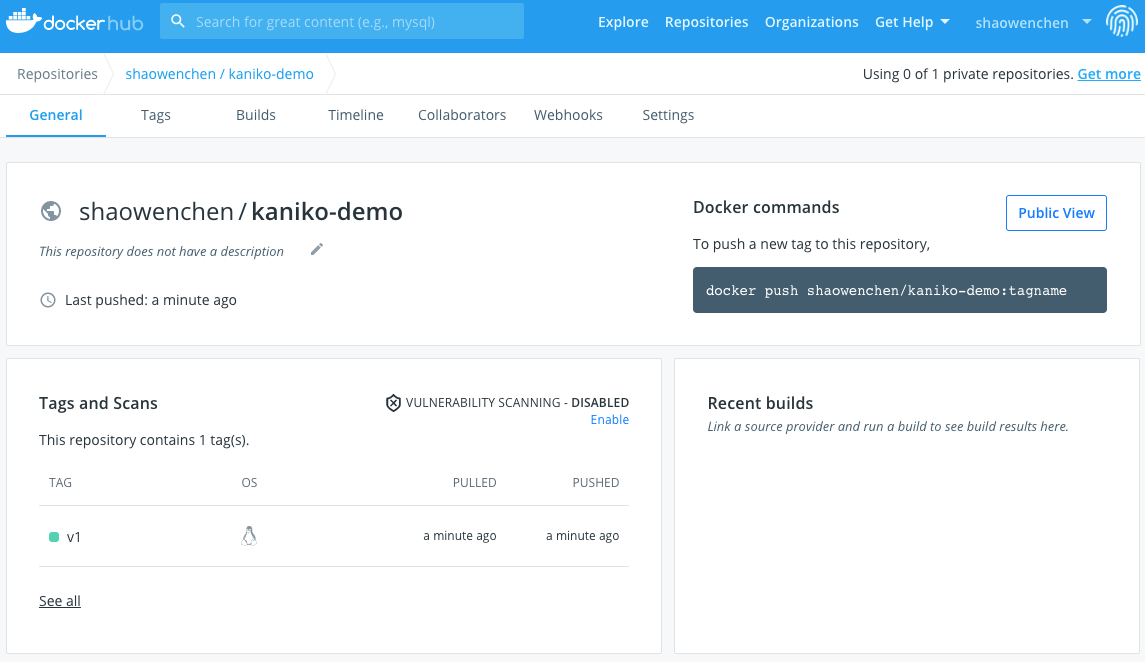
- View the image on DockerHub
The pushed image can be seen on the DockerHub page:
- Use the image to create a container
Run the command:
1
| docker run -d --security-opt apparmor=unconfined --security-opt seccomp=unconfined -p 8011:80 shaowenchen/kaniko-demo:v1
|
Verify that the service works:
 1
 2
 3
 4
 5
 6
 7
 8
 9
10
| curl localhost:8011
Hostname: 6dd22f1e4100
IP: 127.0.0.1
IP: 172.17.0.2
RemoteAddr: 172.17.0.1:40940
GET / HTTP/1.1
Host: localhost:8011
User-Agent: curl/7.29.0
Accept: */*
|
3.3 Running Kaniko on Kubernetes
- Check the Kubernetes version - v1.17.9
For different Kubernetes versions, some of the commands below will differ, so you need to adapt them yourself.
1
2
3
4
| kubectl version
Client Version: version.Info{Major:"1", Minor:"17", GitVersion:"v1.17.9", GitCommit:"4fb7ed12476d57b8437ada90b4f93b17ffaeed99", GitTreeState:"clean", BuildDate:"2020-07-15T16:18:16Z", GoVersion:"go1.13.9", Compiler:"gc", Platform:"linux/amd64"}
Server Version: version.Info{Major:"1", Minor:"17", GitVersion:"v1.17.9", GitCommit:"4fb7ed12476d57b8437ada90b4f93b17ffaeed99", GitTreeState:"clean", BuildDate:"2020-07-15T16:10:45Z", GoVersion:"go1.13.9", Compiler:"gc", Platform:"linux/amd64"}
|
1
| kubectl create ns kaniko-demo
|
- Create an image push secret
1
2
3
4
5
| kubectl -n kaniko-demo create secret docker-registry kaniko-secret \
--docker-server=https://index.docker.io/v1/ \
--docker-username=YOUR_USERNAME \
--docker-password=YOUR_PASSWORD \
--docker-email=mail@chenshaowen.com
|
- Create a kaniko Pod to build the image
 1
 2
 3
 4
 5
 6
 7
 8
 9
10
11
12
13
14
15
16
17
18
19
20
21
22
23
24
25
26
| cat > kaniko-builder.yaml <<-EOF
apiVersion: v1
kind: Pod
metadata:
name: kaniko
namespace: kaniko-demo
spec:
containers:
- name: kaniko
image: gcr.io/kaniko-project/executor:latest
args:
- "--dockerfile=Dockerfile"
- "--context=git://github.com/traefik/whoami"
- "--destination=shaowenchen/kaniko-demo:v2"
volumeMounts:
- name: kaniko-secret
mountPath: /kaniko/.docker/
restartPolicy: Never
volumes:
- name: kaniko-secret
secret:
secretName: kaniko-secret
items:
- key: .dockerconfigjson
path: config.json
EOF
|
Create the Pod
1
| kubectl apply -f kaniko-builder.yaml
|
1
| kubectl -n kaniko-demo logs kaniko
|
The log content is similar to running directly in Docker, so it is not repeated here.
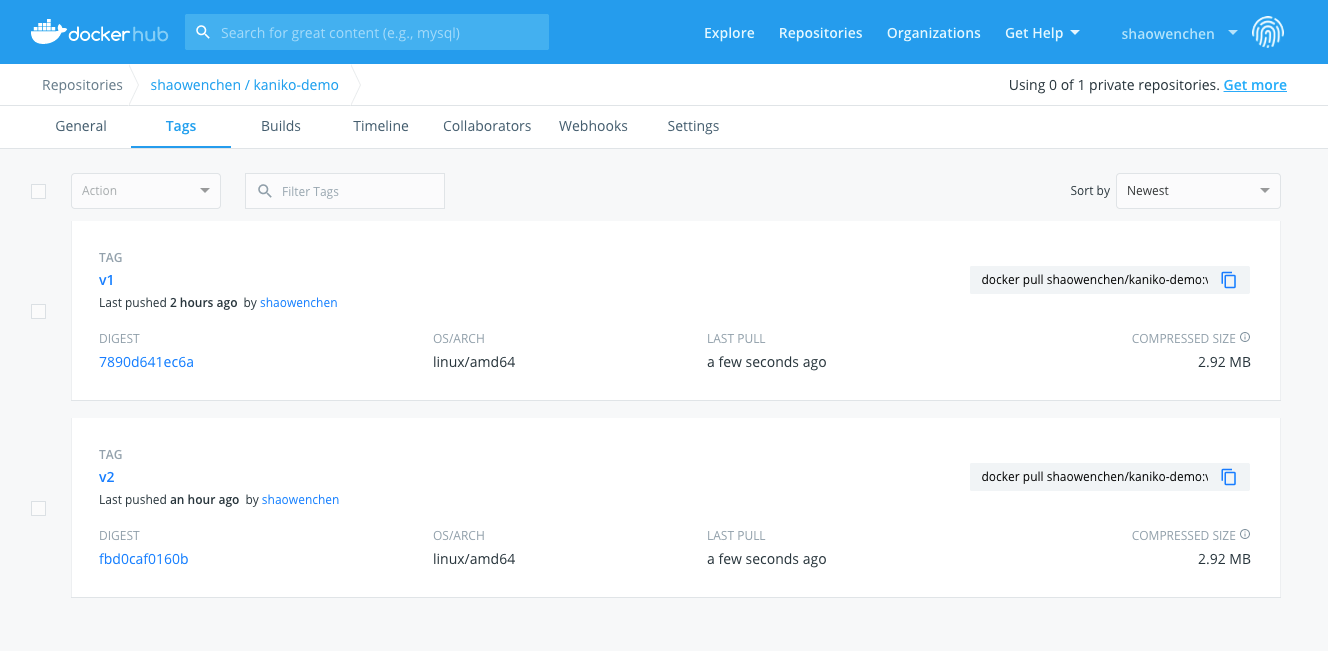
- View the image on the DockerHub page
- Use the built image to create a workload
1
| kubectl -n kaniko-demo run kaniko --image=shaowenchen/kaniko-demo:v2
|
- Expose the service and check the service port
1
| kubectl -n kaniko-demo expose deploy/kaniko --type=NodePort --port=80 --target-port=80
|
1
2
3
| kubectl -n kaniko-demo get svc
NAME TYPE CLUSTER-IP EXTERNAL-IP PORT(S) AGE
kaniko NodePort 10.233.27.225 <none> 80:30772/TCP 29s
|
- Verify that the built image can be used normally
 1
 2
 3
 4
 5
 6
 7
 8
 9
10
| curl 192.168.13.3:30772
Hostname: kaniko-5ddbf597b6-5h8k8
IP: 127.0.0.1
IP: 10.233.90.187
RemoteAddr: 192.168.13.3:11443
GET / HTTP/1.1
Host: 192.168.13.3:30772
User-Agent: curl/7.29.0
Accept: */*
|
4. Other Concerns
- ARM image builds are supported
In the latest version, an ARM Kaniko executor is already available: https://github.com/GoogleContainerTools/kaniko/releases/tag/v1.3.0
- A separate secret and branch parameter cannot be configured for a Git repository
One approach the official project offers is to splice the secret and branch parameters directly into the Git repository URL
- There is no prehook command before the build
The whole process from source code to image needs to be described completely in the Dockerfile. It is best to rework Dockerfiles that copy build artifacts directly in some projects by using multi-stage builds. A Dockerfile like the following cannot be used directly:
1
2
3
4
5
6
7
| FROM java:openjdk-8-jre-alpine
WORKDIR /home
COPY target/*.jar /home
ENTRYPOINT java -jar *.jar
|
5. References
