1. What Is TensorRT
TensorRT is a C++ library mainly used for high-performance inference acceleration on NVIDIA GPUs. It provides both a C++ API and a Python API for integration.
The mainstream deep learning frameworks TensorRT supports are:
- Caffe, where TensorRT can read the prototxt format directly
- TensorFlow, where the TensorFlow pb must be converted to the uff format
- PyTorch, where the PyTorch pth format must be converted to the onnx format
- MXNet, where the MxNet params format must be converted to the onnx format
TensorRT is an inference engine built specifically for NVIDIA GPUs and does not apply to other vendors.
Also, TensorRT is not fully open source: the core runtime library libnvinfer.so is closed source, and only the surrounding libraries and APIs are open source.
2. How TensorRT Optimizes
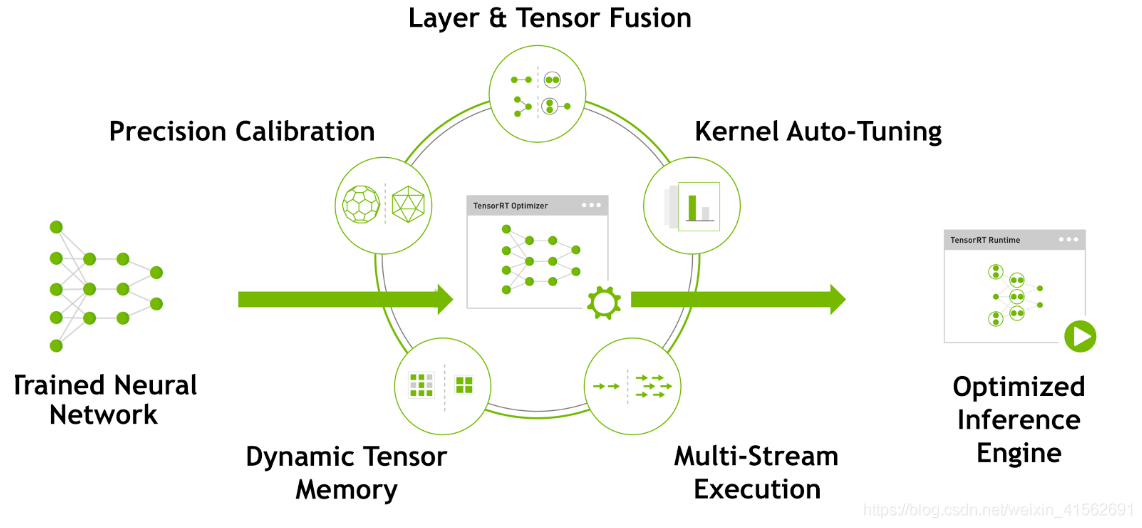
- Layer fusion
During inference, a great deal of time is wasted on launching CUDA cores and on reading and writing each layer’s inputs and outputs, creating a memory bandwidth bottleneck and wasting GPU resources.
TensorRT can fuse layers horizontally and vertically into a single CBR (Convolution-BatchNorm-ReLU) layer, so the model has fewer layers and higher GPU core utilization, which improves inference performance.
- Quantization
When a model is trained, the precision of the network’s parameters is usually FP32; inference with 32-bit floats performs poorly and consumes a large amount of GPU memory. But at inference time, since backpropagation is not needed, parameter precision can be lowered appropriately to improve inference performance.
TensorRT provides automated support for this quantization process, reducing model accuracy loss while improving inference performance.
- Automatic kernel tuning
TensorRT can pick the most appropriate strategy and computation method based on the graphics card architecture, the number of SMs, the core clock, and so on.
- Dynamic tensor memory
At runtime, TensorRT allocates GPU memory dynamically to improve memory utilization and support larger networks.
- Multi-stream parallelism
TensorRT can execute multiple streams on the same GPU at the same time, improving GPU utilization.
3. Converting Models to TensorRT
3.1 PyTorch

PyTorch uses a dynamic computation graph. Converting a PyTorch model to ONNX requires calling PyTorch’s torch.onnx.export function. There are two ways to convert a PyTorch model to ONNX:
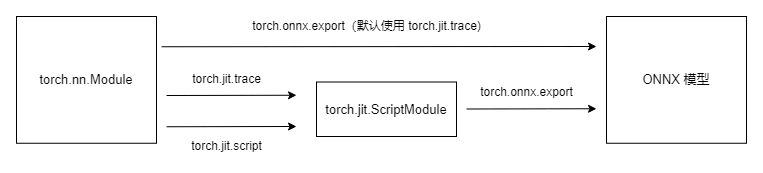
- trace, the tracing method
This exports a static graph of the model by actually running the model once, but it cannot recognize control flow in the model, such as loops. The idea is to have the model perform one inference and record the computation graph. What trace exports is a static graph, and the inference engine executes it more efficiently.
- script, the scripting method
This parses the model to record every computation.
3.2 TensorFlow

TensorFlow uses a static computation graph and already has a complete graph structure.
Because the ckpt format carries a lot of redundant information, and the pb format is smaller, the model is usually converted to pb first. But the computation graph optimization for pb is worse than for uff, so it is less efficient. For this reason the model is converted to uff first, and then to TensorRT.
4. PyTorch to ONNX to TensorRT
- Download the model
| |
- Download the conversion script
When converting PyTorch to the ONNX format, all you need to do is run the torch.onnx.export function. But you will often run into problems such as unsupported operators, RuntimeError, or ShapeError, which means you have to debug the model parameters and operators. There are shared, verified scripts online that can be used to convert specific models.
| |
- Convert to the ONNX format
| |
| |
A large number of files with the .onnx extension are generated under the ./ChatGLM2-6B-onnx directory.
- Validate the model
| |
At this point the output should be
| |
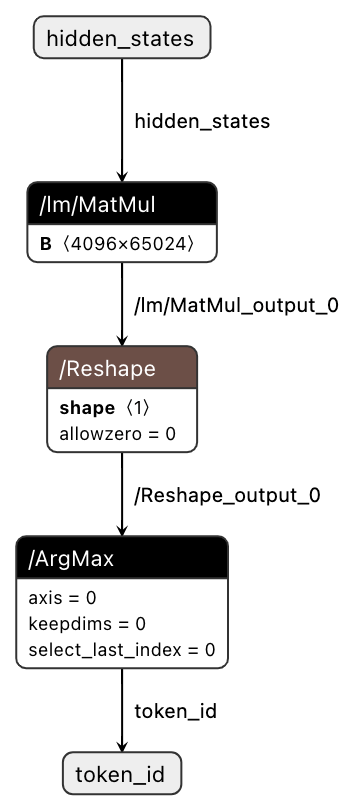
- Visualize the ONNX model
| |
| |
Visit http://localhost:8080/ to inspect the model structure.
- ONNX to TensorRT
Enter the container build environment
| |
Start the conversion
| |
There will be some performance test results, such as P95 and P99, for reference.
- Inspect the output TensorRT model
| |
For large models, however, using TensorRT-LLM for the conversion is a better choice — not only for the conversion success rate and efficiency, but also because the result is easier to deploy and integrate with Triton.
5. TensorRT-LLM to TensorRT
- Enter the build environment
| |
- Convert the TensorRT model
| |
- Test the model
| |
6. Summary
TensorRT is a C++ library from NVIDIA for high-performance inference acceleration on GPUs. It improves inference performance through techniques such as layer fusion, quantization, and kernel optimization.
TensorRT supports converting models from mainstream deep learning frameworks, for example PyTorch to ONNX and then to TensorRT. During the conversion you may have to deal with operators that are not supported.
PyTorch can export an ONNX model with either the trace or the script method.
TensorFlow models can be converted through the chain ckpt -> pb -> uff -> TensorRT.
TensorRT-LLM is NVIDIA’s TensorRT solution for accelerating large model inference. For large models, using TensorRT-LLM is a better choice.
