1. Customizing the docker-machine Location
When using Docker on Windows 7, docker-machine is stored by default in the C:\users\your name\.docker\machine\machines directory.
To avoid taking up storage space on the system drive, you can change this as follows.
If you have not created a virtual machine yet, you can specify the location by setting the MACHINE_STORAGE_PATH environment variable.
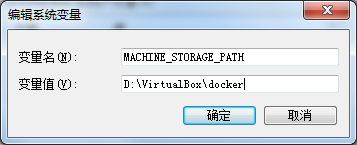
Then run Docker Quickstart Terminal to create and run docker-machine.
If you have already created a virtual machine, you need to migrate the virtual machine and then restart docker-machine.
2. Directory Mounting
On Windows 7, Docker runs inside the virtual environment provided by VirtualBox. Mounting a directory involves file sharing between three parties:
- Windows
- The virtual machine in VirtualBox
- Docker
Mounting a folder from Windows 7 into Docker goes through the virtual machine and takes two steps:
- Step one: mount the Windows folder into the virtual machine in VirtualBox
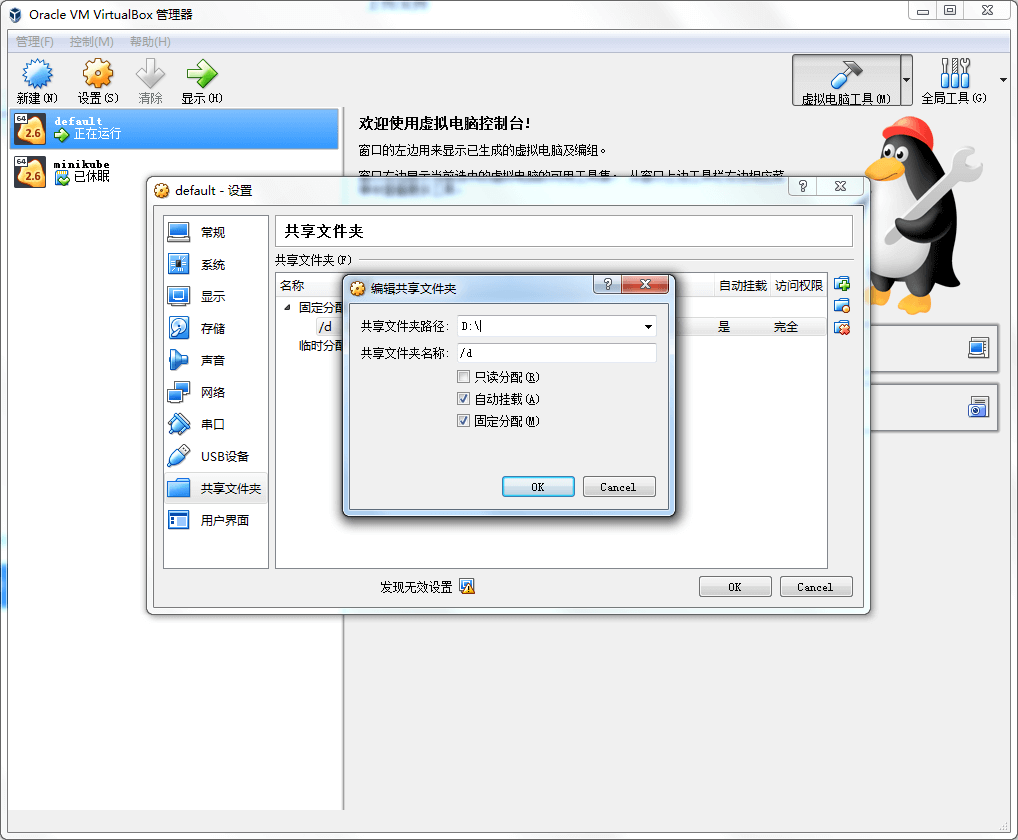
As shown above, open VirtualBox and find a virtual machine named default — this virtual machine is the Docker host. Create a shared folder in it, for example mounting D:\ to the /d directory.
Then restart the virtual machine.
| |
- Step two: mount the virtual machine’s directory in VirtualBox into Docker
Mount the /d/data directory in the virtual machine to the container’s /data directory
| |
3. Configuring a Registry Mirror
- Log into the virtual machine in SSH mode
| |
- Edit the configuration and add the mirror
| |
- Restart the virtual machine
| |
