1. Restful
REST is short for Representational State Transfer, meaning “representation state transfer”. Restful is a development philosophy and a software architecture style for the World Wide Web.
1.1 Features of Restful
- Abstract resources
Images, text, songs, and videos are all resource entities; on the network they are abstracted as resources. In Restful, JSON is often used as the carrier for these resources, uniformly exposing data to the outside world. - Uniform interface
Create, read, update, and delete operations on data map to different HTTP methods. - GET (SELECT): Retrieve a resource (one or many) from the server.
- POST (CREATE): Create a new resource on the server.
- PUT (UPDATE): Update a resource on the server (the client provides the complete resource data).
- PATCH (UPDATE): Update a resource on the server (the client provides only the resource data that needs to change).
- DELETE (DELETE): Delete a resource from the server.
- HEAD: Retrieve metadata about a resource.
- OPTIONS: Retrieve information about which attributes of a resource the client can change.
1.2 Restful Rules
- API URL prefix. To keep the API extensible, it is recommended to set the API URL prefix to http://example.com/api/v1/
- URLs may contain only nouns. For example resource names and parameters, http://example.com/api/v1/user/?id=1
- Operations are set via HTTP headers. There are five common HTTP methods — GET, POST, PUT, PATCH, DELETE — plus two less common verbs, HEAD and OPTIONS. Usage:
- GET /zoos/: List all zoos
- POST /zoos/: Create a zoo
- GET /zoos/ID/: Get information about a specific zoo
- PUT /zoos/ID/: Update information about a specific zoo (providing the zoo’s complete information)
- PATCH /zoos/ID/: Update information about a specific zoo (providing partial information about the zoo)
- DELETE /zoos/ID/: Delete a zoo
- GET /zoos/ID/animals: List all animals of a specific zoo
- DELETE /zoos/ID/animals/ID/: Delete a specific animal of a specific zoo
- Filtering rules
- ?limit=10: Specify the number of records to return
- ?offset=10: Specify the starting position of the returned records.
- ?page=2&per_page=100: Specify which page, and the number of records per page
- ?sortby=name&order=asc: Specify which attribute the results are sorted by, and the sort order
- ?animal_type_id=1: Specify filter conditions
2. Tastypie
2.1 Introduction
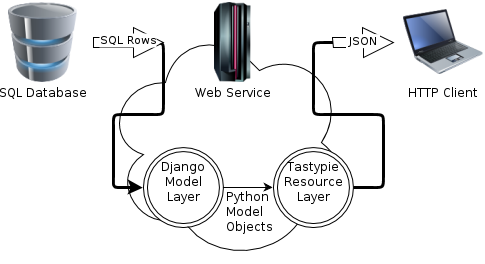
Tastypie is a Restful API development framework based on Django. With simple configuration, it can expose Restful-style interfaces to the outside world.
2.2 Installation and Configuration
| |
settings.py configuration
| |
| |
2.3 Authorization
If you need to restrict permissions on interfaces, Tastypie also provides corresponding support.
First, subclass the Authorization class to implement a MyAuthorization permission management class.
The functions that need to be implemented are:
- def read_list(self, object_list, bundle)
- def read_detail(self, objec_list, bundle)
- def create_detail(self, object_list, bundle)
- def update_list(self, object_list, bundle)
- def update_detail(self, object_list, bundle)
- def delete_list(self, object_list, bundle)
- def delete_detail(self, object_list, bundle)
Second, specify the permission management instance in the Resource’s Meta
| |
2.4 Bundles
In the process of customizing a Resource, you will inevitably use bundles. This is an abstract concept that represents the wrapping of a single resource while retrieving or writing it.
| |
The BucketObject here does not correspond to any Model; it is simply a one-time packaging of a resource — it may be a collection of several models, or data wrapped after an interface call.
2.5 ModelResource
ModelResource provides a Restful API based on an existing Model.
First, create the resource
reasource.py
| |
Second, configure the URL routing and register the interface
| |
Third, start using it
/api/v1/?format=json
View all resources registered under api v1. list_endpoint indicates the resource endpoint, and the URL provided by schema lets you view the fields and usage rules.
| |
/api/v1/QucikView/schema/?format=json
Gives the basic operation permissions, default parameters, the fields of the returned object, and field hints, etc.
| |
/api/v1/QucikView/?format=json&limit=1
Retrieve the list of QucikView resources. If there is pagination, tastypie also provides a hint link.
| |
2.6 Resource
If you need to expose a Restful interface based on a third-party interface, several Models, or a non-ORM data source, ModelResource may not fit. tastypie provides the Resource class to abstract this kind of resource.
The key here is understanding the Bundles concept mentioned above: write a BucketObject class and wrap the resource in it.
reasource.py
| |
The URL configuration is the same as for ModelResource. Here only the get function overload is implemented; if you need to handle other operations, you must override the corresponding functions as well. There are nine in total:
- detail _uri _kwargs
- get
- object_list
- obj _get _list
- obj _get
- obj _create
- obj _update
- obj _delete_list
- obj _delete
- rollback