1. What RDMA Is
RDMA (Remote Direct Memory Access) is a technology created to solve the delay of server-side data processing in network transmission.
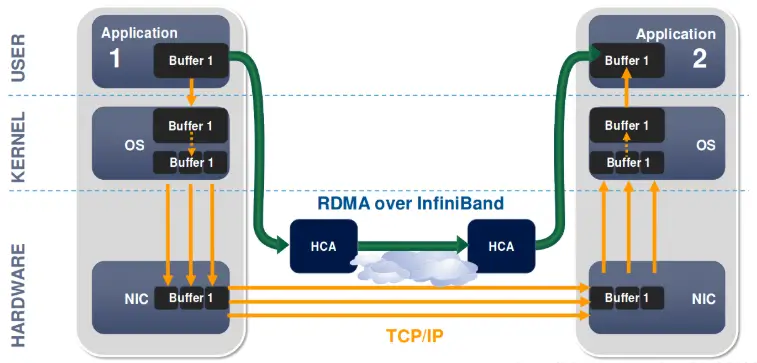
With TCP/IP transmission, data passes through the network stack, then through the NIC to be sent; after the receiver receives it, the data is reassembled according to sequence numbers.
With DMA transmission, data can be transferred directly between the device and memory, without going through the network stack.
With RDMA transmission, DMA data transfer across nodes can be achieved.
The comparison among the three is as follows:
| Feature | TCP | DMA | RDMA |
|---|---|---|---|
| CPU utilization | Relatively high (often above 10-40%) | Relatively low (<10%, implementation-dependent) | Extremely low (usually below 1%) |
| Latency | 10-100 microseconds | A few microseconds (memory transfer) | Sub-microsecond to single-digit microseconds |
| Bandwidth efficiency | 1-10 Gbps (depends on network conditions) | Up to 100 Gbps (related to bus rate) | 100-400 Gbps (depends on the RDMA NIC model, such as RoCE or InfiniBand) |
| Use cases | General network transmission | Local memory or device-to-device data transfer | High-performance network transmission |
| Hardware requirements | None | Requires a DMA controller | Requires an RDMA NIC (such as InfiniBand or RoCE) |
2. The RDMA Communication Process
RDMA uses a queue mechanism for data communication, and its basic communication unit is the QP (Queue Pair). A QP consists of one SQ (Send Queue) and one RQ (Receive Queue).
The general communication process is as follows:
- The HOST submits a work request WR (Work Request), placing the WR into the work queue WQ (Work Queue).
- The RDMA hardware consumes the WR in the WQE and performs the data transfer.
- After the RDMA hardware finishes consuming, it generates a CQE (Completion Queue Entry), places the CQE into the CQ (Completion Queue), and waits for the HOST to consume it.
- The HOST consumes a WC (Work Completion) from the CQ.
3. RDMA Technology Implementations
3.1 InfiniBand
Proposed in 1999 by the InfiniBand Trade Association (IBTA), it aims to provide high-bandwidth, low-latency connectivity for high-performance computing (HPC) and large-scale data centers. It is mainly driven by Intel, NVIDIA, Mellanox (now an NVIDIA subsidiary), IBM, and others, and is widely used in supercomputers and enterprise storage solutions.
InfiniBand has become one of the standards for data centers and HPC, supports multiple protocols (such as RDMA and NVMe over Fabrics), and is gradually expanding into the AI and machine learning fields.
InfiniBand offers high bandwidth (up to 400Gbps), low latency (microsecond level), support for large-scale scaling, and advanced traffic management and quality of service (QoS) features.
3.2. iWARP
Proposed in 2000 by the IETF’s RDMA Working Group, it aims to implement RDMA over existing TCP/IP networks. It is mainly driven by companies such as Intel, Cisco, and Broadcom, and is widely applied particularly in cloud computing and virtualization environments.
iWARP has seen some adoption in enterprise networks, especially for RDMA needs under traditional Ethernet architectures. It is gradually gaining market recognition, but its competitiveness is relatively weak.
iWARP has strong compatibility (it can run on existing Ethernet infrastructure) and supports the TCP/IP protocol, lowering the barrier to RDMA deployment and making it suitable for small and medium-sized data centers.
3.3. RoCE (RDMA over Converged Ethernet)
Proposed in 2008 by IBM and other companies, it aims to integrate RDMA into Ethernet environments and achieve efficient data transfer through DCB technology. It is mainly driven by Mellanox (now NVIDIA), Cisco, Intel, and others, and is gradually becoming widespread in data center and cloud computing environments.
RoCE has two versions. The RoCE v1 protocol is an Ethernet link-layer protocol, while the RoCEv2 protocol is built on top of UDP/IPv4 or UDP/IPv6 and can form larger networks.
Compared with InfiniBand, RoCE’s advantage is that it can run on existing Ethernet infrastructure, which can reduce part of the hardware cost, but it is also hard to get below 50% of InfiniBand’s cost.
4. RDMA under Ascend
The RDMA of the Atlas 800 relies on RoCE NICs, as shown below:
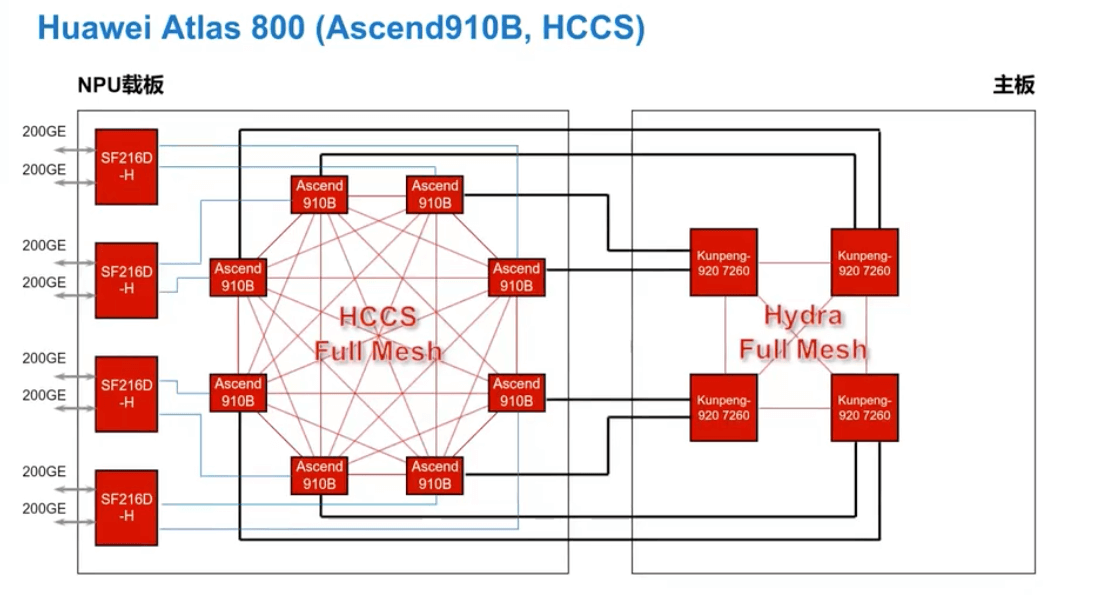
A single Board has four SF216D-H NICs, and each SF216D-H has two 200GE NICs. Each NIC connects to one NPU card and is used for networking.
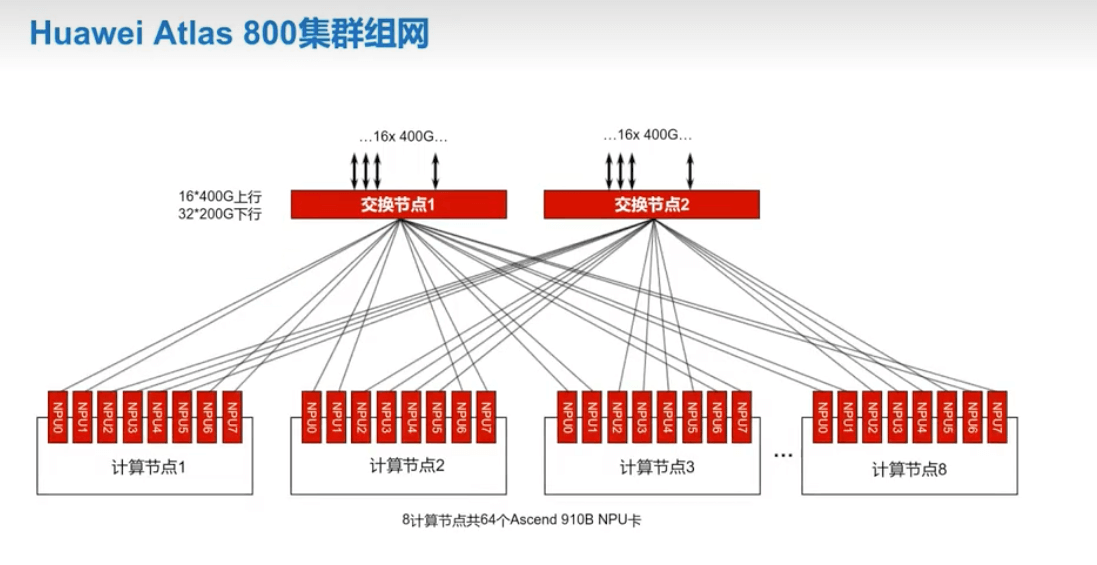
When Huawei Altas 800 clusters are networked, an external switch connects the various NPU cards together to form a parameter plane network. Since the NIC ports on each switch are limited, a larger network requires a Spine-Leaf network topology.
4.1 Common Configuration Commands
- Set the IP address and netmask
| |
-i specifies the card index.
- Set the default gateway of the RoCE NIC
| |
- Set the network detection target
| |
This IP is mainly used to detect network status; it is generally set to the gateway address within the subnet.
- Enable TLS
| |
4.2 Common Inspection Commands
- View the networking IPs
| |
Or
| |
- Check the connectivity of NIC IPs within a single node
| |
- View the connection status of the communication ports
| |
- Card health status
| |
- ECC
| |
- pci
| |
4.3 Common Networking Commands
- View the optical module status
| |
- Query the tls status
| |
- Test connectivity
| |
- Full-mesh test between two nodes
| |
Obtain the ADDRESSES variable and set it on the other host.
| |
4.4 Testing Cross-Host Bandwidth
- Get the IP of the receiving-side card
| |
- Receiver
| |
- Sender
| |
5. Some References
CANN Commercial Edition 8.0.RC3 Collective Communication User Guide 01
