This page looks best with JavaScript enabled

Python2 Source Code Study: pyc

 ·  ☕ 8 min read

This article uses the Python 2.7.8 source code as an example.

1. Common File Formats in Python

  • py file

A Python source code file, which can be modified with a text editor.

  • pyc file

The bytecode file generated after Python source code is compiled.

  • pyw file

When a pyc file is executed, a console window appears; when a pyw file is executed, it does not. A pyw file is mainly used to run pure GUI (graphical user interface) programs, and running it requires the Pythonw interpreter.

  • pyo file

A file produced by compiling Python source code with optimization. Run the command python -O your.py to compile Python source code into a pyo file.

  • pyd file

Generally a Python extension module written in another language. A pyd file is a binary file written in the D language (an evolved, synthesized version of C/C++) and produced by compilation.

2. Generating a pyc File from py

If you have write permission on the code directory, a py source file is compiled into a pyc file in two situations:

  • A module that is imported generates a pyc file.
  • Python code compiled by py_compile generates a pyc file.

What you need to know is that executing a py source file directly does not automatically generate a pyc file.

Single-file compilation:

1
2
import py_compile
py_compile.compile(r'./your.py')

Directory compilation:

1
2
import compileall
compileall.compile_dir('./')

A pyc is a cross-platform binary bytecode file generated by compiling a py source file. The Python interpreter can interpret and execute pyc files, much like a Java virtual machine. At the same time, the content of a pyc is tied to the Python version: different versions of the Python interpreter produce different pyc files after compiling the same py source code. A pyc compiled by Python 2.7 cannot be executed by Python 3.5.

If you execute a pyc across versions, it may raise an error (it says “may” here because the magic number is the same between minor versions, so those can be executed):

1
RuntimeError: Bad magic number in .pyc file

There will be further explanation in the content below.

3. The Source Code of the import Implementation

In Python, import generates pyc files. Below, we start from the part of the Python source code that implements import.

  • Source location: Python\import.c
 1
 2
 3
 4
 5
 6
 7
 8
 9
10
11
12
13
14
/* Load a source module from a given file and return its module */
/* object WITH INCREMENTED REFERENCE COUNT.  If there's a matching */
/* byte-compiled file, use that instead. */
static PyObject *
load_source_module(char *name, char *pathname, FILE *fp)
{
    if (check_compiled_module(pathname, mtime, cpathname))) {
        co = read_compiled_module(cpathname, fpc);
    }
    else {
        write_compiled_module(co, cpathname, &st, mtime);
    }
    m = PyImport_ExecCodeModuleEx(name, (PyObject *)co, pathname);
}

When Python executes the import instruction, it looks in the code directory for files with the same name and the suffix pyw, pyo, or pyc. If one is found, it calls the check_compiled_module function to determine whether the timestamp in the header of the pyc file matches the last modified time of the py file. If they match, it loads it directly; otherwise it recompiles and generates a pyc file, and writes the last modified time into the py source.
If none is found, it compiles and generates a pyc file. Below is the source code of check_compiled_module.

  • Source location: Python\import.c
 1
 2
 3
 4
 5
 6
 7
 8
 9
10
11
12
13
14
15
16
17
18
19
/* Given a pathname for a Python source file, its time of last */
/* modification, and a pathname for a compiled file, check whether the */
/* compiled file represents the same version of the source.  If so, */
/* return a FILE pointer for the compiled file, positioned just after */
/* the header; if not, return NULL. */
/* Doesn't set an exception. */
static FILE *
check_compiled_module(char *pathname, time_t mtime, char *cpathname)
{
    ...
    pyc_mtime = PyMarshal_ReadLongFromFile(fp);
    if (pyc_mtime != mtime) {
        if (Py_VerboseFlag)
            PySys_WriteStderr("# %s has bad mtime\n", cpathname);
        fclose(fp);
        return NULL;
    }
    ...
}

The check_compiled_module function determines whether the pyc file needs to be updated by checking whether the last-modified timestamps mtime of the py and pyc files are the same.

  • Source location: Python\import.c
 1
 2
 3
 4
 5
 6
 7
 8
 9
10
11
12
13
14
15
16
17
18
19
20
21
/* Write a compiled module to a file, placing the time of last*/
/* modification of its source into the header.*/
/* Errors are ignored, if a write error occurs an attempt is made to*/
/* remove the file. */
static void
write_compiled_module(PyCodeObject *co, char *cpathname, struct stat *srcstat, time_t mtime)
{
    ...
    PyMarshal_WriteLongToFile(pyc_magic, fp, Py_MARSHAL_VERSION);
    /* First write a 0 for mtime */
    PyMarshal_WriteLongToFile(0L, fp, Py_MARSHAL_VERSION);
    PyMarshal_WriteObjectToFile((PyObject *)co, fp, Py_MARSHAL_VERSION);
    ...
    /* Now write the true mtime (as a 32-bit field) */
    fseek(fp, 4L, 0);
    assert(mtime <= 0xFFFFFFFF);
    PyMarshal_WriteLongToFile((long)mtime, fp, Py_MARSHAL_VERSION);
    fflush(fp);
    fclose(fp);
    ...
}

When writing the pyc file, a Long variable must also be written, whose content is the last-modified timestamp ftLastWriteTime of the py source file.

4. How pyc Files from Different Versions Are Distinguished

As mentioned earlier, pyc files generated by different Python versions of the interpreter are not the same. So how does the Python interpreter distinguish between them?

In the source code above that generates the pyc file, you can see that PyMarshal_WriteLongToFile(pyc_magic, fp, Py_MARSHAL_VERSION); writes the pyc_magic and Py_MARSHAL_VERSION variables into the pyc file. Py_MARSHAL_VERSION specifies the current file format — 2 in version 2.7.8 and 4 in version 3.5.5; pyc_magic specifies version information related to the Python interpreter.

  • Source location: Python\import.c
 1
 2
 3
 4
 5
 6
 7
 8
 9
10
11
12
13
14
15
16
/* Magic word to reject .pyc files generated by other Python versions.
   It should change for each incompatible change to the bytecode.

   Known values:
       ...
       Python 2.6a0: 62151 (peephole optimizations and STORE_MAP opcode)
       Python 2.6a1: 62161 (WITH_CLEANUP optimization)
       Python 2.7a0: 62171 (optimize list comprehensions/change LIST_APPEND)
       Python 2.7a0: 62181 (optimize conditional branches:
                introduce POP_JUMP_IF_FALSE and POP_JUMP_IF_TRUE)
       Python 2.7a0  62191 (introduce SETUP_WITH)
       Python 2.7a0  62201 (introduce BUILD_SET)
       Python 2.7a0  62211 (introduce MAP_ADD and SET_ADD)
*/
#define MAGIC (62211 | ((long)'\r'<<16) | ((long)'\n'<<24))
static long pyc_magic = MAGIC;

As you can see, the pyc_magic value differs between Python interpreter versions. Defining a new pyc_magic can be used to produce a dedicated Python interpreter, which is also one way to bind a pyc file to a specific Python interpreter.

5. PyCodeObject & PyFrameObject

PyCodeObject is the result actually produced after Python source code is compiled. In other words, any Python source code you write is converted into a PyCodeObject object.

Source location: Include\code.h

 1
 2
 3
 4
 5
 6
 7
 8
 9
10
11
12
13
14
15
16
17
18
19
20
21
22
/* Bytecode object */
typedef struct {
    PyObject_HEAD
    int co_argcount;		/* #arguments, except *args */
    int co_nlocals;		/* #local variables */
    int co_stacksize;		/* #entries needed for evaluation stack */
    int co_flags;		/* CO_..., see below */
    PyObject *co_code;		/* instruction opcodes */
    PyObject *co_consts;	/* list (constants used) */
    PyObject *co_names;		/* list of strings (names used) */
    PyObject *co_varnames;	/* tuple of strings (local variable names) */
    PyObject *co_freevars;	/* tuple of strings (free variable names) */
    PyObject *co_cellvars;      /* tuple of strings (cell variable names) */
    /* The rest doesn't count for hash/cmp */
    PyObject *co_filename;	/* string (where it was loaded from) */
    PyObject *co_name;		/* string (name, for reference) */
    int co_firstlineno;		/* first source line number */
    PyObject *co_lnotab;	/* string (encoding addr<->lineno mapping) See
				   Objects/lnotab_notes.txt for details. */
    void *co_zombieframe;     /* for optimization only (see frameobject.c) */
    PyObject *co_weakreflist;   /* to support weakrefs to code objects */
} PyCodeObject;

The bytecode instructions are stored in the co_code of a PyCodeObjec object. When the Python interpreter executes a sequence of bytecode instructions, that process consists of traversing the entire co_code from beginning to end and executing the bytecode instructions one after another.

Source location: Python\marshal.c

 1
 2
 3
 4
 5
 6
 7
 8
 9
10
11
12
void
PyMarshal_WriteObjectToFile(PyObject *x, FILE *fp, int version)
{
    WFILE wf;
    wf.fp = fp;
    wf.error = WFERR_OK;
    wf.depth = 0;
    wf.strings = (version > 0) ? PyDict_New() : NULL;
    wf.version = version;
    w_object(x, &wf);
    Py_XDECREF(wf.strings);
}

PyMarshal_WriteObjectToFile writes a PyCodeObject object into the pyc file; internally the function calls w_object to store each object appearing in the Python code together with its corresponding TYPE_* marker, for example an int object corresponds to the marker TYPE_INT.

However, when a Python program is running, what its interpreter handles is not a PyCodeObject object but the corresponding stack frame object, PyFrameObject.

  • Source location: Include\frameobject.h
 1
 2
 3
 4
 5
 6
 7
 8
 9
10
11
12
13
14
15
16
17
18
typedef struct _frame {
    PyObject_VAR_HEAD
    struct _frame *f_back;	/* previous frame, or NULL */
    PyCodeObject *f_code;	/* code segment */
    PyObject *f_builtins;	/* builtin symbol table (PyDictObject) */
    PyObject *f_globals;	/* global symbol table (PyDictObject) */
    PyObject *f_locals;		/* local symbol table (any mapping) */
    PyObject **f_valuestack;	/* points after the last local */
    PyObject **f_stacktop;
    PyObject *f_trace;		/* Trace function */
    PyObject *f_exc_type, *f_exc_value, *f_exc_traceback;
    PyThreadState *f_tstate;
    int f_lasti;		/* Last instruction if called */
    int f_lineno;		/* Current line number */
    int f_iblock;		/* index in f_blockstack */
    PyTryBlock f_blockstack[CO_MAXBLOCKS]; /* for try and loop blocks */
    PyObject *f_localsplus[1];	/* locals+stack, dynamically sized */
} PyFrameObject;

The Python interpreter uses the PyInterpreterState structure to maintain the process runtime environment, PyThreadState to maintain the thread runtime environment, and PyFrameObject to maintain the stack frame runtime environment; the three contain one another in that order, as shown below:
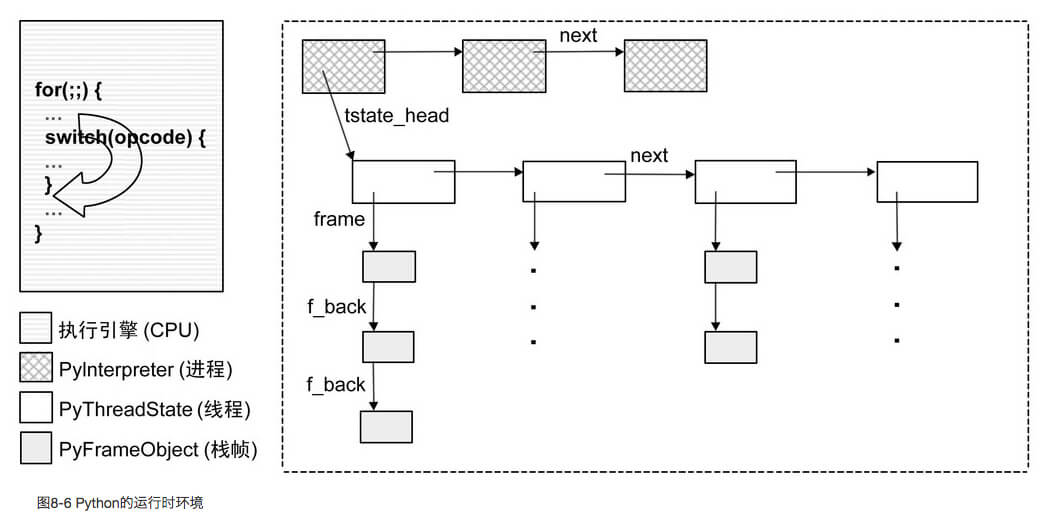
The Python interpreter dynamically loads the three structures above into memory and simulates the execution process of the operating system. After the program runs, it first creates each runtime environment, then loads the bytecode in the stack frame and loops through it, interpreting and executing.

6. References


微信公众号
WRITTEN BY
微信公众号