1. Picking Up from Last Time: Shared Storage Optimizes Pulling Images Overseas
Building on An Image Management and Distribution Case Based on Harbor and Registry, I recently made another optimization.
The previous approach was to deploy a Mirror Cache in each region on a machine with low specs and a large disk to cache images. This introduced a problem: every region needed to pull the image. With N regions, publishing one application meant pulling N times, and the dedicated-line bandwidth used during publishing was multiplied by N.
What was overlooked here is that overseas cloud vendors generally have very fast network speeds. We can partition the overseas regions by connectivity quality and deploy a Mirror Cache in each zone.
Another operational problem is how to expand the disk and clean up images on the host running Mirror Cache. Although Registry lets you set a cache period, the community reports that the setting does not take effect; and the disk can only be expanded up to 1T, after which you have to migrate to a data disk. So a different approach was adopted here: sharing backend storage among multiple Mirror Caches. As shown below:
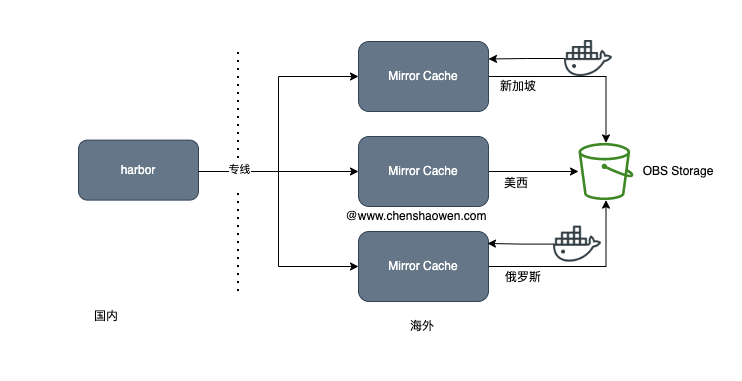
The advantages of using the same OBS backend storage:
- Publishing a multi-region application requires only one pull, instead of one pull per region
- Object storage such as OBS and S3 scales and stays stable better than local disks
- Even without CDN acceleration, the object storage services of the big cloud vendors are not slow anywhere in the world
- Object storage supports lifecycle management, which can be used to automatically clean up image data
Since all image data is cached in OBS object storage, Mirror Cache is in effect a stateless service. Going a step further, we can merge it into a single instance placed in the region with good connectivity to all the other zones.
Now on to the topic of this article: one experience of failing to pull a large image.
2. Failing When Pulling a Large Image
The image is about 10G in size. The pull path is as follows:
Docker Client -> Docker Daemon -> Mirror Cache -> LB -> Harbor
The specific errors from each component are as follows:
- While pulling the image, the Docker Client kept retrying the large single-layer image
| |
When the progress bar reached close to 70%-80%, this image layer started downloading again:
| |
- Docker Daemon error log on the pulling host
| |
- Error log of the image cache service Mirror Cache
| |
- LB error
| |
Characteristics of a large image that cannot be pulled:
- Smaller image layers pull successfully; only a few large single-layer images fail
- Pulling the large image layer keeps retrying
- Other small images pull successfully
Combined with the logs above, my judgment was that a timeout configured on some component was causing the connection to drop after a while. There are plenty of articles online about the LB error log, and the way to solve (104: Connection reset by peer) is to increase the buffer or the timeout.
The timeout here fits that judgment exactly. The LB’s proxy_connect_timeout, proxy_send_timeout, and proxy_read_timeout were all 60s, but for various reasons the LB service could not have these parameters changed, so I had to find another way. If you run into a similar situation, you can try changing these parameter values on the LB.
In the end, I skipped the LB entirely and connected Mirror Cache directly to Harbor. The pull path is as follows:
Docker Client -> Docker Daemon -> Mirror Cache -> Harbor
Without LB forwarding, this not only saved the related costs but simplified the architecture and reduced operational overhead. More importantly, large images could now be pulled, and the endless retrying never happened again.
