In a frontend/backend separated architecture, API documentation changes hands frequently. When third-party interfaces are involved, API and documentation changes can be even faster in multi-party collaboration scenarios. To make maintaining the API and handing over documentation easier, here is a documentation generation tool worth recommending — apidoc.
1. Introduction to apidoc
apidoc is an API documentation generation tool built on nodejs. It extracts content in a specific format from code comments and generates API documentation.
The languages supported so far are: C#, C/C++, D, Erlang, Go, Groovy, Java, Javascript, Pascal/Delphi, Perl, PHP, Python, Rust, Ruby, Scala, and Swift.
Features:
- Cross-platform: linux, windows, macOS, and more are all supported.
- Broad language support.
- Support for document version management.
- Support for generating a single document from multiple projects in different languages.
- Customizable output templates.
2. An Example
Taking Django as an example, write comments in the views function.
| |
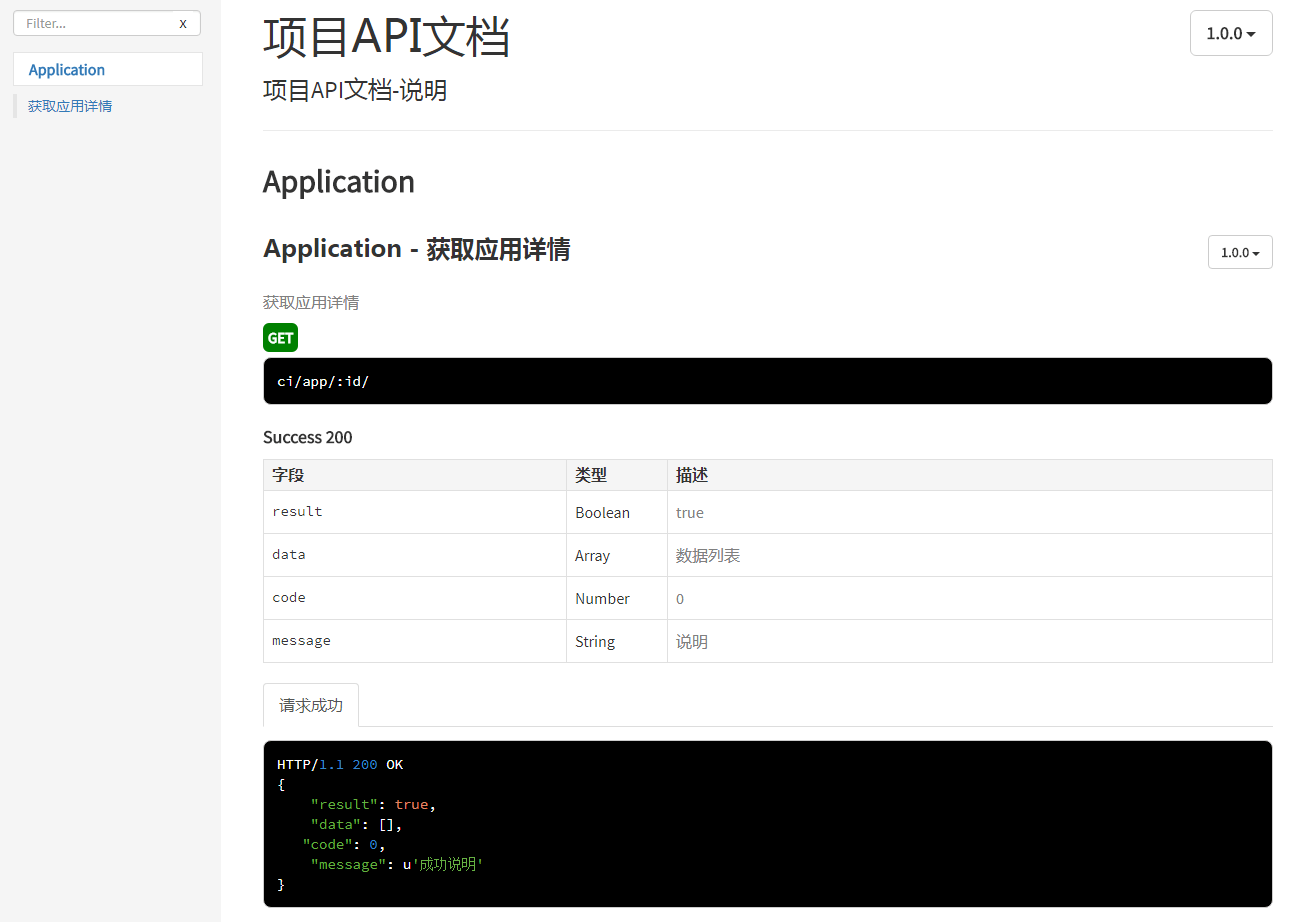
The generated API documentation
3. Keywords Supported by apidoc
apidoc generates API documentation by extracting code comments and following keyword syntax. So if you want to generate an ideal API document, you must follow apidoc’s keyword syntax. Below is a list of the keyword syntax, where { } denotes a variable to be replaced and [ ] denotes an optional parameter:
- @api {method} path [title].
Only comment blocks annotated with @api are parsed and turned into documentation; title is parsed as a sub-menu under the navigation menu (@apiGroup)
method may contain spaces, such as {POST GET} - @apiGroup name.
The group name, parsed as a navigation bar menu - @apiName name.
The interface name. Within the same @apiGroup, @api entries with the same name are distinguished by @apiVersion; otherwise the later @api overrides the earlier one - @apiDescription text.
The interface description, which supports html syntax - @apiVersion verison.
The interface version, in the form major.minor.patch - @apiIgnore [hint].
apidoc ignores interfaces annotated with @apiIgnore; hint is the description - @apiSampleRequest url.
The interface test address for testing; when sending a request, the @api method must be one of POST/GET etc. - @apiDefine name [title] [description].
Defines a comment block (which does not contain @api); combined with @apiUse it can be included elsewhere
@apiUse cannot be used inside an @apiDefine - @apiUse name.
Includes a comment block defined by @apiDefine - @apiParam [(group)] [{type}] [field=defaultValue] [description]. Request parameter
- @apiHeader [(group)] [{type}] [field=defaultValue] [description]. Header parameter
- @apiError [(group)] [{type}] field [description]. Parameter on an error response
- @apiSuccess [(group)] [{type}] field [description]. Parameter on success,
where group denotes the grouping of the parameter, type denotes the type (no spaces allowed), and input parameters may define a default value (no spaces allowed) - @apiParamExample [{type}] [title] example. Example parameter request
- @apiHeaderExample [{type}] [title] example. Example header request
- @apiErrorExample [{type}] [title] example. Example error request
- @apiSuccessExample [{type}] [title] example. Example success request
where type denotes the language type of the example; the example content is rendered directly. - @apiPermission name.
name must be unique; describes the access permission of the @api, such as admin/anyone
4. Installing and Configuring apidoc
- Install apidoc
This assumes nodejs is already installed; if not, download and install it yourself. Install apidoc globally:
| |
- Configuration
Configuration is optional; without it document generation still works, you just lose some API documentation information. In the project root directory, create an apidoc.json file to configure the basic document information:
| |
- Generate the document
In the directory where apidoc.json lives, run the command:
| |
The -i parameter denotes the input directory; by default the generated document goes to /doc under the current directory, and you can also specify it with the -o parameter.
5. Automated apidoc Generation
Every time you update the code comments, you have to run apidoc -i ./ once to see the API documentation, which is a bit tedious. Could the API documentation be generated automatically every time the comments change? Of course it can.
- Install gaze
gaze is a nodejs-based file watching project.
| |
- Write the watch script
apidoc-watch.js
| |
- Run the watcher
You only need to run the command once, before updating the comments.
| |
6. Practical Advice for Projects
6.1 How to Hand Over the Documentation
It is recommended to generate the API documentation into the frontend’s static directory and hand it over as a link, for example: htttp://example.com/static/doc/index.html.
6.2 How to Organize Backend Comments
Taking Django as an example, since apidoc needs a fairly large number of comments, there are two options:
- One is to write the comments directly inside each views function,
- The other is to use a separate file or folder for the comments.
In django, skinny controller, fat model is recommended — write less code and more comments in views.py — so the first option is the better fit. At the same time, keeping comments and the interface implementation together lowers the learning cost of subsequent maintenance.
6.3 Using apiDefine and apiUse
Because frontend and backend often agree on a fixed response format, you can define the fixed-format part as a comment block with apiDefine and reference it elsewhere with apiUse. This effectively reduces the number of comments.
Defining a comment block — note that a comment block should be defined as a separate comment:
| |
Referenced elsewhere
| |
6.4 Use apiGroup Grouping Sensibly
apiGroup and apiName get concatenated into the URL, for example: static/doc/index.html#api-apiGroup-apiName. Giving apiGroup and apiName easily understood names matters. Using apiGroup sensibly, gathering related frontend functionality together, helps the frontend understand the purpose of an API.
