Note that --block-size 4096 in this post means 4GB; using --block-size 4 would be more reasonable and would give better write performance.
1. Environment Preparation
1
| mkdir -p /data/test && cd /data/test
|
All the test tasks are carried out in this directory.
- Create a separate directory for Redis
It is recommended to create a new directory, because Redis will change the Owner of the files in the current directory to systemd-coredump. If it is under the HOME directory, SSH authentication may fail and you will be unable to log in to the machine.
- Start Redis for JuiceFS to use
1
| nerdctl run -d --security-opt apparmor=unconfined --security-opt seccomp=unconfined --name redis --network host -v $PWD/redis-data:/data -e REDIS_PASSWORD=mypassword redis:6
|
- Configure the Redis environment variables
1
2
3
4
| export REDIS_IP=x.x.x.x
export REDIS_PORT=6379
export REDIS_USER=default
export REDIS_PASSWORD=mypassword
|
- Set the object storage environment variables
1
2
3
4
5
| export ACCESS_KEY=xxx
export SECRET_KEY=xxx
export BUCKET=xxx
export ENDPOINT=xxx
export BUCKET_ENPOINT=$BUCKET.$ENDPOINT
|
- Local network test conditions
Bandwidth between Dragonfly Peers: 25 Gbps
Bandwidth from Dragonfly Peer to the object storage origin: 20 Gbps, and it can be saturated on the test machine
- Remove the Dragonfly Peer rate limits
1
2
| perPeerRateLimit: 5120Mi
totalRateLimit: 10240Mi
|
2. Local Disk
2.1 dd Read/Write Test
- Write file, speed 967 MB/s
1
2
3
4
5
6
7
| time dd if=/dev/zero of=./dd.txt bs=4M count=2500
10485760000 bytes (10 GB, 9.8 GiB) copied, 10.8478 s, 967 MB/s
real 0m11.625s
user 0m0.008s
sys 0m11.442s
|
1
2
3
4
5
6
| sync && echo 3 > /proc/sys/vm/drop_caches
time cp ./dd.txt /dev/null
real 0m9.048s
user 0m0.021s
sys 0m4.431s
|
1
2
3
4
5
| time cp ./dd.txt /dev/null
real 0m2.015s
user 0m0.004s
sys 0m2.009s
|
Here the memory cache is used directly.
2.2 benchmark Test
 1
 2
 3
 4
 5
 6
 7
 8
 9
10
11
| juicefs bench --block-size 4096 --big-file-size 1024 --threads 30 ./
+------------------+------------------+--------------+
| ITEM | VALUE | COST |
+------------------+------------------+--------------+
| Write big file | 2067.12 MiB/s | 14.86 s/file |
| Read big file | 6295.55 MiB/s | 4.88 s/file |
| Write small file | 12358.1 files/s | 2.43 ms/file |
| Read small file | 17480.9 files/s | 1.72 ms/file |
| Stat file | 192702.6 files/s | 0.16 ms/file |
+------------------+------------------+--------------+
|
2.3 fio Test
1
| curl -sfL https://raw.githubusercontent.com/shaowenchen/ops/main/getcli.sh |VERSION=latest sh -
|
1
| opscli task -f ~/.ops/tasks/get-diskio-byfio.yaml --size 10g --filename=/data/test/${TEST_CASE}-fio.txt
|
| Test Type | IOPS | Bandwidth | Duration |
|---|
| Rand_Read_Testing | 164k | 639 MiB/s | 16027 msec |
| Rand_Write_Testing | 46.7k | 182 MiB/s | 56175 msec |
| Sequ_Read_Testing | 7754 | 969 MiB/s | 10564 msec |
| Sequ_Write_Testing | 5055 | 632 MiB/s | 16203 msec |
In practice Cache is always enabled, so the case without Cache is not verified here.
3.1 Mounting the File System
1
| export REDIS_DIRECTSERVER=redis://${REDIS_USER}:${REDIS_PASSWORD}@${REDIS_IP}:${REDIS_PORT}/1
|
1
2
3
4
5
| juicefs format \
--storage ks3 \
--bucket ${BUCKET_ENPOINT}\
${REDIS_DIRECTSERVER} \
${TEST_CASE}-direct
|
1
| juicefs mount -d --buffer-size 2000 --max-uploads 150 ${REDIS_DIRECTSERVER} ./${TEST_CASE}-direct --cache-dir=/data/jfs-${TEST_CASE}
|
At this point, operations in the ${TEST_CASE}-direct directory are all synchronized to the ${TEST_CASE}-direct object in the bucket.
3.2 dd Read/Write Test
- Enter the mount directory
- Write file, speed 640 MB/s
1
2
3
4
5
6
7
| time dd if=/dev/zero of=./dd.txt bs=4M count=2500
10485760000 bytes (10 GB, 9.8 GiB) copied, 16.3898 s, 640 MB/s
real 0m16.406s
user 0m0.008s
sys 0m8.233s
|
- First read, speed 84 MB/s
1
2
3
4
5
6
| sync && echo 3 > /proc/sys/vm/drop_caches
time cp ./dd.txt /dev/null
real 2m2.601s
user 0m0.040s
sys 0m7.424s
|
- Cached read, speed 1765 MB/s
At this point JuiceFS has already cached the data locally.
1
2
3
4
5
6
| sync && echo 3 > /proc/sys/vm/drop_caches
time cp ./dd.txt /dev/null
real 0m5.824s
user 0m0.020s
sys 0m5.684s
|
3.3 benchmark Test
 1
 2
 3
 4
 5
 6
 7
 8
 9
10
11
| juicefs bench --block-size 4096 --big-file-size 1024 --threads 30 ./
+------------------+----------------+---------------+
| ITEM | VALUE | COST |
+------------------+----------------+---------------+
| Write big file | 560.37 MiB/s | 36.55 s/file |
| Read big file | 1353.06 MiB/s | 15.14 s/file |
| Write small file | 238.0 files/s | 84.02 ms/file |
| Read small file | 11527.3 files/s | 1.74 ms/file |
| Stat file | 24699.4 files/s | 0.81 ms/file |
+------------------+----------------+---------------+
|
By continuously increasing threads, better performance data can be obtained, saturating the bandwidth of the object storage backend. I tested several sets of data along the threads dimension
| Threads | Operation | Write Speed (MiB/s) | Write Time (s/file) | Read Speed (MiB/s) | Read Time (s/file) |
|---|
| 20 | Write big file | 1491.96 | 13.73 | 1776.85 | 11.53 |
| 30 | Write big file | 1610.24 | 19.08 | 2136.94 | 14.38 |
| 40 | Write big file | 1689.97 | 24.24 | 2803.49 | 14.61 |
| 50 | Write big file | 1714.95 | 29.86 | 3200.11 | 16.00 |
For the other test cases, threads = 30 was chosen as the uniform test parameter.
3.4 fio Test
1
| curl -sfL https://raw.githubusercontent.com/shaowenchen/ops/main/getcli.sh |VERSION=latest sh -
|
1
| opscli task -f ~/.ops/tasks/get-diskio-byfio.yaml --size 10g --filename=/data/test/${TEST_CASE}-direct/fio.txt
|
| Test Type | IOPS | Bandwidth | Duration |
|---|
| Rand_Read_Testing | 159k | 621 MiB/s | 16486 msec |
| Rand_Write_Testing | 47.7k | 187 MiB/s | 54906 msec |
| Sequ_Read_Testing | 8189 | 1024 MiB/s | 10003 msec |
| Sequ_Write_Testing | 5182 | 648 MiB/s | 15806 msec |
3.5 Unmounting the File System
1
2
| cd ..
juicefs umount ./${TEST_CASE}-direct
|
4. JuiceFS Enterprise Edition
4.1 Mounting
Mounting JuiceFS Enterprise Edition requires getting the mount command from the console, as shown below:
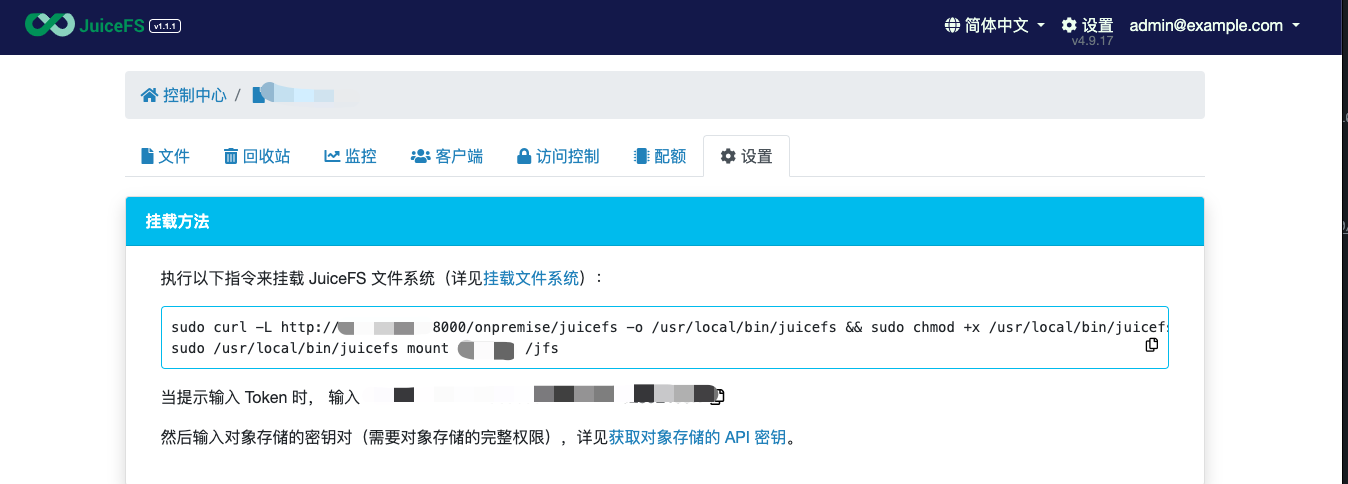
After executing the mount command, you also need to enter the Bucket’s AccessKey and SecretKey. JuiceFS Enterprise Edition is only responsible for storing metadata; the data is still stored in object storage.
4.2 dd Read/Write Test
- Enter the mount directory
- Write file, speed 645 MB/s
1
2
3
4
5
6
7
| time dd if=/dev/zero of=./dd.txt bs=4M count=2500
10485760000 bytes (10 GB, 9.8 GiB) copied, 16.2446 s, 645 MB/s
real 0m16.294s
user 0m0.012s
sys 0m8.963s
|
- First read, speed 853 MB/s
1
2
3
4
5
6
| sync && echo 3 > /proc/sys/vm/drop_caches
time cp ./dd.txt /dev/null
real 0m12.947s
user 0m0.036s
sys 0m7.715s
|
- Cached read, speed 1024 MB/s
1
2
3
4
5
6
| sync && echo 3 > /proc/sys/vm/drop_caches
time cp ./dd.txt /dev/null
real 0m1.969s
user 0m0.020s
sys 0m1.927s
|
4.3 benchmark Test
 1
 2
 3
 4
 5
 6
 7
 8
 9
10
11
| juicefs bench --block-size 4096 --big-file-size 1024 --threads 30 ./
+------------------+------------------+----------------+
| ITEM | VALUE | COST |
+------------------+------------------+----------------+
| Write big file | 349.72 MiB/s | 87.84 s/file |
| Read big file | 710.07 MiB/s | 43.26 s/file |
| Write small file | 41.7 files/s | 719.14 ms/file |
| Read small file | 672.3 files/s | 44.62 ms/file |
| Stat file | 162303.2 files/s | 0.18 ms/file |
+------------------+-----------------+---------------+
|
4.4 fio Test
1
| curl -sfL https://raw.githubusercontent.com/shaowenchen/ops/main/getcli.sh |VERSION=latest sh -
|
1
| opscli task -f ~/.ops/tasks/get-diskio-byfio.yaml --size 10g --filename=/jfs/${TEST_CASE}-ee/fio.txt
|
| Test Type | IOPS | Bandwidth | Duration |
|---|
| Rand_Read_Testing | 147k | 573 MiB/s | 17864 msec |
| Rand_Write_Testing | 45.0k | 176 MiB/s | 58244 msec |
| Sequ_Read_Testing | 7565 | 946 MiB/s | 10828 msec |
| Sequ_Write_Testing | 5182 | 648 MiB/s | 15806 msec |
The default JuiceFS client that gets installed is the Lite version, which does not support Dragonfly, so you need to compile the latest client yourself. Versions after https://github.com/juicedata/juicefs/pull/4057 already support the Dragonfly dfstore object storage acceleration method, but PR https://github.com/juicedata/juicefs/pull/4302 uses the same proxy path as images, which allows multiple Buckets to be accelerated without modifying the manager. The client in this section comes from that PR.
5.1 Configuring Dragonfly
Add the following configuration in Seed Peer and Peer:
1
2
3
4
5
| proxies:
- regx: s3.*amazonaws.com.*
- regx: oss.*aliyuncs.com.*
- regx: obs.*myhuaweicloud.com.*
- regx: ks3.*ksyun.com.*
|
5.2 Mounting
1
| export REDIS_DRAGONFLY=redis://${REDIS_USER}:${REDIS_PASSWORD}@${REDIS_IP}:${REDIS_PORT}/2
|
1
2
3
4
5
| juicefs format \
${REDIS_DRAGONFLY} \
${TEST_CASE}-df \
--storage dragonfly \
--bucket "https://${BUCKET_ENPOINT}?proxy=http://127.0.0.1:65001&backendStorage=s3"
|
In a Kubernetes cluster, you can run a proxy on every node, or deploy proxies on a few cache nodes to provide regional acceleration.
1
| juicefs mount ${REDIS_DRAGONFLY} ./${TEST_CASE}-df --cache-dir=/data/jfs-${TEST_CASE}-df -d
|
The case without Local Cache is also not verified here.
5.3 dd Read/Write Test
- Enter the mount directory
- Write file, speed 382 MB/s
1
2
3
4
5
6
7
| time dd if=/dev/zero of=./dd.txt bs=4M count=2500
10485760000 bytes (10 GB, 9.8 GiB) copied, 27.422 s, 382 MB/s
real 0m27.434s
user 0m0.012s
sys 0m9.840s
|
- First read, speed 31 MB/s
1
2
3
4
5
6
| sync && echo 3 > /proc/sys/vm/drop_caches
time cp ./dd.txt /dev/null
real 5m21.089s
user 0m0.044s
sys 0m8.175s
|
- Cached read, speed 1463 MB/s
1
2
3
4
5
6
| sync && echo 3 > /proc/sys/vm/drop_caches
time cp ./dd.txt /dev/null
real 0m7.077s
user 0m0.048s
sys 0m6.928s
|
At this point the cache consists of both the JuiceFS local cache and the Dragonfly cache.
5.4 benchmark
 1
 2
 3
 4
 5
 6
 7
 8
 9
10
11
| juicefs bench --block-size 4096 --big-file-size 1024 --threads 30 ./
+------------------+----------------+---------------+
| ITEM | VALUE | COST |
+------------------+----------------+---------------+
| Write big file | 355.03 MiB/s | 86.53 s/file |
| Read big file | 110.07 MiB/s | 279.09 s/file |
| Write small file | 347.1 files/s | 86.43 ms/file |
| Read small file | 14406.9 files/s | 2.08 ms/file |
| Stat file | 40294.0 files/s | 0.74 ms/file |
+------------------+-----------------+---------------+
|
At this point the /data/dfget/data/ directory already holds 39G of files.
5.5 fio Test
1
| curl -sfL https://raw.githubusercontent.com/shaowenchen/ops/main/getcli.sh |VERSION=latest sh -
|
1
| opscli task -f ~/.ops/tasks/get-diskio-byfio.yaml --size 10g --filename=/data/test/${TEST_CASE}-df/fio.txt
|
| Test Type | IOPS | Bandwidth | Duration |
|---|
| Rand_Read_Testing | 152k | 592 MiB/s | 17293 msec |
| Rand_Write_Testing | 48.0k | 187 MiB/s | 54625 msec |
| Sequ_Read_Testing | 8225 | 1028 MiB/s | 9959 msec |
| Sequ_Write_Testing | 5171 | 646 MiB/s | 15840 msec |
6. Summary
6.1 dd
bs=4M count=2500
| Test Environment | Local Disk | JuiceFS CE | JuiceFS EE | JuiceFS CE + Dragonfly |
|---|
| Write speed | 967 MB/s | 640 MB/s | 645 MB/s | 382 MB/s |
| First read speed | 1138 MB/s | 84 MB/s | 853 MB/s | 31 MB/s |
| Cached read speed | 5120 MB/s | 1765 MB/s | 1024 MB/s | 1463 MB/s |
- JuiceFS Enterprise Edition has a very fast first read speed, far exceeding JuiceFS Community Edition
- When there is no cache hit, Dragonfly noticeably slows down JuiceFS Community Edition, because Dragonfly has overhead for splitting and seeding files
- When there is a cache hit, the cached read speed of JuiceFS Community Edition is also very fast
6.2 benchmark
–block-size 4096 –big-file-size 1024 –threads 30
| Item/Environment | Local Disk | JuiceFS CE | JuiceFS EE | CE + Dragonfly |
|---|
| Big file write speed | 2067 MiB/s | 560 MiB/s | 350 MiB/s | 355 MiB/s |
| Big file read speed | 6295 MiB/s | 1353 MiB/s | 710 MiB/s | 110 MiB/s |
| Small file write IOPS | 12358 | 238 | 42 | 347 |
| Small file read IOPS | 17480 | 11527 | 672 | 14406 |
| Stat file IOPS | 192703 | 24699 | 162303 | 40294 |
- Dragonfly can greatly improve the small file read/write performance of JuiceFS Community Edition; Dragonfly has optimizations for small files
- Dragonfly noticeably slows down reading big files from JuiceFS Community Edition
- JuiceFS Enterprise Edition is noticeably faster than JuiceFS Community Edition across the board
6.3 fio
10G file
| Test Item/Environment | Local Disk | JuiceFS CE | JuiceFS EE | CE + Dragonfly |
|---|
| Random read IOPS | 164k | 159k | 147k | 152k |
| Random read bandwidth | 639 MiB/s | 621 MiB/s | 573 MiB/s | 592 MiB/s |
| Random write IOPS | 46.7k | 47.7k | 45k | 48k |
| Random write bandwidth | 182 MiB/s | 187 MiB/s | 176 MiB/s | 187 MiB/s |
| Sequential read IOPS | 7.8k | 8.2k | 7.6k | 8.2k |
| Sequential read bandwidth | 969 MiB/s | 1 GB/s | 946 MiB/s | 1 GB/s |
| Sequential write IOPS | 5.1k | 5.2k | 5.2k | 5.2k |
| Sequential write bandwidth | 632 MiB/s | 648 MiB/s | 648 MiB/s | 646 MiB/s |
The fio results show that the differences across these cases are small.
6.4 Some Thoughts and Suggestions
- About JuiceFS Enterprise Edition
JuiceFS Enterprise Edition is only responsible for storing metadata, similar to how the Community Edition needs MySQL or Redis to store metadata. But the nodes where JuiceFS EE is deployed provide cache acceleration. Another point is that enterprise storage software provides a quality-of-service guarantee.
- Performance test results for Dragonfly + JuiceFS Community Edition
The tests above are based on a single machine, whereas Dragonfly’s advantage lies in its acceleration capability through large-scale P2P networking. Therefore, you should not simply make the choice from a performance standpoint, but should take factors such as origin bandwidth and data scale into account.
At the same time, the results above show that when reading files, if there is a cache hit, Dragonfly + JuiceFS Community Edition can match JuiceFS Enterprise Edition.
- Should JuiceFS Community Edition adopt Dragonfly?
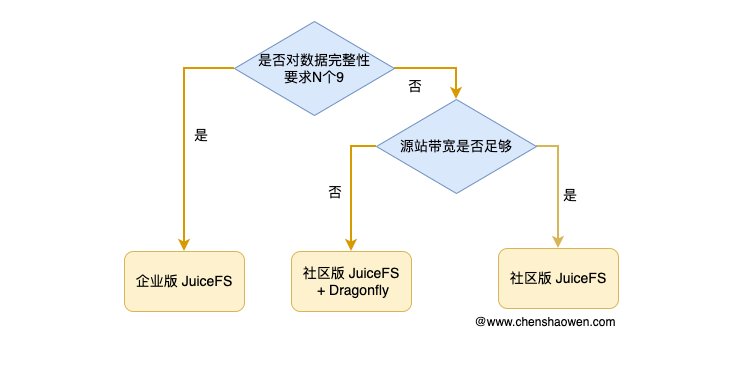
This mainly depends on the bandwidth with which the service accesses the object storage origin.
If the bandwidth with which the service accesses the object storage origin is sufficient, then just use JuiceFS Community Edition directly. If the bandwidth with which the service accesses the object storage origin is unstable or insufficient, then you need to give serious consideration to a cache acceleration service, and then choose JuiceFS Enterprise Edition or Dragonfly + JuiceFS Community Edition according to the specific situation. Below is a decision diagram for reference:
- A deployment architecture for reference
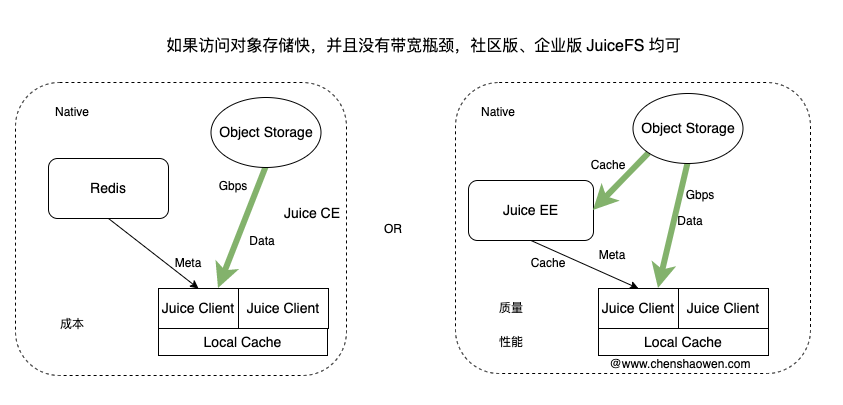
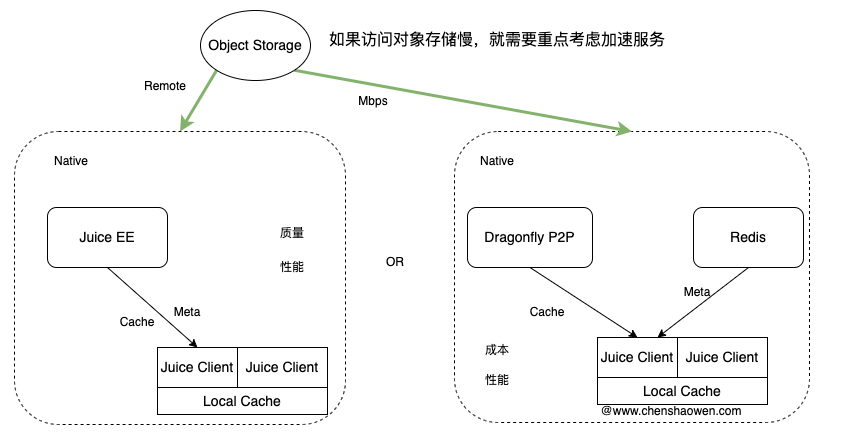
When choosing which approach to adopt, the main considerations are cost, performance, and quality, combined with the current state and scale of the business. Two diagrams are given below for reference: