1. Making Ops Copilot an Ops Coilot
In September 2023, I wrote a version of Ops Copilot, and published an article about it, I’m Writing a Copilot for My Ops Tool.
The effect it achieved was like this:
| |
At that point, the local default browser would open.
| |
But for the Ops project, this kind of feature was meaningless — plenty of open-source projects can provide the same capability.
During the interactive conversation, Ops Copilot completely ignored the capabilities Ops provides. That was the crux of the problem, and I paused updating Copilot-related features for a while.
Ops Copilot’s most recent iteration came out of a production need at my job: resolving various AI infrastructure incidents. The idea came from service-oriented AI Agents and pipelined AI tasks.
Let’s take a look at several key points of this iteration.
2. The Design of Ops Copilot
Ops Copilot is a CLI subcommand that uses an LLM to integrate Ops capabilities. It mainly aims to solve the following problems:
- How to choose the right Task to solve a problem
- How to extract the parameters for executing the relevant Task
Below is the processing logic of Ops Copilot:
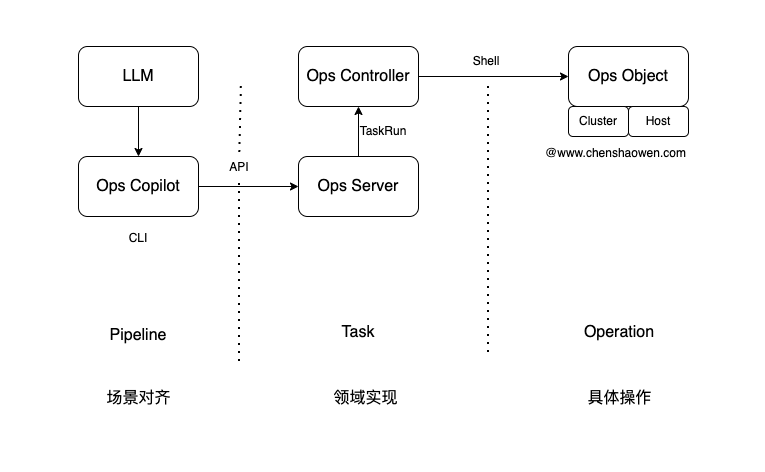
Scenarios are described through Pipeline definitions, and with the help of an LLM the text input is converted into the execution of a particular Pipeline, with the relevant parameters extracted.
Ops Copilot parses the Pipeline and executes the Task jobs. Ops Copilot interacts with Ops Controller through Ops Server, creates a TaskRun job, waits for Ops Controller to finish executing, and retrieves the result.
Ops Server is the component added when Ops gained a new UI iteration in early 2024. It provides authentication and can create Task execution instances, TaskRun.
Ops Controller watches for TaskRun creation, and based on the Cluster or Host object specified in it, obtains the relevant credentials to connect to the Ops Object and perform the relevant operations.
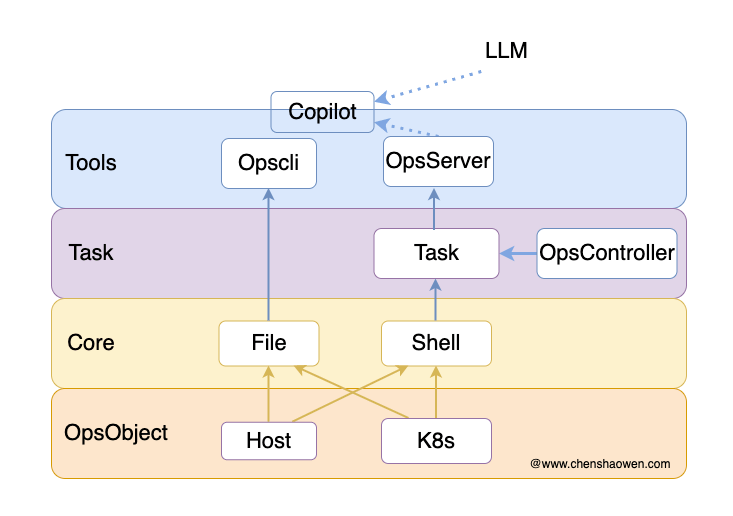
And operations on Cluster and Hosts objects — script execution and file distribution — are precisely the core design of the Ops project.
Following this approach, Ops Copilot is a subcommand truly built on the Ops project, integrated into it, as shown below.
3. Using Ops Copilot
3.1 Parameter Reference
| |
By default, copilot reads OPENAI_API_HOST, OPENAI_API_BASE, OPENAI_API_MODEL, OPENAI_API_KEY, OPS_SERVER, and OPS_TOKEN from environment variables; if an environment variable is not present, the default value is used.
3.2 Installation
If you already installed it before, run
opscli upgradeto upgrade to the latest version.
- For use in China
| |
- For use outside China
| |
3.3 Usage
- Set the environment variables
| |
- Run Copilot
| |
- See which operations are supported
| |
These pipelines are defined in https://github.com/shaowenchen/ops/blob/main/pkg/copilot/pipelines.go. I hope there will be a better extension mechanism later, for example auto-discovery from the clusters where Ops is deployed.
- Query which clusters exist
| |
Ops Copilot periodically pulls the cluster list and host list data from the clusters where Ops is deployed.
- Restart a Pod
| |
On the cluster you can see the relevant Pod’s status update.
| |
A pipeline usually contains several Task jobs. These Tasks come from two sources:
- Task jobs that Ops Copilot periodically obtains from the clusters where Ops is deployed; there are many of these in the Ops Github repository
- Hard-coded Task jobs, https://github.com/shaowenchen/ops/blob/main/pkg/copilot/tasks.go, which allow extending Task jobs unrelated to Ops, such as summary, which uses an LLM to summarize the output, and allow-whitelist, which controls the operator whitelist, etc.
4. Alignment Is the Key
4.1 Aligning on Scenario Intent
Because of my professional experience — I have rolled out Gitlab CI, developed a Github Action plugin, iterated a Jenkins-based project, and built projects based on Tekton and Argo Workflow from 0 to 1 — when I faced the need to design execution logic, my instinct was to choose the approach of assembling tasks into pipelines to execute AI tasks.
Below is a pipeline definition:
| |
- Desc tells the LLM what this Pipeline is for
- LLMTasks contains the concrete logic the Pipeline executes
There are also some default values and configuration, all of which are there to let the LLM match the input accurately while constraining the LLM within the rules we defined.
Desc accurately provides each pipeline’s purpose to the LLM, and the LLM chooses which Pipeline to execute, based on the input text, to solve the problem described by the text — while what Task that Pipeline actually executes is something we work out.
4.2 Aligning on Variable Extraction
Variable extraction is another key point. See the example below.
| |
There are two ways to extract variables effectively:
- Use regex matching
- Give examples
In the example above, providing a real example of podname helps the LLM extract the variables the pipeline needs from the output text.
5. Event-Driven AI Agents
In an earlier article I mentioned that Copilot is driven by people and is people’s responsibility, while an AI Agent is driven by the program itself and is the program’s responsibility.
Through the alignment approaches above, this is in fact not limited to the operations domain; in other domains you can also rapidly align an LLM to implement Copilot functionality based on pipelined AI tasks. The hard part is that you need to implement domain abstractions and component capabilities in that domain similar to Ops Server and Ops Controller. That is not an easy thing.
The original opportunity for developing Ops came from a work need: I had to maintain many machines and clusters, doing operations and configuration in bulk. Thanks to the team’s tolerance, I could develop the Ops project while trying out a large number of operations tasks, and eventually Ops gradually stabilized and came to be used in production. During the iterations, a bug in the Ops project nearly caused an incident; I recorded that part in my blog too, and afterward I treated Ops updates with increasing caution.
Back to AI Agents: there is now also a production need at my job — automatically handling online AI infrastructure failures.
In fact, Copilot and an AI Agent are separated by only a thin wall: it is nothing more than turning passive into active, using a program instead of a person to drive Copilot.
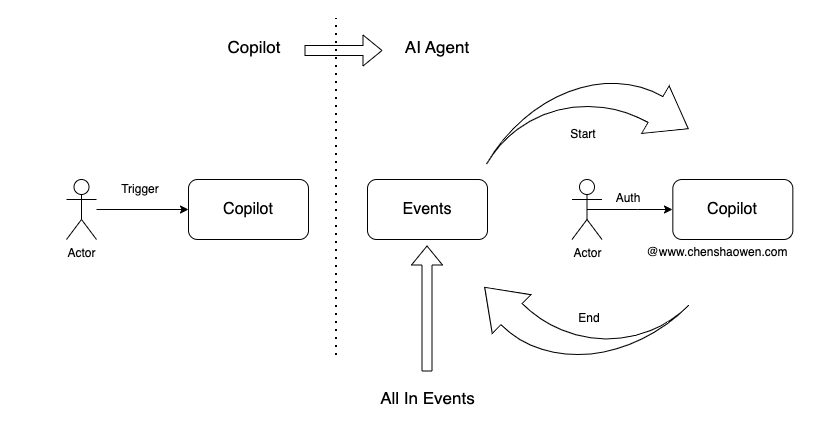
As shown above, Copilot is triggered based on a person’s output, analyzes the person’s output, executes tasks, and feeds the result back to the person. But where does the person’s output come from? There are mainly two kinds:
- From 0 to 1, the original requester of the need
The part created autonomously and originally — for example, I want to create a namespace. Then where will this idea be recorded, and can the source of that record serve as an event source that automatically triggers Copilot to execute the task of creating a namespace.
- From 1 to 1, copied from elsewhere
The part copied from elsewhere — for example, an alert message. Can it generate an event, notify a person, and after confirmation and authorization, be handed to Copilot for execution.
Every activity around production can be turned into an event and passed to Copilot — that is the event-driven AI Agent development approach.
Of course, I am also in the early stages of practicing this part, because inspections can also be done through Ops.

As shown above, inspection tasks run periodically, and when an anomaly is found an event is generated and a notification is sent. If this event were sent directly to Copilot, and Copilot had already integrated a way to handle this kind of event, then the anomaly could be resolved directly with the help of an LLM, achieving full takeover of failure handling.
6. Summary
The main content of this post is as follows:
- The redesign of Ops Copilot
Ops Copilot was redesigned so that it integrates more deeply with the Ops project, using large language models (LLMs) to enhance the automation of operations tasks.
- Pipelined AI tasks
By pipelining AI tasks, and drawing on experience from different CI/CD tools and workflow projects, task assembly and execution were implemented in Ops Copilot.
- Event-driven AI Agents
Turning human operations into program-driven events can promote Copilot’s evolution toward an AI Agent and achieve a program’s full takeover of the environment.
