Statistics show that most files inside a container are never used. Based on this characteristic, Nydus defines a custom filesystem in the Rafs format, enabling on-demand loading of image files to solve the slow startup and storage consumption caused by large images. In AI scenarios, whether for inference or training, images often start at several GB, or even tens of GB, so Nydus is very well suited.
This post is mainly a set of concrete operation steps for quickly configuring the image lazy-loading solution Nydus, along with ways to handle common problems.
1. Install nerdctl and nydus
1
| curl -sfL https://raw.githubusercontent.com/shaowenchen/ops/main/getcli.sh |VERSION=latest sh -
|
If it is already installed, you can update Opscli to the latest version.
1
| opscli task -f ~/.ops/tasks/install-nerdctl.yaml
|
Use the -i ~/.kube/config parameter to target the entire cluster.
1
| opscli task -f ~/.ops/tasks/install-nydus.yaml
|
Use the -i ~/.kube/config parameter to target the entire cluster.
2. Start nydus-snapshotter
The documentation at https://github.com/containerd/nydus-snapshotter/tree/main/misc/snapshotter contains many example configurations. Not all of our production Linux Kernels are above 5.19, so the fuse approach was chosen here.
2.1 Create the configuration file /etc/nydus/config.toml
1
2
| mkdir -p /etc/nydus
wget https://raw.githubusercontent.com/shaowenchen/demo/master/nydus/config.toml -O /etc/nydus/config.toml
|
2.2 Create the configuration file /etc/nydus/nydusd-config.fusedev.json
- Configure the backend and cache
1
| wget https://raw.githubusercontent.com/shaowenchen/demo/master/nydus/nydusd-config.fusedev.json -O /etc/nydus/nydusd-config.fusedev.json
|
- Create the Systemd Unit startup file
1
| wget https://raw.githubusercontent.com/shaowenchen/demo/master/nydus/nydus-snapshotter.service -O /etc/systemd/system/nydus-snapshotter.service
|
- Create the data directory
1
| mkdir -p /data/containerd/io.containerd.snapshotter.v1.nydus
|
1
2
3
| systemctl enable nydus-snapshotter
systemctl start nydus-snapshotter
systemctl status nydus-snapshotter
|
1
| journalctl -u nydus-snapshotter -f
|
3. Integrate Nydus into Containerd
- Add the nydus snapshotter plugin
Edit the configuration file
1
| vim /etc/containerd/config.toml
|
Add the following content
 1
 2
 3
 4
 5
 6
 7
 8
 9
10
11
12
13
| [plugins]
[plugins."io.containerd.grpc.v1.cri"]
[plugins."io.containerd.grpc.v1.cri".containerd]
default_runtime_name = "runc"
ignore_rdt_not_enabled_errors = false
no_pivot = false
discard_unpacked_layers = false
disable_snapshot_annotations = false
snapshotter = "nydus"
[proxy_plugins]
[proxy_plugins.nydus]
type = "snapshot"
address = "/run/containerd-nydus/containerd-nydus-grpc.sock"
|
1
| systemctl restart containerd
|
- Check whether the installation succeeded
1
2
3
| ctr -a /run/containerd/containerd.sock plugin ls | grep nydus
io.containerd.snapshotter.v1 nydus - ok
|
4. Convert an OCI Image Directly into a Nydus Image
- Log in to the image registry
1
| nerdctl login https://index.docker.io/v1/
|
nerdctl is used in the same way as docker; if other registries are involved, log in to those as well.
1
2
3
4
5
6
7
8
| nydusify convert --source shaowenchen/demo:ubuntu:latest --target shaowenchen/demo:ubuntu:latest-nydus
pulling image docker.io/shaowenchen/demo:ubuntu:latest module=converter
pulled image docker.io/shaowenchen/demo:ubuntu:latest, elapse 9.743015898s module=converter
converting image docker.io/shaowenchen/demo:ubuntu:latest module=converter
converted image docker.io/shaowenchen/demo:ubuntu:latest-nydus, elapse 4.002142728s module=converter
pushing image docker.io/shaowenchen/demo:ubuntu:latest-nydus module=converter
pushed image docker.io/shaowenchen/demo:ubuntu:latest-nydus, elapse 1m25.054493982s module=converter
|
You can specify the registry credentials with --backend-config-file ~/.docker/config.json.
5. Use Buildkit to Build a Dockerfile and Produce a Nydus Image
Besides converting with Nydusify, you can also build a Dockerfile directly to generate a Nydus image.
The source provided by https://github.com/moby/buildkit does not support Nydus; you need the version provided by https://github.com/nydusaccelerator/buildkit, but the latter has no release, so it must be downloaded and compiled. I have compiled a version here that you can download and use directly.
1
| wget https://github.com/shaowenchen/nydusaccelerator-buildkit/releases/download/latest/buildkit-linux-amd64.tar.gz
|
1
2
| tar xvf buildkit-linux-amd64.tar.gz
mv bin/* /usr/local/bin/
|
1
| mkdir -p /etc/buildkit /data/buildkit
|
 1
 2
 3
 4
 5
 6
 7
 8
 9
10
11
12
13
14
15
| cat > /etc/buildkit/buildkitd.toml <<EOF
debug = true
root = "/data/buildkit"
[worker.oci]
enabled = false
[worker.containerd]
address = "/run/containerd/containerd.sock"
enabled = true
platforms = [ "linux/amd64", "linux/arm64" ]
namespace = "buildkit"
gc = true
gckeepstorage = 9000
cniPoolSize = 16
EOF
|
Generate the Systemd Unit file
 1
 2
 3
 4
 5
 6
 7
 8
 9
10
11
12
| cat > /etc/systemd/system/buildkitd.service << EOF
[Unit]
Description=buildkitd service
Documentation=https://github.com/moby/buildkit
[Service]
Environment="NYDUS_BUILDER=/usr/local/bin/nydus-image"
ExecStart=/usr/local/bin/buildkitd --config /etc/buildkit/buildkitd.toml
[Install]
WantedBy=multi-user.target
EOF
|
- Start the Buildkitd service
1
2
3
| systemctl enable buildkitd
systemctl start buildkitd
systemctl status buildkitd
|
- Test building a Nydus image with Buildkitd
1
2
3
4
| cat << EOF >Dockerfile
FROM ubuntu
RUN touch 123
EOF
|
1
2
3
4
| buildctl build --frontend=dockerfile.v0 \
--local context=. \
--local dockerfile=. \
--output type=image,name=demo:nydus,push=true,compression=nydus,force-compression=true,oci-mediatypes=true
|
You can also build with nerdctl, which automatically invokes buildkit to do the build.
1
| nerdctl build -f Dockerfile --output type=image,name=demo:nydus,push=true,compression=nydus,force-compression=true,oci-mediatypes=true .
|
The credentials used for pushing come from ~/.docker/config.json; you can log in with nerdctl login.
1
| nerdctl --snapshotter nydus run --rm -it demo:nydus
|
6. Verify Nydus at the Application Layer
6.1 Containerd
1
| nerdctl --snapshotter nydus run --rm -it demo:nydus
|
Other Nydus images include
- dragonflyoss/python:3.9.15-nydus
- ghcr.io/dragonflyoss/image-service/ubuntu:nydus-nightly-v5
6.2 Kubernetes
1
| kubectl create deployment nydus-test --image=demo:nydus
|
You can also create a DaemonSet directly to test on every node.
 1
 2
 3
 4
 5
 6
 7
 8
 9
10
11
12
13
14
15
16
17
18
19
20
21
22
23
| cat << EOF | kubectl apply -f -
apiVersion: apps/v1
kind: DaemonSet
metadata:
name: nydus-test-daemonset
spec:
selector:
matchLabels:
app: nydus-test-daemonset
template:
metadata:
labels:
app: nydus-test-daemonset
name: nydus-test-daemonset
spec:
tolerations:
- key: "node-role.kubernetes.io/control-plane"
operator: "Exists"
effect: "NoSchedule"
containers:
- image: demo:nydus
name: nydus-test-daemonset
EOF
|
1
| kubectl get deployment nydus-test -o wide
|
- Switch to a different node
1
| kubectl patch deployment nydus-test -p '{"spec":{"template":{"spec":{"nodeName":"node1"}}}}'
|
1
| kubectl delete deployment nydus-test
|
- Edit the prometheus-server configuration
1
| kubectl -n monitor edit cm prometheus-server
|
- Add a Job that scrapes Nydus metrics
1
2
3
4
5
6
7
| scrape_configs:
- job_name: nydus
metrics_path: /v1/metrics
static_configs:
- targets:
- x.x.x.x:9110
- x.x.x.x:9110
|
- Add a dashboard in Grafana
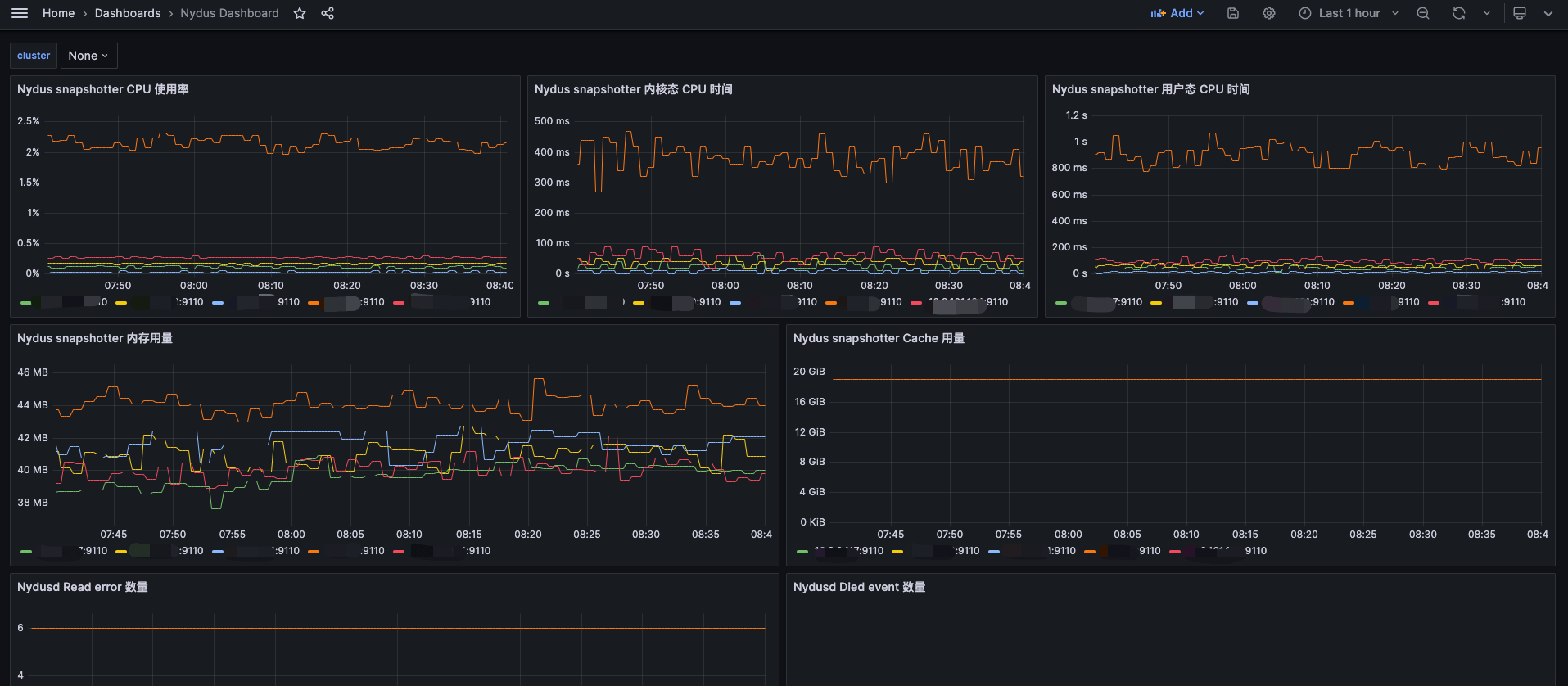
I drew a simple dashboard and shared it on the Grafana website; you can import it directly. The ID is 20245, and the link is https://grafana.com/grafana/dashboards/20245-nydus-dashboard/ .
The final result looks like this:
8. Handling Common Errors
When using Nydus you may run into various problems; here I record the problems I ran into and how I handled them, updated continuously. It is best to use a clean environment and get the configuration right in one pass — configuring repeatedly may produce strange problems.
1
| FATA[0000] failed to extract layer sha256:58e33caaf7a78562cc25629ed0414320c3d755b66bf1f313fdcff75748102013: failed to get stream processor for application/vnd.oci.image.layer.nydus.blob.v1: no processor for media-type: unknown
|
1
| failed to register layer: Error processing tar file(exit status 1): archive/tar: invalid tar header
|
The nydus-snapshotter service is abnormal; check the service logs, or pull the image without Nydus configured.
1
| journalctl -u nydus-snapshotter.service -f
|
8.2 The application will not start, snapshot already exists
1
| FATA[0001] unable to prepare extraction snapshot: target snapshot "sha256:58e33caaf7a78562cc25629ed0414320c3d755b66bf1f313fdcff75748102013": already exists
|
1
| create snapshot: missing parent "k8s.io/14/sha256:e3e5579ddd43c08e4b5c74dc12941a4ef656fab070b1087a1fd5a8a836b71e7d" bucket: not found
|
Delete the application’s image first, clean the cache, then retry.
1
| nerdctl image prune --force --all
|
8.3 nydus-snapshotter will not start, failed to initialize snapshotter: initialize filesystem
1
2
3
| level=error msg="Process 770795 has been a zombie"
...
level=fatal msg="failed to start nydus-snapshotter" error="failed to initialize snapshotter: initialize filesystem thin layer: wait for daemon cmb35s0g2p2n0dt9tqag: wait until daemon is RUNNING: get daemon state: daemon socket /data/containerd/io.containerd.snapshotter.v1.nydus/socket/cmb35s0g2p2n0dt9tqag/api.sock: not found"
|
There may also be another containerd-nydus-grpc that has not fully exited.
1
| ps aux |grep containerd-nydus-grpc
|
Find and kill the other process, then restart the nydus-snapshotter service.
1
2
3
4
5
6
7
| "failed to parse configuration information"
containerd-nydus-grpc[21763]: at api/src/config.rs:243
containerd-nydus-grpc[21763]: note: enable `RUST_BACKTRACE=1` env to display a backtrace
containerd-nydus-grpc[21763]: [2024-01-04 17:19:49.125269 +08:00] ERROR [/src/error.rs:22] Error:
containerd-nydus-grpc[21763]: Rafs(LoadConfig(Os { code: 22, kind: InvalidInput, message: "Invalid argument" }))
containerd-nydus-grpc[21763]: at service/src/lib.rs:121
containerd-nydus-grpc[21763]: note: enable `RUST_BACKTRACE=1` env to display a backtrace
|
According to the hint, there is a problem with the configuration file, including the configuration format, key values, whether directories exist, and so on. The problem I ran into was that the root directory did not exist.
1
| mkdir -p /data/containerd/io.containerd.snapshotter.v1.nydus
|
1
| systemctl restart nydus-snapshotter
|
8.5 Kubelet reports an error, the directory cannot be found
1
| Failed to get the info of the filesystem with mountpoint" err="failed to get device for dir "/var/lib/containerd/io.containerd.snapshotter.v1.nydus": stat failed on /var/lib/containerd/io.containerd.snapshotter.v1.nydus with error: no such file or directory" mountpoint="/var/lib/containerd/io.containerd.snapshotter.v1.nydus"
|
According to https://github.com/containerd/nydus-snapshotter/issues/288 , Nydus currently requires its root directory to be $containerd_root_dir/io.containerd.snapshotter.v1.nydus.
Check containerd’s root directory
1
2
3
| cat /etc/containerd/config.toml |grep root
root = "/var/lib/containerd"
|
Edit the Nydus configuration file
1
| vim /etc/nydus/config.toml
|
Change the root directory to the subdirectory io.containerd.snapshotter.v1.nydus under containerd’s root directory. Create that directory, then restart the nydus-snapshotter service.
8.6 After a restart, Pods managed by Containerd fail to start with an Init:CreateContainerError error
First turn off the nydus configuration in containerd
1
2
| sed -i 's/snapshotter = "nydus"/snapshotter = ""/g' /etc/containerd/config.toml
systemctl restart containerd.service
|
Wait a while, then turn the nydus configuration back on.
1
2
| sed -i 's/snapshotter = ""/snapshotter = "nydus"/g' /etc/containerd/config.toml
systemctl restart containerd.service
|
8.7 The application will not start, reporting bucket: not found
1
| containerd[937]: time="2024-01-07T08:17:13.044578960+08:00" level=error msg="RunPodSandbox for &PodSandboxMetadata{Name:kube-scheduler-k8s-master-03,Uid:d63b14268dcd89918c2eba5fa110d396,Namespace:kube-system,Attempt:2,} failed, error" error="rpc error: code = NotFound desc = failed to create containerd container: create snapshot: missing parent \"k8s.io/14/sha256:e3e5579ddd43c08e4b5c74dc12941a4ef656fab070b1087a1fd5a8a836b71e7d\" bucket: not found"
|
Go to the host and pull the image directly to see whether it can be pulled successfully.
If it still fails, try cleaning up the image and trying again.
Wipe Containerd’s root directory and reboot the machine; this has been tested and works.
1
| FATA[0001] mount callback failed on /run/user/0/containerd-mount3967735320: read /run/user/0/containerd-mount3967735320/etc/group: input/output error
|
Clean up Containerd’s root directory and reboot the machine; this has been tested and works.
1
2
3
| systemctl disable nydus-snapshotter
systemctl disable containerd
systemctl disable kubelet
|
1
2
3
4
| rm -rf /data/containerd/*
systemctl enable nydus-snapshotter
systemctl enable containerd
systemctl enable kubelet
|
8.9 Error reported when nydus-snapshotter starts
1
2
3
| journalctl -u nydus-snapshotter.service | grep error
Aug 08 19:15:01 k8s-4090-10 containerd-nydus-grpc[5151]: time="2024-08-08T19:15:01.311252782+08:00" level=error msg="failed to destroy cgroup, err cgroups: unable to remove path \"/sys/fs/cgroup/system.slice/nydusd\": still contains running processes"
|
First stop nydus-snapshotter and the processes related to nydus
1
2
3
| systemctl stop nydus-snapshotter
ps aux |grep nydus
|
Delete the cgroup that reported the error
1
| rmdir /sys/fs/cgroup/system.slice/nydusd
|
Restart Nydus-snapshotter
1
| systemctl restart nydus-snapshotter
|
