This article mainly covers how to install Nginx from source on Linux and enable HTTP/2, and it also compares the speed of accessing this site over HTTP/1.1 versus HTTP/2.0.
1. Building and Installing Nginx
First you need to download Nginx and a few of its dependencies. Zlib compresses data when a web request is transferred, saving bandwidth; PCRE matches URLs with regular expressions for routing and dispatch; OpenSSL or LibreSSL, the secure sockets algorithm library, provides HTTPS support. The latest versions are used below:
| |
When configuring, you need to enable at least the http_v2_module and http_ssl_module modules:
cd nginx-1.11.1
./configure --with-openssl=../libressl-2.4.1 --with-pcre=../pcre-8.30   --with-zlib=../zlib-1.2.8  --with-http_v2_module --with-http_ssl_module
You will see output like the following, which includes the paths to the configuration file and the logs.
nginx path prefix: “/usr/local/nginx”
nginx binary file: “/usr/local/nginx/sbin/nginx”
nginx modules path: “/usr/local/nginx/modules”
nginx configuration prefix: “/usr/local/nginx/conf”
nginx configuration file: “/usr/local/nginx/conf/nginx.conf”
nginx pid file: “/usr/local/nginx/logs/nginx.pid”
nginx error log file: “/usr/local/nginx/logs/error.log”
nginx http access log file: “/usr/local/nginx/logs/access.log”
nginx http client request body temporary files: “client_body_temp”
nginx http proxy temporary files: “proxy_temp”
nginx http fastcgi temporary files: “fastcgi_temp”
nginx http uwsgi temporary files: “uwsgi_temp”
nginx http scgi temporary files: “scgi_temp”
Then you can just install it.
| |
Nginx is installed to /usr/local/nginx by default. At this point you can check the Nginx version with a command.
| |
You will see output like the following.
nginx version: nginx/1.11.1
At this point you still cannot manage the Nginx state with service nginx start/stop/restart. You need to register it as a system service; here we simply replace the original Nginx with the version we just compiled.
| |
2. Configuring Nginx
Note: using HTTP/2 requires an HTTPS connection. Configure the /usr/local/nginx/conf/nginx.conf file according to your service needs. Enabling HTTP/2 is very simple — you only need to replace the original listen 443 ssl with listen 443 ssl http2 and start nginx.
| |
3. Testing
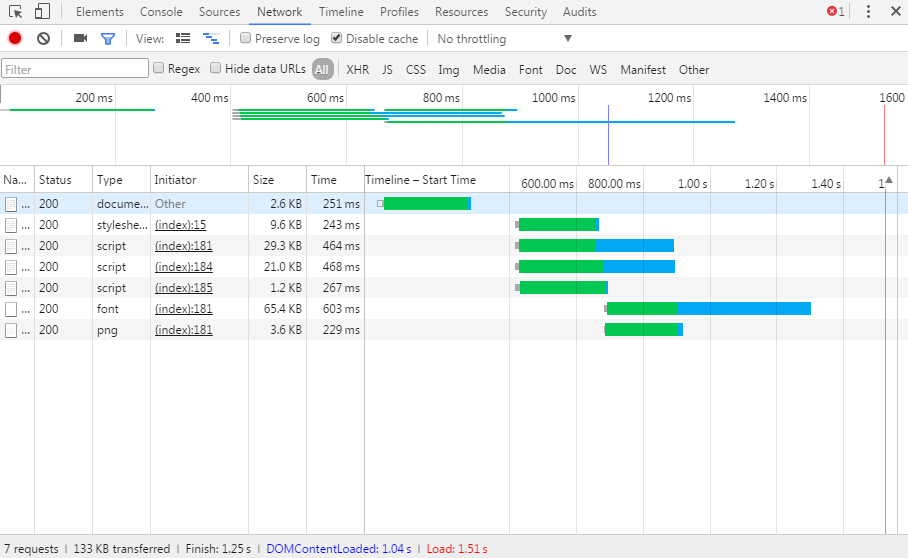
Below is accessing this site without HTTP/2 enabled:
Below is accessing this site with HTTP/2 enabled:
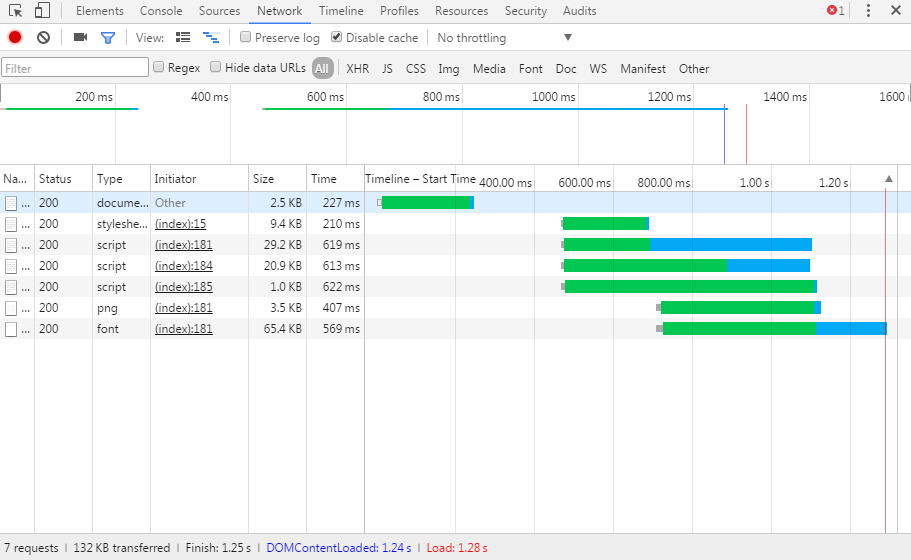
There is an improvement in speed.
