1. Docker’s Network Model
1.1 bridge Mode
bridge mode is used by default, and you can also specify it with --net=bridge.
In bridge mode, containers connect to the same virtual bridge, docker0. docker0 usually occupies the 172.17.0.1/16 subnet. Containers on the same bridge can communicate directly over IP.
1.2 host Mode
Use --net=host to specify host mode.
In host mode, the container shares the Network Namespace with the host. The container uses the host’s IP address directly, and at the same time it can see all the network devices on the host.
1.3 none Mode
Use --net=none to specify none mode.
none mode allocates a Network Namespace for the container but performs no network configuration on it. That is, the container has no network interface, IP, routes, or any other network configuration.
1.4 container Mode
Use --net=container:container_id/container_name to specify container mode.
container mode lets it share network resources such as IP and ports with another container that already exists. Apart from the shared network, the two containers are isolated in every other respect and can communicate through the IO network interface.
2. Kubernetes Network Model
2.2 Basic Principles of Kubernetes Networking
Every Pod has its own independent IP address. All Pods live in a flat network space where they can reach one another directly.
Users do not need to think about how to establish connectivity between Pods, nor about mapping container ports to host ports.
All containers can communicate with other containers without NAT; all nodes can communicate with all containers without NAT; the address of a container is the same address that others see.
2.1 Types of IP in Kubernetes
There are three kinds of IP in Kubernetes:
- Pod IP
IP per Pod. When each Pod starts, a container whose image is gcr.io/google_containers/pause is created automatically. Communication between the inside and the outside of the container is proxied through this container, and its IP is the Pod IP.
- Cluster IP
A Cluster IP is not bound to an actual network interface or virtual device, but is an Iptables rule. For example, a Service Cluster IP is redirected by kube-proxy to its local port using Iptables rules, and then load balanced to the backend Pods.
- External IP
The IPs above are all used for internal communication. For external services, you need to expose an externally reachable IP, usually the physical IP address of a proxy node. Here too, kube-proxy and Iptables are needed to forward traffic to the backend Pods.
3. Network Scenarios in Kubernetes
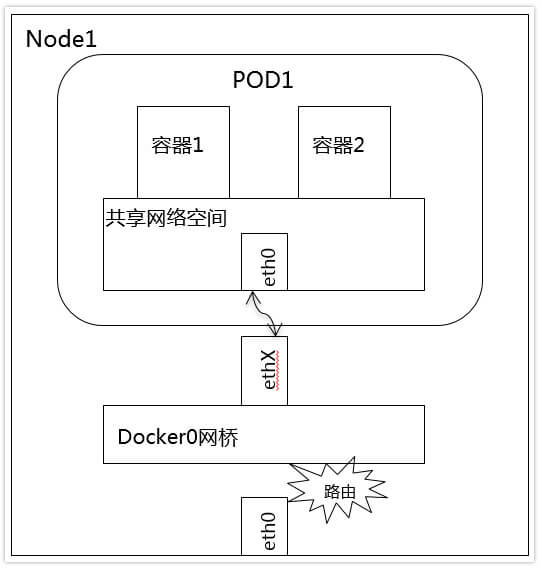
3.1 Containers Within the Same Pod
Containers within a Pod share the same network space, and communication between them can be done with the localhost address plus the container port.
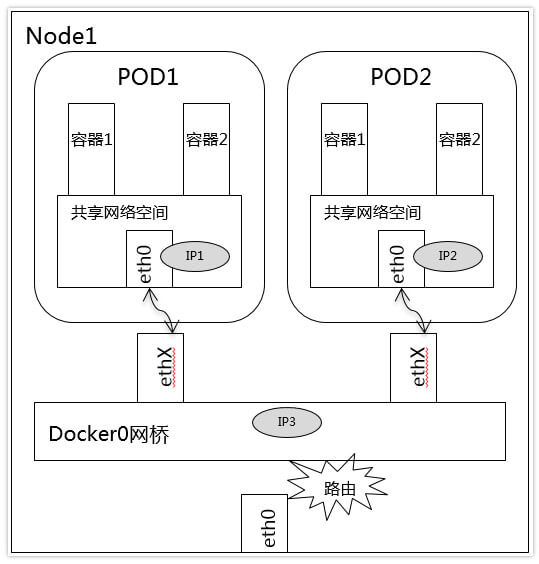
3.2 Containers Within the Same Node
docker0 is the router for Pods within the same Node. The Pods are on the same address subnet and can communicate directly.
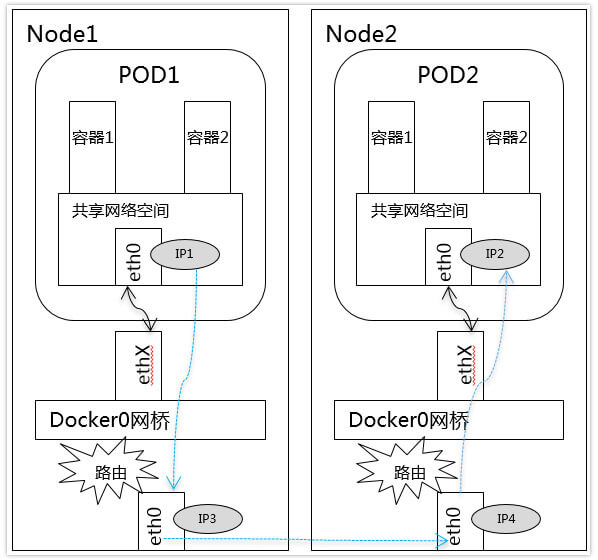
3.3 Containers Across Different Nodes
Container communication across different Nodes is achieved by associating the Pod’s IP with the IP of the Node it runs on.
Communication between Nodes is realized by forwarding through their network interfaces. This requires planning the Pod-IP allocation for the whole cluster, so that Pod IP addresses do not conflict.
4. Two Network Models: CNI and CNM
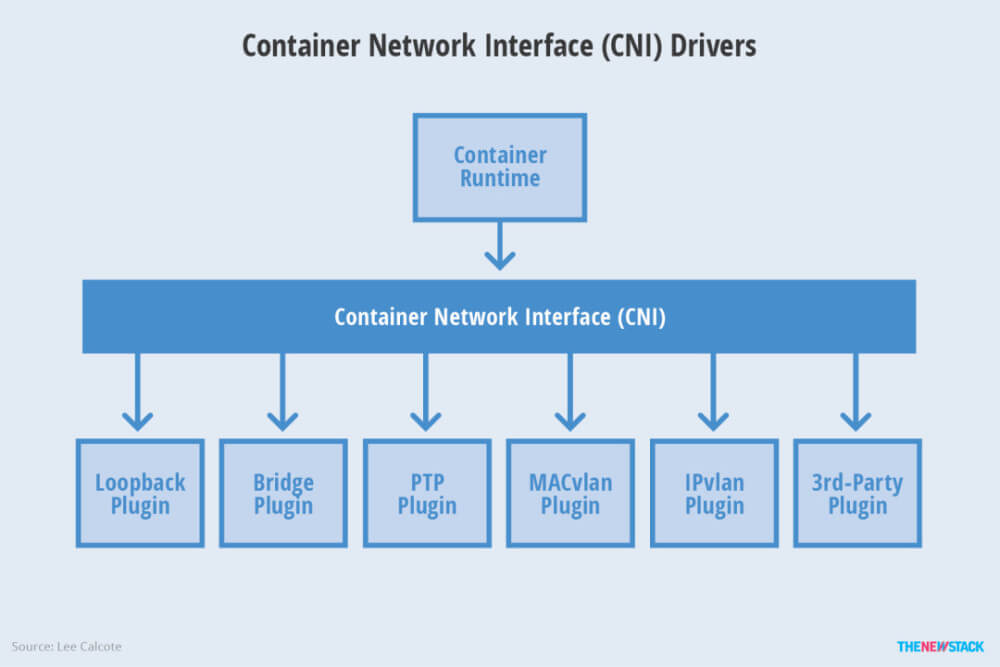
CNM is tightly bound to Docker. CNI is compatible with other container technologies (such as rkt) and higher-level orchestration systems (Kubernetes, Mesos), and its community is more active.
4.1 CNI
CNI is a network model led by CoreOS and Google. This model defines two components, container management and network plugins. They communicate in JSON to implement the container’s network functionality, and the plugin implements the concrete functionality.
4.2 CNM
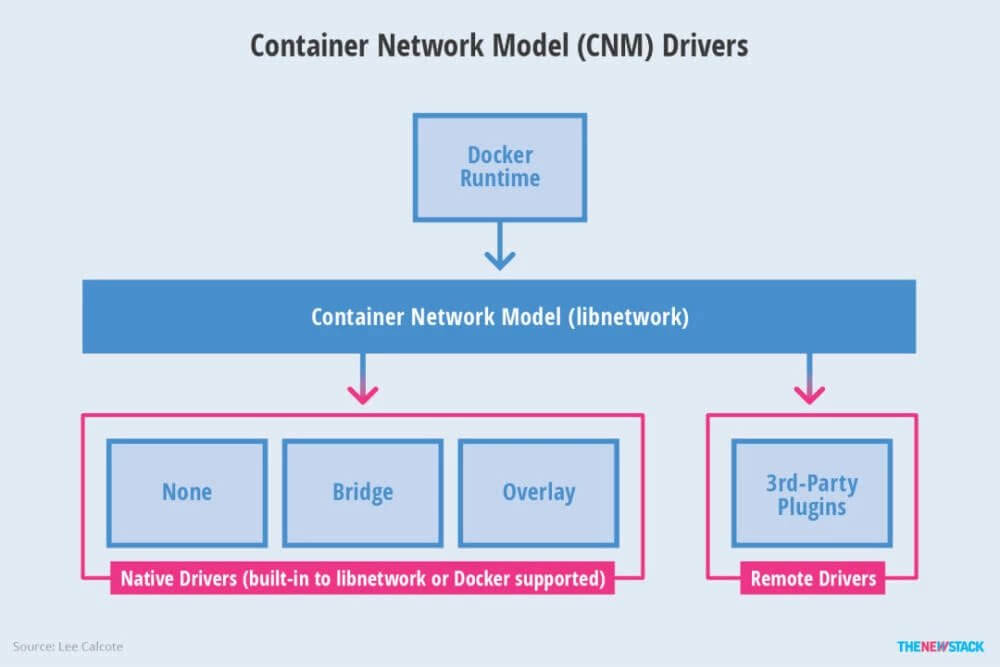
CNM is a network model led by Docker. Libnetwork is the implementation of the CNM specification, and Libnetwork provides the interface between the Docker daemon and network drivers. The network controller is responsible for pairing drivers with networks. Each driver is responsible for managing the networks it owns, including the services provided to that network. Each network has one driver, and multiple drivers can be used simultaneously by containers attached to multiple networks.
4.3 CNI Plugins
- Flannel
Flannel is a project developed by CoreOS. Compared with other plugins, Flannel is easier to install and configure. Flannel uses an Overlay to create the network.
- Calico
Calico is more comprehensive: it not only provides network connectivity between hosts and Pods but also covers network security and management.
Calico uses the BGP routing protocol to route packets between hosts, giving better performance. In addition, Calico provides powerful network policy configuration, allowing users to freely define forwarding rules.
- Canal
Canal attempts to integrate the network layer provided by Flannel with Calico’s network policy features.
