1. Network Isolation in Kubernetes
Kubernetes introduced Network Policy in 1.3. It defines entities through ipBlock, podSelector, and namespaceSelector, and controls their From (Ingress) and To (Egress) traffic behavior.
But Kubernetes only defines the network policy; the actual implementation depends on the network plugin. Today, network plugins such as Calico, Cilium, and Weave Net all support network isolation.
Different Kubernetes versions support network isolation to different degrees. 1.3–1.6 requires enabling extensions/v1beta1/networkpolicies in kube-apiserver; from 1.7 it can be used directly, and 1.8 added Egress and IPBlock support.
If no network policy is configured, then by default traffic behavior is completely unrestricted.
2. Field Attributes of the Network Isolation Object
Here is the example from the official documentation:
 1
 2
 3
 4
 5
 6
 7
 8
 9
10
11
12
13
14
15
16
17
18
19
20
21
22
23
24
25
26
27
28
29
30
31
32
33
34
| apiVersion: networking.k8s.io/v1
kind: NetworkPolicy
metadata:
name: test-network-policy
namespace: default
spec:
podSelector:
matchLabels:
role: db
policyTypes:
- Ingress
- Egress
ingress:
- from:
- ipBlock:
cidr: 172.17.0.0/16
except:
- 172.17.1.0/24
- namespaceSelector:
matchLabels:
project: myproject
- podSelector:
matchLabels:
role: frontend
ports:
- protocol: TCP
port: 6379
egress:
- to:
- ipBlock:
cidr: 10.0.0.0/24
ports:
- protocol: TCP
port: 5978
|
To make the composition of a network policy more intuitive, I drew a diagram:
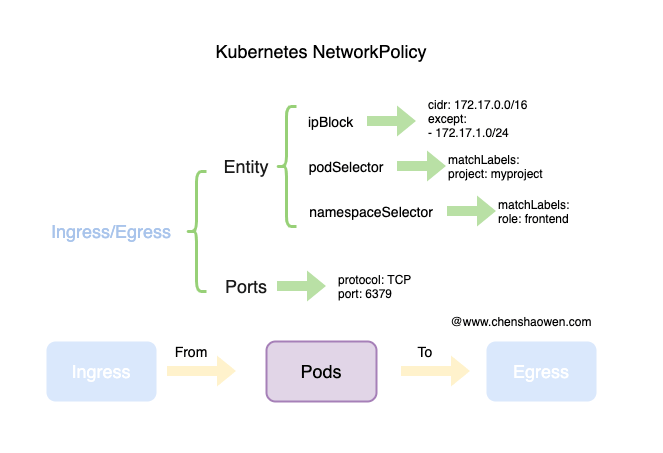
A NetworkPolicy consists of four parts:
- The Pods to be controlled
- The policy type; Ingress and Egress are optional
- The Ingress policy, including the Entity and the port/protocol definitions
- The Egress policy, including the Entity and the port/protocol definitions
There are three types of Entity to choose from: ipBlock specifies an IP range, namespaceSelector specifies the matching namespace, and podSelector specifies the matching Pods.
If multiple NetworkPolicies are defined for the same entity, matching any one of them is enough to let traffic through.
3. Network Isolation Examples
When configuring Ingress and Egress you will encounter two special objects, [] and {}. A [] means it points to no entity at all, and is usually used to deny traffic; a {} means all entities, and is usually used to allow traffic.
Another thing worth noting is that lists express an OR relationship.
1
2
3
4
5
6
| egress:
- ports:
- port: 443
protocol: TCP
- to:
- namespaceSelector: {}
|
This means allowing all TCP traffic on port 443, and at the same time allowing traffic on any port from all namespaces.
1
2
3
4
5
6
| egress:
- ports:
- port: 443
protocol: TCP
to:
- namespaceSelector: {}
|
This means allowing TCP traffic on port 443 destined for all namespaces.
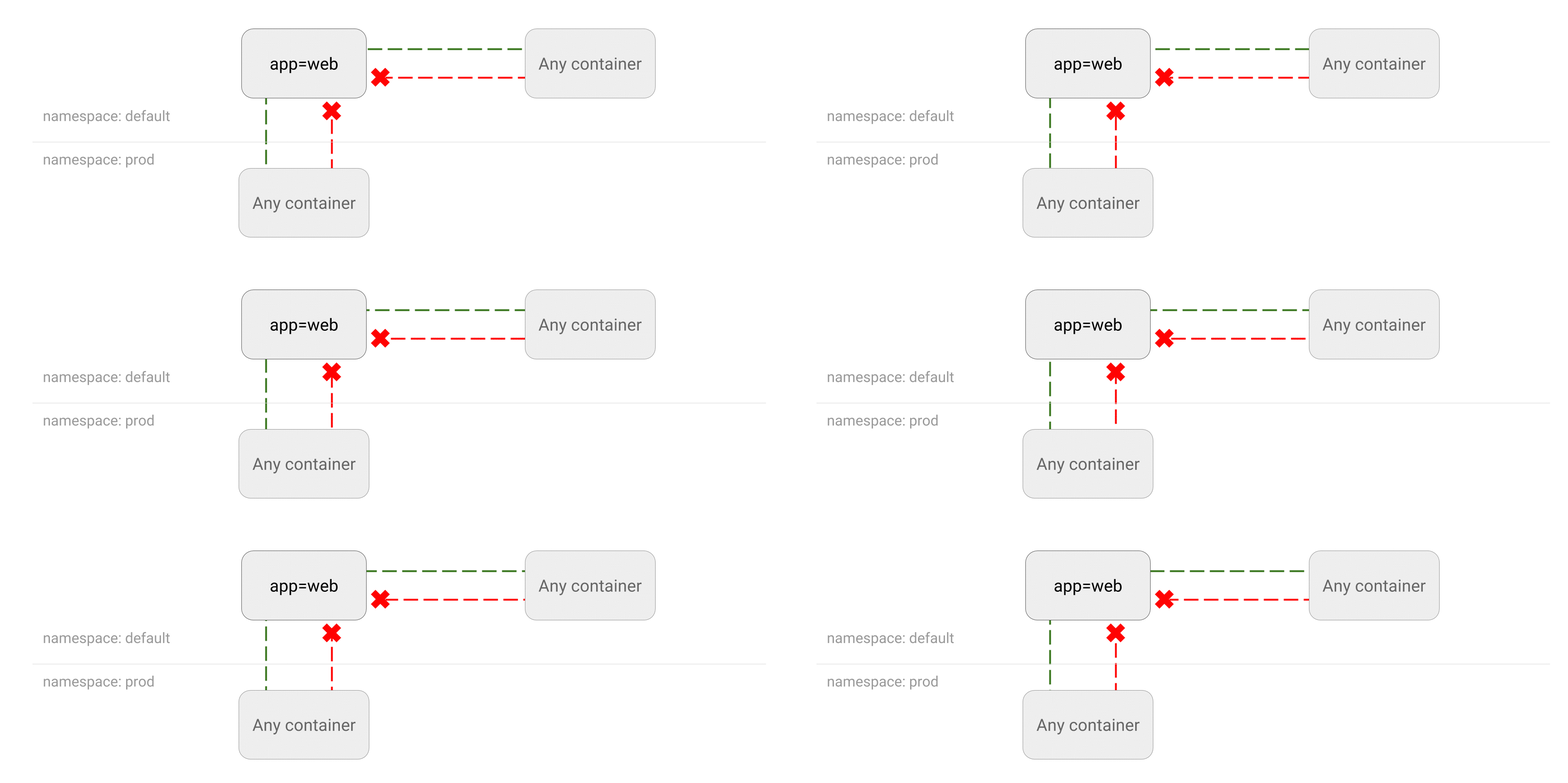
3.1 Deny All Traffic to a Pod
1
| kubectl run --generator=run-pod/v1 web --image=nginx --labels app=web --expose --port 80
|
- Run a temporary Pod to test the network
Verify that by default Kubernetes places no restriction on traffic.
1
2
3
4
5
6
7
| kubectl run --generator=run-pod/v1 --rm -i -t --image=alpine test-$RANDOM -- sh
/ # wget -qO- http://web
<!DOCTYPE html>
<html>
<head>
...
|
- Create the network policy
Pods carrying the app=web label will deny all access traffic. An Ingress of [] means the matched set of entities is empty.
 1
 2
 3
 4
 5
 6
 7
 8
 9
10
11
| cat <<EOF | kubectl apply -f -
kind: NetworkPolicy
apiVersion: networking.k8s.io/v1
metadata:
name: web-deny-all
spec:
podSelector:
matchLabels:
app: web
ingress: []
EOF
|
1
2
3
4
| kubectl run --generator=run-pod/v1 --rm -i -t --image=alpine test-$RANDOM -- sh
/ # wget -qO- --timeout=2 http://web
wget: download timed out
|
1
2
3
| kubectl delete pod web
kubectl delete service web
kubectl delete networkpolicy web-deny-all
|
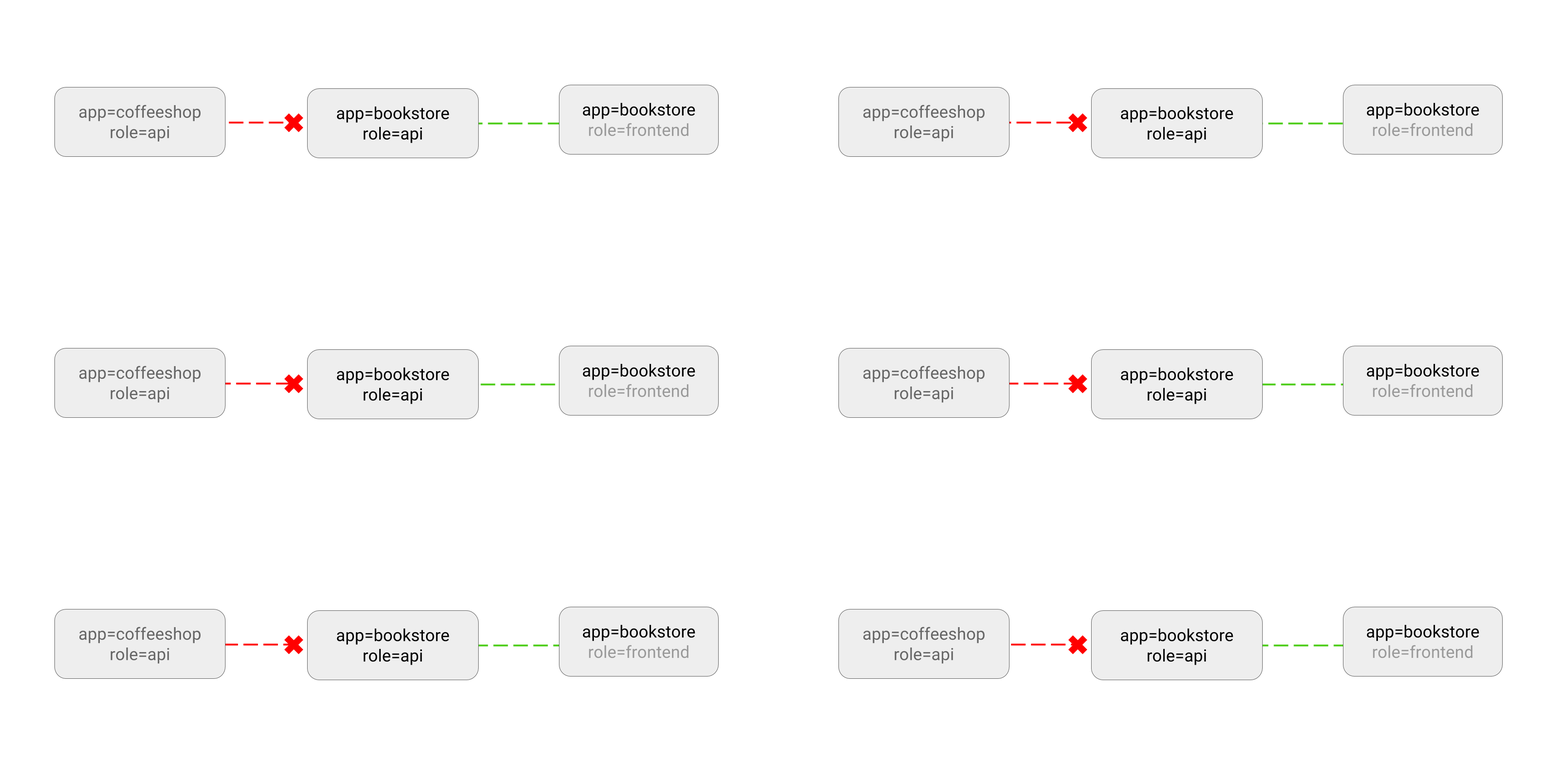
3.2 Allow Only Specified Pods to Access the Application
1
| kubectl run --generator=run-pod/v1 apiserver --image=nginx --labels app=bookstore,role=api --expose --port 80
|
- Create the network policy
Allow only Pods carrying the label app=bookstore to access the application.
 1
 2
 3
 4
 5
 6
 7
 8
 9
10
11
12
13
14
15
16
| cat <<EOF | kubectl apply -f -
kind: NetworkPolicy
apiVersion: networking.k8s.io/v1
metadata:
name: api-allow
spec:
podSelector:
matchLabels:
app: bookstore
role: api
ingress:
- from:
- podSelector:
matchLabels:
app: bookstore
EOF
|
1
2
3
4
| kubectl run --generator=run-pod/v1 test-$RANDOM --rm -i -t --image=alpine -- sh
/ # wget -qO- --timeout=2 http://apiserver
wget: download timed out
|
1
2
3
4
| kubectl run --generator=run-pod/v1 test-$RANDOM --rm -i -t --image=alpine --labels app=bookstore,role=frontend -- sh
/ # wget -qO- --timeout=2 http://apiserver
<!DOCTYPE html>
<html><head>
|
1
2
3
| kubectl delete pod apiserver
kubectl delete service apiserver
kubectl delete networkpolicy api-allow
|
3.3 Allow All Traffic to a Pod
1
| kubectl run --generator=run-pod/v1 web --image=nginx --labels=app=web --expose --port 80
|
- Create the network policy
Setting Ingress to an empty {} means allowing all sources.
 1
 2
 3
 4
 5
 6
 7
 8
 9
10
11
12
13
| cat <<EOF | kubectl apply -f -
kind: NetworkPolicy
apiVersion: networking.k8s.io/v1
metadata:
name: web-allow-all
namespace: default
spec:
podSelector:
matchLabels:
app: web
ingress:
- {}
EOF
|
1
2
3
4
5
| kubectl run --generator=run-pod/v1 test-$RANDOM --rm -i -t --image=alpine -- sh
/ # wget -qO- --timeout=2 http://web
<!DOCTYPE html>
<html><head>
|
1
2
| kubectl delete pod,service web
kubectl delete networkpolicy web-allow-all
|
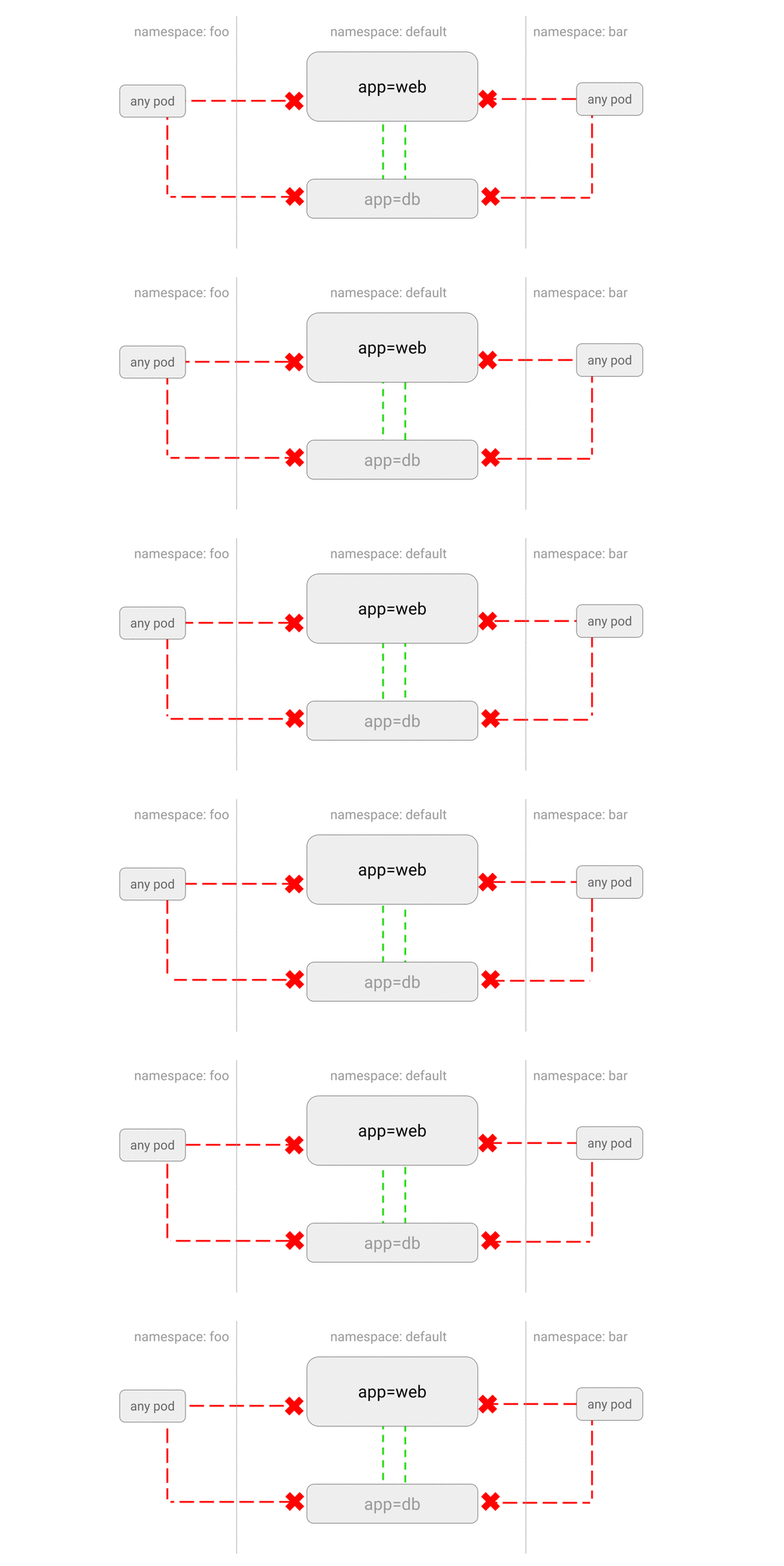
3.4 Deny Traffic from Other Namespaces
1
| kubectl run --generator=run-pod/v1 web --namespace default --image=nginx --labels=app=web --expose --port 80
|
- Create the network policy
Allow only Pods within the default namespace to access each other; Pods from other namespaces are not allowed to access.
 1
 2
 3
 4
 5
 6
 7
 8
 9
10
11
12
13
| cat <<EOF | kubectl apply -f -
kind: NetworkPolicy
apiVersion: networking.k8s.io/v1
metadata:
namespace: default
name: deny-from-other-namespaces
spec:
podSelector:
matchLabels:
ingress:
- from:
- podSelector: {}
EOF
|
1
2
3
4
5
| kubectl create namespace foo
kubectl run --generator=run-pod/v1 test-$RANDOM --namespace=foo --rm -i -t --image=alpine -- sh
/ # wget -qO- --timeout=2 http://web.default
wget: download timed out
|
1
2
3
4
5
| kubectl run --generator=run-pod/v1 test-$RANDOM --namespace=default --rm -i -t --image=alpine -- sh
/ # wget -qO- --timeout=2 http://web.default
<!DOCTYPE html>
<html>
|
1
2
3
4
| kubectl delete pod web
kubectl delete service web
kubectl delete networkpolicy deny-from-other-namespaces
kubectl delete namespace foo
|
3.5 Allow All Namespaces to Access Specified Pods
1
| kubectl run --generator=run-pod/v1 web --image=nginx --namespace default --labels=app=web --expose --port 80
|
- Create the network policy
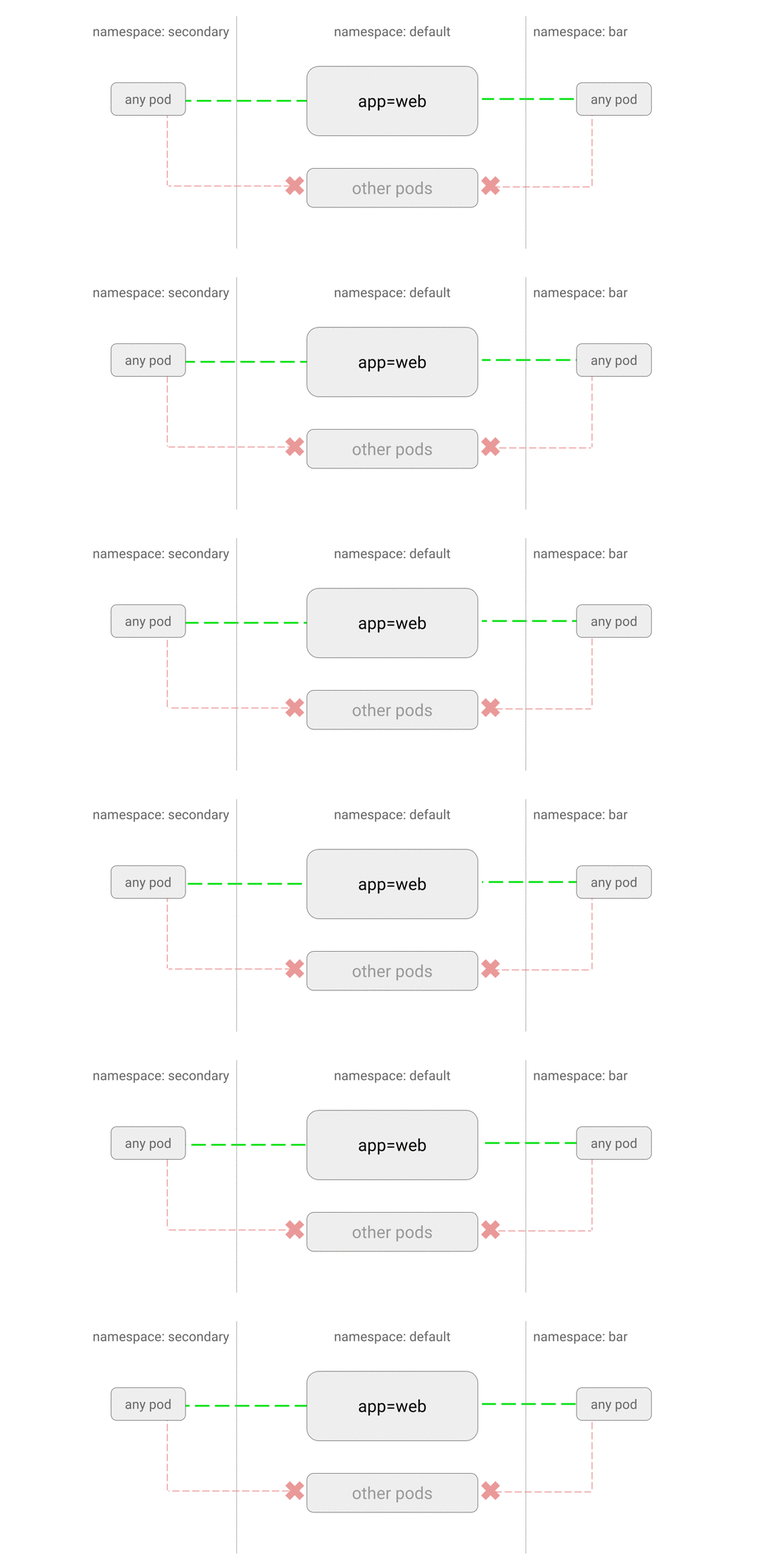
Allow only the Pod labeled app=web under the default namespace to be accessed. Other Pods under default are not allowed to be accessed.
 1
 2
 3
 4
 5
 6
 7
 8
 9
10
11
12
13
14
| cat <<EOF | kubectl apply -f -
kind: NetworkPolicy
apiVersion: networking.k8s.io/v1
metadata:
namespace: default
name: web-allow-all-namespaces
spec:
podSelector:
matchLabels:
app: web
ingress:
- from:
- namespaceSelector: {}
EOF
|
1
2
3
4
5
6
7
| kubectl create namespace secondary
kubectl run --generator=run-pod/v1 test-$RANDOM --namespace=secondary --rm -i -t --image=alpine -- sh
/ # wget -qO- --timeout=2 http://web.default
<!DOCTYPE html>
<html>
<head>
|
1
2
3
4
| kubectl delete pod web -n default
kubectl delete service web -n default
kubectl delete networkpolicy web-allow-all-namespaces -n default
kubectl delete namespace secondary
|
3.6 Allow a Specified Namespace to Access Specified Pods
1
| kubectl run --generator=run-pod/v1 web --image=nginx --labels=app=web --expose --port 80
|
- Create the test namespaces
1
2
3
4
| kubectl create namespace dev
kubectl label namespace/dev purpose=testing
kubectl create namespace prod
kubectl label namespace/prod purpose=production
|
- Create the network policy
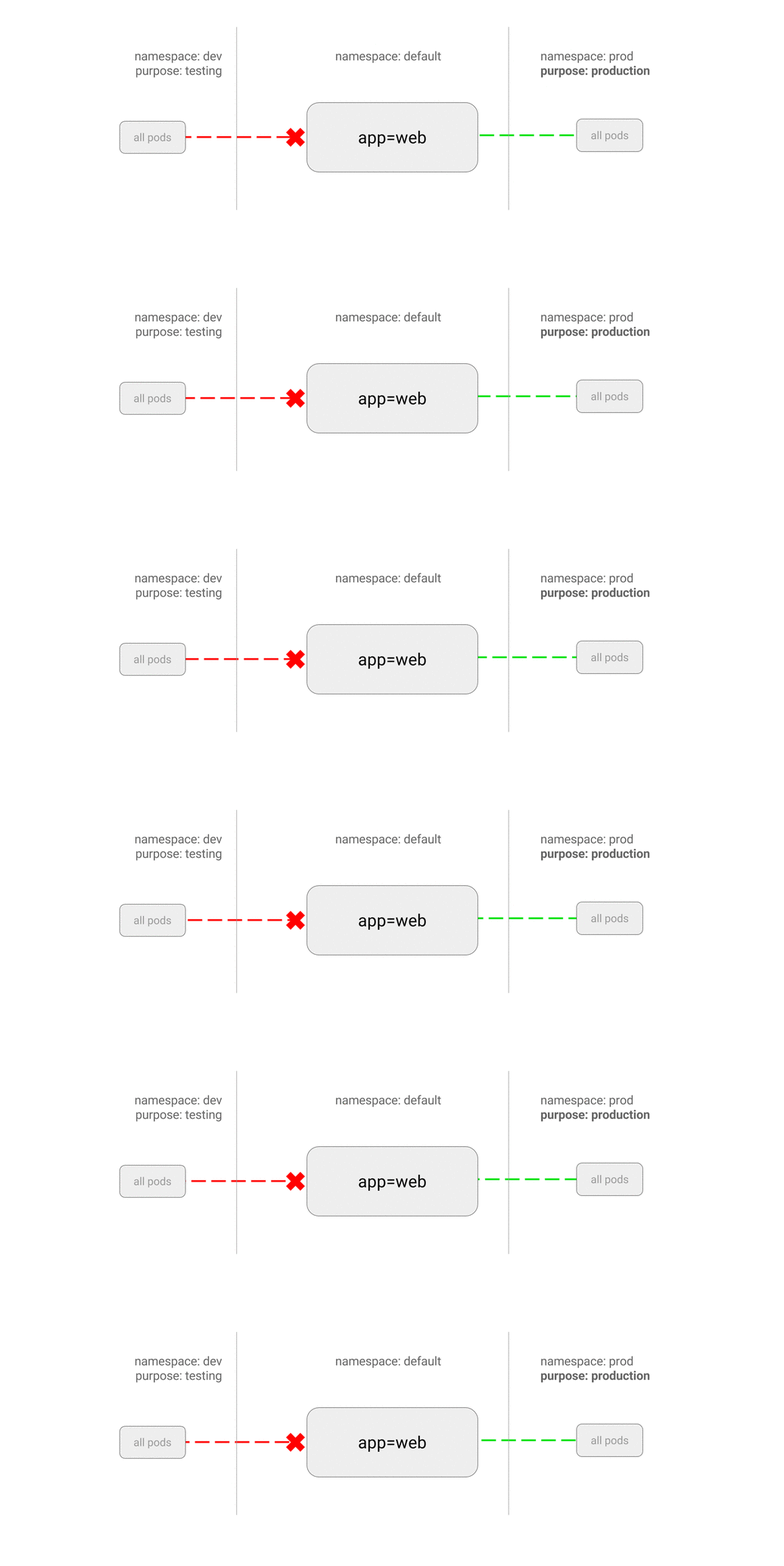
Allow only Pods in namespaces carrying the label purpose=production to access the specified application; other applications are not allowed to access it.
 1
 2
 3
 4
 5
 6
 7
 8
 9
10
11
12
13
14
15
| cat <<EOF | kubectl apply -f -
kind: NetworkPolicy
apiVersion: networking.k8s.io/v1
metadata:
name: web-allow-prod
spec:
podSelector:
matchLabels:
app: web
ingress:
- from:
- namespaceSelector:
matchLabels:
purpose: production
EOF
|
1
2
3
4
| kubectl run --generator=run-pod/v1 test-$RANDOM --namespace=dev --rm -i -t --image=alpine -- sh
/ # wget -qO- --timeout=2 http://web.default
wget: download timed out
|
1
2
3
4
5
6
| kubectl run --generator=run-pod/v1 test-$RANDOM --namespace=prod --rm -i -t --image=alpine -- sh
/ # wget -qO- --timeout=2 http://web.default
<!DOCTYPE html>
<html>
<head>
|
1
2
3
4
| kubectl delete networkpolicy web-allow-prod
kubectl delete pod web
kubectl delete service web
kubectl delete namespace {prod,dev}
|
3.7 Allow Only a Specified Pod in a Specified Namespace to Access the Application
This feature requires Kubernetes 1.11 or later.
1
| kubectl run --generator=run-pod/v1 web --image=nginx --labels=app=web --expose --port 80
|
1
2
| kubectl create namespace other
kubectl label namespace/other team=operations
|
- Create the network policy
The namespace and the Pods must both satisfy the requirements before the specified application can be accessed.
 1
 2
 3
 4
 5
 6
 7
 8
 9
10
11
12
13
14
15
16
17
18
19
| cat <<EOF | kubectl apply -f -
kind: NetworkPolicy
apiVersion: networking.k8s.io/v1
metadata:
name: web-allow-all-ns-monitoring
namespace: default
spec:
podSelector:
matchLabels:
app: web
ingress:
- from:
- namespaceSelector: # chooses all pods in namespaces labelled with team=operations
matchLabels:
team: operations
podSelector: # chooses pods with type=monitoring
matchLabels:
type: monitoring
EOF
|
1
2
3
4
| kubectl run --generator=run-pod/v1 test-$RANDOM --rm -i -t --image=alpine -- sh
/ # wget -qO- --timeout=2 http://web.default
wget: download timed out
|
1
2
3
4
| kubectl run --generator=run-pod/v1 test-$RANDOM --labels type=monitoring --rm -i -t --image=alpine -- sh
/ # wget -qO- --timeout=2 http://web.default
wget: download timed out
|
1
2
3
4
| kubectl run --generator=run-pod/v1 test-$RANDOM --namespace=other --rm -i -t --image=alpine -- sh
/ # wget -qO- --timeout=2 http://web.default
wget: download timed out
|
1
2
3
4
5
6
| kubectl run --generator=run-pod/v1 test-$RANDOM --namespace=other --labels type=monitoring --rm -i -t --image=alpine -- sh
/ # wget -qO- --timeout=2 http://web.default
<!DOCTYPE html>
<html>
<head>
|
1
2
3
4
| kubectl delete networkpolicy web-allow-all-ns-monitoring
kubectl delete namespace other
kubectl delete pod web
kubectl delete service web
|
3.8 Allow Access Only to Specified Ports of a Pod
1
| kubectl run --generator=run-pod/v1 apiserver --image=ahmet/app-on-two-ports --labels=app=apiserver
|
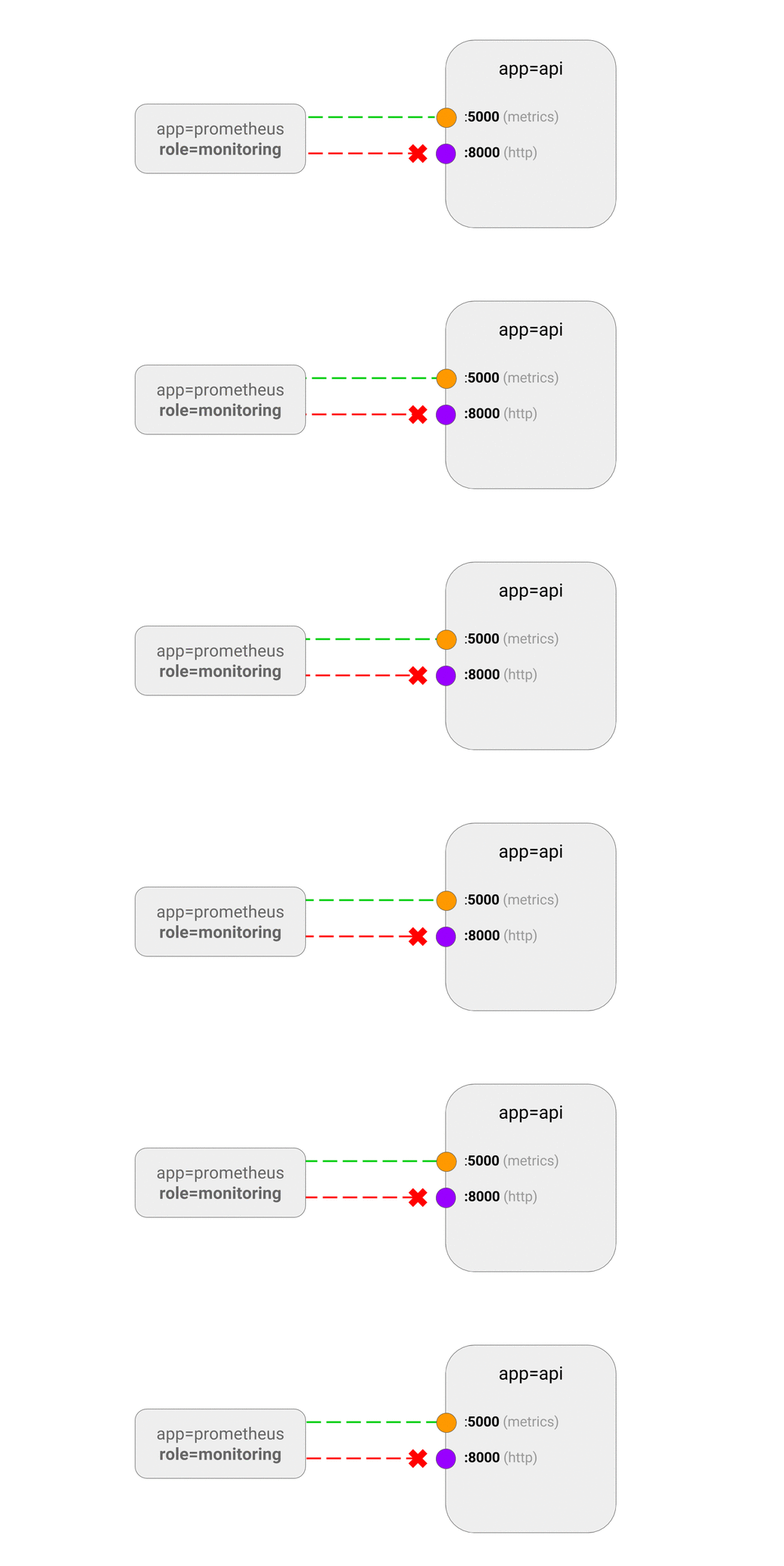
This application returns a Hello response on port 8000 and monitoring data on port 5000. Next, expose the Pod through a Service:
1
| kubectl create service clusterip apiserver --tcp 8001:8000 --tcp 5001:5000
|
- Create the network policy
Allow only Pods carrying the label role=monitoring to access port 5000 of the application.
 1
 2
 3
 4
 5
 6
 7
 8
 9
10
11
12
13
14
15
16
17
| cat <<EOF | kubectl apply -f -
kind: NetworkPolicy
apiVersion: networking.k8s.io/v1
metadata:
name: api-allow-5000
spec:
podSelector:
matchLabels:
app: apiserver
ingress:
- ports:
- port: 5000
from:
- podSelector:
matchLabels:
role: monitoring
EOF
|
1
2
3
4
5
6
7
| kubectl run --generator=run-pod/v1 test-$RANDOM --rm -i -t --image=alpine -- sh
/ # wget -qO- --timeout=2 http://apiserver:8001
wget: download timed out
/ # wget -qO- --timeout=2 http://apiserver:5001/metrics
wget: download timed out
|
1
2
3
4
5
6
7
8
9
| kubectl run --generator=run-pod/v1 test-$RANDOM --labels=role=monitoring --rm -i -t --image=alpine -- sh
/ # wget -qO- --timeout=2 http://apiserver:8001
wget: download timed out
/ # wget -qO- --timeout=2 http://apiserver:5001/metrics
http.requests=1
go.goroutines=5
go.cpus=4
|
1
2
3
| kubectl delete pod apiserver
kubectl delete service apiserver
kubectl delete networkpolicy api-allow-5000
|
3.9 Use Multiple Selectors to Specify Access Sources
1
| kubectl run --generator=run-pod/v1 db --image=redis:4 --port 6379 --expose --labels app=bookstore,role=db
|
- Create the network policy
You can configure multiple allowed sources at the same time; matching just one of them is enough to gain access.
 1
 2
 3
 4
 5
 6
 7
 8
 9
10
11
12
13
14
15
16
17
18
19
20
21
22
23
24
25
| cat <<EOF | kubectl apply -f -
kind: NetworkPolicy
apiVersion: networking.k8s.io/v1
metadata:
name: redis-allow-services
spec:
podSelector:
matchLabels:
app: bookstore
role: db
ingress:
- from:
- podSelector:
matchLabels:
app: bookstore
role: search
- podSelector:
matchLabels:
app: bookstore
role: api
- podSelector:
matchLabels:
app: inventory
role: web
EOF
|
1
2
3
4
5
6
| kubectl run --generator=run-pod/v1 test-$RANDOM --labels=app=inventory,role=web --rm -i -t --image=alpine -- sh
/ # nc -v -w 2 db 6379
db (10.59.242.200:6379) open
(works)
|
1
2
3
4
5
6
| kubectl run --generator=run-pod/v1 test-$RANDOM --labels=app=other --rm -i -t --image=alpine -- sh
/ # nc -v -w 2 db 6379
nc: db (10.59.252.83:6379): Operation timed out
(traffic blocked)
|
1
2
3
| kubectl delete pod db
kubectl delete service db
kubectl delete networkpolicy redis-allow-services
|
3.10 Deny a Pod’s Egress Traffic
1
| kubectl run --generator=run-pod/v1 web --image=nginx --port 80 --expose --labels app=web
|
- Create the network policy
Deny any egress traffic for Pods carrying the label app=foo.
 1
 2
 3
 4
 5
 6
 7
 8
 9
10
11
12
13
| cat <<EOF | kubectl apply -f -
apiVersion: networking.k8s.io/v1
kind: NetworkPolicy
metadata:
name: foo-deny-egress
spec:
podSelector:
matchLabels:
app: foo
policyTypes:
- Egress
egress: []
EOF
|
1
2
3
4
5
6
7
| kubectl run --generator=run-pod/v1 --rm --restart=Never --image=alpine -i -t -l app=foo test -- ash
/ # wget -qO- --timeout 1 http://web:80/
wget: bad address 'web:80'
/ # wget -qO- --timeout 1 http://www.example.com/
wget: bad address 'www.example.com'
|
1
2
| kubectl delete pod,service web
kubectl delete networkpolicy foo-deny-egress
|
3.11 Deny External Egress Traffic
1
| kubectl run --generator=run-pod/v1 web --image=nginx --port 80 --expose --labels app=web
|
- Create the network policy
Allow Pods carrying the label app=foo to access services on all port 53, and at the same time allow access to applications in all namespaces. Here ports and to are in an OR relationship.
 1
 2
 3
 4
 5
 6
 7
 8
 9
10
11
12
13
14
15
16
17
18
19
20
| cat <<EOF | kubectl apply -f -
apiVersion: networking.k8s.io/v1
kind: NetworkPolicy
metadata:
name: foo-deny-external-egress
spec:
podSelector:
matchLabels:
app: foo
policyTypes:
- Egress
egress:
- ports:
- port: 53
protocol: UDP
- port: 53
protocol: TCP
- to:
- namespaceSelector: {}
EOF
|
 1
 2
 3
 4
 5
 6
 7
 8
 9
10
| kubectl run --generator=run-pod/v1 --rm --restart=Never --image=alpine -i -t -l app=foo test -- ash
/ # wget -O- --timeout 1 http://web:80
Connecting to web (10.59.245.232:80)
<!DOCTYPE html>
<html>
/ # wget -O- --timeout 1 http://www.example.com
Connecting to www.example.com (93.184.216.34:80)
wget: download timed out
|
1
2
| kubectl delete pod,service web
kubectl delete networkpolicy foo-deny-external-egress
|
4. References
