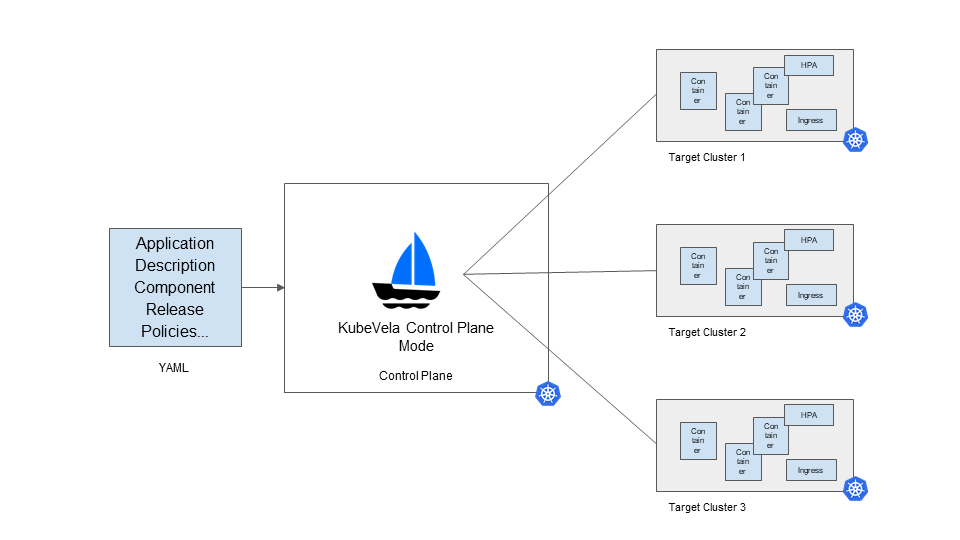
Kubevela is currently at version 1.1. We usually consider 1.x releases to be relatively stable and safe to try in production. Through continuous tracking and learning, I have also come to appreciate some of the things Kubevela does well. This is a summary document.
1. What Problem Kubevela Solves
- Aimed at platform developers
Several roles need to be distinguished: development, operations, and operations development. Development faces business requirements, operations faces business stability, and operations development faces efficiency. Operations development provides all kinds of tools to break down the barriers between development and operations, satisfying fast business launches while also guaranteeing business stability.
Kubevela holds little appeal for development and operations, but it can be a real eye-opener for operations development. That is because Kubevela can significantly raise a team’s platform level, putting it directly into the mainstream tier.
- Managing the application lifecycle
Kubevela provides a solution for managing the application lifecycle: application definitions via applications, deployment via appdeployments, version management via applicationrevisions, rollback via approllouts, and canary release via traits and approllouts. Using these CRD objects, a large portion of business requirements can be covered.
- Making workloads and traits componentized
A Component provides the definition of a workload, such as Deployment or CloneSet. A Trait provides the definition of a characteristic, such as Ingress or Istio. Through these two abstractions, Kubevela lets platform developers assemble and customize a platform suited to their own business.
The orchestration capability provided by Workflow adds more possibilities for integrating all kinds of cloud native components, and can even extend into the CICD domain.
2. Challenges Facing Applications in a Multi-Cluster Setting
- A unified view
On an application-oriented platform, switching clusters is a very poor user experience. What we need is not to deploy a separate management service on every cluster and then view data from different clusters by changing the data source.
We should be application-centric: a cluster is merely an attribute of an application, and an application must not be made to belong to some cluster. A unified view means providing the user with a single UI that contains a complete application description, the runtime it lives on, a live service profile, and other information.
- The definition of an application
In the world, no two platform teams define an application the same way.
Which attributes and which characteristics an application should contain, which fields should be constrained and how — many details need to be weighed and considered. Of course, you can also choose to carry technical debt, defer the problem, and ship a few versions quickly. But that road is long and hard, and it only gets harder.
Every team attaches some business-specific attributes when defining an application. Self-rescue is impossible; complex business requirements will not give platform developers a moment to breathe.
Therefore, the emergence of OAM is an opportunity — a chance to unify application lifecycle management (ALM). Although Kubernetes Applications before it died on the beach, Kubevela is like a star in the night sky, offering boundless hope.
- Phased rollout
Phased rollout has two dimensions: a multi-replica application within a single cluster, and the same application across multiple clusters.
Multiple replicas in a single cluster are not all updated at once; they need a phased rollout. This process is called a rollout, and it is a gradual ramping-up process.
Services spread across multiple clusters or regions also need an observation period when updating, and cannot just show hand all at once.
3. Multi-Cluster Applications Under AppDeployment
Here the main object is AppDeployment, used to publish an application across multiple clusters.
- Adding multiple child clusters on the primary cluster
You need to configure multiple cluster contexts within the same kubeconfig, then simply follow the official documentation. Here two clusters, prod-cluster-1 and prod-cluster-2, have been added. Below is the command to view the clusters:
| |
- Defining an Application
You need to define components and traits ahead of time. Below is the application definition:
| |
Because of the app.oam.dev/revision-only: "true" annotation, the related resources will not be created. Here we are only defining the application, and there is no need to create the corresponding workload.
- Modifying the application version to produce different application versions
To get closer to a production environment, we modify the parameters of the Application above, for example the environment variables and the image version, to produce different application versions.
| |
In the end, the application versions distributed to each cluster are produced from these. These versions are roughly the same but differ in small details, similar to everyday application updates.
- AppDeployment distributes applications across clusters
AppDeployment provides a perspective closer to how users understand an application. An application contains not only the definition of the application but also the choice of runtime. Here cluster-test-app-v1 is deployed to the prod-cluster-1 cluster with 3 replicas, while cluster-test-app-v2 is deployed to the prod-cluster-2 cluster with 4 replicas.
| |
4 Multi-Cluster Applications Under Workflow
Workflow is a feature newly added in a recent Kubevela release. Here it is mainly used to generate the cross-cluster resource objects that OCM needs.
4.1 Configuring Open Cluster Management (OCM)
- Installing Open Cluster Management with the vela command
| |
- Adding multiple child clusters on the primary cluster
You need to configure multiple cluster contexts within the same kubeconfig. On the dev1 cluster, add the kubeconfig for the dev2 cluster.
| |
- Configuring environment variables
Use dev1 (the primary cluster) to manage dev2 (the child cluster). On the primary cluster, run the commands:
| |
- Finding the Token for adding a child cluster
On the primary cluster, run the command:
| |
Take the token value from it and Base64-decode it to obtain a valid hub-token value.
- Adding a child cluster
Here hub-apiserver is the access address of the primary cluster’s kube-apiserver. On the primary cluster, run the command:
| |
- Accepting the new cluster join request
On the primary cluster, run the command:
| |
- Viewing the managed clusters
On the primary cluster, run the command:
| |
- Installing Kubevela rollout on the managed cluster
On the child cluster, run the commands:
helm repo add kubevela https://charts.kubevela.net/core
helm install vela-rollout  --create-namespace -n vela-system kubevela/vela-rollout
4.2 Creating a WorkflowStepDefinition to Describe Cross-Cluster Resources
On the primary cluster, use Workflow to define cross-cluster resources in a WorkflowStepDefinition. Below is one of the resources required:
| |
Here ManifestWork defines the configuration and resource information to be distributed to a given cluster. Only dispatch-traits is defined here; correspondingly we also need to define dispatch-comp-rev.
The process of distributing resources can be understood as: packaging the resources to be distributed into a ManifestWork object on the primary cluster, distributing it through OCM to an AppliedManifestworks object on the child cluster, and then having the child cluster extract the resources and create them.
4.3 Creating an Application to Distribute
Here Application is used to define an application on the primary cluster dev1 and distribute it to the child cluster dev2.
| |
In the OCM multi-cluster application scenario, the child cluster needs the Kubevela rollout component deployed. Therefore, Kubevela can control the rollout process on the child cluster more finely, for example the ratio and number of each batch during the rolling process.
4.4 Problems You May Encounter
- OCM reports an error when creating resources on the child cluster
E0905 14:36:23.461052 1 base_controller.go:270] "ManifestWorkAgent" controller failed to sync "nginx-server-traits", err: rollouts.standard.oam.dev "nginx-server" is forbidden: User "system:serviceaccount:open-cluster-management-agent:klusterlet-work-sa" cannot get resource "rollouts" in API group "standard.oam.dev" in the namespace "default"
The message says permissions are insufficient, so on the child cluster I directly bound admin permissions to klusterlet-work-sa.
| |
5. Summary
This post mainly discusses Kubevela applications in a multi-cluster setting. The main points are as follows:
- Multi-cluster applications differ from single-cluster ones: they cannot be implemented by simply switching the data source, and they place higher demands on interaction design. A multi-cluster application platform needs a unified view to inspect the service profile of an application across clusters, be application-centric, treat clusters as attributes, and distinguish the primary from the secondary.
- AppDeployment is a good abstraction that can also inspire platform design, and you can still see traces of KubeFed in it. AppDeployment presents multi-cluster applications from the user’s perspective, but currently the granularity of its workload handling is too coarse: it targets the entire Application, meaning it deletes, updates, and creates workloads in full. To use it in production, you still need to pair it with rollout for updates.
- Integrating Kubevela multi-cluster applications under OCM via Workflow is more extensible, and later it can be swapped for other multi-cluster components, such as Karmada. Leveraging OCM’s distribution capability plus the Kubevela rollout component on the child cluster, we can achieve phased rollout and rolling updates.
In fact, multi-cluster applications require considering not only the distribution of the application description, but more importantly the rolling update of workloads, the unified allocation of resources, intelligent scheduling of applications, automatic scaling of applications, and the status profile of services. Kubevela targets the visible application, but supporting an entire application platform still requires more underlying components.
