1. What MPI Is
MPI, the Message Passing Interface, is a communication protocol used for parallel computing.
MPI provides a set of standardized interfaces for transferring data between different compute nodes, and is widely used in scientific computing, machine learning, deep learning, and other fields.
MPI has multiple implementations; the common ones are MPICH and OpenMPI. MPICH is led by Argonne National Laboratory and is the basis for various commercially customized versions, so MPICH should not simply be regarded as a single product but as a family of derived versions, such as MVAPICH and Intel MPI. OpenMPI is a version jointly developed by several research institutions (including UTK, IU, Cisco, NVIDIA, and others).
For a concrete choice, refer to:
- Open MPI
Suited to most Linux clusters, especially scenarios that need high-performance network support (such as InfiniBand, RoCE) and GPU support. Commonly used in HPC and deep learning clusters.
- MPICH
A general-purpose, highly compatible option for Linux systems, suitable for standard MPI applications. If a system wants to migrate between different MPI implementations, MPICH is the safe choice.
- MVAPICH
Based on MPICH, optimized specifically for high-performance networks (such as InfiniBand and RDMA), suited to scientific computing tasks and GPU tasks with high network bandwidth demands.
- Intel MPI
Optimized specifically for Intel hardware, suited to Intel processors and Intel Omni-Path networks, and supports mainstream Linux systems.
2. MPI Communication Primitives
2.1 Point-to-Point, P2P
A way for one process to communicate with another specified process.
- send
| |
Send a specified amount of data to the specified process.
- receive
| |
Receive a specified amount of data from the specified process.
2.2 Collective Communication, CC
A way for one process to communicate with all processes.
- barrier
Wait for all processes to reach a certain point.
| |
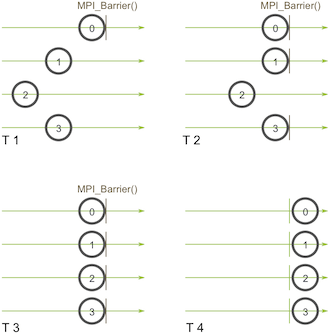
After process 0 calls MPI_Barrier at time T1, it must wait for all processes to reach the MPI_Barrier call before they can all continue executing together.
- broadcast
| |
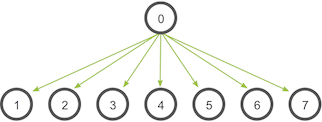
The root process, process 0, sends one copy of the data to all processes.
- scatter
| |
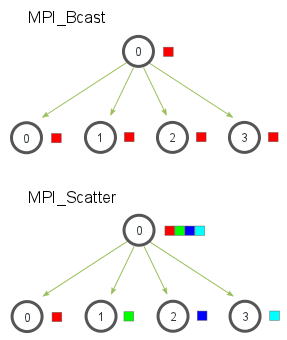
Unlike broadcast, which sends a complete copy of the data to all processes, scatter splits the data into multiple parts and sends them to different processes.
- gather
| |
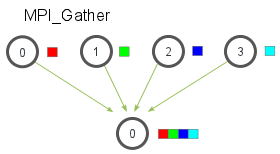
The opposite of scatter, gather receives multiple pieces of data into a single process.
- allgather
| |
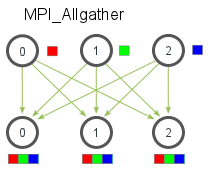
allgather does not need a root to be specified; all processes receive the data of every other process.
- reduce
| |
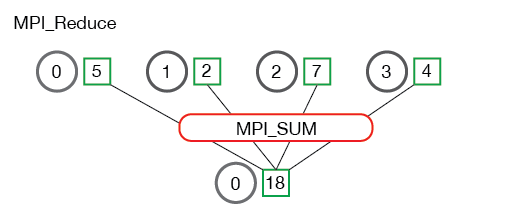
When performing a reduce operation, an op must be specified; this operation is called a reduction. In the figure above, the reduction operation is a sum.
- allreduce
| |
Unlike reduce, allreduce does not need a root to be specified, and all processes receive the reduced result.
3. Installing MPICH\OpenMPI
To install MPICH, run
| |
To install OpenMPI, run
| |
You will get compilation commands and run commands; whether you install MPICH or OpenMPI, you get a similar set of command-line tools.
3.1 MPI Compilation Commands
- mpicc
Compile MPI programs with the C compiler, ensuring the compiled program can use the MPI communication library.
- mpic++, mpiCC, mpicxx
Compile MPI programs with the C++ compiler.
- mpif77, mpif90, mpifort
Compile MPI programs with different Fortran compilers.
3.2 MPI Run Commands
- mpirun
Run MPI programs and manage the startup of MPI processes.
- mpiexec
Similar to mpirun, but more compliant with the MPI standard.
- mpiexec.xxx, mpirun.xxx
MPI program managers for specific environments and specific tools.
4. MPI Program Example
4.1 Writing an MPI Python Program
| |
Save the following code:
| |
In some collective communication scenarios, you sometimes want to do something special for one particular process; in that case you use rank to check whether the current process’s number matches the condition and then perform the operation.
4.2 Configuring Passwordless SSH
- Configure
/etc/hosts
Edit the /etc/hosts file and add mappings from hostname to IP address.
| |
- Generate an SSH key
| |
- Configure mutual passwordless access between hosts
| |
4.3 Installing Dependencies
- Install MPI
All hosts should install the same MPI implementation and version.
| |
Here you need to install one extra dependency package, libopenmpi-dev, which is used to compile and install mpi4py.
- Install the mpi4py and numpy dependencies
| |
- Copy the mpi.py file to every host
| |
4.4 Creating the Hostfile
| |
Here slots means the maximum number of processes each host can start. In general, slots is the number of CPU cores.
Besides using a hostfile to specify hosts, you can also use the -host parameter to specify hosts and their slots values.
| |
host-1:1 means host-1 can only start one process; the number after the colon is the maximum number of processes.
4.5 Running the MPI Program
- Multiple hosts, multiple processes
| |
- Single host, multiple processes
| |
- mpi assigns processes to each host in order, giving each host up to its slots count
Make the number of available slots far larger than the number of processes and observe MPI’s process allocation strategy.
| |
After many runs, the result was always that host-1 was assigned 2 processes, host-2 was assigned 2 processes, and host-3 was assigned none. This shows that MPI fills each host in the order the hosts are provided, giving each host as many processes as it can take.
