Sharing with you some of the tech news I have been following over the past month. There is also some interesting content here too: tools, learning resources, tips, and more.
Frontend
Webpack
Back in February this year, Webpack had already released version 4.0.0. Webpack 4 no longer supports Node.js 4, and it brings a big improvement in compilation speed. At the same time, Webpack 4 removed the commonchunk plugin and switched to the optimization property for more flexible configuration; this is probably the most complicated part of the upgrade.
Fastpack
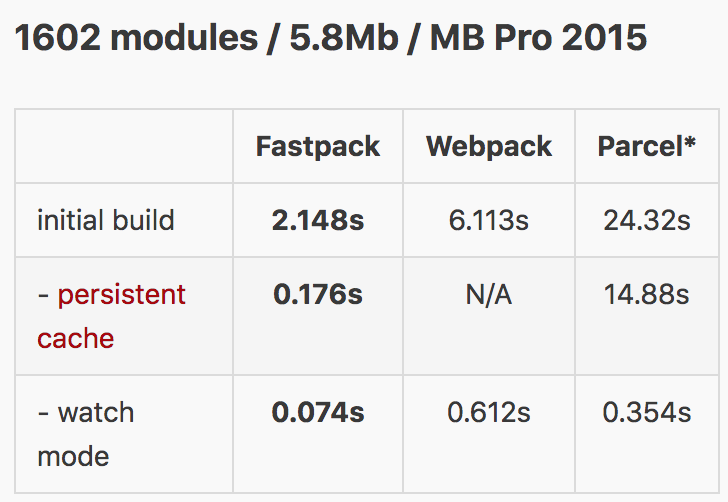
Fastpack is a JavaScript application bundler, with the goal of bundling a medium-sized application (about 1,000 modules) in less than 1000 ms and incremental rebundling in under 100 ms.
The benchmark results are below:
Vue CLI 3.0
Evan You announced the official release of Vue CLI 3.0 on Medium.
The core goal of Vue CLI is to provide build setup as a pre-configuration built on Webpack 4. The goal is to minimize the number of times developers have to configure things.
Official documentation: https://cli.vuejs.org/zh/guide/
Backend
Python
Version updates: Python 3.7.0 & 3.6.6 have been released
Learning resources:
- RealPython: Socket Programming in Python (Guide): https://realpython.com/python-sockets/
- RealPython: Python Code Quality: Tools & Best Practices: https://realpython.com/python-code-quality/
- Python 101 : The subprocess module: https://python101.pythonlibrary.org/intro.html
Python-related Tools
- Jupyter Notebook opens as a web page, where you can write and run code directly in the page, and the results of running the code are displayed right below the code block. Jupyter Notebook 101 Preview Chapter: http://www.blog.pythonlibrary.org/
- PyCharm 2018.2 Out Now, related link: https://blog.jetbrains.com/pycharm/2018/07/pycharm-2018-2-out-now/
- Nice Vim trick for Python code: https://jugad2.blogspot.com/2018/08/nice-vim-trick-for-python-code.html
- Seaborn is a data visualization tool that wraps a higher-level API on top of matplotlib: https://seaborn.pydata.org/
celery
2018.07.18 version update: v4.2.1
Related link: http://docs.celeryproject.org/en/latest/whatsnew-4.2.html
The updated features are as follows:
| |
redis
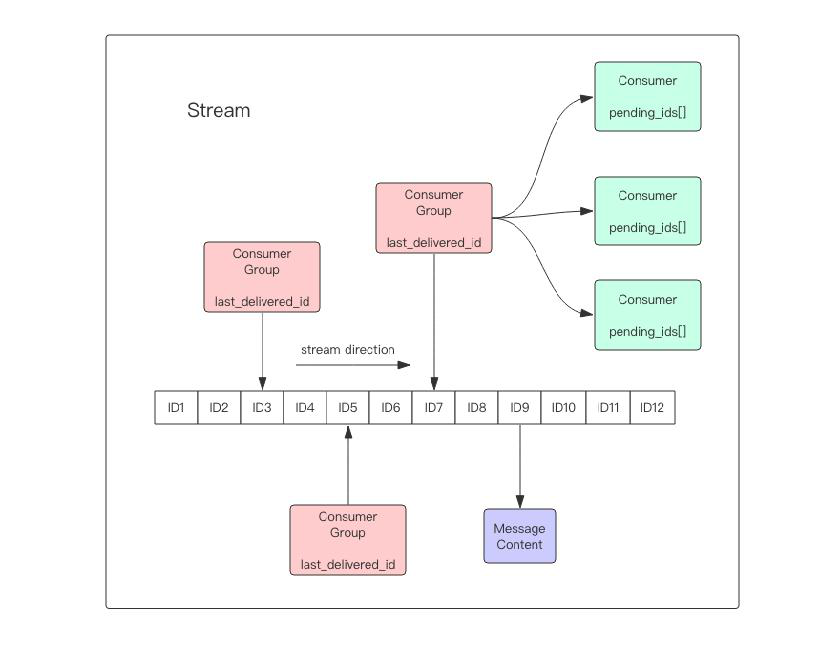
Redis recently released version 5.0, which adds a new data structure called stream — a persistable message queue that supports multicast — and the author of Redis admitted that the design of stream borrowed heavily from Kafka.
Tools
Consoles on Windows
On Windows, using CMD and PowerShell usually cannot fully meet development needs. Here are a few console tools:
| Feature | Cygwin | MinGW/MSYS | MSYS2 |
|---|---|---|---|
| GNU or not | No | Yes | Yes |
| Broader software support | Supports the vast majority of GNU software | Supports common software; Git, Vim, and similar need separate support | Supports most GNU software |
| More Linux-like | Cygwin on Windows is like Wine on Linux | Implements the main Linux programs such as Bash | Native 64/32-bit support |
| GCC compilation | Includes MinGW32 cross-compilation, supporting both compilation of programs that depend on cygwin.dll and standalone Windows programs; can compile Linux applications directly | Supports compiling standalone Windows programs | Supports compiling standalone Windows programs |
| Chinese language support | Supports Chinese display and input methods directly | Requires configuration to support Chinese display and input; deleting one Chinese character takes two deletes | Supports Chinese display and input methods, Chinese help system, and Chinese prompts (for some software) |
| Speed | Slow | Fast | Fast |
Package Manager on Windows: chocolatey
Official website: https://chocolatey.org/
How do you install chocolatey? Run the following command with administrator privileges:
| |
Interesting Stuff
How Chrome Renders an HTML Document into Pixels on the Page
Video: https://drive.google.com/file/d/1Ky59m-F79ULs4ydMbD4Mp1dBXvs_eDes/view
Tips
Solving Cross-Origin Issues in Webpack with a Proxy
During local development and debugging, you usually need to access online data, http://localhost:8008/api -> http://online.com/api. A proxy can effectively solve the cross-origin problem. By configuring a proxy, you can effectively avoid the security risks left behind by django-cors-headers.
| |
