1. Hardware
1.1 CPU
- Support for AVX/AVX-512, used for erasure coding computation and SIMD operations
- Support for AES-NI, used for object encryption
| Total storage per node | Recommended vCPU count |
|---|---|
| Up to 1 TB | 8 |
| Up to 10 TB | 16 |
| Up to 100 TB | 32 |
| Up to 1 PB | 64 |
| More than 1 PB | 128 |
1.2 Memory
More is better where possible, since it raises concurrency and increases the Page Cache hit rate.
| Disk count | 32 GiB | 64 GiB Memory | 128 GiB Memory | 256 GiB Memory | 512 GiB Memory |
|---|---|---|---|---|---|
| 4 disks | 1,074 | 2,149 | 4,297 | 8,595 | 17,190 |
| 8 disks | 840 | 1,680 | 3,361 | 6,722 | 13,443 |
| 16 disks | 585 | 1,170 | 2,341 | 4,681 | 9,362 |
1.3 Disk
- Multi-node, multi-disk is recommended, with 4, 8, or 16 disks per node — powers of two
- Provide raw disks directly; do not use RAID
- Keep disk specifications as uniform as possible; a single slow disk causes a severe barrel effect
1.4 Network
Taking sequential reads of HDD 200 MB/s and NVMe 3000 MB/s as an example, calculate the number of disks that can be supported:
| Network bandwidth | Throughput limit | HDD count (200MB/s) | NVMe count (3000MB/s) |
|---|---|---|---|
| 1 GbE | 125 MB/s | 0.6 | 0.04 |
| 10 GbE | 1.25 GB/s | 6 | 0.4 |
| 25 GbE | 3.125 GB/s | 15 | 1 |
| 50 GbE | 6.25 GB/s | 31 | 2 |
| 100 GbE | 12.5 GB/s | 62 | 4 |
For a multi-node deployment, you also need to account for data transfer between machines, so add NICs in proportion to the number of machines.
Isolating the storage network from the business network is also a recommended practice, and it requires additional network devices.
2. Kernel Configuration
2.1 Network Optimization
| |
2.2 Disable Swap
| |
3. System Configuration
3.1 Set Up TSC Time Synchronization
TSC time synchronization is more accurate and more stable than system time synchronization.
| |
4. File System
| |
| |
- Use the xfs format — better suited to large files and high concurrency
- logbufs=8 improves concurrent metadata write capability
- logbsize=256k increases the log buffer size
- noatime disables file access time
- nodiratime disables directory access time
- max_retries=0 disables retries, avoiding conflicts with MinIO’s own automatic retries
5. Choosing an Erasure Coding Scheme
M (Data Blocks), K (Parity Blocks)
Basic principles:
- The system bottleneck is disk IO
- The more data blocks there are, the less redundancy and the faster the system
- The more parity blocks there are, the more failed disks can be tolerated
- minio distributes each block (M+K) evenly across every node
- At least M blocks must be healthy to read successfully, and at least M+1 blocks must be healthy to write successfully
If you can draw the data block distribution diagram, making the choice should be easy.
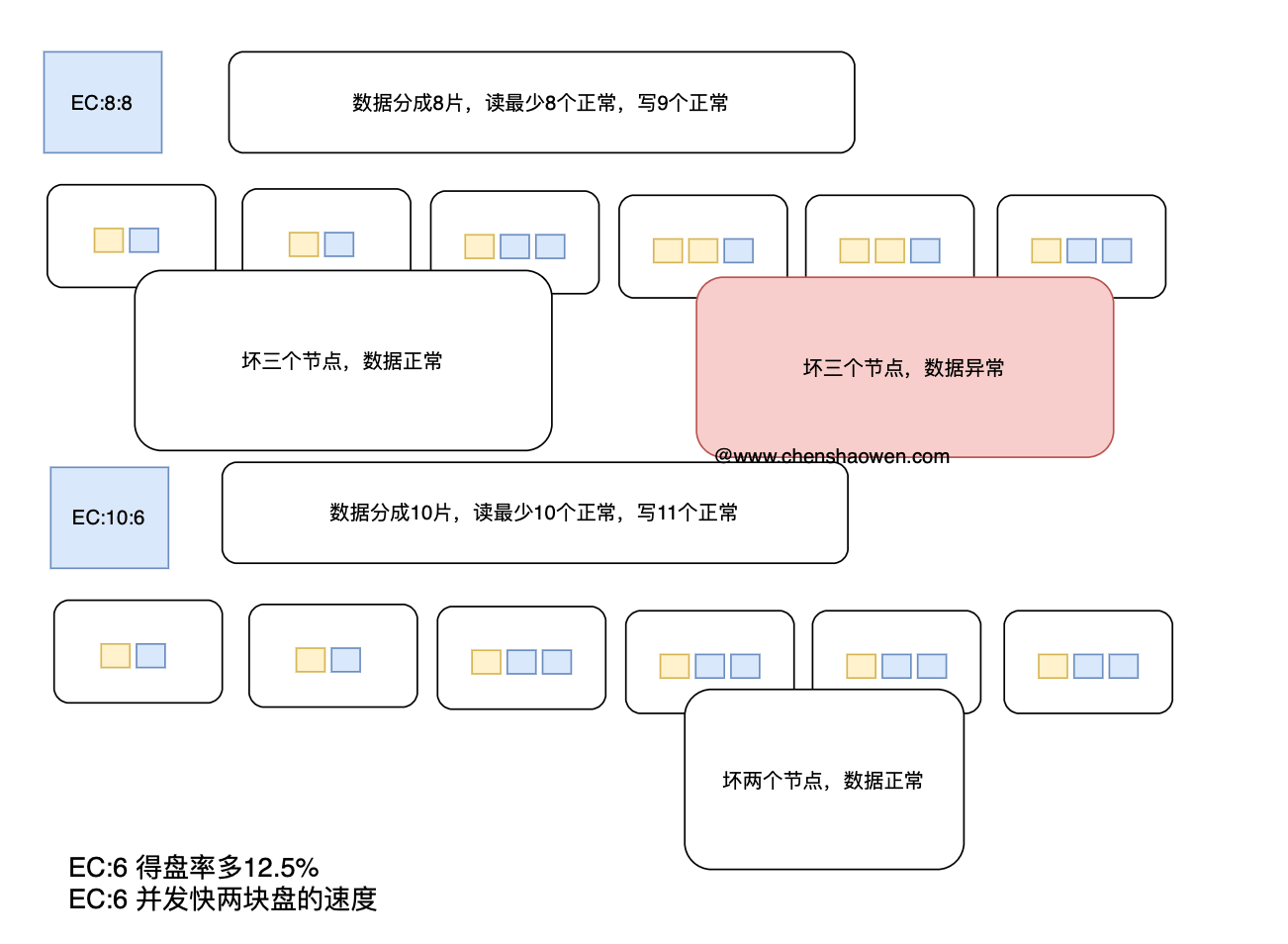
6. Choosing a File Size
blockSizeV2 is defined in the source at https://github.com/minio/minio/blob/7aac2a2c5b7c882e68c1ce017d8256be2feea27f/cmd/object-api-common.go#L37. It is fixed at 1M (10M in older versions) and represents the processing window size for data, mainly affecting CPU, MEM, and small-file processing speed.
The size of the data file is a separate matter. Under an EC 10:6 configuration, minio writes a 1GB file by splitting the 1GB file into 10 data blocks, then computing 6 parity blocks, and storing each block in an erasure set chosen to be as spread out as possible. Each block is stored as a Part data file and a Meta metadata file.
Note the following:
- If a data block is only at the KB level, minio writes the data directly into the Meta file for storage
- For large file transfers, streaming chunking is used, and minio stores each chunk separately according to its size
Therefore, to achieve greater throughput, we need to:
- Use larger chunks when streaming uploads, or use –disable-multipart to disable chunking
- Keep stored files from being too small; the threshold is around 1GB for HDD, and you should test it yourself
7. Monitoring Dashboards
minio has four built-in dimensions of monitoring metrics: cluster, node, bucket, and resource. Running the following commands generates the corresponding scrape configuration.
- Cluster
| |
- Node
| |
- Bucket
| |
- Resource
| |
- Grafana dashboards
https://github.com/minio/minio/tree/master/docs/metrics/prometheus/grafana
