1. Where a Message Queue Fits
1.1 Asynchronous Processing
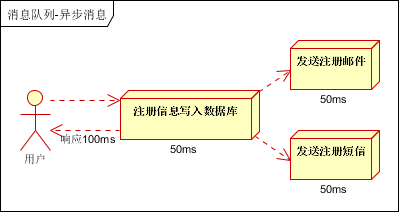
Use case: after a user registers, a registration email and a registration SMS must be sent. With the synchronous approach, system performance (concurrency, throughput, response time) hits a bottleneck.
1.2 Application Decoupling
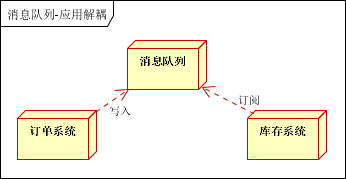
Use case: after a user places an order, the order system needs to notify the inventory system. The traditional approach is for the order system to call the inventory system’s API, which creates a strong dependency between the applications. With a message queue, the order system writes to the queue after placing an order and no longer cares about the follow-up operations, decoupling the order system from the inventory system.
1.3 Traffic Shaping
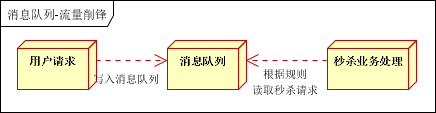
Use case: flash sales. Excessive traffic typically causes a traffic spike and takes the application down. With a message queue, the user’s request is first written to the queue after the server receives it, keeping the service available.
1.4 Message-Driven Systems
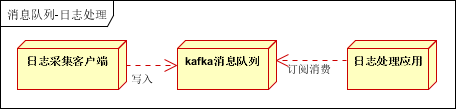
Use case: log processing, for example in Kafka applications, solving the problem of transmitting large volumes of logs.
2. Which Message Queues Exist
Kafka is an open-source distributed publish-subscribe messaging system from LinkedIn, now an Apache top-level project. Kafka’s main characteristic is that it consumes messages using a pull model and pursues high throughput; its original purpose was log collection and transmission. Kafka does not support transactions, and it has no strict requirements around duplicate, lost, or erroneous messages. Internally it uses batch message processing and a zero-copy mechanism; data storage and retrieval are sequential batch operations on local disk with O(1) complexity, so message processing is very efficient, making it suitable for the data collection workloads of internet services that produce large volumes of data.
RabbitMQ is an open-source message queue system implemented on the AMQP protocol and developed in Erlang. The AMQP protocol is mostly used within enterprise systems, in scenarios with high requirements for data consistency, stability, and reliability. AMQP’s main features are being message-oriented, and its queues, routing (including point-to-point and publish/subscribe), reliability, and security. RabbitMQ is slightly behind Kafka in throughput, but it supports reliable message delivery and transactions; it does not support batch operations.
3. RabbitMQ and Celery
Celery is an asynchronous job queue with no message storage capability. Its basic function is to manage the distribution of tasks to different servers and to collect the results.
RabbitMQ, by contrast, is a message broker. Its basic function is to receive and forward messages. Celery is therefore usually used together with RabbitMQ, though Redis, MongoDB, and the like can also be used.
Some basic concepts in RabbitMQ:
Producing means sending. A program that sends messages is called a producer.
A queue is like a mailbox, and it is managed by RabbitMQ. Although messages flow between the application and RabbitMQ, they can only be stored in a queue. A queue has no bounds — you can store as many messages as you like. It is essentially an unlimited buffer. A queue can receive messages from multiple producers and can also be read by multiple consumers.
Consuming means something like receiving. A program that waits to receive messages is called a consumer. In the diagram we represent it with a “C”.
4. Usage
4.1 Installing RabbitMQ
| |
At this point RabbitMQ is already running, but the management page it provides cannot be accessed, because it is not enabled by default.
4.2 Enabling the Web Management Page
After starting RabbitMQ, the Web management page is not accessible.
Step one, enable the management plugin (start the rabbitmq service first, then install the plugin)
| |
Step two, restart the service
On Windows:
| |
On Linux:
| |
Step three, visit the Web management page
http://127.0.0.1:15672
Default account and password: guest:guest
4.3 Common RabbitMQ Commands
Enable the management plugin: rabbitmq-plugins enable rabbitmq_management
Disable the management plugin: rabbitmq-plugins disable rabbitmq_management
Start RabbitMQ: rabbitmq-service start
Stop RabbitMQ: rabbitmq-service stop
List all queues: rabbitmqctl list_queues
Clear all queues: rabbitmqctl reset
Stop the application: rabbitmqctl stop_app
Start the application: rabbitmqctl start_app
4.4 A Celery Application
Install celery with pip
| |
Step one, define the task function.
Create a file tasks.py
| |
Step two, run the Celery worker.
| |
Step three, call the task
| |
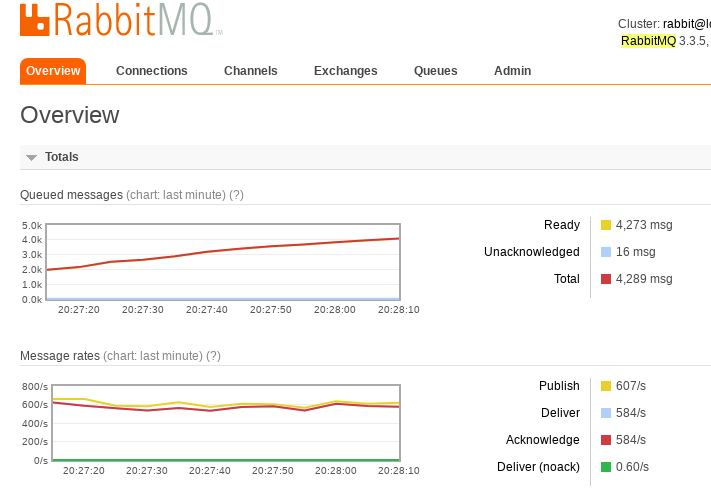
The delay call lets you invoke a function asynchronously. The figure below shows the processing rate while executing In [2]; you can see that the number of messages processed keeps growing and the processing rate has hit a bottleneck.
5. High Availability
RabbitMQ modes fall roughly into three kinds: single mode, normal mode, and mirrored mode.
- Single mode: standalone mode.
- Normal mode: the default cluster mode.
For a queue, the message body exists on only one node; two nodes A and B share only the same metadata, that is, the queue structure.
When a message enters node A’s queue and a consumer pulls it from node B, RabbitMQ temporarily transfers the message between A and B, taking the message body out of A and sending it to the consumer via B.
So a consumer should connect to each node as much as possible and take messages from it. That is, for the same logical queue, a physical queue should be created on multiple nodes. Otherwise, whether the consumer connects to A or B, the exit is always A, which creates a bottleneck. - Mirrored mode
The queues you need are made into mirrored queues, existing on multiple nodes; this is RabbitMQ’s HA (high availability) solution.
This mode solves the problem above. Its essential difference from normal mode is that the message body is actively synchronized between mirror nodes, rather than being pulled temporarily when a consumer fetches data.
The side effects are obvious: besides lowering system performance, if there are too many mirrored queues and a large number of messages come in, the cluster’s internal network bandwidth will be heavily consumed by this synchronization traffic.
