1. Introduction to Fluid
Below is the Fluid architecture diagram from https://github.com/fluid-cloudnative/fluid:
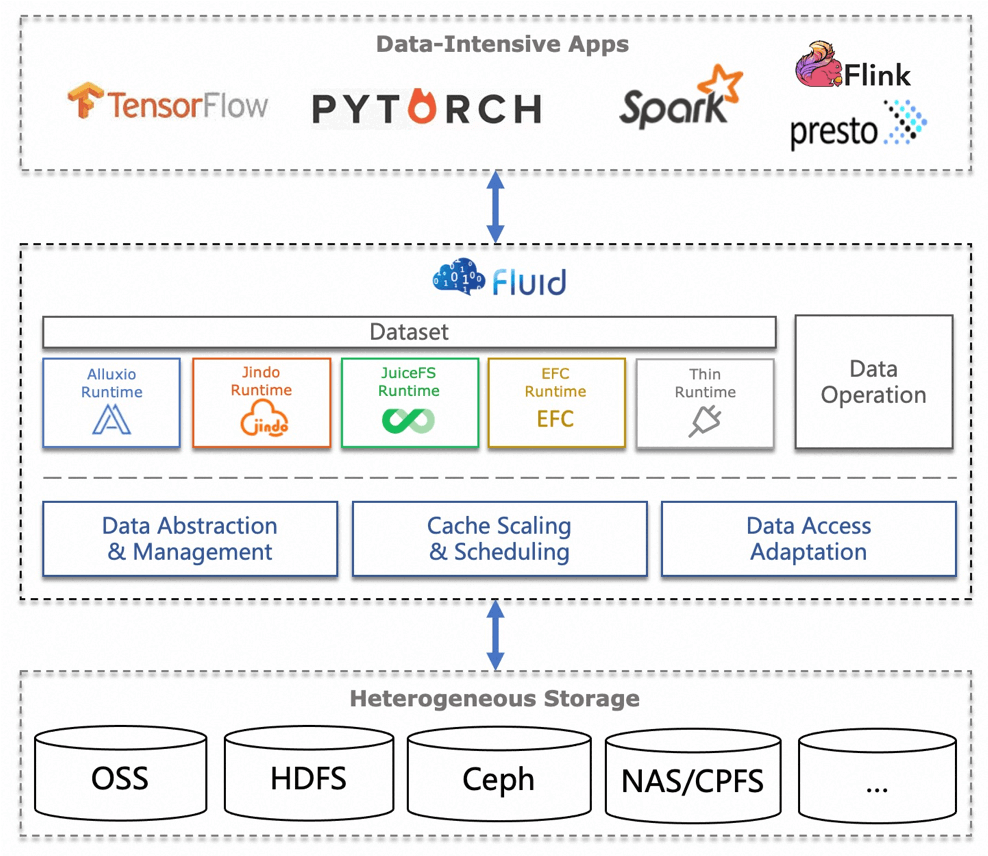
Fluid abstracts two concepts:
- Dataset, a collection of data, the abstraction from the user’s point of view
- Runtime, the abstraction of the real services such as data storage and acceleration
Fluid mainly solves the problems of using traditional caching systems on Kubernetes:
- It describes the Dataset, a collection of data, through a CRD and provides lifecycle management
- Relying on a Runtime backend, it provides a localized distributed caching service to Kubernetes cluster applications through a PVC
The workflow when using Fluid:
- Define the Dataset, setting the access credentials, storage location, read/write mode, and so on
- Define the Runtime; the runtime controller automatically binds the Dataset and Runtime with the same name via AddOwner; then creates a worker and configures the Runtime-related resources; and creates a PV with the
${NAMESPACE}- prefix and a PVC with the same name - When a Pod mounts the PVC, it first creates a fuse pod on the node and mounts the
/runtime-mnt/juicefs/xxx directory onto the host; then Fluid’s CSI Controller mounts that directory into the Pod.
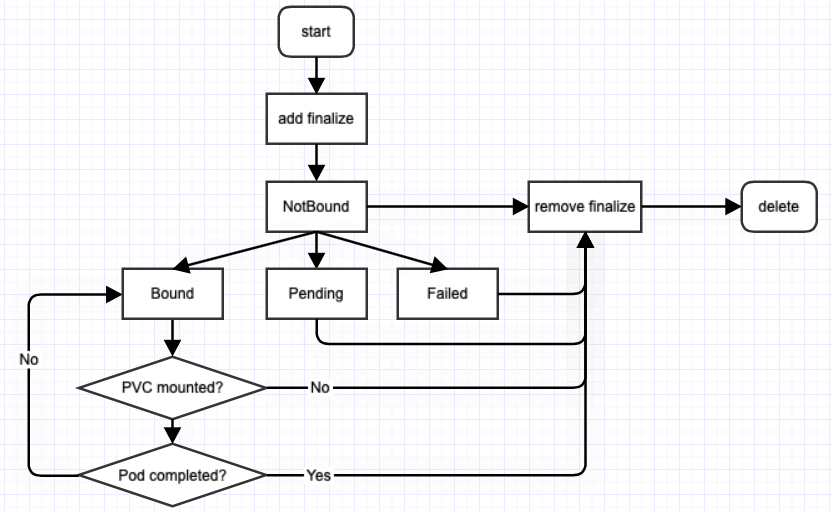
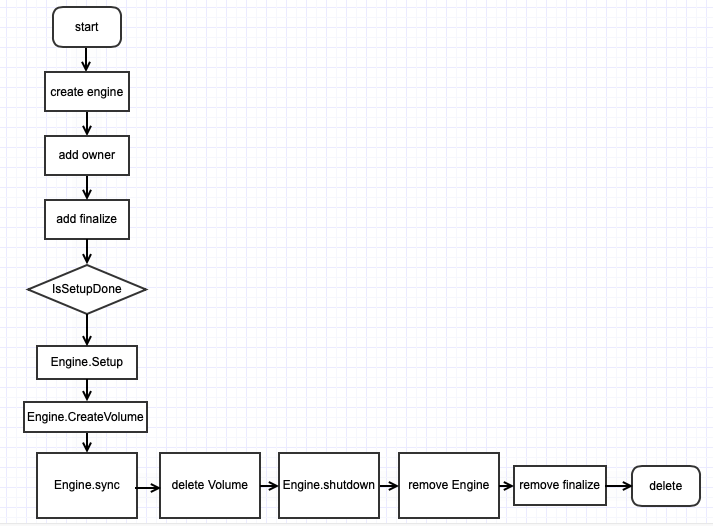
The lifecycle of the Dataset and Runtime is described in Fluid’s code repository; see https://github.com/fluid-cloudnative/fluid/blob/master/docs/zh/dev/runtime_dev_guide.md
Below is the lifecycle of the Dataset
Below is the lifecycle of the Runtime
When in use:
Every request a Pod makes to a mounted file directory is forwarded to the fuse pod, which converts file I/O into network I/O to access the backend runtime storage.
2. Deploying Fluid
1
| kubectl create ns fluid-system
|
1
2
| helm repo add fluid https://fluid-cloudnative.github.io/charts
helm repo update
|
1
| helm install --namespace fluid-system fluid fluid/fluid --devel
|
Since the juicefs client version used by my format is juicefs version 1.1.1+2023-11-28.437f4e6, in order for the image version in the work/fuse pod to match (you can of course configure it), I am using the --devel version here, that is, the current 1.0.0 beta version.
1
2
3
4
| helm list --namespace fluid-system
NAME NAMESPACE REVISION UPDATED STATUS CHART APP VERSION
fluid fluid-system 1 2024-01-25 21:48:14.902476965 +0800 CST deployed fluid-1.0.0-alpha.17 1.0.0-719fc87
|
 1
 2
 3
 4
 5
 6
 7
 8
 9
10
11
12
13
| kubectl -n fluid-system get pod
NAME READY STATUS RESTARTS AGE
csi-nodeplugin-fluid-b8k9l 2/2 Running 0 9m33s
csi-nodeplugin-fluid-gzl6w 2/2 Running 0 9m33s
csi-nodeplugin-fluid-p5whc 2/2 Running 0 9m33s
csi-nodeplugin-fluid-pwplp 2/2 Running 0 9m33s
csi-nodeplugin-fluid-xs9kc 2/2 Running 0 9m33s
csi-nodeplugin-fluid-xwwlm 2/2 Running 0 9m33s
dataset-controller-6978c55675-2rtdr 1/1 Running 0 9m33s
fluid-webhook-76d4c5fd45-bbmw7 1/1 Running 0 9m33s
fluidapp-controller-697656949c-487mv 1/1 Running 0 9m33s
juicefsruntime-controller-fbf45c44f-vtlcf 1/1 Running 0 5m17s
|
3. Environment Preparation
- Start a Redis instance for JuiceFS to use
1
| mkdir -p /data/test/redis-data && cd /data/test
|
1
| nerdctl run -d --security-opt apparmor=unconfined --security-opt seccomp=unconfined --name redis --network host -v $PWD/redis-data:/data -e REDIS_PASSWORD=mypassword redis:6
|
- Configure the Redis environment variables
1
2
3
4
| export REDIS_IP=x.x.x.x
export REDIS_PORT=6379
export REDIS_USER=default
export REDIS_PASSWORD=mypassword
|
- Configure the bucket environment variables
1
2
3
4
5
6
| export ACCESS_KEY=xxx
export SECRET_KEY=xxx
export BUCKET=xxx
export ENDPOINT=xxx
export BUCKET_ENPOINT=$BUCKET.$ENDPOINT
export PROVIDER=xxx
|
1
2
3
4
5
6
| export REDIS_DIRECTSERVER=redis://${REDIS_USER}:${REDIS_PASSWORD}@${REDIS_IP}:${REDIS_PORT}/1
juicefs format \
--storage ${PROVIDER} \
--bucket ${BUCKET_ENPOINT}\
${REDIS_DIRECTSERVER} \
juicefs-direct-demo
|
The filesystem needs to be initialized in advance; otherwise, when it is used in the cluster, you will get an error saying the .stats file cannot be found.
1
| export NAMESPACE=shaowen-test
|
- [Optional] Mount the filesystem locally
1
| juicefs mount -d --buffer-size 2000 --max-uploads 150 ${REDIS_DIRECTSERVER} ./${NAMESPACE}-direct --cache-dir=/data/jfs-${NAMESPACE}
|
- [Optional] Enter the directory and create a few test files
1
2
| cd ${NAMESPACE}-direct
echo "123" > test.txt
|
4. Configuring the Dataset
1
| kubectl create ns ${NAMESPACE}
|
 1
 2
 3
 4
 5
 6
 7
 8
 9
10
11
12
| kubectl apply -f - <<EOF
apiVersion: v1
kind: Secret
metadata:
name: juicefs-direct-secret
namespace: ${NAMESPACE}
type: Opaque
stringData:
metaurl: redis://${REDIS_USER}:${REDIS_PASSWORD}@${REDIS_IP}:6379/1
access-key: ${ACCESS_KEY}
secret-key: ${SECRET_KEY}
EOF
|
Redis requires a username to be set; the default is default, and it must be stated explicitly.
 1
 2
 3
 4
 5
 6
 7
 8
 9
10
11
12
13
14
15
16
17
18
19
20
21
22
23
24
25
26
27
28
29
30
31
32
| kubectl apply -f - <<EOF
apiVersion: data.fluid.io/v1alpha1
kind: Dataset
metadata:
name: juicefs-direct-demo
namespace: ${NAMESPACE}
spec:
accessModes:
- ReadWriteMany
mounts:
- name: juicefs-direct-demo
mountPoint: "juicefs:///"
options:
bucket: ${BUCKET_ENPOINT}
storage: ${PROVIDER}
encryptOptions:
- name: metaurl
valueFrom:
secretKeyRef:
name: juicefs-direct-secret
key: metaurl
- name: access-key
valueFrom:
secretKeyRef:
name: juicefs-direct-secret
key: access-key
- name: secret-key
valueFrom:
secretKeyRef:
name: juicefs-direct-secret
key: secret-key
EOF
|
bucket should be the full form of Bucket.Endpoint, not just a bucket name. The default accessModes is ReadOnlyMany, that is, read-only mode; here it is changed to ReadWriteMany. In addition, what is mounted here is the root / directory of JuiceFS; in production you can mount different subdirectories along project or application boundaries.
1
2
3
4
| kubectl -n ${NAMESPACE} get dataset
NAME UFS TOTAL SIZE CACHED CACHE CAPACITY CACHED PERCENTAGE PHASE AGE
juicefs-direct-demo NotBound 4s
|
At this point there is no Runtime with the same name configured yet, so the status is NotBound.
5. Configuring the Runtime
 1
 2
 3
 4
 5
 6
 7
 8
 9
10
11
12
13
14
| kubectl apply -f - <<EOF
apiVersion: data.fluid.io/v1alpha1
kind: JuiceFSRuntime
metadata:
name: juicefs-direct-demo
namespace: ${NAMESPACE}
spec:
replicas: 1
tieredstore:
levels:
- mediumtype: SSD
path: /cache
quota: 40960 # 40GiB
EOF
|
There are many parameters that can be configured here; refer to the CRD definition documentation under the api directory of the corresponding branch at https://github.com/fluid-cloudnative/fluid. Different Fluid versions may have different parameters, so watch out for the distinction.
1
2
3
4
| kubectl -n ${NAMESPACE} get juicefsruntime
NAME WORKER PHASE FUSE PHASE AGE
juicefs-direct-demo Ready 96s
|
It may take a while to become Ready, because the worker needs to be created.
1
2
3
4
| kubectl -n ${NAMESPACE} get pod
NAME READY STATUS RESTARTS AGE
juicefs-direct-demo-worker-0 1/1 Running 0 115s
|
The worker has no anomalies and is running normally.
1
2
3
4
| kubectl -n ${NAMESPACE} get dataset
NAME UFS TOTAL SIZE CACHED CACHE CAPACITY CACHED PERCENTAGE PHASE AGE
juicefs-direct-demo 1.01GiB 40.00KiB Bound 33m
|
1
2
3
4
| kubectl -n shaowen-test get pvc
NAME STATUS VOLUME CAPACITY ACCESS MODES STORAGECLASS AGE
juicefs-direct-demo Bound shaowen-test-juicefs-direct-demo 100Pi RWX fluid 5m21s
|
RWX means ReadWriteMany, that is, read-write mode.
6. Creating a Workload
 1
 2
 3
 4
 5
 6
 7
 8
 9
10
11
12
13
14
15
16
17
18
| kubectl apply -f - <<EOF
apiVersion: v1
kind: Pod
metadata:
name: juicefs-direct-demo
namespace: ${NAMESPACE}
spec:
containers:
- name: demo
image: shaowenchen/demo:ubuntu
volumeMounts:
- mountPath: /data/jfs
name: data
volumes:
- name: data
persistentVolumeClaim:
claimName: juicefs-direct-demo
EOF
|
1
2
3
4
5
6
| kubectl -n ${NAMESPACE} get pod juicefs-direct-demo
NAME READY STATUS RESTARTS AGE
juicefs-direct-demo 1/1 Running 0 52m
juicefs-direct-demo-fuse-mkz4x 1/1 Running 0 52m
juicefs-direct-demo-worker-0 1/1 Running 0 54m
|
- Enter the workload and inspect the data directory
 1
 2
 3
 4
 5
 6
 7
 8
 9
10
11
12
| kubectl -n ${NAMESPACE} exec -it juicefs-direct-demo bash
ls -al /data/jfs/
total 7
drwxrwxrwx 2 root root 4096 Jan 25 12:33 .
drwxr-xr-x 3 root root 25 Jan 25 12:53 ..
-r-------- 1 root root 0 Jan 25 12:53 .accesslog
-r-------- 1 root root 1627 Jan 25 12:53 .config
-r--r--r-- 1 root root 0 Jan 25 12:53 .stats
dr-xr-xr-x 2 root root 0 Jan 25 12:53 .trash
-rw-r--r-- 1 root root 4 Jan 25 12:33 test.txt
|
The JuiceFS directory is mounted in the Pod
 1
 2
 3
 4
 5
 6
 7
 8
 9
10
11
12
13
14
15
| juicefs bench --block-size 4096 --big-file-size 1024 --threads 5 ./
+------------------+------------------+---------------+
| ITEM | VALUE | COST |
+------------------+------------------+---------------+
| Write big file | 207.88 MiB/s | 24.63 s/file |
| Read big file | 761.77 MiB/s | 6.72 s/file |
| Write small file | 136.8 files/s | 36.56 ms/file |
| Read small file | 293.7 files/s | 17.03 ms/file |
| Stat file | 9007.3 files/s | 0.56 ms/file |
| FUSE operation | 89312 operations | 0.97 ms/op |
| Update meta | 1595 operations | 1.57 ms/op |
| Put object | 1780 operations | 111.32 ms/op |
| Get object | 1780 operations | 75.37 ms/op |
+------------------+------------------+---------------+
|
