FailedCreatePodSandBox
- Error
Error response from daemon: OCI runtime create failed: container_linux.go:380: starting container process caused: process_linux.go:402: getting the final child's pid from pipe caused: EOF: unknown
- Resolution
Clear the cache
| |
- Cause
Too much memory fragmentation
calico-node Keeps Restarting increase max user
- Error
runtime: failed to create new OS thread (have 11 already; errno=11),runtime: may need to increase max user processes (ulimit -u)
- Resolution
Raise the ulimit limit
| |
- Cause
The user process count is exhausted
calico-node BIRD is not ready
- Error
Readiness probe failed: calico/node is not ready: BIRD is not ready: Error querying BIRD: unable to connect to BIRDv4 socket: dial unix /var/run/calico/bird.ctl: connect: connection refused
- Resolution
Run ifconfig to find the NIC bound to the current host IP, for example ens192.
kubectl -n kube-system edit ds calico-node
Change
| |
to
| |
so that the interface value can regex-match ens192.
- Cause
Calico did not automatically identify the correct NIC.
cgroup Memory Leak cannot allocate memory
- Error
mkdir /sys/fs/cgroup/memory/kubepods/burstable/pod7a1e89bd-b85e-46c6-9674-bbfd3ead02d1: cannot allocate memory
If there is any mention of fork, it may be PID exhaustion.
- Temporary Resolution
Clear the cache
| |
- Permanent Resolution
- Edit
/etc/default/grub
Add cgroup.memory=nokmem to GRUB_CMDLINE_LINUX
- Generate the configuration
/usr/sbin/grub2-mkconfig -o /boot/grub2/grub.cfg
- Reboot the machine
reboot
- Cause
cgroup memory leak
kubectl 404 page not found
- Error
When running kubectl exec, the error error: unable to upgrade connection: 404 page not found is reported
- Resolution
Add the current node’s IP to the kubelet startup arguments, Environment="KUBELET_EXTRA_ARGS=--node-ip=x.x.x.x"
- Cause
The installation tool failed to accurately identify the host IP
System Call Errors and Permission Denied Inside Containers
- Error
Problem executing scripts Post-Invoke Sub-process returned an error code with a permission denied message
- Resolution
At runtime, add the argument --security-opt seccomp=unconfined to disable seccomp
- Cause
The Seccomp security module in the kernel restricts the container’s ability to make system calls to the host.
NodePort Service Not Accessible via localhost
- Error
A service exposed through NodePort cannot be accessed via localhost:port, only via the host’s ip:port.
- Resolution
Check the loopback forwarding parameter
| |
Take effect temporarily
| |
Take effect permanently
| |
- Cause
ipvs mode disables this forwarding path by default
Pod Creation Fails fork/exec /usr/bin/runc
- Error
| |
- Resolution
Check the PID limit
| |
Check current usage
| |
Permanently raise the PID limit
echo "kernel.pid_max=65535 " >> /etc/sysctl.conf && sysctl -p
kubelet volume subpaths are still present on disk
- Error
A large number of kubelet error logs
| |
- Cause
When a Pod is forcibly deleted with --force --grace-period=0, its resources are not reclaimed.
- Resolution
Find the relevant Pod under /var/lib/kubelet/pods/, confirm the Pod has stopped, then delete the Pod’s directory.
Check the Pod name
| |
fmovedaemon-b9c68cd45-qm2wr is the Pod name; once you confirm the Pod has stopped, just delete the directory.
| |
kubelet MountVolume failed
- Error
| |
- Resolution
Edit the multipath file
| |
Add the following:
| |
Restart the service
| |
- Cause
Multipath created a multipath device for every matching device path, including Longhorn storage volume devices, which caused the Kubelet mount error.
Large-Memory Pod Fails to Start page allocation failure
- Error
| |
- Resolution
| |
- Cause
System memory is fragmented, so there are not enough large pages to create the system namespace. You can check memory usage with the following command; if there are many 0s, memory is heavily fragmented:
| |
Under IPVS Mode, Service Reports No route to host
- Error
No route to host
- Cause
When there are a large number of short-lived connections, many connections are in the TIME_WAIT state, and the kernel reuses those connection ports.
When the kernel parameter net.ipv4.vs.conn_reuse_mode is set to 0 and a port is reused, IPVS forwards traffic directly to the previous RS, bypassing load balancing, so some traffic is forwarded to a Pod that has already been destroyed, resulting in No route to host.
- Resolution
Before kernel version 5.9, using iptables mode is recommended.
But in iptables mode, once the number of services in the cluster exceeds 2000, the efficiency of rule changes and forwarding starts to drop noticeably and CPU usage rises.
After kernel version 5.9, using IPVS mode is recommended.
- Set
net.ipv4.vs.conn_reuse_modeto 1, forcing reused connections through load balancing - Set
net.ipv4.vs.conntrackto 0, preventing IPVS from performing DROP SYNC on reused connections
Cluster kube-apiserver P99 Approaches 20s
- Error
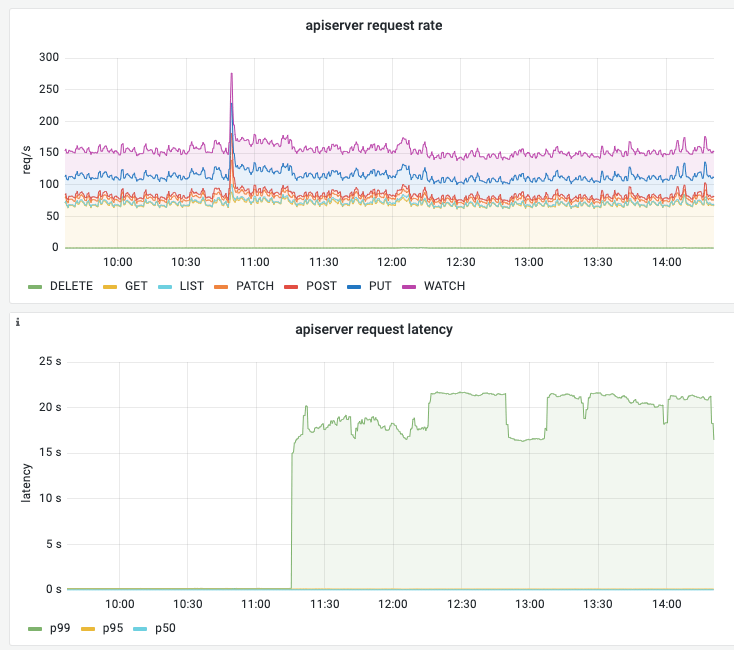
- Resolution
Delete the nodes that have already been shut down and are in the NotReady state.
- Cause
A possible cause is that some nodes in the cluster have been shut down but were not removed from the cluster. As a result, some request passing through kube-apiserver has to wait for a timeout, and the timeout is 20s.
The exact cause still needs further verification, but after deleting the nodes that have been shut down, the kube-apiserver P99 returns to normal.
Slow Pod Creation
- Error
Sep 11 08:23:17 node3 kubelet[1437]: E0911 08:23:17.770706 1437 kubelet_volumes.go:225] "There were many similar errors. Turn up verbosity to see them." err="orphaned pod \"10ff3c51-ebf2-47dd-b837-fd584319a754\" found, but error not a directory occurred when trying to remove the volumes dir" numErrs=10
- Cause
One possible cause is that creating the Pod depends on resources such as Secrets and ConfigMaps, but in the current namespace these resources do not exist, so the Kubelet keeps trying to fetch them until it times out, which affects Pod creation.
- Resolution
Find the missing resources and create them.
Creating a Debug Pod
- Create a DaemonSet
| |
- Create a Deployment on a specified node
| |
| |
Calico Reports timeout
| |
Check the network connectivity between the node hosting the Calico Pod and the master node.
Configuring sysctl Parameter does not exist
| |
| |
Kubelet Reports rpc error
| |
When Kubelet calls Containerd, the timeout is too short, causing the request to time out. Upgrading runc fixes it:
| |
After downloading, replace runc
| |
Restart Kubelet and Containerd
| |
Try to use Containerd 1.7.0 or later.
Kube-Proxy Reports xtables lock
| |
Some program is contending with Kube-Proxy for the xtables lock, possibly a Pod that keeps restarting or retrying. Common ones are
- Flannel; increasing its CPU and Memory resources fixes it
The CNI Component Cannot Reach apiserver
| |
You can try resetting the node first
| |
If that still does not work, it is most likely a firewall configuration problem.
Istio 426 Upgrade Required
When accessing an Istio service, you encounter a 426 Upgrade Required or low_version error.
Istio enables only HTTP/1.1 and HTTP/2 support by default. To enable HTTP/1.0 support, set:
| |
nerdctl failed to create default network
When using nerdctl, the following error is reported:
| |
Fix:
| |
Nodes Joining the Cluster with a Custom Image Cause NotReady
| |
Fix:
| |
Change Environment="KUBELET_EXTRA_ARGS=--node-ip=x.x.x.x --hostname-override=xxx" to the correct values or remove it entirely.
The hostname was duplicated, so a single hostname uploaded the status of multiple nodes.
Restart kubelet
| |
cni0 already has an ip address
| |
Fix:
| |
This usually happens because leftover cni0 configuration on the node prevents Flannel from initializing the node properly; you need to delete the CNI-related configuration and reinitialize.
Node Reaches the Pod Limit
- Check the number of Pods on the node
| |
| |
| |
- Change the maximum number of Pods on the node
| |
| |
Set maxPods to a larger value, for example 250. The value set here must match the network segment settings, otherwise it will cause network conflicts.
- Restart kubelet
| |
Node User Password Expired Your password has expired
| |
- Check the user’s password expiration information
| |
- Make the user’s password never expire
| |
Slow Traffic for Istio-Managed Pods on a Node
- Symptom
Traffic to Pods running on the node is very slow.
kubelet reports the following error:
| |
- Resolution
| |
The likely cause is excessive pressure on Istiod or a network connectivity problem, which interrupts the connection to the Envoy proxy on the node; restarting kubelet re-establishes the connection.
Istio Permission denied
Error message:
| |
Normally, when a Pod is created, the following configuration is applied to allow listening on ports below 1024.
| |
But it may not take effect; you can set it manually:
Verify the problem
| |
Take effect temporarily
| |
Take effect permanently
| |
Application Reports CSI Driver not found
Error message:
| |
Fix:
- Restart the storage-registered CSI Driver
- Restart Kubelet
A Sudden Flood of PUT: /resource/apiservices/v1
A large number of similar errors appear in the apiserver logs
| |
The apiserver metric monitoring shows a large number of requests under the /resource/apiservices/v1 endpoint.
The cause is that the certificate on a node expired, but the other nodes are fine, so the cluster as a whole is still usable.
Fix:
Renew the certificate on the abnormal apiserver node.
Automatically Cleaning Up Failed + Succeeded Pods
Edit the kube-controller-manager configuration file:
| |
Add the following argument:
| |
Uneven Pod Connection Counts on a Single Node
- Modify the kube-proxy configuration
| |
| |
Set it to the least-connection algorithm, so that the number of connections per RS is as even as possible.
Restart kube-proxy
| |
- Verify it takes effect
| |
You can see that the lc algorithm is in effect.
| |
Note that IPVS only affects traffic on the current node and cannot perceive global traffic.
Istiod XDS Push P99 Reaches 30s
- Exempt some namespaces from pushes
| |
| |
cgroup driver different
- Check
Check Kubelet:
| |
Check Docker:
| |
Check Containerd:
| |
| |
- Resolution
Taking unify to systemd as an example.
Modify the Kubelet configuration /var/lib/kubelet/config.yaml:
| |
Modify the Docker configuration /etc/docker/daemon.json:
| |
Modify the Containerd configuration /etc/containerd/config.toml:
| |
Machine Crashes After Enabling ACS and iommu in BIOS
Once ACS is enabled, the PCIe Switch forbids direct P2P communication between downstream devices, forcing all GPU<->GPU and GPU<->other PCIe device data to be forwarded through the CPU Root Complex.
Once IOMMU (Intel VT-d / AMD-Vi) is enabled, it remaps and permission-checks the DMA addresses of all devices.
If you run cross-machine training or inference tasks on the machine, it may suddenly become unresponsive.
