1. Event Handling Models: Bubbling and Capturing
| |
In the code above, a div element contains a p child element. If both elements have a click handler, how do we know which one will be triggered first?
To solve this problem, Microsoft and Netscape proposed two almost completely opposite concepts.
Event bubbling and event capturing were proposed by Microsoft and Netscape respectively; both concepts exist to solve the problem of the event flow (the order in which events occur) within a page.
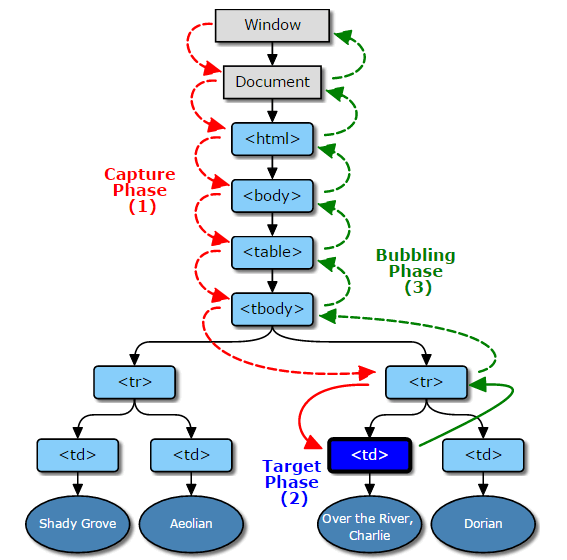
The event-bubbling flow model is compatible with all major browsers, so from a compatibility standpoint it is still advisable to use the event bubbling model.
1.1 Capturing Event Flow
Netscape proposed an event flow called event capturing. The event starts at the outermost layer and proceeds down to the most specific element.
In the example above, under the concept of event capturing the order in which the click event occurs is document -> html -> body -> div -> p
1.2 Bubbling Event Flow
Microsoft proposed an event flow called event bubbling. Event bubbling can be vividly compared to dropping a stone into water: bubbles keep rising from the bottom of the water to the surface. That is, the event starts at the innermost element and propagates upward until it reaches the document object.
In the example above, under the concept of event bubbling the order in which the click event occurs is p -> div -> body -> html -> document
1.3 The W3C Event Handling Model
Any event in the W3C event model first enters the capture phase until it reaches the target element, then enters the bubbling phase.
In the example above, under the concept of event capturing the order in which the click event occurs is document -> html -> body -> div -> p -> div -> body -> html -> document
2. DOM Event Binding
There are three ways to listen for events in JavaScript:
1.DOM Level 0 event handling
Binding form: element[’on’ + type] = function(){} or null (to remove the handler)
Assigning a function to an event handler property. Characteristics: simple and supported by all browsers, but it overwrites existing bindings.
2.DOM Level 2 event handling
Methods for adding and removing event handlers: addEventListener, removeEventListener.
Binding form: element.addEventListener(type, listener, useCapture); // not supported in IE6~8
In IE, use attachEvent and detachEvent instead.
Binding form: element.attachEvent(’on’ + type, listener); // IE6~10, not supported in IE11
3.DOM Level 3 event handling
The DOM Level 3 event module redefines these events on top of DOM Level 2 events and also adds some new events, such as UI events, focus events, mouse events, wheel events, text events, keyboard events, composition events, and mutation events. You can also use createEvent to define custom events.
Parameter meanings
type: the event type
listener: the callback function invoked after the event fires
useCapture: whether to use capture. If the value is true, useCapture indicates that the user wants to initiate capture. Once capture is initiated, as long as that event type occurs anywhere in the DOM subtree, it will first be captured by this event listener and then dispatched to event listeners in the DOM subtree. And events that bubble upward will not trigger those capture-initiating event listeners. For a further explanation, see the DOM Level 3 Events document. The default value of useCapture is false.
addEventListener is a method for registering event listeners introduced by the W3C working group starting with DOM Level 2; before that, the traditional way to register event listeners was element[’on’ + type]. The main differences between them are that element[’on’ + type] cannot use event capture, and element[’on’ + type] does not support registering multiple event listeners for the same event on the same element. As shown in the example below, after the element is clicked it only prints 1, not 0 and 1.
1 2 3 4 5 6element.onclick = function () { console.log(0); }; element.onclick = function () { console.log(1); };However, the addEventListener method is not supported in IE6~8 browsers. So how do you register multiple event listeners for the same event in older versions of IE? It turns out that starting with the IE5.0 series, IE introduced the attachEvent() method to support this feature. Unfortunately, that method does not support event capture either. And starting with IE 11, this method has been deprecated.
