1. After Turning Off affinity-assistant
In an earlier post, by turning off affinity-assistant and using NFS storage, I saved nearly 30 seconds on average per pipeline execution.[1]
- The impact of affinity-assistant
Before turning it off, the sequence diagram for creating a Pod looked like this:
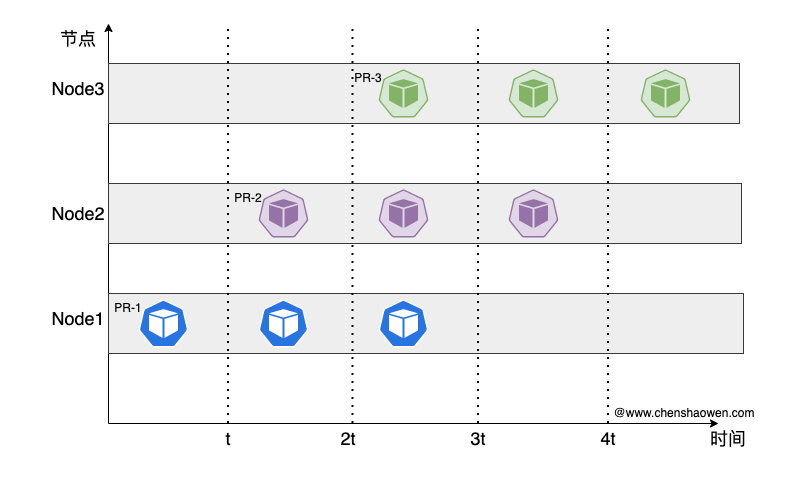
Because affinity-assistant was on, every pipeline was bound to a single node for execution.
After turning it off, the sequence diagram for creating a Pod looks like this:
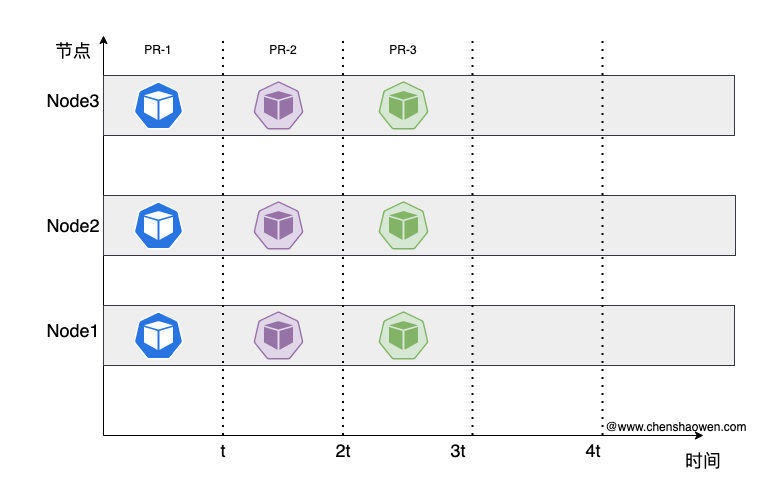
When multiple pipelines run concurrent tasks, this approach effectively saves Pod creation time.
- Using NFS storage
The use of a PV is divided into several processing stages: create, attach, and mount. Thanks to NFS being so old that it never implemented complex storage control and attach features, build efficiency was greatly improved once again.
2. IO Never Saturates
After rolling out the optimizations above, the performance of the build system improved a great deal, and user feedback showed that it really was a sizeable improvement.

ps: it was taken offline for a while in the middle, which gave users a roller-coaster feeling
The new problem was that during build peaks, pipelines that normally took 2-3 min to complete needed 5-6 min as concurrency increased.
- Checking the monitoring
The Grafana graph looks like this:
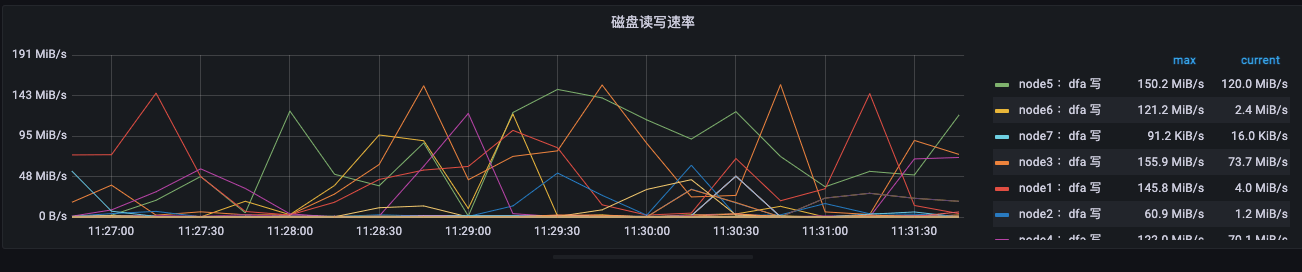
IO speed was not high, staying within 150MB/s. But we were using enterprise-grade SSDs, which was a huge deviation from expectations. I contacted after-sales technical support, and they said it met expectations — and that this was not even the steady state; once the disk filled up, the speed would drop further. Only reformatting would briefly restore high speed.
Others once suspected that Docker build was not making full use of system resources. But in an earlier post I verified and ruled that out one by one, and the final conclusion was that Docker build does not limit resource usage by default; it is just that Overlay IO is slower than the disk.
- A first disk speed test
| |
The measured IO was 1.2 GB/s. So why could we only use up to 150MB/s?
The people paying attention to the build system were misled too, thinking it was a software problem. What was actually overlooked was file size. Benchmarking is genuinely a very difficult thing: to evaluate a system effectively, you must have a deep understanding of all of its key factors. Miss any single factor and you can reach an entirely opposite conclusion.
- Testing disk speed again
In a build system, code repositories and image files consist mostly of small files, and a huge number of files are only a few KB. So when testing, choosing a block size of 1MB is definitely wrong; you have to test 4K random read/write.
Install fio
| |
Install opscli [2]
| |
Start the test
| |
The test result was 140MB/s, which basically matches the monitored speed.
3. Infinite IO Capability
Hardware is limited by physics, budget, and complicated corporate processes, so a high-spec configuration was out of reach; we could only optimize on the software architecture side.
Below is the current storage situation: all pipelines share a single NFS Server. When a Pod runs on a node, the node mounts the file directory of the NFS Server.
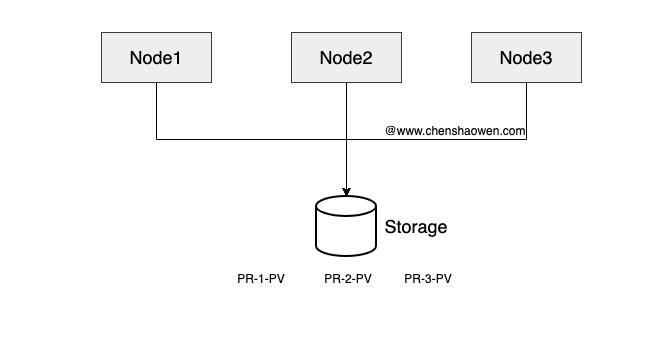
In this situation IO easily becomes a bottleneck. Here is a new storage approach: we provide a storage pool NFS-1, NFS-2, NFS-3… NFS-10, deploying 10 NFS Servers corresponding to 10 different disks. In the Kubernetes cluster, these correspond to 10 StorageClasses. As shown below:
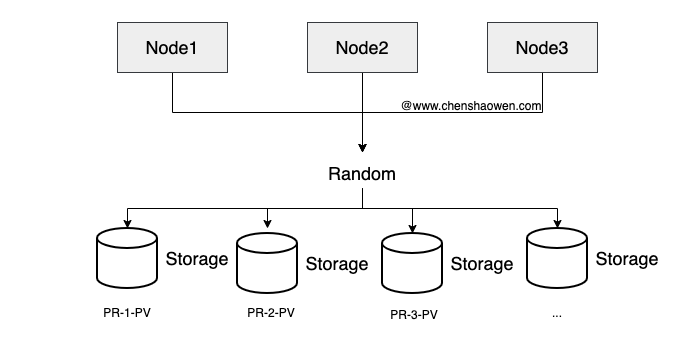
Under Tekton, we execute pipelines by submitting a PipelineRun, and the storageClassName can be set in the volumeClaimTemplate. The format is as follows:
| |
We just need to randomly set the storageClassName value to one of NFS-1, NFS-2, NFS-3…NFS-10. Of course, if real-time IO metrics are available, it is better to prefer the storage with lower load.
Why do I call it infinite IO capability? Because you only need to add disks, deploy NFS, deploy nfs-client-provisioner, and add the StorageClass to the list of selectable storage, and the build system gains horizontally scalable IO capability with almost no impact on the existing system.
4. When to Scale Up
You can watch the following metric:
irate(node_disk_io_time_seconds_total{node=~"$node",device!~'^(md\\d+$|dm-)'}[3m])
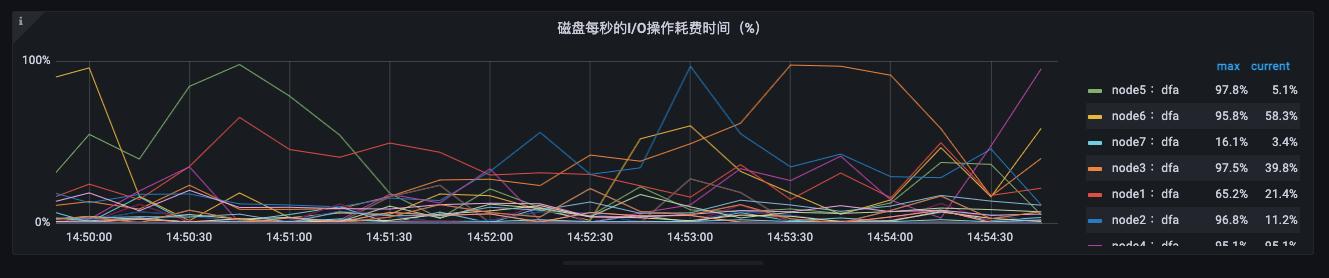
You should not stare only at disk speed; the key thing to watch is disk IO load.
If the metric on a given disk stays close to 100%, that disk is overloaded and build tasks need to be reduced. If a large number of disks stay close to 100%, it is time to scale up.
There are two ways to scale up:
- Vertical scaling: swap in disks with better IO performance
- Horizontal scaling: add more disks
Vertical scaling is simpler to operate than horizontal scaling, but it costs more and leaves limited room to grow. Expanding IO by adding disks should be the better choice.
5. Summary
This post is mainly about optimizing the build system in order to obtain infinite IO scalability. Builds are a resource-hungry consumer; adding CPU and memory and moving to SSDs are common measures, yet IO still shows an obvious bottleneck in real production environments. This post mainly offers the following points:
- Benchmarking is a highly specialized task; be very cautious about giving conclusions
- In a Tekton build cluster, you can extend IO capability by building a storage pool and setting different StorageClasses
- Disk speed is only one dimension; continuous integration should pay more attention to disk IO load
