1. InfiniBand Network
InfiniBand (abbreviated IB) is a computer network communication standard for high-performance computing. It offers extremely high throughput and very low latency, and is used for data interconnection between computers. InfiniBand is also used as a direct or switched interconnect between servers and storage systems, as well as between storage systems themselves.
An InfiniBand network requires a dedicated software and hardware environment, including InfiniBand NICs, fiber connections, and InfiniBand-capable switches, to provide a high-speed, lossless interconnect network. Through its efficient data transfer capabilities, especially Remote Direct Memory Access (RDMA), the InfiniBand protocol enables excellent data transfer rates in multi-node environments, typically reaching 200 Gbps and above.
2. InfiniBand Network Topology
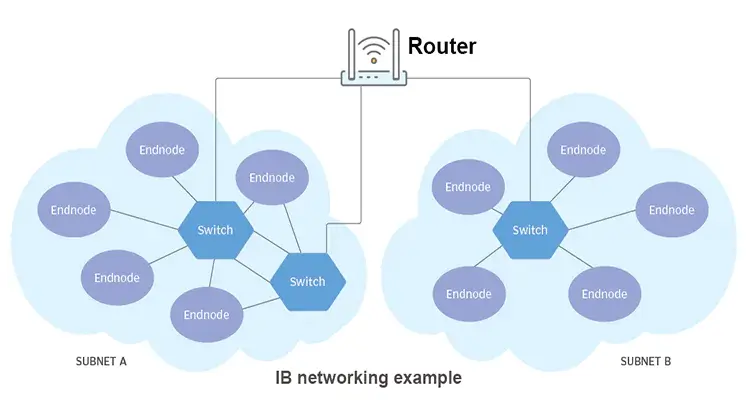
The InfiniBand network is divided into two layers:
- The first layer is a Subnet composed of End Nodes and Switches; an End Node is generally an IB card plugged into a node
- The second layer consists of several Subnets connected by Routers
The Subnet Manager assigns a Local ID to each Node and Switch; within the same Subnet, routing is done by LID (Local ID).
3. Installing the MLNX OFED Driver
MLNX OFED is used to enable and optimize the network transmission performance of Mellanox NICs.
1
| wget https://content.mellanox.com/ofed/MLNX_OFED-4.9-5.1.0.0/MLNX_OFED_LINUX-4.9-5.1.0.0-ubuntu20.04-x86_64.tgz
|
1
2
3
| tar zxf MLNX_OFED_LINUX-4.9-5.1.0.0-ubuntu20.04-x86_64.tgz
cd MLNX_OFED_LINUX-4.9-5.1.0.0-ubuntu20.04-x86_64
./mlnxofedinstall
|
 1
 2
 3
 4
 5
 6
 7
 8
 9
10
11
12
13
14
15
16
| systemctl status openibd
● openibd.service - openibd - configure Mellanox devices
Loaded: loaded (/lib/systemd/system/openibd.service; enabled; vendor preset: enabled)
Active: active (exited) since Mon 2024-11-04 11:36:29 CST; 2min 35s ago
Docs: file:/etc/infiniband/openib.conf
Process: 45926 ExecStart=/etc/init.d/openibd start bootid=0bc1ef52562f40ba85221c254bfc466e (code=exited, status=0/S>
Main PID: 45926 (code=exited, status=0/SUCCESS)
Tasks: 0 (limit: 9830)
Memory: 13.8M
CGroup: /system.slice/openibd.service
Nov 04 11:36:24 bj6-e-ai-kas-node-a800-gc-01 systemd[1]: Starting openibd - configure Mellanox devices...
Nov 04 11:36:24 bj6-e-ai-kas-node-a800-gc-01 root[45935]: openibd: running in manual mode
Nov 04 11:36:29 bj6-e-ai-kas-node-a800-gc-01 openibd[45926]: [49B blob data]
Nov 04 11:36:29 bj6-e-ai-kas-node-a800-gc-01 systemd[1]: Finished openibd - configure Mellanox devices.
|
4. Installing the MFT Driver
MFT is used for device maintenance and management scenarios: upgrading firmware, viewing low-level device information, modifying hardware parameters (such as setting a device into SR-IOV mode), and so on.
1
2
3
| wget https://www.mellanox.com/downloads/MFT/mft-4.29.0-131-x86_64-deb.tgz
tar zxvf mft-4.29.0-131-x86_64-deb.tgz
bash mft-4.29.0-131-x86_64-deb/install.sh
|
 1
 2
 3
 4
 5
 6
 7
 8
 9
10
11
12
13
14
15
16
17
18
19
20
| mst status -v
MST modules:
------------
MST PCI module is not loaded
MST PCI configuration module loaded
PCI devices:
------------
DEVICE_TYPE MST PCI RDMA NET NUMA
ConnectX6(rev:0) /dev/mst/mt4123_pciconf3 cd:00.0 mlx5_5 net-ibs19 1
ConnectX6(rev:0) /dev/mst/mt4123_pciconf2 96:00.0 mlx5_4 net-ibs18 1
ConnectX6(rev:0) /dev/mst/mt4123_pciconf1 5f:00.0 mlx5_1 net-ibs11 0
ConnectX6(rev:0) /dev/mst/mt4123_pciconf0 1d:00.0 mlx5_0 net-ibs10 0
ConnectX5(rev:0) /dev/mst/mt4119_pciconf0.1 7c:00.1 mlx5_bond_0 net-bond1 0
ConnectX5(rev:0) /dev/mst/mt4119_pciconf0 7c:00.0 mlx5_bond_0 net-bond1 0
|
5.1 Listing the NICs
1
2
3
| ls /sys/class/net/
bond1 eth0 eth1 ibs10 ibs11 ibs18 ibs19
|
Here bond1 is used to aggregate multiple NICs; from the output below you can see it is associated with eth0 and eth1. The other four NICs are IB NICs.
1
2
3
4
5
6
7
8
9
| cat /proc/net/bonding/bond1
Slave Interface: eth0
MII Status: up
Speed: 25000 Mbps
Slave Interface: eth1
MII Status: up
Speed: 25000 Mbps
|
1
2
3
4
5
6
7
8
| lspci -D | grep Mellanox
0000:1d:00.0 Infiniband controller: Mellanox Technologies MT28908 Family [ConnectX-6]
0000:5f:00.0 Infiniband controller: Mellanox Technologies MT28908 Family [ConnectX-6]
0000:7c:00.0 Ethernet controller: Mellanox Technologies MT27800 Family [ConnectX-5]
0000:7c:00.1 Ethernet controller: Mellanox Technologies MT27800 Family [ConnectX-5]
0000:96:00.0 Infiniband controller: Mellanox Technologies MT28908 Family [ConnectX-6]
0000:cd:00.0 Infiniband controller: Mellanox Technologies MT28908 Family [ConnectX-6]
|
5.3 Viewing the Mapping with ibdev2netdev
1
2
3
4
5
6
7
| ibdev2netdev
mlx5_0 port 1 ==> ibs10 (Up)
mlx5_1 port 1 ==> ibs11 (Up)
mlx5_4 port 1 ==> ibs18 (Up)
mlx5_5 port 1 ==> ibs19 (Up)
mlx5_bond_0 port 1 ==> bond1 (Up)
|
5.4 Viewing the Status with ibstat
 1
 2
 3
 4
 5
 6
 7
 8
 9
10
11
12
13
14
15
16
17
18
19
20
21
22
23
24
25
26
27
28
29
30
31
32
33
34
35
36
| ibstat
CA 'mlx5_4'
CA type: MT4123
Number of ports: 1
Firmware version: 20.31.1014
Hardware version: 0
Node GUID: 0xe8ebd30300fd0788
System image GUID: 0xe8ebd30300fd0788
Port 1:
State: Active
Physical state: LinkUp
Rate: 200
Base lid: 33
LMC: 0
SM lid: 1
Capability mask: 0x2651e848
Port GUID: 0xe8ebd30300fd0788
Link layer: InfiniBand
CA 'mlx5_bond_0'
CA type: MT4119
Number of ports: 1
Firmware version: 16.34.1002
Hardware version: 0
Node GUID: 0xe8ebd30300bbf454
System image GUID: 0xe8ebd30300bbf454
Port 1:
State: Active
Physical state: LinkUp
Rate: 25
Base lid: 0
LMC: 0
SM lid: 0
Capability mask: 0x00010000
Port GUID: 0xeaebd3fffebbf454
Link layer: Ethernet
...
|
ibstat lists all InfiniBand devices; from the Link layer field you can see that some are in InfiniBand mode, while others are in the ordinary NIC Ethernet mode.
1
2
3
| sminfo
sminfo: sm lid 1 sm guid 0x946dae030082fd9a, activity count 113412031 priority 0 state 3 SMINFO_MASTER
|
6. IB Monitoring and Test Commands
6.1 Watching Asynchronous Events with ibv_asyncwatch
1
2
3
4
| ibv_asyncwatch
mlx5_0: async event FD 4
...
|
1
2
3
4
5
6
7
8
9
| ibv_devices
device node GUID
------ ----------------
mlx5_0 e8ebd30300d90228
mlx5_1 e8ebd30300d93038
mlx5_4 e8ebd30300d8f4a8
mlx5_5 e8ebd30300d8fe84
mlx5_bond_0 1070fd0300d218ee
|
 1
 2
 3
 4
 5
 6
 7
 8
 9
10
11
12
13
14
15
16
17
18
19
20
| ibv_devinfo
hca_id: mlx5_0
transport: InfiniBand (0)
fw_ver: 20.31.1014
node_guid: e8eb:d303:00d9:0228
sys_image_guid: e8eb:d303:00d9:0228
vendor_id: 0x02c9
vendor_part_id: 4123
hw_ver: 0x0
board_id: MT_0000000223
phys_port_cnt: 1
port: 1
state: PORT_ACTIVE (4)
max_mtu: 4096 (5)
active_mtu: 4096 (5)
sm_lid: 1
port_lid: 17
port_lmc: 0x00
link_layer: InfiniBand
|
6.4 Testing Connectivity with ibv_rc_pingpong
ibv_rc_pingpong, ibv_srq_pingpong, and ibv_ud_pingpong test connectivity between nodes using an RC connection, an SRQ, or a UD connection respectively.
1
2
3
| ibv_rc_pingpong -d mlx5_0
local address: LID 0x0023, QPN 0x000069, PSN 0x7b3a43, GID ::
|
1
2
3
4
5
6
| ibv_rc_pingpong x.x.x.x
local address: LID 0x0011, QPN 0x00004c, PSN 0xf6c0af, GID ::
remote address: LID 0x0023, QPN 0x000068, PSN 0x7fd96b, GID ::
8192000 bytes in 0.01 seconds = 12752.68 Mbit/sec
1000 iters in 0.01 seconds = 5.14 usec/iter
|
7.1 ib_read_bw Read Bandwidth Test
Uses the RDMA Read operation to read data from remote memory into local memory.
1
| ib_read_bw -d mlx5_0 -a
|
 1
 2
 3
 4
 5
 6
 7
 8
 9
10
11
12
13
14
15
16
17
18
19
20
21
22
23
| ib_read_bw x.x.x.x
---------------------------------------------------------------------------------------
RDMA_Read BW Test
Dual-port : OFF Device : mlx5_0
Number of qps : 1 Transport type : IB
Connection type : RC Using SRQ : OFF
PCIe relax order: Unsupported
ibv_wr* API : ON
TX depth : 128
CQ Moderation : 1
Mtu : 4096[B]
Link type : IB
Outstand reads : 16
rdma_cm QPs : OFF
Data ex. method : Ethernet
---------------------------------------------------------------------------------------
local address: LID 0x11 QPN 0x00d7 PSN 0x3f4202 OUT 0x10 RKey 0x007757 VAddr 0x007fdd661f3000
remote address: LID 0x23 QPN 0x006f PSN 0xc92b7f OUT 0x10 RKey 0x00640e VAddr 0x007fa486e28000
---------------------------------------------------------------------------------------
#bytes #iterations BW peak[MB/sec] BW average[MB/sec] MsgRate[Mpps]
Conflicting CPU frequency values detected: 3000.001000 != 2592.026000. CPU Frequency is not max.
65536 1000 23479.18 23478.83 0.375661
---------------------------------------------------------------------------------------
|
Average bandwidth is about 25 GB/s
7.2 ib_read_lat Read Latency Test
1
| ib_read_lat -d mlx5_0 -a
|
 1
 2
 3
 4
 5
 6
 7
 8
 9
10
11
12
13
14
15
16
17
18
19
20
21
22
23
24
| ib_read_lat x.x.x.x
---------------------------------------------------------------------------------------
RDMA_Read Latency Test
Dual-port : OFF Device : mlx5_0
Number of qps : 1 Transport type : IB
Connection type : RC Using SRQ : OFF
PCIe relax order: Unsupported
ibv_wr* API : ON
TX depth : 1
Mtu : 4096[B]
Link type : IB
Outstand reads : 16
rdma_cm QPs : OFF
Data ex. method : Ethernet
---------------------------------------------------------------------------------------
local address: LID 0x11 QPN 0x00d8 PSN 0xfb6eb4 OUT 0x10 RKey 0x02f8d8 VAddr 0x0056038e7f1000
remote address: LID 0x23 QPN 0x0070 PSN 0xed7a89 OUT 0x10 RKey 0x007354 VAddr 0x007fefa803d000
---------------------------------------------------------------------------------------
#bytes #iterations t_min[usec] t_max[usec] t_typical[usec] t_avg[usec] t_stdev[usec] 99% percentile[usec] 99.9% percentile[usec]
Conflicting CPU frequency values detected: 3000.003000 != 2500.000000. CPU Frequency is not max.
Conflicting CPU frequency values detected: 3000.000000 != 2776.822000. CPU Frequency is not max.
2 1000 2.80 3.40 2.88 2.89 0.06 3.24 3.40
---------------------------------------------------------------------------------------
|
Average latency is about 3 usec.
7.3 ib_send_bw Send Bandwidth Test
Uses the IB Send operation to transfer data by sending messages.
 1
 2
 3
 4
 5
 6
 7
 8
 9
10
11
12
13
14
15
16
17
18
19
20
21
22
23
24
| ib_send_bw x.x.x.x
---------------------------------------------------------------------------------------
Send BW Test
Dual-port : OFF Device : mlx5_0
Number of qps : 1 Transport type : IB
Connection type : RC Using SRQ : OFF
PCIe relax order: Unsupported
ibv_wr* API : ON
TX depth : 128
CQ Moderation : 1
Mtu : 4096[B]
Link type : IB
Max inline data : 0[B]
rdma_cm QPs : OFF
Data ex. method : Ethernet
---------------------------------------------------------------------------------------
local address: LID 0x11 QPN 0x00db PSN 0x4c58fb
remote address: LID 0x23 QPN 0x0073 PSN 0xa9ed43
---------------------------------------------------------------------------------------
#bytes #iterations BW peak[MB/sec] BW average[MB/sec] MsgRate[Mpps]
Conflicting CPU frequency values detected: 3000.000000 != 2500.270000. CPU Frequency is not max.
65536 1000 23452.31 23451.72 0.375227
---------------------------------------------------------------------------------------
|
Average bandwidth is about 25 GB/s
7.4 ib_send_lat Send Latency Test
1
| ib_send_lat -d mlx5_0 -a
|
 1
 2
 3
 4
 5
 6
 7
 8
 9
10
11
12
13
14
15
16
17
18
19
20
21
22
23
24
| ib_send_lat x.x.x.x
---------------------------------------------------------------------------------------
Send Latency Test
Dual-port : OFF Device : mlx5_0
Number of qps : 1 Transport type : IB
Connection type : RC Using SRQ : OFF
PCIe relax order: Unsupported
ibv_wr* API : ON
TX depth : 1
Mtu : 4096[B]
Link type : IB
Max inline data : 236[B]
rdma_cm QPs : OFF
Data ex. method : Ethernet
---------------------------------------------------------------------------------------
local address: LID 0x11 QPN 0x00dc PSN 0xe1c26
remote address: LID 0x23 QPN 0x0074 PSN 0xaeeb66
---------------------------------------------------------------------------------------
#bytes #iterations t_min[usec] t_max[usec] t_typical[usec] t_avg[usec] t_stdev[usec] 99% percentile[usec] 99.9% percentile[usec]
Conflicting CPU frequency values detected: 3000.000000 != 2650.989000. CPU Frequency is not max.
Conflicting CPU frequency values detected: 2999.996000 != 2499.938000. CPU Frequency is not max.
2 1000 1.45 2.82 1.50 1.50 0.02 1.57 2.82
---------------------------------------------------------------------------------------
|
Average latency is about 1.5 usec
7.5 ib_write_bw Write Bandwidth Test
Uses the RDMA Write operation to write data from local memory into remote memory
1
| ib_write_bw -d mlx5_0 -a
|
 1
 2
 3
 4
 5
 6
 7
 8
 9
10
11
12
13
14
15
16
17
18
19
20
21
22
23
24
| ib_write_bw x.x.x.x
---------------------------------------------------------------------------------------
RDMA_Write BW Test
Dual-port : OFF Device : mlx5_0
Number of qps : 1 Transport type : IB
Connection type : RC Using SRQ : OFF
PCIe relax order: Unsupported
ibv_wr* API : ON
TX depth : 128
CQ Moderation : 1
Mtu : 4096[B]
Link type : IB
Max inline data : 0[B]
rdma_cm QPs : OFF
Data ex. method : Ethernet
---------------------------------------------------------------------------------------
local address: LID 0x11 QPN 0x00de PSN 0x4a0b65 RKey 0x00bea0 VAddr 0x007fd4f0020000
remote address: LID 0x23 QPN 0x0076 PSN 0xd08359 RKey 0x00c5a5 VAddr 0x007f1dc709a000
---------------------------------------------------------------------------------------
#bytes #iterations BW peak[MB/sec] BW average[MB/sec] MsgRate[Mpps]
Conflicting CPU frequency values detected: 3000.042000 != 2521.873000. CPU Frequency is not max.
65536 5000 23533.15 23532.41 0.376519
---------------------------------------------------------------------------------------
|
Average bandwidth is about 23 GB/s
8. IB Diagnostic Commands
8.1 Diagnosing the Network with ibdiagnet
