Recently I was responsible for developing a backend-heavy application. The data flow in this application is complex, and the processing logic has piled up in a redundant mess. The project’s tech stack is Django + Vuejs. The frontend is bundled with Webpack, managed in modules, and mainly displays data. The backend involves many modules, many processing rules, and many data tables, so every time I had to modify an earlier feature I spent a lot of time reviewing the code. This made me realize that decoupling modules is extremely important in a complex application. Below are some reflections and practices.
1. The Observer Pattern
In practice, I mainly use Django Signal to decouple modules. Django Signal is Django’s implementation and application of the observer pattern. So it is worth first understanding the observer pattern.
The observer pattern is a type of software design pattern. People usually express their understanding of the observer pattern with the equation: publish + subscribe = observer pattern. In fact, this equation is not entirely correct.
Differences between the publish-subscribe pattern and the observer pattern:
- The publish-subscribe pattern relies on a message queue (RabbitMQ, RocketMQ, ActiveMQ, Kafka, ZeroMQ, MetaMq, etc.) for communication and is asynchronous; the observer pattern is usually synchronous
- The publish-subscribe pattern is loosely coupled — the publisher and subscriber may even belong to different applications; the observer pattern belongs to a single application
In terms of implementation, the observer pattern requires maintaining a subscription list. When the state changes, all objects in the list are notified automatically.
2. Django Signal
Signal is a signal dispatcher provided by the Django framework. A sender sends a signal, notifying a series of receivers, which in turn triggers the receivers to perform some operation.
Note that Django signals are synchronous. If abused, they will affect Django’s processing efficiency.
Below I will take Django 1.8.3 as an example, starting from a usage case and moving on to the source code, to introduce how Signal is implemented in Django.
2.1 A Simple Usage Case
Here is a small requirement: after a save on the MyModel table, trigger some execution logic.
- Load the Signal
myApp/__init__.py
| |
myApp/apps.py
| |
- Bind the signal handler function
myApp/signals/handlers.py
| |
2.2 Understanding Django Signal’s Processing Logic from the Source Code
The example above uses very little code yet enjoys all the convenience of the signal handling mechanism Django provides. But if you stop at usage, you may not gain a deeper understanding of Django Signal. Below, let us look at Django Signal’s processing logic from the source code.
- Declaring a signal
Django ships with a large number of Model-related signals that can be used directly. The signal used in the example above, post_save, is an instance of the ModelSignal class, and ModelSignal in turn inherits from the Signal class.
django/db/models/signal.py
| |
- Registering a signal handler function
The receiver function Django provides is a decorator; the decorated function is registered as a parameter into the list of receiver objects.
django/dispatch/__init__.py
| |
django/dispatch/dispatcher.py
| |
django/dispatch/dispatcher.py
| |
- Sending the signal
After the save completes, Django proactively emits the post_save signal; for a custom signal, you need to trigger it yourself.
django/db/models/base.py
| |
- Handling the signal
Handling the signal is, in fact, simply calling the functions in the receiver list one by one.
django/dispatch/dispatcher.py
| |
3. Decoupling with Signals, Async Tasks
After studying the observer pattern and understanding Django Signal, you have basically mastered the fundamentals of decoupling Django modules. Next, you need to further clarify the coupling mechanism between modules and lay down project conventions, and then you can put it into practice cleanly.
Let us map out the request processing chain:
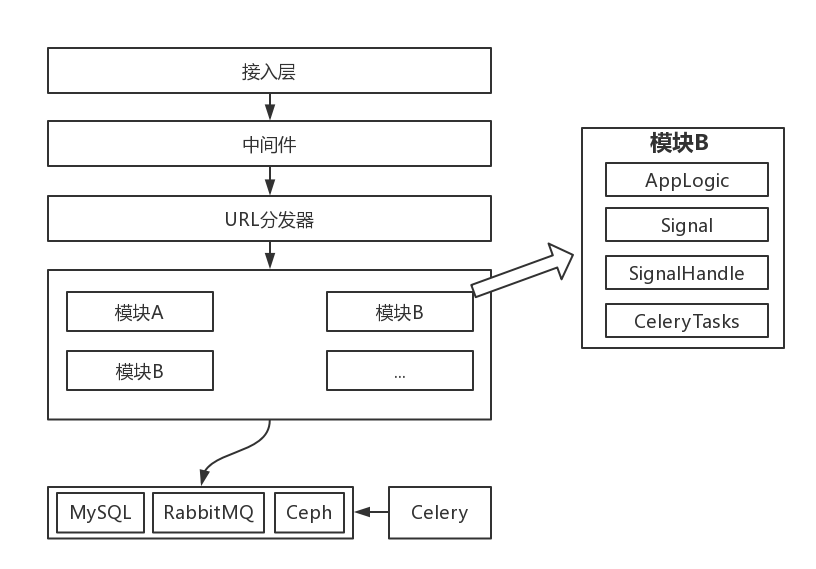
After a request passes through the access layer and middleware, the URL dispatcher matches it to the appropriate processing module, and ultimately some module is responsible for returning the response. Each module connects to the database, message queue, and object storage to persist state.
Each module consists of four parts:
- AppLogic, the application logic of the module
- Signal, the signals built into the module
- SignalHandle, the signal handling handles the module cares about
- CeleryTasks, the module’s async tasks
Modules are coupled to each other entirely through signals:
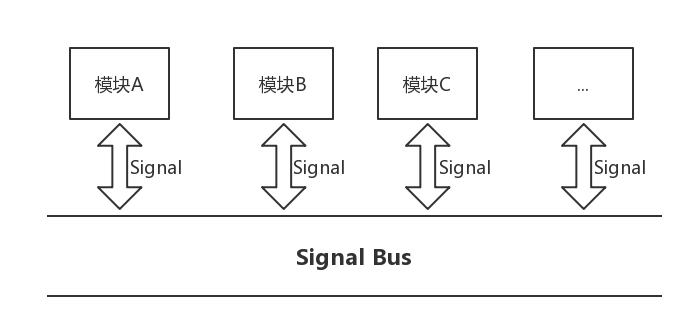
Because Django Signal is a synchronous processing mechanism, you can combine it with Celery and RabbitMQ to support asynchronous processing.
Below is an example of a signal handling asynchronous logic:
myApp/tasks.py
| |
myApp/signals/handlers.py
| |
