1. Background
Under a microservices architecture, the dependency relationships between services are complex. During development, multiple services often need joint debugging. There are two ways to do this:
- Deploy services to the online development environment, the Kubernetes cluster
Use telepresence to connect local and online cluster communication, so you get a relatively stable joint debugging environment.
The drawback is that you need to generate credentials with sufficient privileges, and R&D staff need to be familiar with using Kubernetes. One set per person is also relatively expensive.
- Call each other directly between development machines on the office network
The intranet is interconnected, so direct calls are also feasible. But some service dependencies hard-code HTTPS and the domain name, so you need to set up an HTTPS proxy service locally.
This article mainly introduces how to use Node.js to build an HTTPS proxy service for forwarding requests to dependent services.
2. Proxy Logic
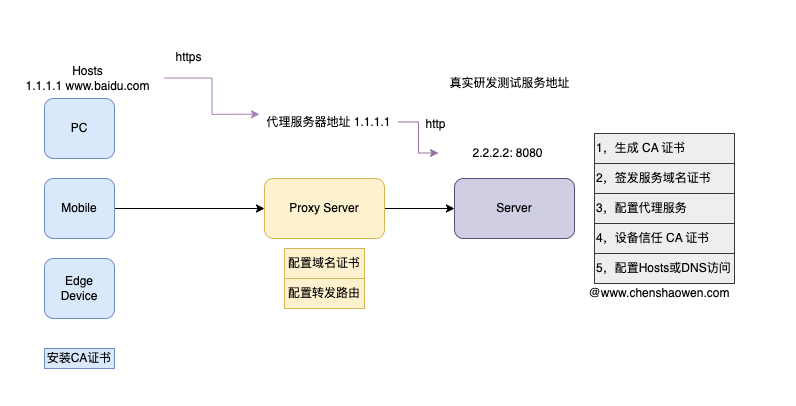
As shown above, this is a schematic of proxying HTTPS requests. The main steps are:
Generate a CA certificate
Issue a service domain certificate
Configure the proxy service
Make the device trust the CA certificate
Configure Hosts or DNS access
For the specific operations of generating a CA certificate and issuing a service domain certificate, see Harbor Uses a Self-Signed Certificate to Support HTTPS Access.
3. Configuring the Proxy
- Install dependencies
| |
- Configure proxy.js
| |
- Start the proxy service
| |
At this point, by configuring Hosts or DNS (1.1.1.1 www.baidu.com) and accessing https://www.baidu.com, you can reach the http://2.2.2.2:8080 service.
- Specifying the target domain and its resolution
If you want to configure target as a domain name and specify the resolution yourself, you can add a DNS snippet, which takes effect only in the current service.
| |
