1. Running Locally in Containers
- Start the LLM
| |
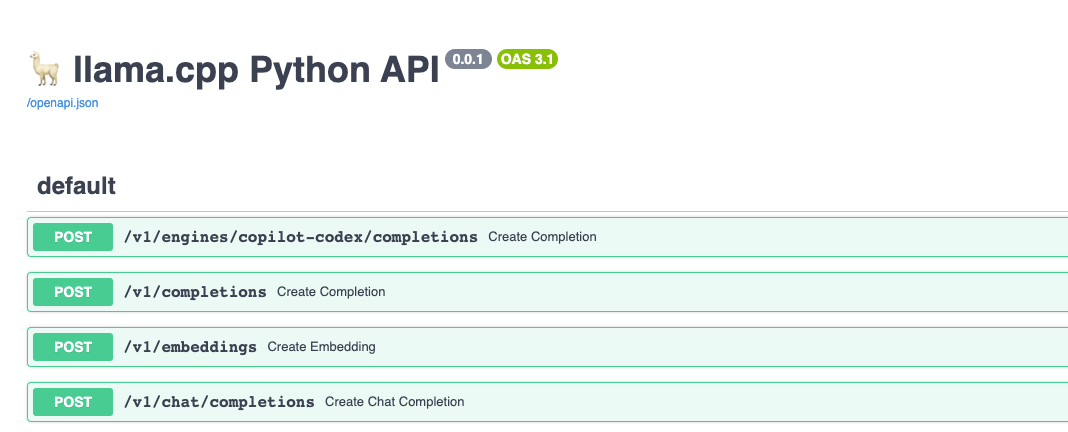
The API documentation is available at http://localhost:8000/docs, as shown below:
- Deploy a simple Chat UI
Note that the OPENAI_API_HOST parameter must be set to your host machine’s IP address rather than localhost or 127.0.0.1, otherwise it will be unreachable.
| |
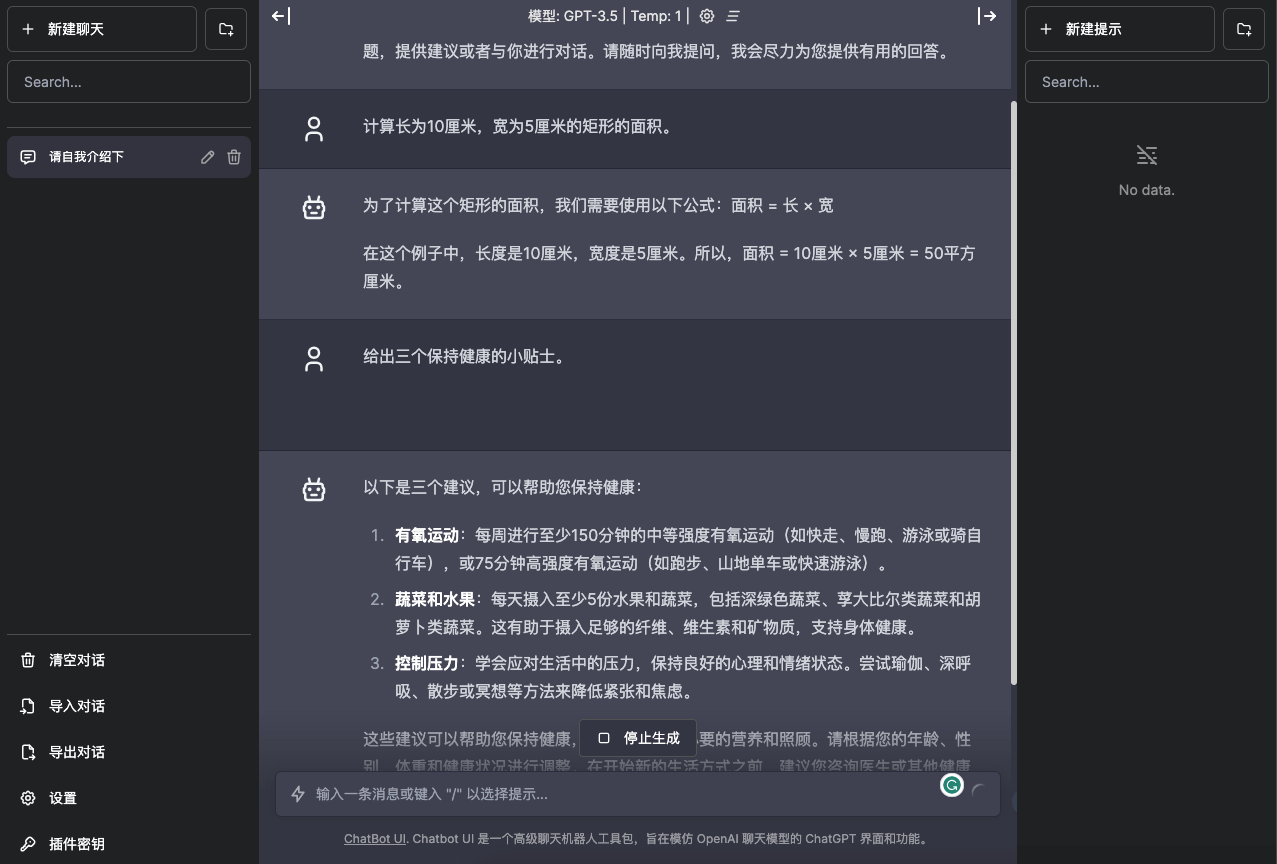
The page looks like this:
2. Quick Deployment on K8s
- Deploy the LLM application
kubectl create deploy vicuna --image=shaowenchen/vicuna-33b-v1.3-gguf:full
kubectl expose deploy vicuna  --port 8000 --target-port=8000 --type=NodePort
Alternatively, you can skip exposing the port and just create a service, then access it from other containers using vicuna as the domain name.
- Deploy the Chat UI
| |
- Get the access address
| |
3. Testing and Usage
Question:
Please introduce yourself
Reply:
Hello, I am ChatGPT, a large-scale language model based on OpenAI's inference generation model. With the help of billions of words of internet text, I have learned a lot about language, culture, and knowledge. I can answer questions, offer suggestions, or have a conversation with you. Please feel free to ask me anything, and I will do my best to give you useful answers.
Question:
Calculate the area of a rectangle that is 10 cm long and 5 cm wide.
Reply:
To calculate the area of this rectangle, we need to use the following formula: Area = length × width

In this example, the length is 10 cm and the width is 5 cm. So the area = 10 cm × 5 cm = 50 square cm.
Question:
Give three tips for staying healthy.
Reply:
Here are three suggestions that can help you stay healthy:

Aerobic exercise: get at least 150 minutes of moderate-intensity aerobic activity (such as brisk walking, jogging, swimming, or cycling) each week, or 75 minutes of high-intensity aerobic activity (such as running, mountain biking, or fast swimming).
Vegetables and fruits: eat at least 5 servings of fruits and vegetables a day, including dark green vegetables, cruciferous vegetables, and carrots. This helps you get enough fiber, vitamins, and minerals to support your health.
Manage stress: learn to cope with stress in life and maintain a good mental and emotional state. Try methods such as yoga, deep breathing, walking, or meditation to reduce tension and anxiety.
These suggestions can help you stay healthy and provide your body with the necessary nutrition and care. Please adjust them according to your age, gender, weight, and health condition. Before starting a new lifestyle, it is advisable to consult a doctor or other health professional.
The answers look decent: whether it is the 33b model or the 7b model, both can give reasonable answers. Of course, I only ran a small amount of manual testing using HuggingFace’s alpaca-data-gpt4-chinese dataset.
4. Performance Issues
Performance is actually the issue I really care about, because only when the resources required for inference match the resources available can it be deployed and used quickly in production; otherwise you face high procurement costs.
4.1 CPU and IO Maxed Out, Mem Usage Low
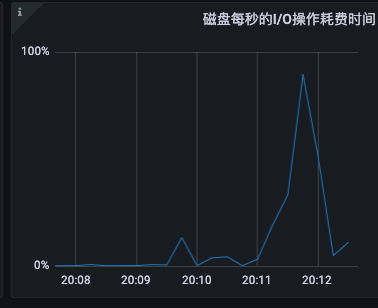
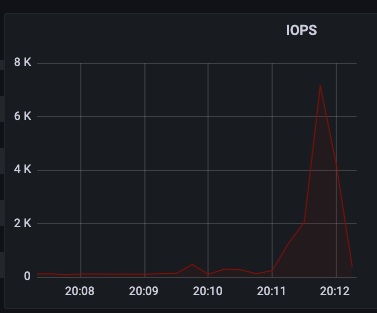
Let’s look at the monitoring directly
- IO maxed out
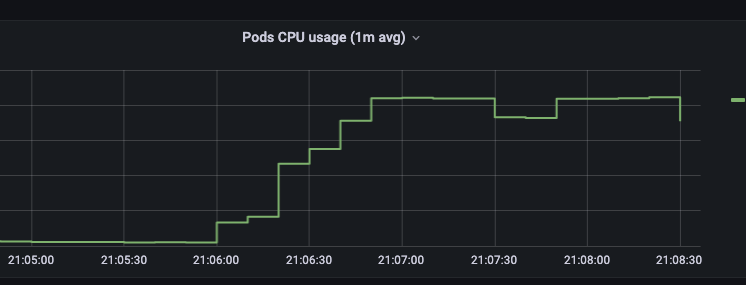
- CPU maxed out
It is worth noting that the physical machine has a 40-core CPU, but at most only 20 cores can be used. One tuning suggestion I saw in the Issues is to set the CPU to half the number of cores on the machine. What has been observed so far may be related to this suggestion.
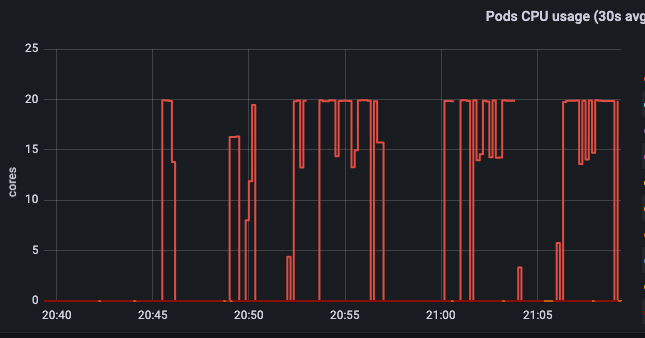
On a 40-core machine, the CPU used for inference stays at 20 cores and cannot go higher.
- Mem usage low
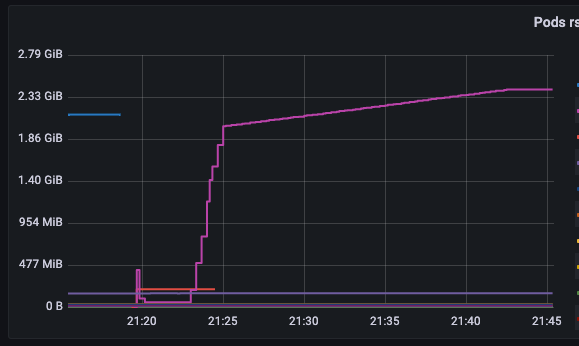
The memory usage is surprising — CPU, IO, and Mem usage are so unbalanced; it used less than 3GB.
4.1 Mounting Memory into the Filesystem
Because IO was maxed out, I guessed that the disk was the bottleneck constraining inference efficiency. So I mounted the model file in the container into memory and tested again.
| |
Unfortunately, inference efficiency did not improve significantly. So what exactly is the disk IO doing? Does the inference process really need less than 3GB of memory? How to speed up the inference process is the next thing I need to focus on.
5. Some Pre-Built Model Images
- chinese-alpaca-2-7b-16k
| Name | Quant method | Size |
|---|---|---|
| shaowenchen/chinese-alpaca-2-7b-16k-gguf:Q2_K | Q2_K | 3.68 GB |
| shaowenchen/chinese-alpaca-2-7b-16k-gguf:Q3_K | Q3_K | 4.16 GB |
| shaowenchen/chinese-alpaca-2-7b-16k-gguf:Q3_K_L | Q3_K_L | 4.46 GB |
| shaowenchen/chinese-alpaca-2-7b-16k-gguf:Q3_K_S | Q3_K_S | 3.81 GB |
| shaowenchen/chinese-alpaca-2-7b-16k-gguf:Q4_0 | Q4_0 | 4.7 GB |
| shaowenchen/chinese-alpaca-2-7b-16k-gguf:Q4_K | Q4_K | 4.95 GB |
| shaowenchen/chinese-alpaca-2-7b-16k-gguf:Q4_K_S | Q4_K_S | 4.73 GB |
- vicuna-33b-v1.3
| Name | Quant method | Compressed Size |
|---|---|---|
| shaowenchen/vicuna-33b-v1.3-gguf:Q2_K | Q2_K | 12.78 GB |
| shaowenchen/vicuna-33b-v1.3-gguf:Q3_K | Q3_K | 14.81 GB |
| shaowenchen/vicuna-33b-v1.3-gguf:Q4_K | Q4_K | 18.24 GB |
| shaowenchen/vicuna-33b-v1.3-gguf:Q5_K | Q5_K | 21.72 GB |
| shaowenchen/vicuna-33b-v1.3-gguf:Q6_K | Q6_K | 25.05 GB |
| shaowenchen/vicuna-33b-v1.3-gguf:Q8_0 | Q8_0 | 31.34 GB |
| shaowenchen/vicuna-33b-v1.3-gguf:full | full | 56.07 GB |
- baichuan2-7b-chat
| Name | Quant method | Size |
|---|---|---|
| shaowenchen/baichuan2-7b-chat-gguf:Q2_K | Q2_K | 7.59 GB |
| shaowenchen/baichuan2-7b-chat-gguf:Q3_K | Q3_K | 8.61 GB |
| shaowenchen/baichuan2-7b-chat-gguf:Q3_K_L | Q3_K_L | 9.23 GB |
| shaowenchen/baichuan2-7b-chat-gguf:Q3_K_S | Q3_K_S | 7.93 GB |
| shaowenchen/baichuan2-7b-chat-gguf:Q4_0 | Q4_0 | 9.6 GB |
- llama-2-13b-langchain-chat
| Name | Quant method | Size |
|---|---|---|
| shaowenchen/llama-2-13b-langchain-chat-gguf:Q4_K | Q4_K | 16.7 GB |
| shaowenchen/llama-2-13b-langchain-chat-gguf:Q5_K | Q5_K | 19.5 GB |
Among these models, apart from vicuna-33b, the others can all run inference smoothly on a 20-core CPU, and even 4-bit quantization gives decent results. If you need models with higher quantization precision, you can download them from HuggingFace.
6. Summary
Model capabilities will gradually become a foundational capability for keeping IT systems running. This is happening, and happening fast; rebuilding upper-layer applications is urgent. This post is mainly some notes on researching how to run inference with large models on machines without a GPU. The main contents are as follows:
- Running the LLM locally in containers
- Quick deployment of the LLM on K8s
- Testing and usage: Q4 quantization already gives decent results
- During inference, IO is maxed out, CPU is maxed out, and Mem usage is low. The low Mem usage is related to the number of concurrent requests.
