1. How XSS Works and Several Common Attack Types
An XSS attack is an attack that executes malicious scripts to steal a user’s login state, hijack a session, and so on. The input sources for malicious scripts include Cookies, Post forms, Get requests, HTTP header content, and more. We usually call a code fragment used for an XSS attack an XSS vector.
The common types of XSS attacks are:
- Reflected XSS. The XSS vector is concatenated directly into the URL to lure the user into clicking it.
- Stored XSS. The XSS vector is submitted to the database through a form. When the page displays the data, the XSS vector is executed.
- DOM Based XSS. By modifying the DOM of the rendered page, it bypasses the defense rules and executes a malicious script to achieve the attack objective.
The general path of an XSS attack is: first find an input source that is echoed back as text on the page, then close the tag and inject an executable JavaScript script.
For more, see XSS Principles and Construction.
2. Approaches to Preventing XSS
Defending against XSS attacks is mainly about running an XSS Filter over the text content to stop malicious scripts from executing.
XSS filtering has two main modes: blacklist and whitelist.
- Blacklist-based XSS filtering escapes or removes the tags and attributes on the blacklist.
- Whitelist-based XSS filtering allows only the tags and attributes on the whitelist to exist; everything else is escaped or removed.
Because XSS is complex and ever-changing, it is impossible to enumerate every XSS attack vector, so a blacklist-based XSS Filter is not safe enough. A whitelist-based XSS Filter, on the other hand, requires enumerating every allowed tag and attribute, which makes configuration tedious. This is also why XSS is so rampant: there is no XSS defense scheme that is cheap to implement and has no impact on user input.
Another way to prevent it is to stop malicious scripts from executing. That is, allow the malicious script to exist but not to run. For example, in Vuejs, the v-text directive displays the XSS vector on the page without executing it, so it does not trigger the attack behavior. But when we allow users to input styles, we use the v-html directive to display the user’s input on the page. That can lead to an XSS attack. We need further defensive measures.
3. XSS Prevention Options
Stored XSS can carry out worm attacks and is extremely harmful, so it is the focus of XSS prevention. Among the rich-text XSS defense schemes I have encountered, there are two approaches:
- Frontend and backend enumerate a limited set of tags and attributes and filter against a whitelist
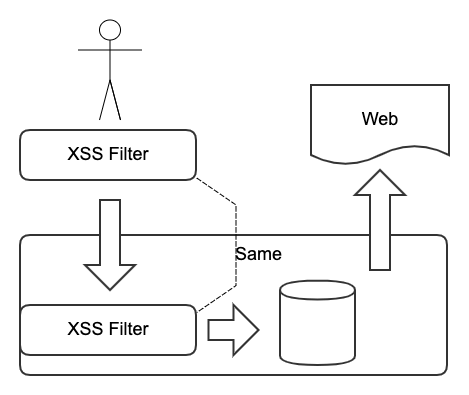
This approach requires users to be able to input only specified, limited tags and attributes. The frontend can configure the rich-text editor to show only the specified tags, improving the user experience. The backend cannot directly trust frontend data and needs to filter again based on the whitelist; bleach is recommended. This ensures that the data written to the database is trustworthy. For a Django project, django-xss-cleaner is recommended.
Use case: simple rich-text input.
- The backend escapes on storage, and the frontend filters against a blacklist when displaying
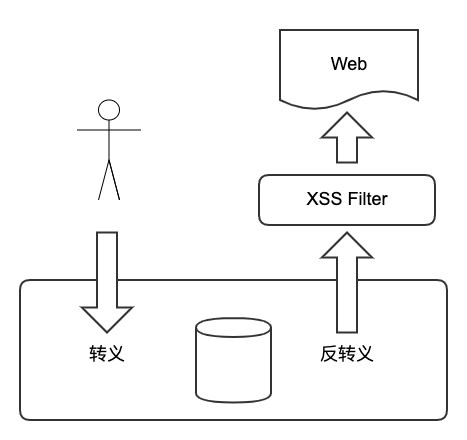
In practice, ordinary users will not input XSS vectors, while an attacker can very easily use Postman or Burp Suite
for security testing. The second approach is to trust the data input not at all, yet still not corrupt the user’s data. So the user’s input is escaped directly into storage and unescaped on output, guaranteeing that the content in the database is trustworthy. When displaying the data, the frontend filters the displayed content against a blacklist; js-xss is recommended.
Use case: an indeterminate range of input tags and complex rich-text editing features.
4. CSP
Besides filtering the content with an XSSFilter, HttpOnly and CSP headers can further prevent XSS attacks.
CSP (Content Security Policy) is a security policy used to defend against XSS. CSP uses whitelist control to allow only specified resources to load. These resources include JavaScript, CSS, HTML, Frames, fonts, image, embeddable object, Java applets, ActiveX, audio, and video.
There are two ways to enable CSP:
- Set the
Content-Security-Policyfield in the HTTP header - Add a
<meta>tag to the web page
Configuration examples:
Only allow resources from the same origin
| |
Allow JS resources from the same origin and specified addresses
| |
With multiple resources, the later ones override the earlier ones
| |
For a Django project, django-csp is recommended.
