1. Basic Concepts
A Dockerfile is a collection of instructions for building a Docker image. Docker reads Dockerfile instructions to build an image automatically. A Dockerfile is similar to a Makefile: both are text files that organize all the instructions in the order the image is built.
The command to build a Docker image:
| |
In this command, the Docker CLI processes things as follows:
- Pass the current directory and its subdirectories to the Docker Daemon as the build context
- Find the Dockerfile in the current directory (not including subdirectories)
- Validate the Dockerfile’s syntax
- Execute the instructions in the Dockerfile one by one, generating intermediate images along the way (stored locally as a cache for later instructions or builds)
2. What a Dockerfile Contains
A Dockerfile generally contains the following parts:
- Base image — which image to build on. The syntax is FROM base-image-name
- Maintainer information — record the name or email of the person who wrote the Dockerfile. The syntax is MANITAINER name/email
- Image operations — the changes to make to the base image, such as installing new software or applying special configuration. The most common is the RUN command
- Container startup command — what to run when a container based on the image starts. The most common are the CMD command or the ENTRYPOINT command
3. Dockerfile Commands
3.1 FROM
Syntax: FROM image[:tag]
Explanation: sets which image the image being built is based on. The FROM instruction must be the first instruction in the entire Dockerfile. If the specified image does not exist, it is automatically downloaded from Docker Hub. If no tag is specified, the default is latest.
3.2 MAINTAINER
Syntax: MAINTAINER name
Explanation: the MAINTAINER instruction lets you set author information on the image you are about to build.
3.3 RUN
Syntax:
- RUN command #will invoke /bin/sh -c command
- RUN [“executable”, “param1”, “param2”] #will invoke exec, to avoid the argument-passing problems that sometimes arise with the shell form, and because some base images may not include /bin/sh
Explanation: the RUN instruction executes any command in a new container and then commits the resulting changes to the current image. The committed image is used for the next step defined in the Dockerfile. Commands defined in RUN are executed and committed in order — this is exactly the benefit of Docker’s cheap commits and of being able to create containers from any historical point of an image, much like a version control tool.
3.4 CMD
Syntax:
- CMD [“executable”, “param1”, “param2”] #will invoke exec; the preferred form
- CMD [“param1”, “param2”] #when the ENTRYPOINT instruction is used, passes default parameters to it
- CMD command [ param1|param2 ] #will invoke /bin/sh -c
Explanation: the command specified in the CMD instruction is executed when the image runs. Only one CMD may exist in a Dockerfile; if several CMD instructions are used, only the last one takes effect. When an ENTRYPOINT instruction is present, what is defined in CMD becomes the default parameters for the ENTRYPOINT instruction — that is, you can use the CMD instruction to pass parameters to ENTRYPOINT.
Note: both RUN and CMD execute commands; the difference is that a command defined in RUN is executed when the docker build command creates the image, while a command defined in CMD is executed when the docker run command runs the image. In addition, when using the first syntax — invoking exec — the command must be an absolute path.
3.5 EXPOSE
Syntax: EXPOSE port [ …]
Explanation: the EXPOSE instruction tells Docker which ports the container listens on at runtime. Docker uses this information when linking different containers (using the –link parameter).
3.6 ENV
Syntax: ENV key value
Explanation: the ENV instruction sets environment variables. The environment variables set in the Dockerfile also affect RUN instructions, and they remain effective when the resulting image runs. If you need to change these environment variables at runtime, you can add the –env key=value parameter when running docker run.
Note: it is best not to define names that might conflict with the system’s predefined environment variables, otherwise you may get unexpected results.
3.7 ADD
Syntax: ADD src dest
Explanation: the ADD instruction copies a file or directory from a specified path into a specified path in the container.
Note:
- If you run docker build somefile, that is, build via standard input, the ADD instruction only supports the url form. Also, if a url requires authentication you can do it with RUN wget … or RUN curl …; the ADD instruction does not support authentication.
- The src path must be in the same directory as the Dockerfile or in a subdirectory of it. For example, you cannot use ADD ../somepath, because the first thing docker build does is send the directory containing the Dockerfile, including subdirectories, to the docker daemon.
- If src is a url and dest does not end with ‘/’, the file is downloaded and renamed to dest.
- If src is a url and dest ends with ‘/’, the file is downloaded to dest/filename. The url must be a normal path form; a url like ‘http://example.com’ will not work.
- If src is a local archive and dest is a directory ending with ‘/’, the ’tar -x’ command is invoked to decompress it; if dest contains a file with the same name it is overwritten. When src is a url, decompression is not performed.
3.8 COPY
Syntax: COPY src dest
Explanation: the usage is the same as ADD, but src does not support urls, so this instruction cannot be used when running docker build somefile.
3.9 ENTRYPOINT
Syntax:
- ENTRYPOINT [’executable’, ‘param1’, ‘param2’] #will invoke exec; the preferred form
- ENTRYPOINT command param1 param2 #will invoke /bin/sh -c
Explanation: the command specified in the ENTRYPOINT instruction is executed when the image runs. Only one may exist in a Dockerfile; if several ENTRYPOINT instructions are used, only the last instruction takes effect. Parameters can be passed to the command specified in the ENTRYPOINT instruction (the exec form) via docker run. For example, a container started with docker run images -l will pass the -l parameter to the command defined by the ENTRYPOINT instruction and will override the default parameters defined in the CMD instruction (if any), but will not override the parameters defined in that instruction. For example, with ENTRYPOINT [’ls’,’-a’] and CMD [’/etc’], starting a container with docker run image runs the ls -a /etc command, and starting it with docker run image -l runs the ls -a -l command — the -l parameter overrides the /etc parameter defined in the CMD instruction.
Note:
- When an ENTRYPOINT instruction is used, the resulting image, when run, executes only the command specified by that instruction.
- When an ENTRYPOINT instruction is present, the CMD instruction can only (when the ENTRYPOINT instruction uses the exec form) be used as a parameter of the ENTRYPOINT instruction; in other cases it is ignored.
3.10 VOLUME
Syntax: VOLUME [‘samepath’]
Explanation: the VOLUME instruction sets a mount point, which other containers can mount to share data or to back up, restore, or migrate container data.
3.11 USER
Syntax: USER [username|uid]
Explanation: the USER instruction sets the user or uid used to run the resulting image and to execute RUN instructions.
3.12 WORKDIR
Syntax: WORKDIR /path/to/workdir
Explanation: the WORKDIR instruction sets the working directory for the commands executed by the RUN, CMD, and ENTRYPOINT instructions in the Dockerfile (the default is the / directory). This instruction may appear more than once in a Dockerfile file; if a relative path is used, it is relative to the previous WORKDIR value. For example, with WORKDIR /data, WORKDIR logs, RUN pwd, the final output of the current directory is /data/logs.
4. Best Practices
4.1 Use a .dockerignore File
As the first step of building an image, the docker CLI looks for a .dockerignore file in the context directory, excludes some of the files and directories in the context directory according to the .dockerignore file, and then passes the remaining files and directories to the docker service. The .dockerignore syntax is the same as .gitignore.
4.2 Avoid Installing Unnecessary Packages
To reduce complexity, dependencies, file size, and creation time, you should avoid installing extra or unnecessary packages. For example, we do not need to include a text editor in a database image.
4.3 Sort Multi-line Arguments Lexicographically
Wherever possible, ease future changes by sorting multi-line arguments alphanumerically. This will help you avoid duplicate packages and make updates easier. Adding a space before the backslash ( \ ) is a good habit.
| |
4.4 Make Good Use of the Build Cache
During image creation, Docker executes each instruction in the order specified by the Dockerfile.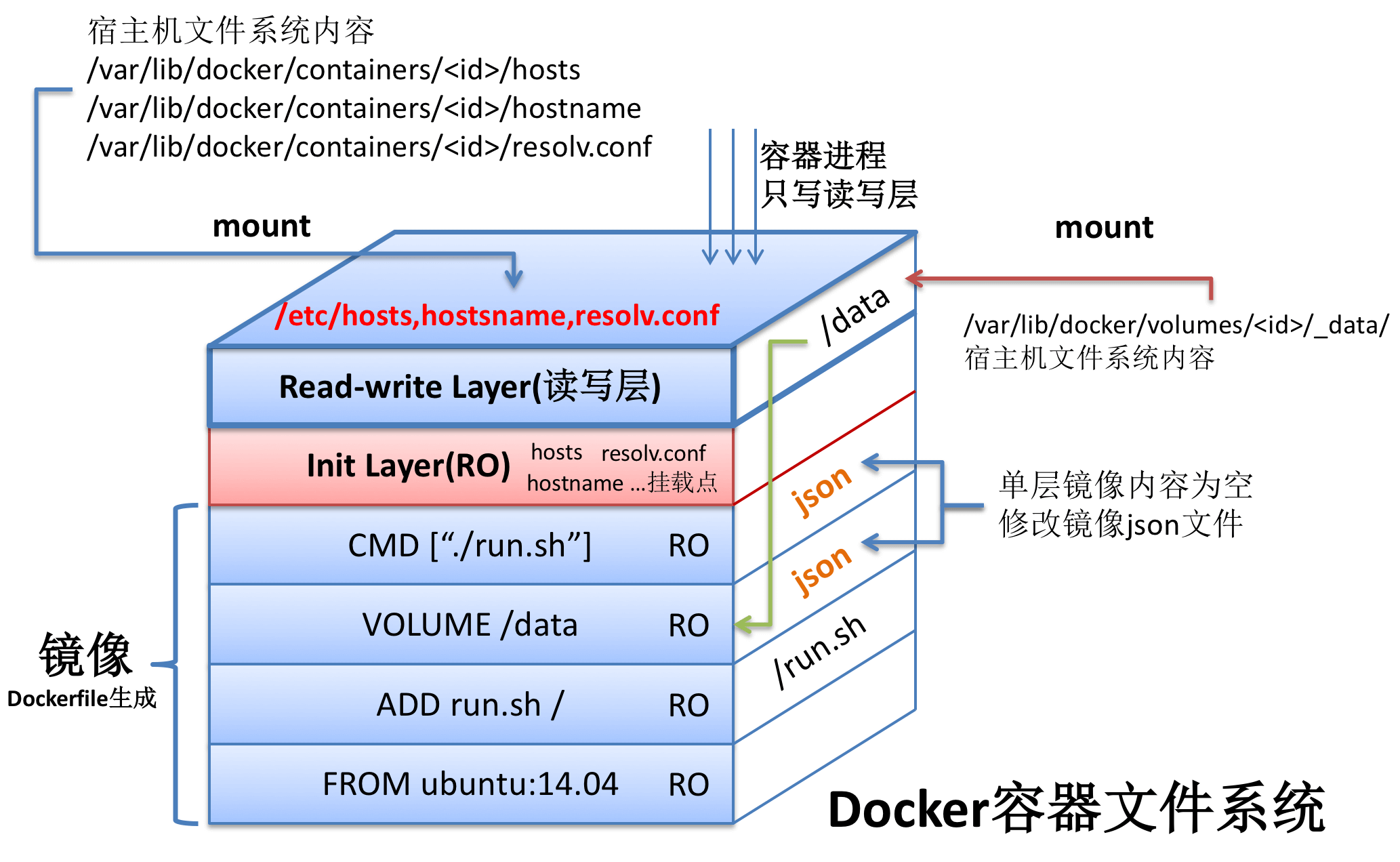
Generally, for each command, docker generates an image layer. If, when building a particular image layer, that layer is found to already exist, it is used directly instead of being rebuilt.
Most instructions decide whether to use the cache by comparing the instruction and the base image it runs on against the cache. The exceptions are ADD and COPY: these two instructions copy file contents into the image, and docker also checks the checksum of each file’s contents (excluding the last modification time and last access time). If the checksums differ, the cache is not used.
4.5 One Function Per Image
Do not run multiple processes with different functions in a container; install only one application’s packages and files in each image, and let programs that need to interact communicate through a pod (a feature provided by kubernetes) or the network between containers. This keeps things modular, lets different applications be maintained and upgraded separately, and also reduces the size of each individual image.
4.6 Do Not Upgrade Versions During a Build
Updates will happen inside the base image; do not run apt-get upgrade to update inside your container. Because of isolation, if an update tries to modify init or change devices inside the container, the update may often fail. It can also produce an inconsistent image, because you no longer have the correct source of record for how your application should run and which versions of the dependencies included in the image are used.
