Four or five years have passed since I first started blogging. My original intent was to record, think, and organize — a little more for my own benefit, and if it could help others too, so much the better. I went from csdn at the very beginning, to deploying Ghost on Linode, to Pages hosting, and finally to settling on a CDN. At first it was about being able to write with focus, then about learning more technical details through a website, and finally a return to the original intent: just being able to write content with focus.
1. CSDN Blog
Whether we are writing a blog or searching for answers, we cannot avoid third-party blogs. Common third-party blogs inside China include csdn, cblogs, lofter, and so on; abroad there are wordpress, blogger, and others.
The characteristics of third-party blogs are:
- Zero cost. No need to buy a domain, a server, or other resources.
- Zero maintenance. No need to maintain a server.
- Zero promotion. The platform recommends good content to users. With the help of the platform’s high-authority domain, content gets indexed by search engines quickly and ranks high.
After migrating my notes from Evernote to csdn, the quality of my organized and recorded notes improved a lot. Content that I once casually pasted and copied gradually started to become a bit more clear and well-structured.
2. Standalone Ghost Deployment
After updating on csdn for a while, it happened that I was learning website technologies. So the idea of deploying a blog independently came to me.
Starting from scratch and deploying a blog on my own lets you learn a great deal.
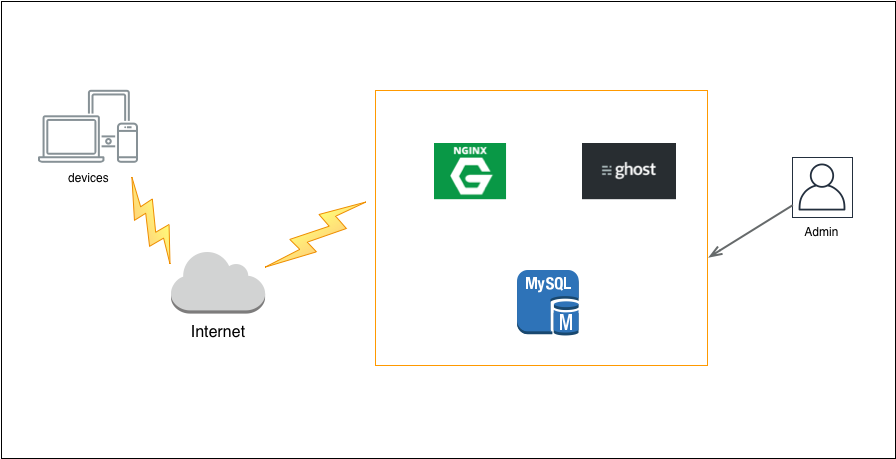
From a VPS I got to know Alibaba Cloud, Linode, DigitalOcean, and others; from buying a domain, I got to know how to choose a domain, domain trading, domain squatting, DNS resolution, SEO, and so on; from blog software, I got to know Wordpress, Ghost, and others; from logging into a server, I got to know operations; from deployment, I got to know Nginx, MySQL, and others; from image hosting, I got to know Qiniu, Upyun, and others. Besides deploying everything myself, I also learned about some all-in-one platforms, for example OpenShift. This was also the PaaS platform I first came into contact with.
Here is my deployment plan diagram:
3. Git Pages Hosting
Deploying a blog independently requires buying a domain, a server, and other resources — an extra expense every year. At the same time, the blog is not multi-region active-active, high-performance, or highly available.
So I chose a rather programmer-like approach: Git Pages.
GitHub, GitLab, Bitbucket, and others all provide a free static page hosting service called Pages. Using the Pages service, you can publish documents, blogs, and so on.
Taking GitHub as an example, it usually only takes a few simple steps to use Pages:
Create a project: [username].github.io
Commit the static html files
Visit [username].github.io, or bind your own domain to access it.
If you want to edit documents in Markdown, you need the help of static page generation tools such as Jekyll and Hexo.
For more Git tips please refer to: Git Tips You Do Not Notice
Here I chose Hexo, mainly because Hexo is based on Nodejs while Jekyll is based on Ruby, so installing the Hexo runtime environment is more convenient.
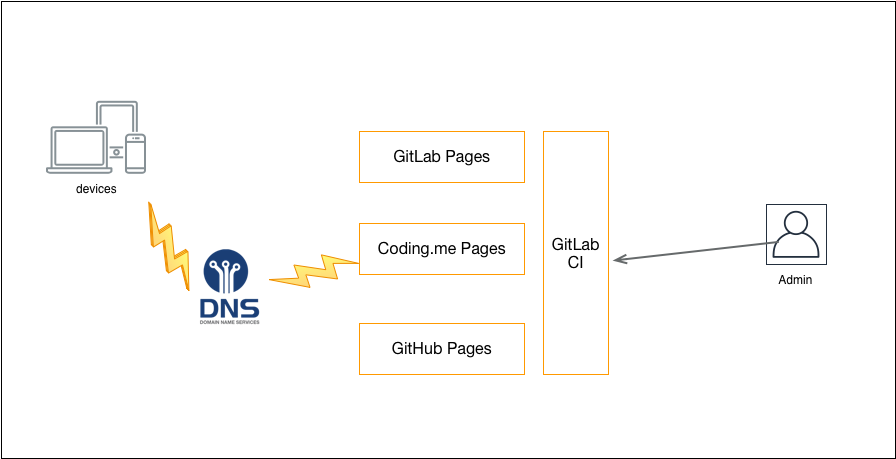
Here is my deployment plan diagram:
Finally, I migrated the entire blog to Hexo. Reference article: How to Migrate a Blog from Ghost to Hexo
4. CDN
Using DNS for load balancing, coding.me for domestic access and gitlab.io for overseas access, is a decent multi-region active-active solution.
But these two Pages services are both unstable and slow. The coding.me Pages service goes haywire from time to time, and the page will not open for over a dozen seconds. gitlab.io gives a poor experience when accessed from within China, and even gitlab.com has had service outages, so it has always only served as a backup.
Since Pages services are usually free, providers have little incentive to optimize and improve the experience.
In fact, blogs and documentation-type websites are usually dominated by static content. The static content in a website, such as JS, CSS, images, and other resources, is usually put on a CDN. Because of this, I decided to also put the static HTML pages on a CDN, making full use of the CDN’s edge nodes to respond to page access requests from nearby.
CDN providers only offer a certain amount of free HTTP traffic, while my main site uses HTTPS. But each page of the site is less than 10 KB, so an extra traffic cost of only a few yuan a month buys a service with very fast access — an excellent deal.
Here is my deployment plan diagram:
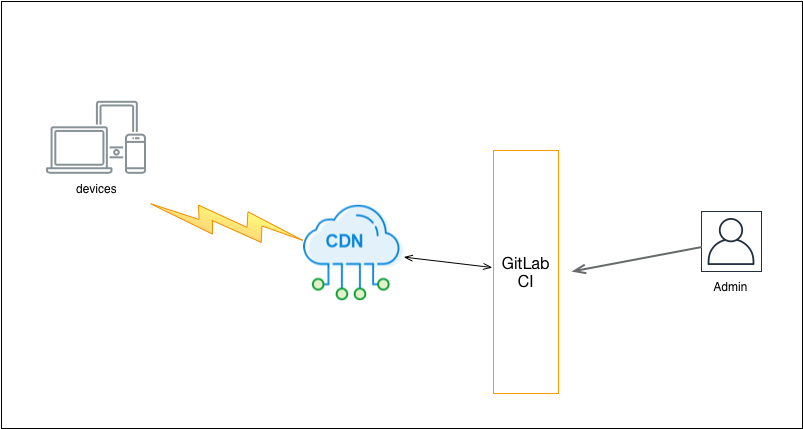
Another approach is to use the CDN’s mirror acceleration feature to mirror the original website to the CDN and use the CDN as the access entry point. Compared with deploying directly on a CDN, this approach requires fewer changes, but once the original website goes down it affects the entire service. In the end, I still chose the simpler approach of deploying directly on a CDN.
