1. What Problem Kata Solves
Security and isolation are what make Kata Container stand out from Docker Container.
Kata Container comes from the merger of the Intel Clear Containers and Hyper runV projects. Intel Clear Containers used Intel VT-x technology to provide containers through lightweight virtual machines, solving the security problem while delivering excellent performance. Hyper runV, on the other hand, was aimed at Docker’s runc, providing a container runtime that follows the OCI runtime specification.
2. Kata in Kubernetes
2.1 OCI and CRI-O
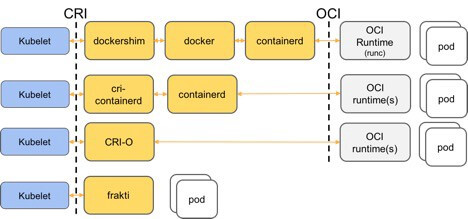
The OCI standard emerged to prevent the container standard from being held hostage by Docker alone.
The CRI standard decouples Kubelet from the runtime, so any container manager implementing the CRI standard can be used for Pod creation.
The CRI-O plugin implements both the CRI and OCI standards, and can be used to replace Containerd to interface directly with OCI runtimes such as runc.
As shown below:
2.2 Kata and Containerd
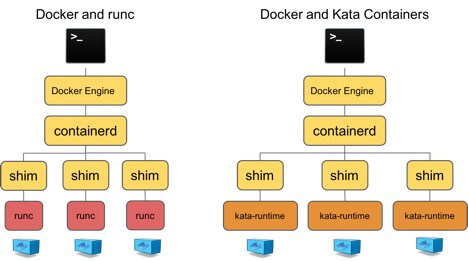
To stay compatible with the OCI standard, Docker split the runtime management functionality out of the Docker Daemon, forming Containerd. When running containers, you can replace Docker’s runc with kata-runtime.
2.3 Integration of Kata with Kuberntes
As shown below, what Kata mainly replaces is the OCI runtime layer; the rest is no different from a Kubernetes based on Docker runc. At the same time, Pods based on kata-runtime and Pods based on runc can coexist in the same cluster.
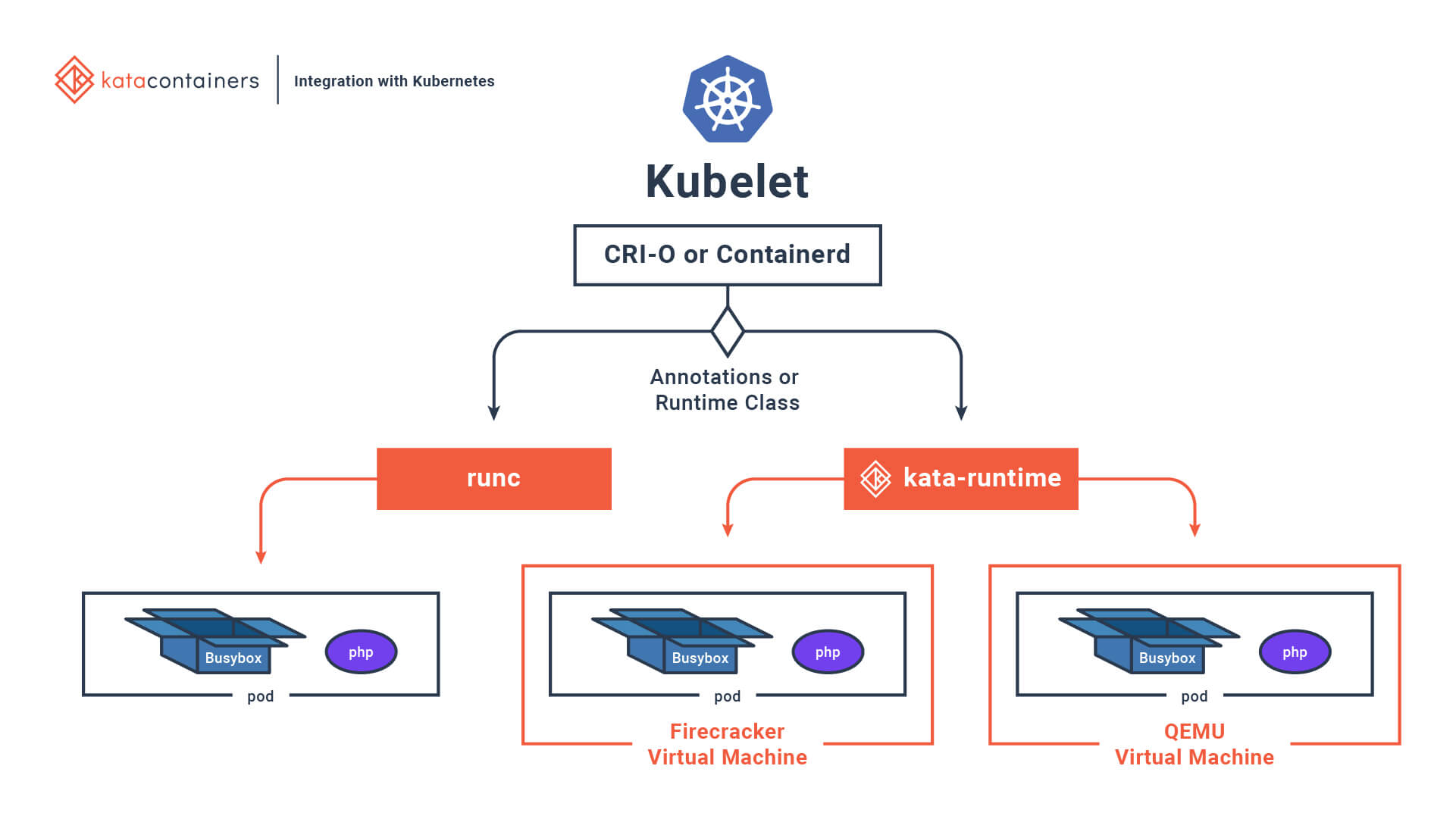
The main problem at present is that Kata does not support the host network. In Kubernetes, etcd, nodelocaldns, kube-apiserver, kube-scheduler, metrics-server, node-exporter, kube-proxy, calico, kube-controller-manager, and so on — that is, Static Pods and Daemonsets — all use the host network. So during installation and deployment, runc is still used as the default runtime, while kata-runtime is made available as an optional runtime for specific workloads.
3. Integrating Kata into a Kubernetes Cluster
3.1 Installing the Kubernetes Cluster
Installing a cluster with Kubeadm is very convenient; you can refer to the earlier document Installing a Kubernetes Cluster with Kubeadm.
You can also refer directly to the official documentation, https://kubernetes.io/docs/setup/production-environment/tools/kubeadm/install-kubeadm/ .
Since Kata requires hardware virtualization support, and IaaS vendors generally do not enable the relevant features, I used physical machines and could only use the domestic network. The script below can be used to download the relevant images in advance.
- Query the image list
| |
- Download the images
| |
- Check the installed Kubernetes version
| |
3.2 Installing the Kata Command-Line Tool
Taking the CentOS operating system as an example:
| |
3.3 Checking Whether the Hardware Supports Kata
Kata’s hardware requirements are satisfied by any one of the following:
- Intel VT-x technology.
- ARM Hyp mode (virtualization extension).
- IBM Power Systems.
- IBM Z mainframes.
After installing kata-runtime, run the check command:
| |
This output means the running environment supports Kata Containers.
3.4 Configuring and Testing Docker
- Configure the kata-runtime parameters
| |
Add the following content; runc is still used by default, but Kata can be used by specifying the runtime parameter.
| |
- Restart the Docker service
| |
- Test whether Kata was installed successfully
| |
| |
The kernel version used by the kata-runtime container differs from that of the host, which shows that kata-runtime was configured successfully.
3.5 Configuring Kubelet
- Add a configuration file
| |
- Restart to take effect
| |
Here containerd is used. If you use CRI-O, the configuration will be different.
3.6 Providing kata-runtime to Kubernetes
You can use kata-runtime by creating a Container directly. But in a cluster, how do we tell Kubernetes which workloads need to use kata-runtime? Depending on the version, Kata provides different ways to do this.
First, you need to generate the containerd configuration file in all cases
| |
- The RuntimeClass approach
This approach has version requirements for the relevant components:
Kata Containers v1.5.0 or above (including 1.5.0-rc)
Containerd v1.2.0 or above
Kubernetes v1.12.0 or above
In the config.toml configuration file, add the following content:
| |
Here the kata in [plugins.cri.containerd.runtimes.kata] will be used as the RuntimeClass handler key.
- The
untrusted_workload_runtimeapproach
For environments that do not meet the version requirements above, the earlier approach can be used.
Add the following content to the configuration file:
| |
Finally, in all cases you need to restart containerd.
| |
4. Using kata-runtime
4.1 The RuntimeClass Approach
- Create a RuntimeClass
kata-runtime.yaml
| |
You can also create a RuntimeClass for runc
| |
- Create the workload kata-pod.yaml
| |
| |
- View the workload
| |
4.2 The untrusted_workload_runtime Approach
untrusted_workload_runtime uses annotations to tell the Kubernetes cluster which workloads need to use kata-runtime.
| |
Below is an example, kata-pod-untrusted.yaml
| |
| |
5. References
- https://github.com/kata-containers/documentation/blob/master/install/centos-installation-guide.md
- https://ustack.io/2019-11-21-container%E7%9B%B8%E5%85%B3%E6%A6%82%E5%BF%B5%E6%A2%B3%E7%90%86.html
- https://github.com/kata-containers/documentation/blob/master/how-to/how-to-use-k8s-with-cri-containerd-and-kata.md
- https://github.com/kubernetes/kubernetes/issues/73189
- https://blog.zufardhiyaulhaq.com/kubernetes-with-cri-containerd-and-kata-containers/
