Kubernetes relies on the kube-proxy component to implement Service communication and load balancing. In this process, because SNAT is used to translate the source address, a service in a Pod cannot obtain the real client IP address. This article mainly answers the question of how a workload in a Kubernetes cluster can obtain the real IP address of the client.
1. Creating a Backend Service
1.1 Choosing a Service
Here containous/whoami is chosen as the backend service image. On its Docker Hub introduction page, you can see that accessing its port 80 returns information about the client. In the code, we can obtain this information from the HTTP headers.
| |
1.2 Cluster Environment
The cluster has three nodes: one master and two worker nodes.
| |
1.3 Creating the Service
- Create a namespace
| |
- Create the workload
| |
- Create the service
| |
- View the created service
| |
- Access the service
When you open the Master node’s EIP + :31509 in a browser, the following content is returned:
| |
As you can see, RemoteAddr is the IP of the Master node, not the real IP address of the accessing client.
1.3 Preparing an Ingress Controller and LB
To better simulate a production environment, two possible link nodes are added here: Ingress and Load Balancer (abbreviated as LB below).
- Install the Ingress Controller
Reference document: Installing Ingress with Helm
- Prepare the LB
A cloud vendor’s LB is used here. For bare-metal machines, an LB designed for bare metal can also be used. Of course, keepalived + haproxy can also be used instead of an LB.
2. Getting the Real IP by Accessing Directly Through NodePort
In the access above, the reason the real client IP cannot be obtained is that SNAT changes the source IP when accessing the SVC. Changing the service’s externalTrafficPolicy to Local mode can solve this problem.
Run the command:
| |
Access the service and you get the following content:
| |
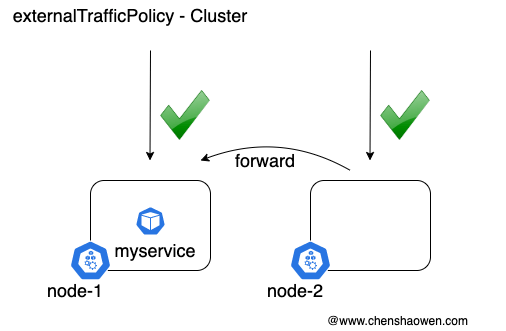
“Cluster obscures the client source IP and may cause a second hop to another node, but should have good overall load-spreading. Local preserves the client source IP and avoids a second hop for LoadBalancer and NodePort type services, but risks potentially imbalanced traffic spreading.” (Kubernetes official explanation)
Below is a simplified comparison diagram:
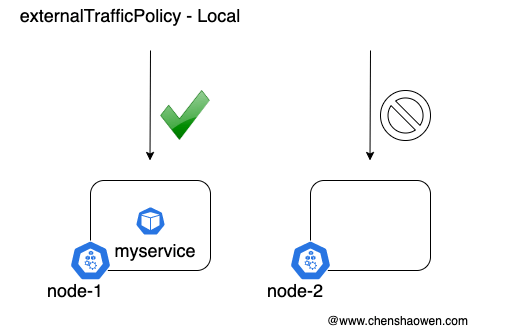
When a request lands on a node that has no service Pod, it will be unreachable. When accessing with curl, it will stall at TCP_NODELAY and then report a timeout:
| |
3. Getting the Real IP by Accessing Through LB -> Service
In a production environment, there are usually multiple nodes receiving client traffic at the same time. Using only Local mode would reduce service availability. The purpose of introducing an LB is to leverage its health-checking feature so that traffic is forwarded only to nodes that have the service Pod.
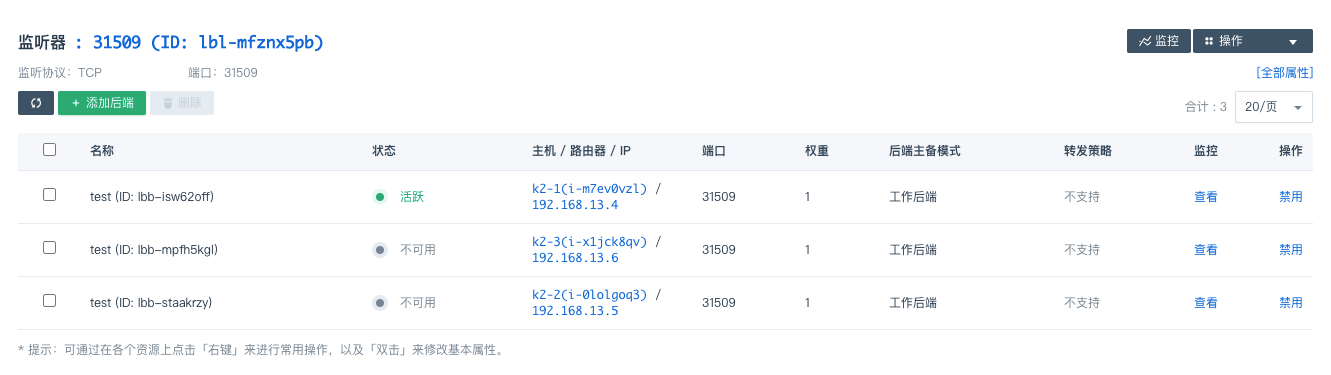
As shown in the figure below, on the service’s port 31509 only the master node is active, and traffic is directed only to the master node, as expected.
Next, keep increasing the number of replicas to 3.
| |
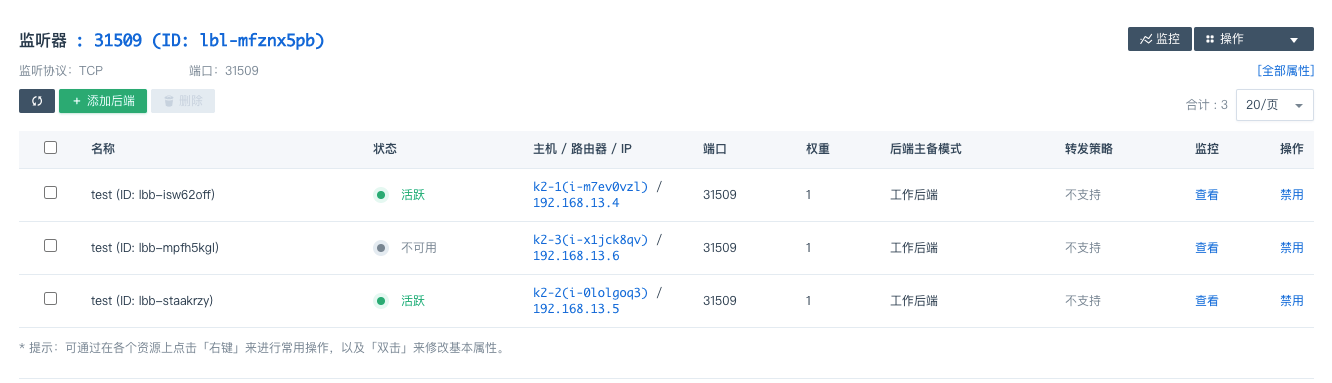
Unfortunately, the Pods are not evenly distributed across the three nodes; two of them are on master. As a result, the LB’s backend nodes are not fully lit up either. As shown below:
This requires adding an anti-affinity description to the deploy. Run the command:
| |
There are two choices here. The first is to configure a soft policy, but it cannot guarantee that all LB backends are lit up and that traffic is distributed evenly.
| |
The other is to configure a hard policy, which forces Pods to be distributed on different nodes, but limits the number of replicas, that is, the total number of Pods cannot exceed the total number of Nodes.
| |
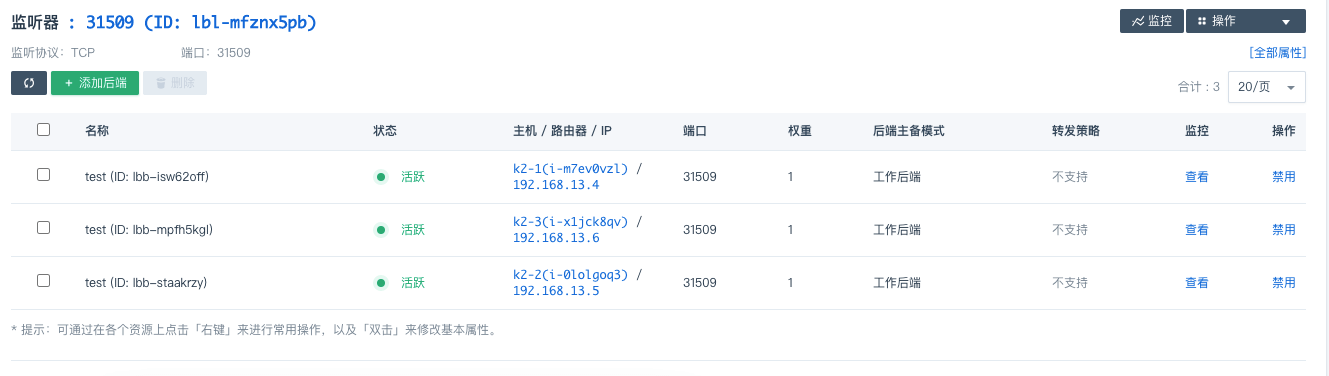
With the hard policy configuration, all backends are finally lit up, as shown below:
4. Getting the Real IP by Accessing Through LB -> Ingress -> Service
If every service occupied its own LB, the cost would be high, and the configuration would not be flexible enough: each time a new service is added, a new port mapping has to be added to the LB.
Another approach is for the LB to direct traffic on ports 80 and 443 to the Ingress Controller, which then forwards the traffic to the Service and on to the service in the Pod.
In this case, the LB needs to be able to either pass through at the TCP layer or forward at the HTTP layer with the real IP preserved. The Ingress Controller’s externalTrafficPolicy is set to Local mode, while the Service does not have to be set to Local mode.
If you want to improve availability, you can likewise refer to the anti-affinity configuration above to ensure that every backend node has an Ingress Controller.
Changing the Ingress Controller into a DaemonSet is also a deployment approach.
Access the service and you get the following content:
Hostname: myservice-7dcf6b965f-vv6md
IP: 127.0.0.1
IP: 10.233.96.152
RemoteAddr: 10.233.70.68:34334
GET / HTTP/1.1
Host: realip.dev.chenshaowen.com:30000
User-Agent: Chrome/87.0.4280.67 Safari/537.36
Accept: text/html,application/xhtml+xml,application/xml;q=0.9,image/avif,image/webp,image/apng,*/*;q=0.8,application/signed-exchange;v=b3;q=0.9
Accept-Encoding: gzip, deflate
Accept-Language: zh-CN,zh;q=0.9,en;q=0.8
Cache-Control: max-age=0
Cookie: _ga=GA1.2.896113372.1605489938; _gid=GA1.2.863456118.1605830768
Cookie: lang=zh;
Upgrade-Insecure-Requests: 1
X-Forwarded-For: 139.198.113.75
X-Forwarded-Host: realip.dev.chenshaowen.com:30000
X-Forwarded-Port: 80
X-Forwarded-Proto: http
X-Original-Uri: /
X-Real-Ip: 139.198.113.75
X-Request-Id: 999fa36437a1180eda3160a1b9f495a4
X-Scheme: http
In X-Forwarded-For, the client’s real IP information can already be obtained.
In one document, I saw an emphasis that the following content also needs to be added to the Ingress configuration.
| |
But here it is not configured, and the Forward field information can still be obtained, which may be related to the Ingress Controller version. If there is no X- header in the response, you can try it.
Here is the relevant Ingress configuration:
| |
| |
The traffic forwarding path:
LB(80/443) -> Ingress Controller(30000) -> myservice(80) -> myservice-fc55d766-xxxx(80)
5. Summary
This article introduced three deployment approaches for obtaining the real IP:
- Getting the real IP by accessing directly through NodePort
Constrained by Local mode, the service may become unreachable. You need to ensure that the node providing the external entry point must have a copy of the service workload.
- Getting the real IP by accessing through LB -> Service
Leveraging the LB’s health-checking capability improves service availability. It is suitable for scenarios with few services, or where you are willing to have one LB per service.
- Getting the real IP by accessing through LB -> Ingress -> Service
Traffic on ports 80 and 443 is directed by the LB to the Ingress Controller, which then distributes it to services. But using Local mode for the Ingress Controller requires that every backend node of the LB has an Ingress Controller replica. It is suitable for scenarios where a large number of services are exposed externally.
Of course, they can also be used in combination. For services that do not need to obtain the client’s real IP, you can continue to use Cluster mode.
